1. הקדמה
This manual provides essential instructions for the safe and efficient use of your SONY VAIO Pro PK VJPK11 laptop. Please read this manual thoroughly before operating your device and retain it for future reference. It covers setup, operation, maintenance, and troubleshooting to ensure optimal performance and longevity of your laptop.
2. המוצר נגמרview
The SONY VAIO Pro PK VJPK11 is a portable computing device designed for productivity and multimedia. Familiarize yourself with its components and features.

איור 2.1: חֲזִית view of the SONY VAIO Pro PK VJPK11 laptop. This image displays the laptop open, revealing the screen, keyboard, and touchpad. The VAIO logo is visible on the screen, and an Intel Core i5 sticker is on the palm rest.
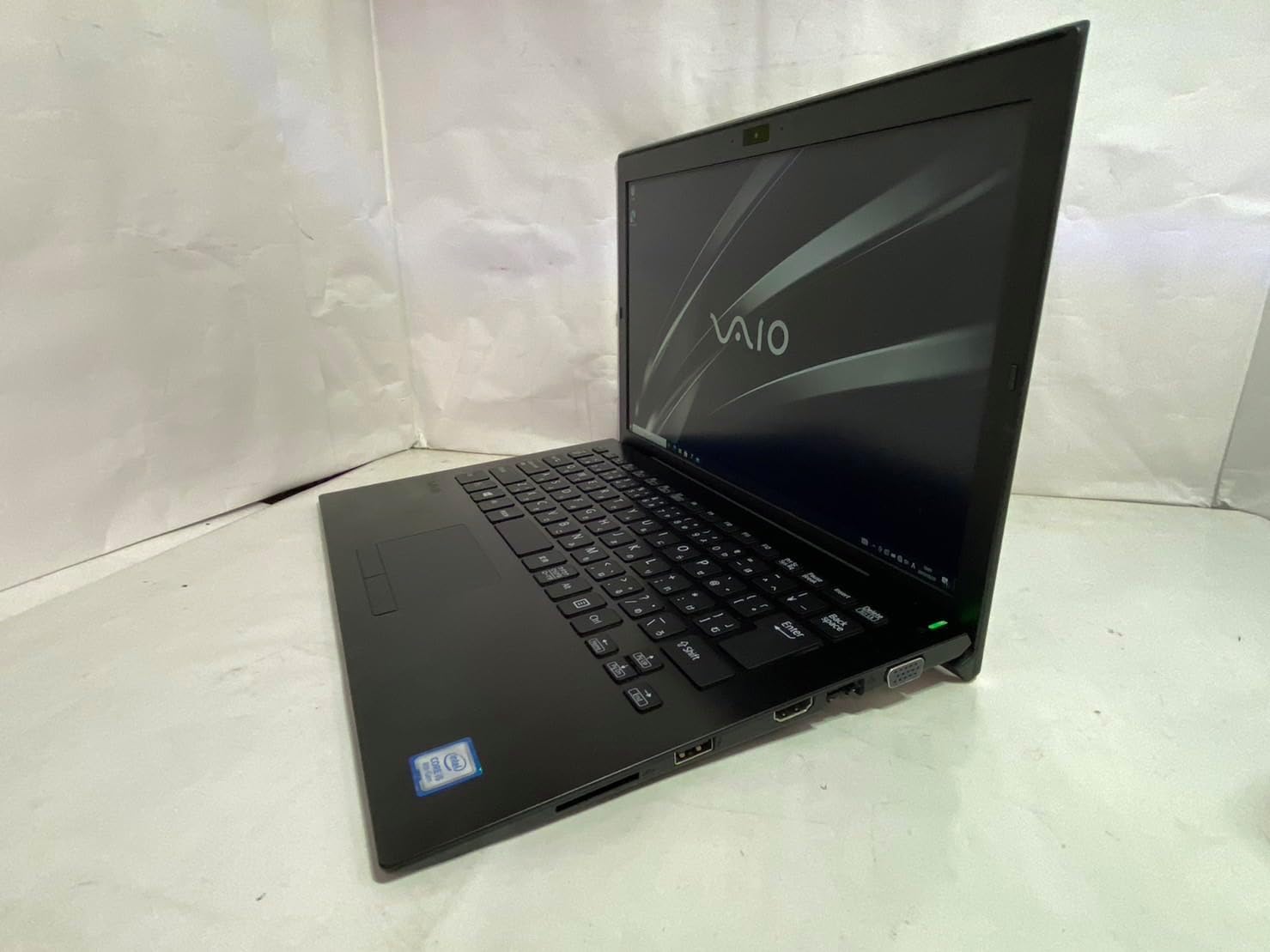
איור 2.2: צד שמאל view of the SONY VAIO Pro PK VJPK11 laptop. This image shows the left side of the laptop, highlighting various ports such as USB, HDMI, and a VGA port, along with a ventilation grille.

איור 2.3: רֹאשׁ view of the SONY VAIO Pro PK VJPK11 laptop with the lid closed. This image displays the sleek black finish of the laptop's lid, featuring the prominent silver VAIO logo in the center.
3. התקנה
3.1 פירוק
Carefully remove the laptop and all accessories from the packaging. Ensure all components are present:
- SONY VAIO Pro PK VJPK11 Laptop
- מתאם AC וכבל חשמל
- תיעוד (מדריך זה, מידע על אחריות)
3.2 חיבור לחשמל
- Connect the AC adapter to the power input port on your laptop.
- חבר את כבל החשמל למתאם ה-AC.
- Insert the power cord into a grounded electrical outlet.
- Allow the battery to charge fully before initial use, or use the laptop while connected to power.
3.3 Initial Boot-Up and Windows Setup
Press the power button to turn on the laptop. Follow the on-screen instructions to complete the Windows 10 Pro setup process. This typically involves selecting your region, language, accepting license agreements, and creating a user account.
4. הוראות הפעלה
4.1 הפעלה/כיבוי
- כדי להפעיל: Press the power button located on the laptop.
- לכבות: לחץ על כפתור התחל, לאחר מכן על כפתור הפעלה ובחר 'כיבוי'.
- לאתחל: לחצו על כפתור התחל, לאחר מכן על כפתור ההפעלה ובחרו 'הפעל מחדש'.
- לישון: Click the Start button, then Power, and select 'Sleep', or close the laptop lid.
4.2 מקלדת ומשטח מגע
The laptop features a standard QWERTY keyboard and a multi-touch touchpad. Use the touchpad for cursor control and gestures. Refer to Windows settings for customizing touchpad sensitivity and gestures.
4.3 חיבור ציוד היקפי
- התקני USB: Connect USB devices (e.g., mouse, external drive) to the available USB 3.0 ports.
- תצוגה חיצונית: Use the HDMI or VGA port to connect an external monitor or projector. Press מקש Windows + P to manage display modes.
- רשת קווית (LAN): Connect an Ethernet cable to the LAN port for a wired internet connection.
- כרטיס SD: Insert an SD card into the dedicated SD card slot for data transfer.
4.4 באמצעות Webcam and Bluetooth
- Webפִּקָה: המשולב webcam can be used for video calls and conferencing. Access it through applications like Camera or communication software.
- בלוטות': Enable Bluetooth in Windows settings to connect wireless devices such as headphones, speakers, or mice.
5. תחזוקה
5.1 ניקוי המחשב הנייד
השתמש במטלית רכה נטולת מוך מעט דampened with water or a screen cleaner to clean the display and exterior surfaces. Avoid harsh chemicals or abrasive materials. Ensure the laptop is powered off and unplugged before cleaning.
5.2 טיפול בסוללה
To prolong battery life, avoid extreme temperatures. If storing the laptop for an extended period, ensure the battery is charged to approximately 50%.
5.3 עדכוני תוכנה
Regularly check for and install Windows updates and driver updates from the SONY support webאתר כדי להבטיח יציבות ואבטחת המערכת.
5.4 גיבוי נתונים
גבה מעת לעת את הנתונים החשובים שלך לכונן חיצוני או לאחסון ענן כדי למנוע אובדן נתונים.
6. פתרון תקלות
This section addresses common issues you might encounter with your SONY VAIO Pro PK VJPK11.
6.1 אין כוח
- Ensure the AC adapter is securely connected to the laptop and a working power outlet.
- ודא ששקע החשמל תקין על ידי חיבור מכשיר אחר.
- אם הסוללה התרוקנה לחלוטין, יש לאפשר לה להיטען מספר דקות לפני שתנסה להפעיל אותה.
6.2 בעיות תצוגה
- If the screen is blank, try adjusting the display brightness using the function keys.
- If an external monitor is connected, ensure the correct display output mode is selected (Windows key + P).
- הפעל מחדש את המחשב הנייד.
6.3 בעיות קישוריות Wi-Fi
- ודא ש-Wi-Fi מופעל בהגדרות Windows.
- הפעל מחדש את הנתב והמודם שלך.
- בדוק אם מכשירים אחרים יכולים להתחבר לאותה רשת Wi-Fi.
- עדכן את מנהלי ההתקנים של הרשת האלחוטית שלך.
6.4 Laptop Running Slow
- סגור יישומים מיותרים הפועלים ברקע.
- בדוק את מנהל המשימות עבור תהליכים הצורכים כמות גדולה של מעבד או זיכרון RAM.
- הפעל ניקוי ואיחוי דיסק (עבור HDD, לא הכרחי עבור SSD).
- ודא ש-Windows ומנהלי ההתקנים מעודכנים.
7. מפרטים
Key technical specifications for the SONY VAIO Pro PK VJPK11 laptop:
| תכונה | מִפרָט |
|---|---|
| דֶגֶם | SONY VAIO Pro PK VJPK11 (VJPK11C11N) |
| מעבד | Intel Core i5-8250U (1.60GHz) |
| אַיִל | 8.00GB DDR3 SDRAM |
| אִחסוּן | 256GB SSD (SATA) |
| לְהַצִיג | 14.0-inch Wide (1920x1080 pixels) |
| גרָפִיקָה | גרפיקה משולבת של אינטל |
| מַעֲרֶכֶת הַפעָלָה | Windows 10 Pro 64bit |
| נמלים | VGA, HDMI, USB 3.0, LAN, SD Card Slot |
| קישוריות | LAN, בלוטות' |
| Webפִּקָה | מְשׁוּלָב Webפִּקָה |
8. אחריות ותמיכה
For information regarding your product's warranty, please refer to the warranty card included with your purchase or visit the official SONY support website. For technical assistance, contact SONY customer support or your authorized dealer.
תמיכה מקוונת: https://www.sony.com/electronics/support


