מָבוֹא
This manual provides essential information for setting up, operating, and maintaining your Microsoft Surface Studio 2+ All-In-One Desktop Computer. The Surface Studio 2+ is designed for productivity and creativity, featuring a versatile 28-inch PixelSense™ touchscreen display.
אנא קרא מדריך זה בעיון כדי להבטיח שימוש נכון ולמקסם את תוחלת החיים של המכשיר שלך.
מה יש בקופסה
ודא שכל הפריטים נמצאים באריזה:
- Surface Studio 2+ All-in-One Computer
- עט משטח
- מקלדת משטח
- עַכְבָּר
- Power Cord with Grip-Release Cable
- מדריך להתחלה מהירה
- מדריך בטיחות ואחריות
הגדרה
- פריקת אריזה: Carefully remove the Surface Studio 2+ and its accessories from the packaging. Place the computer on a stable, flat surface.

Image: The Microsoft Surface Studio 2+ All-in-One computer displaying the Windows 11 desktop interface.
- חיבור חשמל: Connect the power cord to the power port on the back of the Surface Studio 2+ base, then plug the other end into a wall outlet.

תמונה: אחורי view of the Surface Studio 2+ base, highlighting the various ports including the power input.
- חבר ציוד היקפי: Connect the Surface Keyboard and Mouse. These devices typically connect wirelessly via Bluetooth. Follow the on-screen instructions during initial setup for pairing.
- אתחול ראשוני: Press the power button, usually located on the back or side of the display. The computer will guide you through the Windows 11 Pro setup process, including language selection, network connection, and user account creation.
הוראות הפעלה
התאמת התצוגה
The Surface Studio 2+ features a unique Zero Gravity Hinge, allowing the display to be adjusted from an upright desktop mode to a flat studio mode for drawing and writing.

Image: A sequence showing the Surface Studio 2+ display being adjusted from an upright position to a nearly flat angle.
- מצב שולחן עבודה: Gently push the top of the screen backward to tilt it into an upright position for traditional desktop use.
- מצב סטודיו: Gently pull the top of the screen forward and down towards the base to transition it into a low-angle, flat position ideal for creative tasks with the Surface Pen.
Using the Surface Pen and Touchscreen
The 28-inch PixelSense™ touchscreen supports multi-touch gestures and is optimized for use with the included Surface Pen.
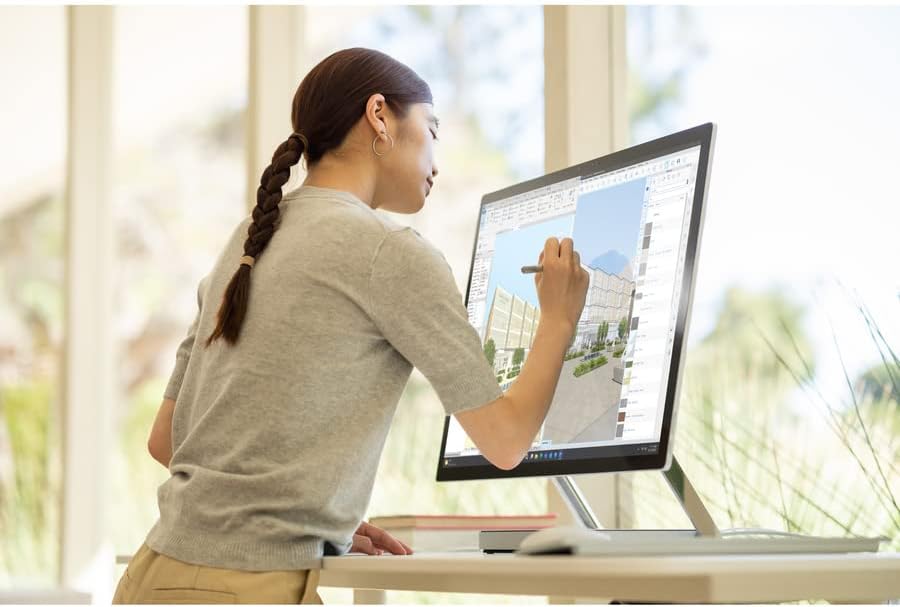
Image: A person using the Surface Pen to interact with the touchscreen of the Microsoft Surface Studio 2+ in studio mode.
- מחוות מגע: Utilize standard Windows touch gestures for navigation, zooming, and scrolling.
- עט משטח: The Surface Pen allows for precise drawing, writing, and annotation directly on the screen. It can be magnetically attached to the side of the display for storage.
Windows 11 Pro
Your Surface Studio 2+ comes pre-installed with Windows 11 Pro. Familiarize yourself with the operating system's interface and features for optimal productivity.
- תפריט התחלה: Access applications, settings, and power options from the Start Menu.
- שורת משימות: הצמד יישומים נפוצים לשורת המשימות לגישה מהירה.
- הגדרות: Customize your device, manage accounts, and configure privacy settings through the Settings app.
תכונות
The Microsoft Surface Studio 2+ is equipped with advanced components for high performance:
- מעבד: Intel Core i7 3 GHz processor for demanding tasks.
- זֵכֶר: 32 GB DDR4 RAM for smooth multitasking.
- אִחסוּן: 1 TB Solid State Drive (SSD) for fast boot times and application loading.
- גרָפִיקָה: NVIDIA GeForce RTX 3060 with 6GB dedicated memory for graphics-intensive applications and gaming.
- לְהַצִיג: 28-inch PixelSense™ touchscreen with 4500 x 3000 resolution.
- מַעֲרֶכֶת הַפעָלָה: ווינדוס 11 פרו.
- קישוריות: Integrated 802.11ax Wi-Fi and Bluetooth for wireless connections.
תַחזוּקָה
ניקוי המכשיר
- מָסָך: השתמש במטלית רכה נטולת מוך מעט דampשטפו במים או בחומר ניקוי מסכים המיועד במיוחד לאלקטרוניקה. הימנעו מכימיקלים חזקים.
- גוּף: נגבו את המשטחים החיצוניים בעזרת מטלית רכה ויבשה.
- אוורור: Ensure the ventilation openings on the base are clear of dust and obstructions to prevent overheating.
עדכוני תוכנה
בדוק באופן קבוע אם קיימים עדכוני Windows והתקן אותם כדי לוודא שהמערכת שלך כוללת את תיקוני האבטחה ושיפורי הביצועים העדכניים ביותר.
- עבור אל הגדרות > Windows Update.
- נְקִישָׁה בדוק אם יש עדכונים ולהתקין את כל העדכונים הזמינים.
פתרון בעיות
| לְהַנפִּיק | פתרון אפשרי |
|---|---|
| המחשב לא נדלק. | Ensure the power cord is securely connected to both the computer and a working electrical outlet. Try a different outlet. |
| התצוגה ריקה. | Check power connection. Ensure the computer is powered on. If connected to an external display, verify display input settings. |
| Surface Pen or Mouse not responding. | Check battery levels. Re-pair the devices via Bluetooth settings in Windows. |
| ביצועים איטיים. | Close unnecessary applications. Check for and install Windows updates. Run a disk cleanup. |
| בעיות קישוריות Wi-Fi. | Restart your router and the Surface Studio 2+. Check Wi-Fi settings in Windows to ensure it's enabled and connected to the correct network. |
מפרטים
| תכונה | פְּרָט |
|---|---|
| מספר דגם | SBG-00001 |
| גודל תצוגה | 28 אינץ' |
| רזולוציית מסך | 4500 x 3000 |
| מעבד | אינטל Core i7 (3 גיגה-הרץ) |
| אַיִל | 32 GB DDR4 |
| כונן קשיח | SSD 1 TB |
| מעבד גרפי | NVIDIA GeForce RTX 3060 |
| גודל זיכרון RAM של כרטיס המסך | 6 ג'יגה-בייט |
| מַעֲרֶכֶת הַפעָלָה | Windows 11 Pro |
| סוג אלחוטי | 802.11ax, בלוטות' |
| משקל פריט | 21.1 פאונד |
| מידות המוצר (LxWxH) | 25.1 x 0.5 x 17.3 אינץ' |
| צֶבַע | כֶּסֶף |
אחריות ותמיכה
Your Microsoft Surface Studio 2+ is covered by a manufacturer's warranty. Please refer to the included "Safety and Warranty Guide" for detailed information regarding warranty terms, conditions, and registration.
For technical support, driver downloads, or further assistance, please visit the official Microsoft Support webאתר או צור קשר עם שירות הלקוחות של מיקרוסופט.
תמיכה מקוונת: support.microsoft.com/surface


