1. הקדמה
Thank you for choosing the FLYLINKTECH BD10 6000A 12V Car Jump Starter and Power Bank. This device is designed to provide emergency jump-starting for vehicles and serve as a portable power bank for various electronic devices. Please read this manual thoroughly before use to ensure safe and optimal operation.

Image 1.1: The FLYLINKTECH BD10 Jump Starter unit with its smart battery clamps.
2. מידע בטיחות
יש להקפיד תמיד על אמצעי הזהירות הבאים כדי למנוע פגיעה או נזק למכשיר או לרכב:
- אל תנסה להתניע סוללה קפואה באמצעות התנעה מהירה.
- ודא חיבור קוטביות תקינה (סיכה אדומה)amp לחיוב, שחור clamp to negative). Reverse polarity can cause damage.
- אל תאפשר את ה-smart clamps to touch each other when connected to the jump starter.
- הרחק את המכשיר מילדים.
- Do not expose the device to extreme temperatures (above 60°C / 140°F or below -20°C / -4°F) or direct sunlight for extended periods.
- אין לפרק או לשנות את המכשיר.
- השתמש רק ב-smart card המסופקamps and charging cables.
- If the device becomes excessively hot during use, disconnect it immediately.

Image 2.1: The jump starter incorporates multiple safety features such as spark-proof, reverse polarity, overvoltage, short circuit, overload, and high-temperature protection.
3. תכולת החבילה
ודא שכל הפריטים נמצאים בחבילה:
- FLYLINKTECH BD10 Jump Starter Unit
- סוללה חכמה Clamps
- כבל USB-C ל-USB-C
- כבל USB-A ל-USB-C
- מתאם מטען לרכב 12V DC
- מדריך למשתמש
- מארז אחסון

Image 3.1: The complete package includes the jump starter, smart clamps, various cables, user manual, and a protective storage case.
4. הגדרה וטעינה
4.1 חיוב ראשוני
Before first use, fully charge the jump starter. The device features a 26800mAh battery capacity.
- Connect the provided USB-C cable to the jump starter's USB-C input port.
- Connect the other end of the cable to a compatible USB wall charger (not included). For fastest charging, use a PD 45W charger.
- מסך ה-LED יציג את מצב הטעינה ואחוז הסוללהtage.
4.2 Charging Times
| דירוג מטען | זמן טעינה משוער |
|---|---|
| 5W | 18 שעות |
| 18W | 7 שעות |
| 45W | 2 שעות |
Note: A 45W wall charger is not included in the package.

Image 4.1: The device supports PD 45W fast charging, significantly reducing recharge time when using a compatible charger.
5. הוראות הפעלה
5.1 התנעת רכב בקפיצה
The FLYLINKTECH BD10 is capable of jump-starting all gas engines and diesel engines up to 12.0L.
- ודא טעינה מספקת: Check the jump starter's LED screen to ensure it has at least 50% charge.
- קונקט סמארט CLamps: הכנס את התקע הכחול של ה-smart clamps into the jump starter's 12V output port. Ensure a firm connection.
- חיבור למצבר הרכב:
- צרף את אדום (+) clamp לקוטב החיובי של המצבר של הרכב.
- צרף את שחור (-) clamp to the vehicle's negative battery terminal.
- מחוון בדוק: ה-clamp indicator light should turn solid green, indicating a correct connection. If it flashes or shows red, check connections and battery status.
- Press BOOST (if needed): If the vehicle battery is extremely low or completely dead, press the 'BOOST' button on the jump starter. Wait for the indicator light on the smart clamps to turn solid green.
- התנעת רכב: Attempt to start your vehicle. If it doesn't start on the first try, wait 30 seconds before trying again. Do not attempt more than 3 consecutive starts.
- הסר את Clamps: לאחר התנעת הרכב, הסר מיד את ה-smart clampממצבר הרכב, ולאחר מכן נתק אותם ממתנע הקפיצות.

Image 5.1: The jump starter connected to a car battery, ready for operation. It supports 6000A peak current, 12V output, and is suitable for a wide range of engines.

Image 5.2: Visual guide illustrating the four steps to jump-start a vehicle: connect the plug, attach clamps, press boost, and start the engine.
5.2 פונקציית סוללת הכוח
The BD10 can charge multiple electronic devices via its USB-A and USB-C ports.
- פלט USB1: עד 18W (מקסימום)
- פלט USB2: עד 18W (מקסימום)
- יציאת USB-C: עד 45W (PD)
Connect your device using the appropriate USB cable to the desired output port. The LED screen will show 'OUT' and the wattage being drawn.

Image 5.3: The jump starter functioning as a power bank, simultaneously charging a smartphone and a tablet via its USB ports.
פנס LED 5.3
The built-in LED flashlight offers three modes: constant light, SOS signal, and strobe light.
- Press and hold the flashlight button to turn on the constant light.
- Press the button again to cycle through SOS and strobe modes.
- לחץ והחזק שוב כדי לכבות.

Image 5.4: The integrated LED flashlight provides illumination, an SOS signal, and a strobe function for emergency situations.
5.4 Informative LED Screen
The 6.0-inch LED screen provides real-time information about the device's status:
- רמת סוללה: מציג את אחוזי הסוללה שנותרוtage.
- IN/OUT Indicator: Shows whether the device is charging (IN) or discharging (OUT).
- מהtagתצוגה אלקטרונית: Indicates the power (W) being drawn or supplied.
- אזהרות שגיאה: Displays specific error codes or symbols if an issue occurs.
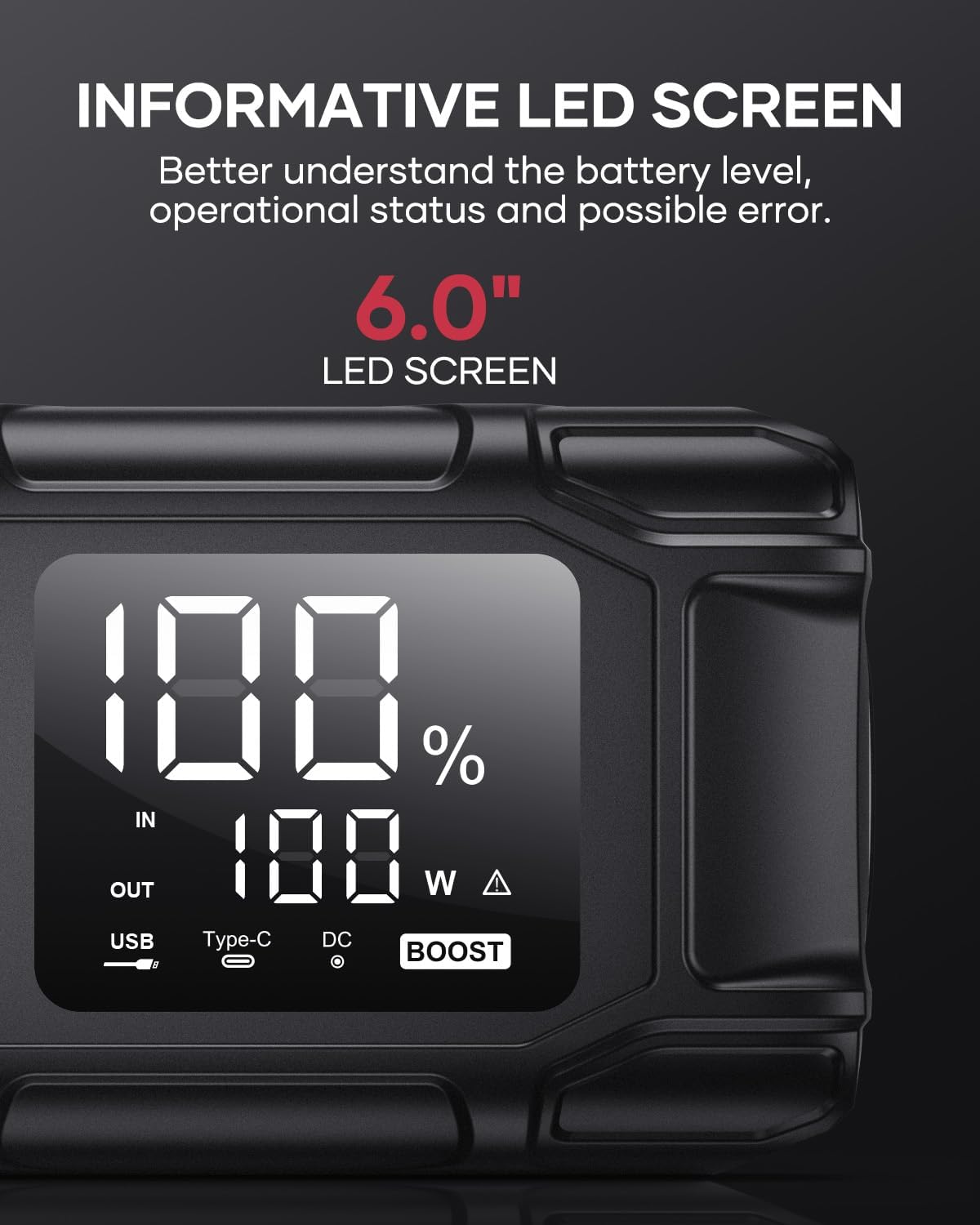
Image 5.5: The 6.0-inch LED screen provides clear information on battery percentage, input/output status, and power consumption.
6. תחזוקה
- טען מחדש באופן קבוע: כדי להאריך את חיי הסוללה, יש לטעון את מתנע הכוח כל 3-6 חודשים, גם אם אינו בשימוש.
- אִחסוּן: Store the device in its protective case in a cool, dry place, away from direct sunlight and moisture.
- ניקוי: נגבו את המכשיר במטלית רכה ויבשה. אין להשתמש בכימיקלים חזקים או בחומרים שוחקים.
- Clamp לְטַפֵּל: ודא שהקליל החכםampנקיים וללא קורוזיה לפני ואחרי כל שימוש.
7. פתרון תקלות
The device features multiple alarm situations indicated by audible signals and screen displays:
- כרך נמוךtagהגנה אלקטרונית: Audible signal "3". Recharge the device.
- כרך חיצוניtage Exceeds Vehicle Voltage: Audible signal "4". Check vehicle battery voltage.
- הגנה מפני קצר חשמלי: Audible signal "5". Check clamp connections for short circuits.
- Safety Mode Activated: Audible signal "6". Device has entered safety mode due to an issue.
- הגנה מפני זרם יתר: Audible signal "7". Reduce load or check connections.
- אזעקת טמפרטורה גבוהה/נמוכה: Audible signal "8". Allow device to return to operating temperature range (-20°C to 60°C).
- Reverse Connection: Audible signal "9". Correct the clamp קוטביות.

תמונה 7.1: נגמרview of the device's multi-alarm system, indicating various protection states with unique audible signals.
אם הבעיות נמשכות לאחר ביצוע שלבים אלה, אנא פנו לתמיכת הלקוחות.
8. מפרטים
| תכונה | מִפרָט |
|---|---|
| מותג | FLYLINKTECH |
| דֶגֶם | BD10 |
| זרם פלט שיא | 6000 Ampלפני |
| קיבולת סוללה | 26800mAh |
| פלט כרךtage | 12V |
| כניסת/פלט USB-C | PD 45W |
| יציאת USB-A | 18W (מקסימום) |
| Applicable Engine Types | All Gas, up to 12.0L Diesel |
| טמפרטורת הפעלה | -20°C עד 60°C (-4°F עד 140°F) |
| מידות המוצר | 23.95 x 10 x 5.69 ס"מ |
| משקל פריט | 920 גרם |

Image 8.1: The device is designed to operate reliably in extreme climates, from -20°C (-4°F) to 60°C (140°F).
9. אחריות ותמיכה
FLYLINKTECH is committed to providing high-quality products. For any questions, technical assistance, or warranty claims, please refer to the contact information provided with your purchase or visit the official FLYLINKTECH webאתר. אנא שמור את הוכחת הרכישה שלך לצורכי אחריות.


