מָבוֹא
This user manual provides detailed instructions for the operation and maintenance of your Jensen CD-660 Portable Stereo CD Player Boombox. Please read this manual thoroughly before using the device to ensure proper function and to maximize your listening experience. Keep this manual for future reference.
הוראות בטיחות חשובות
כדי להפחית את הסיכון להתחשמלות, שריפה או פציעה, יש להקפיד תמיד על אמצעי הזהירות הבסיסיים הבאים:
- אין לחשוף מכשיר זה לגשם או לחות.
- אין לחסום פתחי אוורור.
- אין להתקין ליד מקורות חום כלשהם כגון רדיאטורים, אוגרי חום, תנורים או מכשירים אחרים (כולל ampמחצבים) המייצרים חום.
- הגן על כבל החשמל מפני הליכה או צביטה.
- השתמש רק בתוספות/אביזרים שצוינו על ידי היצרן.
- נתק מכשיר זה במהלך סופות ברקים או כאשר אינו בשימוש לתקופות ארוכות.
- הפנה כל טיפול לצוות שירות מוסמך.
תוכן החבילה
ודא שכל הפריטים המפורטים להלן כלולים בחבילה שלך:
- Jensen CD-660 Portable Stereo CD Player Boombox
- AC Adapter (120V)
- מדריך לבעלים
המוצר נגמרview
Familiarize yourself with the various parts and controls of your Jensen CD-660 boombox.
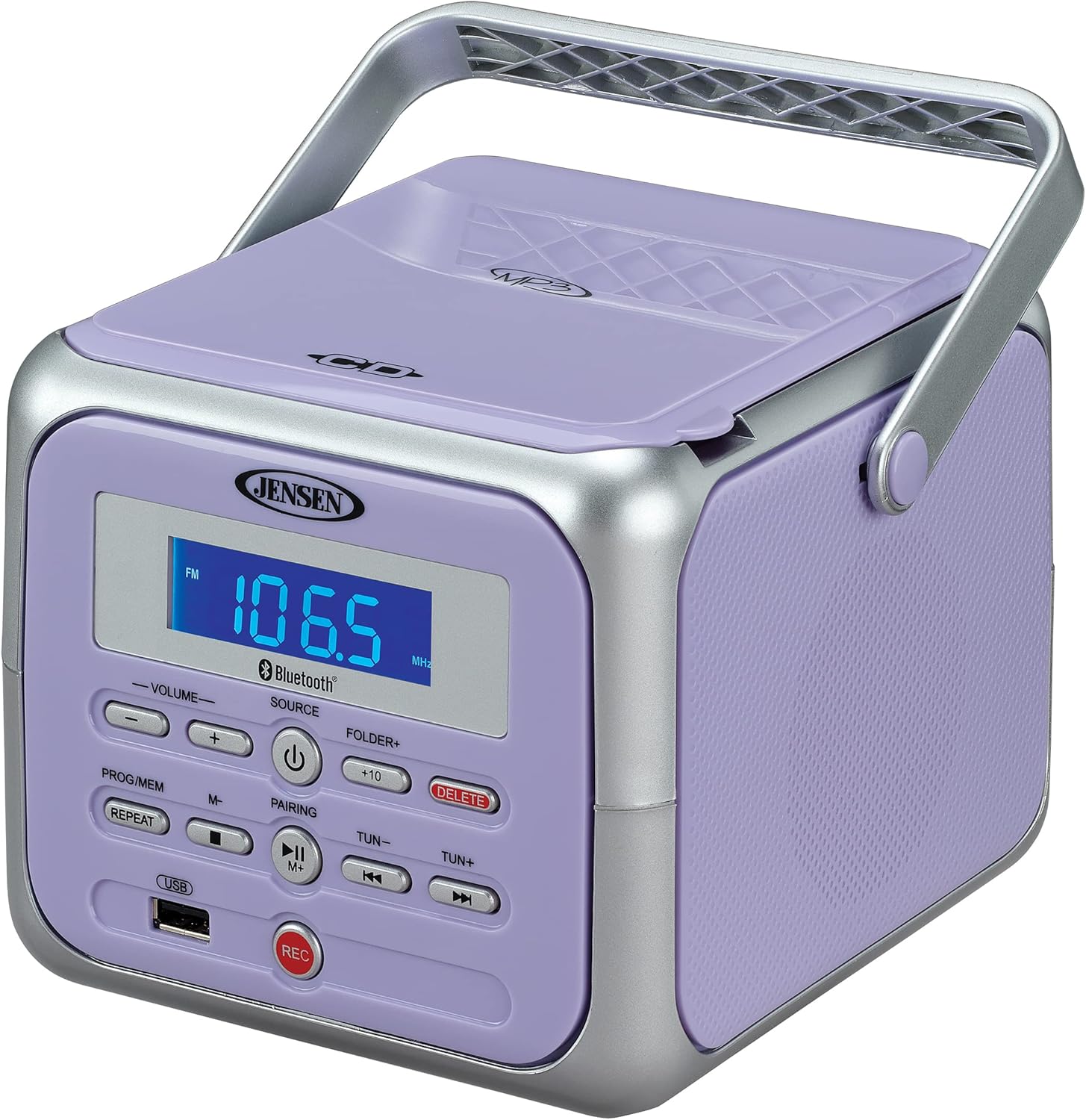
איור 1: חזית view of the Jensen CD-660 with the carrying handle extended. This image displays the main control panel, including the display screen, volume controls, source selection, and playback buttons.

איור 2: חזית view of the Jensen CD-660 with the carrying handle folded down. This perspective highlights the compact design and the arrangement of buttons and the LCD display.

איור 3: למעלה view of the Jensen CD-660 with the CD compartment lid open, revealing the CD tray. This illustrates the top-loading mechanism for disc insertion.
תכונות לוח הבקרה:
- תצוגת LCD: Shows current mode, track number, frequency, and other information.
- כפתורי עוצמת קול +/-: כוונן את רמת פלט השמע.
- לחצן SOURCE: Selects between CD, Bluetooth, FM Radio, and Aux-in modes.
- כפתור הפעלה: מפעיל או מכבה את היחידה.
- PROG/MEM Button: Programs CD tracks or stores FM radio presets.
- לחצן REPEAT: חוזר על הרצועה הנוכחית או על כל הרצועות.
- כפתור צימוד: מפעיל מצב צימוד Bluetooth.
- לחצן PLAY/PAUSE: מתחיל או מושהה את ההפעלה.
- לחצן עצור: מפסיק את ההשמעה.
- SKIP/SEARCH Buttons (◀◀ / ▶▶): דילוג על רצועות או חיפוש בתוך רצועה.
- TUN +/- Buttons: מכוון את תדר הרדיו FM.
- FOLDER+ Button: Navigates to the next folder on a USB device.
- +10 Button: Skips 10 tracks forward on CD/USB.
- לחצן מחק: מחיקות שנרשמו files מ- USB.
- כפתור REC: Initiates recording to a USB flash drive.
- יציאת USB: For USB flash drive playback and recording.
- ג'ק אקס-אין: מחבר התקני שמע חיצוניים.
- שקע אוזניות: להאזנה פרטית.
הגדרה
הפעלת היחידה
The Jensen CD-660 can be powered by either the included AC adapter or batteries.
פעולת מתח AC:
- Plug the AC adapter into the AC IN jack located on the back of the unit.
- חבר את הקצה השני של מתאם ה-AC לשקע חשמל סטנדרטי של 120 וולט AC בקיר.
הפעלת סוללה:
For portable use, the unit requires 6 x 'C' (UM-2) batteries (not included).
- פתחו את מכסה תא הסוללות בתחתית היחידה.
- Insert 6 'C' size batteries, ensuring correct polarity (+/-) as indicated inside the compartment.
- סגור היטב את מכסה תא הסוללות.
פֶּתֶק: Disconnect the AC adapter when operating on battery power. Remove batteries if the unit will not be used for an extended period.
הוראות הפעלה
תפעול כללי:
- הקש על כּוֹחַ לחצן כדי להפעיל את היחידה.
- הקש על מָקוֹר button repeatedly to select your desired mode (CD, Bluetooth, FM, USB, AUX).
- כוונן את עוצמת הקול באמצעות נפח +/- כפתורים.
השמעת CD:
The unit supports CD, CD-R/RW, MP3, and WMA disc formats.
- פתח את מכסה תא התקליטורים.
- הנח תקליטור כאשר צד התווית פונה כלפי מעלה על הציר.
- סגור את מכסה תא התקליטורים.
- הקש על מָקוֹר כפתור לבחירת מצב CD.
- הקש על PLAY/PAUSE כפתור להפעלת השמעה.
- השתמש ב- דילוג / חיפוש buttons (◀◀ / ▶▶) to navigate tracks.
- הקש על לְהַפְסִיק כפתור להפסקת ההפעלה.
הפעלת בלוטות ':
הזרם אודיו באופן אלחוטי מהמכשיר התומך ב-Bluetooth שלך.
- הקש על מָקוֹר button to select Bluetooth mode. The display will show "BT" and flash, indicating pairing mode.
- במכשיר ה-Bluetooth שלך, הפעל את ה-Bluetooth וחפש מכשירים זמינים.
- Select "JENSEN CD-660" from the list of devices.
- Once paired, the display will stop flashing and show "BT".
- התחל להשמיע אודיו במכשיר המחובר שלך.
- השתמש ב- PLAY/PAUSE ו דילוג / חיפוש buttons on the boombox or your device to control playback.
רדיו FM:
האזינו לתחנות הרדיו FM האהובות עליכם.
- הקש על מָקוֹר כפתור כדי לבחור מצב רדיו FM.
- Extend the FM wire antenna for optimal reception.
- הקש על טון +/- כפתורים כדי לכוון תחנה באופן ידני.
- לחץ והחזק את טון +/- כפתורים לסריקה אוטומטית לתחנה הזמינה הבאה.
אחסון והחזרה של קביעות מוגדרות מראש:
The unit can store up to 30 FM presets.
- כוון לתחנת ה-FM הרצויה.
- הקש על PROG / MEM button. The display will show a flashing preset number.
- השתמש ב- דילוג / חיפוש buttons (◀◀ / ▶▶) to select the desired preset number.
- הקש על PROG / MEM לחיצה נוספת על הכפתור כדי לאשר ולשמור את התחנה.
- כדי לאחזר פריט מוגדר מראש, לחצו על PROG / MEM לחץ שוב ושוב על הלחצן כדי לעבור בין תחנות שנשמרו.
השמעת USB:
Play MP3, WAV, or FLAC audio files מכונן הבזק מסוג USB.
- הכנס כונן הבזק מסוג USB ליציאת ה-USB.
- הקש על מָקוֹר לחצן לבחירת מצב USB.
- The unit will automatically begin playing the first compatible audio file.
- השתמש ב- דילוג / חיפוש buttons (◀◀ / ▶▶) to navigate tracks.
- השתמש ב- FOLDER+ button to navigate between folders on the USB drive.
- ה +10 button can be used to skip 10 tracks forward.
הקלטת USB:
Record audio directly to a USB flash drive from CD, FM Radio, Aux-in, or Bluetooth sources.
- הכנס כונן הבזק מסוג USB ליציאת ה-USB.
- Select the desired audio source (CD, FM, AUX, or Bluetooth).
- Start playback of the audio you wish to record.
- הקש על REC button to begin recording. The display will indicate recording status.
- הקש על REC לחץ שוב על עצירת ההקלטה.
- למחיקת קובץ מוקלט file, נווט אל ה file in USB playback mode and press the לִמְחוֹק לַחְצָן.
Aux-in Connection:
Connect external audio devices like smartphones or tablets.
- Connect one end of a 3.5mm audio cable (not included) to the Aux-in jack on the boombox.
- חבר את הקצה השני של הכבל לשקע האוזניות או ליציאת השמע של המכשיר החיצוני שלך.
- הקש על מָקוֹר button to select Aux-in mode.
- התחל להשמיע אודיו במכשיר החיצוני שלך.
- כוונן את עוצמת הקול הן ברמקול והן במכשיר החיצוני שלך לקבלת צליל אופטימלי.
תַחזוּקָה
ניקוי היחידה:
- נגב את החלק החיצוני של היחידה בעזרת חומר רך, דamp בַּד. אין להשתמש בחומרי ניקוי שוחקים או ממסים.
- עבור עדשת התקליטור, השתמשו בדיסק מיוחד לניקוי עדשות תקליטורים.
טיפול בסוללה:
- הוציאו את הסוללות אם לא נעשה שימוש ביחידה למשך תקופה ממושכת כדי למנוע דליפות.
- אין לערבב סוללות ישנות וחדשות, או סוגים שונים של סוללות.
פתרון בעיות
If you encounter issues with your Jensen CD-660, refer to the following table for common problems and solutions.
| בְּעָיָה | סיבה אפשרית | פִּתָרוֹן |
|---|---|---|
| אין כוח | מתאם AC אינו מחובר; הסוללות התרוקנו או הוכנסו בצורה שגויה. | Ensure AC adapter is securely plugged in; Replace batteries or check polarity. |
| אין קול | עוצמת קול נמוכה מדי; נבחר מקור שגוי; אוזניות מחוברות. | Increase volume; Select correct source; Disconnect headphones. |
| תקליטור לא מתנגן | CD inserted incorrectly; Disc is dirty or scratched; CD compartment not closed. | Insert CD with label side up; Clean or replace disc; Close compartment securely. |
| התאמת Bluetooth נכשלה | Device too far; Bluetooth not enabled on external device; Boombox not in pairing mode. | Move device closer; Enable Bluetooth; Ensure boombox is in BT pairing mode. |
| קליטת FM גרועה | אנטנה לא מורחבת; אות חלש. | Fully extend the FM wire antenna; Reposition the unit for better reception. |
| בעיות נגינה ב-USB | לא נתמך file format; USB drive not properly inserted or corrupted. | לְהַבטִיחַ files are MP3/WAV/FLAC; Reinsert USB drive; Try a different USB drive. |
מפרטים
| תכונה | פְּרָט |
|---|---|
| מספר דגם | CD-660 |
| מקור כוח | AC 120V (included adapter) or 6 x 'C' (UM-2) batteries (not included) |
| קישוריות | Bluetooth 5.1 (A2DP, AVRCP), USB, Aux-in |
| תאימות CD | תקליטור, תקליטור-R/RW, MP3, WMA |
| הפעלת USB | MP3, WAV, FLAC |
| רדיו FM | Stereo Receiver with 30 Presets, PLL Digital Tuning |
| מידות (B x H x D) | 16.2 ס"מ x 13.2 ס"מ x 16.7 ס"מ (6.38 אינץ' x 5.2 אינץ' x 6.57 אינץ') |
| מִשׁקָל | בערך 2.46 פאונד (1.12 ק"ג) |
אחריות ותמיכה
This Jensen CD-660 Portable Stereo CD Player Boombox comes with a manufacturer's warranty. Please refer to the included Owner's Manual for specific details regarding warranty coverage, terms, and conditions. For technical support or service inquiries, please contact Jensen customer service directly. Contact information can typically be found in the Owner's Manual or on the official Jensen webאֲתַר.


