1. הקדמה
The Taurus Air Fry Digital Grill is a versatile kitchen appliance designed for healthier cooking. It functions as both an oil-free fryer and an oven, utilizing hot air circulation to cook food with little to no added oil. This manual provides essential information for safe operation, setup, maintenance, and troubleshooting to ensure optimal performance and longevity of your appliance.

The Taurus Air Fry Digital Grill, showcasing its spacious interior with three levels for cooking various dishes simultaneously, including vegetables, chicken, and fries.
2. הוראות בטיחות חשובות
בעת שימוש במכשירים חשמליים, יש לנקוט תמיד באמצעי זהירות בסיסיים כדי להפחית את הסיכון של שריפה, התחשמלות ופציעה של אנשים.
- קרא את כל ההוראות לפני השימוש במכשיר.
- אל תיגע במשטחים חמים. השתמש בידיות או ידיות.
- כדי להגן מפני התחשמלות, אין לטבול את הכבל, התקעים או היחידה הראשית במים או בנוזל אחר.
- יש צורך בהשגחה צמודה כאשר כל מכשיר נמצא בשימוש על ידי ילדים או בקרבתו.
- נתק מהשקע כאשר אינו בשימוש ולפני ניקוי. מניחים להתקרר לפני ששמים או מורידים חלקים.
- אין להפעיל כל מכשיר עם כבל או תקע פגומים או לאחר שהמכשיר פגום או ניזוק בכל דרך שהיא.
- השימוש באביזרים נלווים שלא מומלץ על ידי יצרן המכשיר עלול לגרום לפציעות.
- אין להשתמש בחוץ.
- אל תתנו לכבל להיות תלוי על קצה השולחן או השיש, או לגעת במשטחים חמים.
- אין להניח על או ליד מבער גז או חשמלי חם, או בתנור מחומם.
- יש לנקוט משנה זהירות בעת העברת מכשיר המכיל שמן חם או נוזלים חמים אחרים.
- תמיד חברו תחילה את התקע למכשיר, ולאחר מכן חברו את הכבל לשקע בקיר. כדי לנתק, כבו כל בקר למצב "כבוי", ולאחר מכן הוציאו את התקע משקע הקיר.
- אל תשתמש במכשיר לשימוש אחר מהשימוש המיועד.
3. המוצר נגמרview
Familiarize yourself with the main components and accessories of your Taurus Air Fry Digital Grill.
רכיבים ואביזרים

רוטיסרי ספיט: Ideal for evenly cooking a whole chicken or roasts. The image shows the rotisserie accessory and a chicken being cooked inside the grill.

סל רשת מסתובב: Perfect for achieving crispy results on items like fries, nuts, or popcorn with continuous tumbling. The image displays the mesh basket accessory.

Mesh Racks and Drip Tray: The appliance includes multiple mesh racks for multi-level cooking and a drip tray to collect excess oil and crumbs, making cleanup easier. The image shows the grill with its dimensions and the included racks and tray.
4. התקנה ושימוש ראשון
Follow these steps before using your Air Fry Digital Grill for the first time.
- פתיחת האריזה של המכשיר: הוציאו בזהירות את הגריל ואת כל האביזרים מהאריזה.
- הסרת חומרי אריזה: Ensure all protective films, stickers, and packaging inserts are removed from inside and outside the appliance.
- ניקוי ראשוני: Wash all removable parts (mesh racks, drip tray, rotisserie spit, mesh basket) with warm soapy water. Wipe the interior and exterior of the main unit with a damp מטלית. יבשו היטב את כל החלקים לפני ההרכבה מחדש.
- מיקום: Place the appliance on a stable, level, heat-resistant surface, away from walls or other appliances to allow for proper air circulation. Ensure there is at least 10 cm of free space on all sides.
- חיבור חשמל: חבר את כבל החשמל לשקע חשמל מוארק.
- שריפה לשימוש ראשון: It is recommended to run the appliance empty for about 10-15 minutes at 180°C (356°F) during the first use. This helps to burn off any manufacturing residues and odors. A slight odor or smoke may be present, which is normal. Ensure the area is well-ventilated.
5. הוראות הפעלה
Learn how to operate your Taurus Air Fry Digital Grill for various cooking needs.
לוּחַ בַּקָרָה

א מפורט view of the intuitive touch screen control panel, featuring 8 pre-set cooking programs for various food types.
The digital touch screen allows for easy control of cooking settings. It features a clear display for time and temperature, along with various function icons.
פעולה בסיסית
- הפעלה/כיבוי: Press the power icon to turn the appliance on or off.
- הגדרת טמפרטורה: Use the temperature control buttons (usually '+' and '-') to adjust the cooking temperature between 40°C and 200°C (104°F and 392°F). The image below shows the temperature range capability.

The appliance set to a temperature, highlighting its wide temperature range from 40°C to 200°C for versatile cooking.
- הגדרת זמן: Use the time control buttons to set the cooking duration, typically from 0 to 60 minutes.
- התחל הפסק: לחץ על כפתור ההתחלה/השהיה כדי להתחיל או לעצור זמנית את תהליך הבישול.
תוכניות מוגדרות מראש
The grill comes with 8 pre-set programs for common dishes, simplifying your cooking experience. Select the desired program icon on the touch screen, and the appliance will automatically set the optimal time and temperature.
| תָכְנִית | Typical Food Items | הערות |
|---|---|---|
| צ'יפס | French fries, potato wedges | For crispy results, shake the basket halfway through. |
| עוֹף | Chicken wings, drumsticks, small whole chicken | Use rotisserie for whole chicken. |
| לָדוּג | Fish fillets, shrimp | Cook until flaky. |
| בָּשָׂר | Steaks, pork chops | התאם את הזמן למידת העשייה הרצויה. |
| יְרָקוֹת | Broccoli, bell peppers, carrots | Toss with a little oil for best results. |
| לֶאֱפוֹת | Cakes, muffins, pastries | Use appropriate bakeware. |
| פִּיצָה | Frozen or fresh pizza | Ensure pizza fits on the rack. |
| לְיַבֵּשׁ | Fruits, vegetables, jerky | Low temperature, long cooking time. |
שימוש באביזרים
- פונקציית רוטיסרי: Insert the rotisserie spit through the center of the food (e.g., whole chicken). Secure with forks. Place the spit into the designated slots inside the grill. Select the rotisserie icon on the control panel to activate rotation.
- סל רשת מסתובב: Place food inside the mesh basket and secure the lid. Insert the basket into the rotisserie slots. Activate the rotation function for even cooking.
- מדפי רשת: Use the mesh racks for air frying, baking, or dehydrating. Place food directly on the racks or use oven-safe dishes. The multi-level design allows for cooking different items simultaneously.
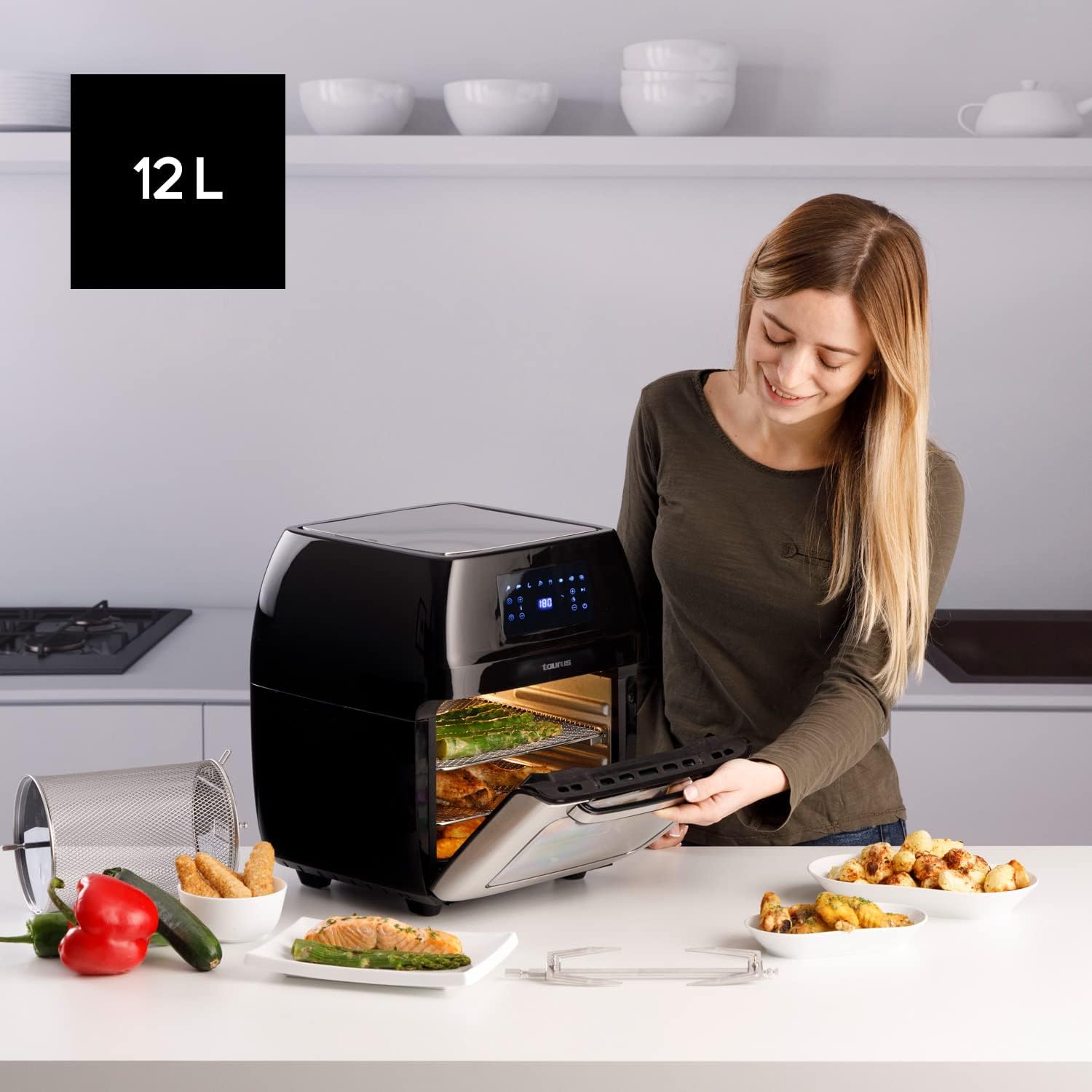
A user opening the 12-liter capacity Air Fry Digital Grill, demonstrating its large interior suitable for family-sized meals, with various cooked dishes around.
6. תחזוקה וניקיון
ניקוי קבוע מבטיח את אורך החיים וביצועים אופטימליים של המכשיר שלכם.
- נתק וקירור: תמיד נתקו את המכשיר משקע החשמל ותנו לו להתקרר לחלוטין לפני ניקויו.
- נקה חלקים נשלפים: The mesh racks, drip tray, rotisserie spit, and mesh basket are removable and dishwasher-safe for easy cleaning. For stubborn food residue, soak in warm soapy water before washing.
- פנים נקי: Wipe the interior of the grill with a damp מטלית וחומר ניקוי עדין. הימנעו מחומרי ניקוי שוחקים או כריות קרצוף שעלולות לפגוע בציפוי המונע הידבקות.
- חוץ נקי: נגבו את המשטח החיצוני בעזרת מטלית רכהamp בַּד. אין להשתמש בכימיקלים קשים או בחומרים שוחקים.
- אִחסוּן: ודאו שכל החלקים נקיים ויבשים לפני אחסון המכשיר. יש לאחסן במקום קריר ויבש.
7. פתרון תקלות
עיין בסעיף זה לקבלת בעיות נפוצות ופתרונותיהן.
| בְּעָיָה | סיבה אפשרית | פִּתָרוֹן |
|---|---|---|
| המכשיר אינו נדלק. | לא מחובר לחשמל; תקלה בשקע החשמל; תקלה במכשיר. | ודא שכבל החשמל מחובר היטב לשקע תקין. נסה שקע אחר. אם הבעיה נמשכת, צור קשר עם תמיכת הלקוחות. |
| האוכל לא מבושל באופן שווה. | Overcrowding; Incorrect temperature/time; Food not shaken/turned. | Do not overcrowd the basket/racks. Adjust temperature and time as needed. For smaller items, shake or turn food halfway through cooking. |
| עשן לבן שמקורו במכשיר. | Grease residue; High fat content food. | Clean the drip tray and interior thoroughly. For high-fat foods, drain excess fat from the drip tray during cooking. |
| האוכל לא קריספי. | Too much moisture; Not enough oil (for certain foods); Overcrowding. | Pat food dry before cooking. A light spray of oil can help. Ensure proper air circulation by not overcrowding. |
8. מפרט טכני
| מִפרָט | פְּרָט |
|---|---|
| מותג | מַזַל שׁוֹר |
| מספר דגם | 973981000 |
| יְכוֹלֶת | 12 ליטר |
| כּוֹחַ | 1700 וואט |
| כרך ידtage | 230 וולט |
| חוֹמֶר | נירוסטה |
| מידות (L x W x H) | 39 x 34.5 x 43 ס"מ |
| מִשׁקָל | 7.91 קילוגרם |
| תכונה מיוחדת | ניתן לתכנות |
9. אחריות ותמיכת לקוחות
For warranty information and customer support, please refer to the documentation included with your purchase or visit the official Taurus webאתר. שמור את הוכחת הרכישה שלך עבור כל תביעת אחריות.


