1. הקדמה
תודה על הרכישהasing the Aspen 40-inch Washable Tower Fan. This manual provides important information regarding the safe operation, installation, maintenance, and troubleshooting of your new fan. Please read this manual thoroughly before use and retain it for future reference.
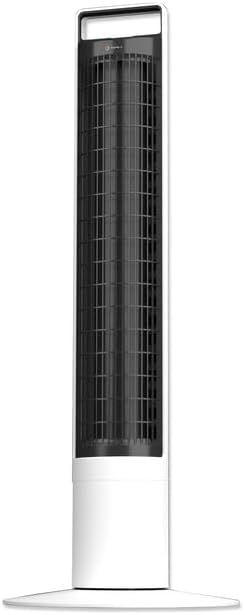
תמונה: חזית view of the Aspen 40-inch Washable Tower Fan.
2. מידע בטיחות
יש להקפיד תמיד על אמצעי זהירות בסיסיים בעת שימוש במכשירים חשמליים כדי להפחית את הסיכון לשריפה, התחשמלות ופציעות אדם.
- אין להפעיל מאוורר עם כבל או תקע פגומים.
- אל תעביר כבל מתחת לשטיחים. אין לכסות את הכבל בשטיחים לזרוק, ברזלים או כיסויים דומים. ארגן את הכבל הרחק מאזור התנועה והיכן שהוא לא ימעד.
- תמיד נתקו את המאוורר מהחשמל לפני הזזה, ניקוי או ביצוע תחזוקה.
- Do not immerse the main unit (base) in water or other liquids. Only the detachable tower is designed for washing.
- Ensure the fan is completely dry before reassembling and plugging in after cleaning.
- מאוורר זה מיועד לשימוש פנימי בלבד.
3. תכולת החבילה
ודא שכל הרכיבים נמצאים בחבילה:
- Aspen 40-inch Tower Fan (Main Unit and Detachable Tower)
- Base Assembly (2 parts)
- שלט רחוק (כולל סוללת CR2 אחת)
- מדריך למשתמש (מסמך זה)
4. התקנה
Follow these steps to assemble and set up your tower fan:
- מכלול בסיס: Connect the two halves of the base assembly. Align the fan tower with the assembled base and twist clockwise to secure it. A screwdriver may be needed for initial base assembly.
- מיקום: Place the fan on a firm, level surface. Ensure there is adequate space around the fan for proper airflow and oscillation.
- חיבור חשמל: חבר את כבל החשמל לשקע חשמל רגיל.

Image: Illustration of the fan base assembly process.
5. הוראות הפעלה
Your Aspen Tower Fan can be operated using the control panel on top of the unit or the included magnetic RF remote control.
פונקציות לוח בקרה ושלט רחוק:

Image: Close-up of the fan's top control panel and the magnetic remote control, showing button functions.
- הפעלה/כיבוי: לחץ על לחצן ההפעלה (⏻) כדי להפעיל או לכבות את המאוורר.
- מהירות מאוורר: Cycle through 4 fan speeds (Low, Medium, High, Turbo) by pressing the fan speed button (⇋).
- תְנוּדָה: לחץ על כפתור התנודה (↻) to activate or deactivate the 60-degree narrow-angle oscillation feature. This provides a consistent, focused breeze.

Image: Visual representation of the fan's 60-degree narrow-angle oscillation, showing airflow.
- שָׁעוֹן עֶצֶר: Set the auto-off timer for up to 8 hours by pressing the timer button (◷). Each press adds an hour to the timer.
- מנורת לילה: Activate the 3-color LED nightlight by pressing the nightlight button (💡). Cycle through colors or turn off the light.

Image: The Aspen Tower Fan with its base illuminated by the built-in nightlight.
תכונות נוחות:
- ידית נשיאה: The integrated handle on top of the fan allows for easy transport.

Image: A hand holding the fan by its convenient top carry handle.
- שלט רחוק מגנטי: The remote control magnetically attaches to the top of the fan for convenient storage.
6. תחזוקה
The Aspen Tower Fan features an easy-wash design for convenient cleaning. Regular cleaning ensures optimal performance and extends the life of your fan.
Cleaning the Detachable Fan Tower:
- הסר את השלט: First, remove the magnetic remote control from the top of the fan.
- Detach Tower: Twist the fan tower counter-clockwise from the base and gently pull it up to detach.
- לִשְׁטוֹף: The detached fan tower can be washed or rinsed with soap and water. You can soak it or spray it with a water nozzle.
- יבש לחלוטין: Allow the fan tower to dry completely before reassembling. Ensure no moisture remains inside.
- הרכיבו מחדש: Align the line on the fan tower with the unlock symbol on the base, then push down and twist clockwise to lock it into place. Reinsert the remote.

Image: A person rinsing the detached fan tower with a shower head in a bathtub.

Image: A visual sequence showing a dusty fan, the rinsing process, and a clean, fresh fan.
סרטון הדרכה:
Video: Official Aspen video demonstrating how to clean the tower fan. This video shows the steps for detaching the tower, washing it, and reassembling it.
7. פתרון תקלות
If you encounter issues with your Aspen Tower Fan, refer to the following common problems and solutions:
| בְּעָיָה | סיבה אפשרית | פִּתָרוֹן |
|---|---|---|
| המאוורר לא נדלק. | No power, loose connection, remote battery low. | Check power cord connection. Ensure outlet is working. Replace remote battery (CR2). |
| זרימת אוויר מופחתת. | Dust buildup in tower. | Clean the detachable fan tower as per Maintenance section. |
| המאוורר משמיע רעש חריג. | Obstruction, improper assembly. | Ensure no foreign objects are inside. Check if the tower is securely locked into the base. |
| השלט רחוק לא עובד. | Battery depleted, obstruction between remote and fan. | Replace the CR2 battery in the remote. Ensure no objects are blocking the signal path. |
If the problem persists after trying these solutions, please contact Aspen customer support.
8. מפרטים
| תכונה | פְּרָט |
|---|---|
| מותג | צַפצָפָה רַעֲדָנִית |
| שם הדגם | Aspen Tower Fan Black (ASTF-A40-BLK) |
| מידות המוצר | 12" D x 12" W x 41" H |
| משקל פריט | 9.9 פאונד |
| צֶבַע | לָבָן |
| מקור כוח | חשמלי עם כבלים |
| מספר רמות הספק | 4 מהירויות |
| שיטת בקרה | מְרוּחָק |
| תכונות מיוחדות | Lightweight, Oscillating, Detachable for Washing, 3-Color Nightlight, 4 Timers, Magnetic RF Remote |
| סוג חדר | חדר שינה, סלון, משרד ביתי |
| רכיבים כלולים | מְרוּחָק |
| שימוש בפנים/חוץ | מקורה |
| סוללות | נדרשת סוללת CR1 אחת (כלול) |
9. אחריות ותמיכה
Specific warranty details are not provided in this manual. For warranty information, product support, or to purchase replacement parts, please contact Aspen customer service.
You can visit the official Aspen store on Amazon for more information: Aspen Store


