מָבוֹא
Thank you for choosing the Tera 0013 Portable Wireless Barcode Scanner. This device is designed for efficient 1D and 2D barcode scanning, offering versatile connectivity and compatibility with various operating systems and devices. This manual provides essential information for setup, operation, maintenance, and troubleshooting to ensure optimal performance.
מדריך התקנה
תוכן החבילה
- סורק ברקודים Tera 0013
- כבל טעינה USB
- 2.4G USB Dongle (if applicable)
- מדריך למשתמש
Attaching to Smartphone
The Tera 0013 features a unique extendable back clip design, suitable for smartphones ranging from 5.31 to 6.69 inches, and can extend up to 7 inches (18 cm). This design ensures the scanner does not block your phone's camera, facilitating seamless mobile scanning. A protective flannel prevents scratches on your device.

Image: The Tera 0013 barcode scanner securely clipped onto the back of a smartphone, ready for use.
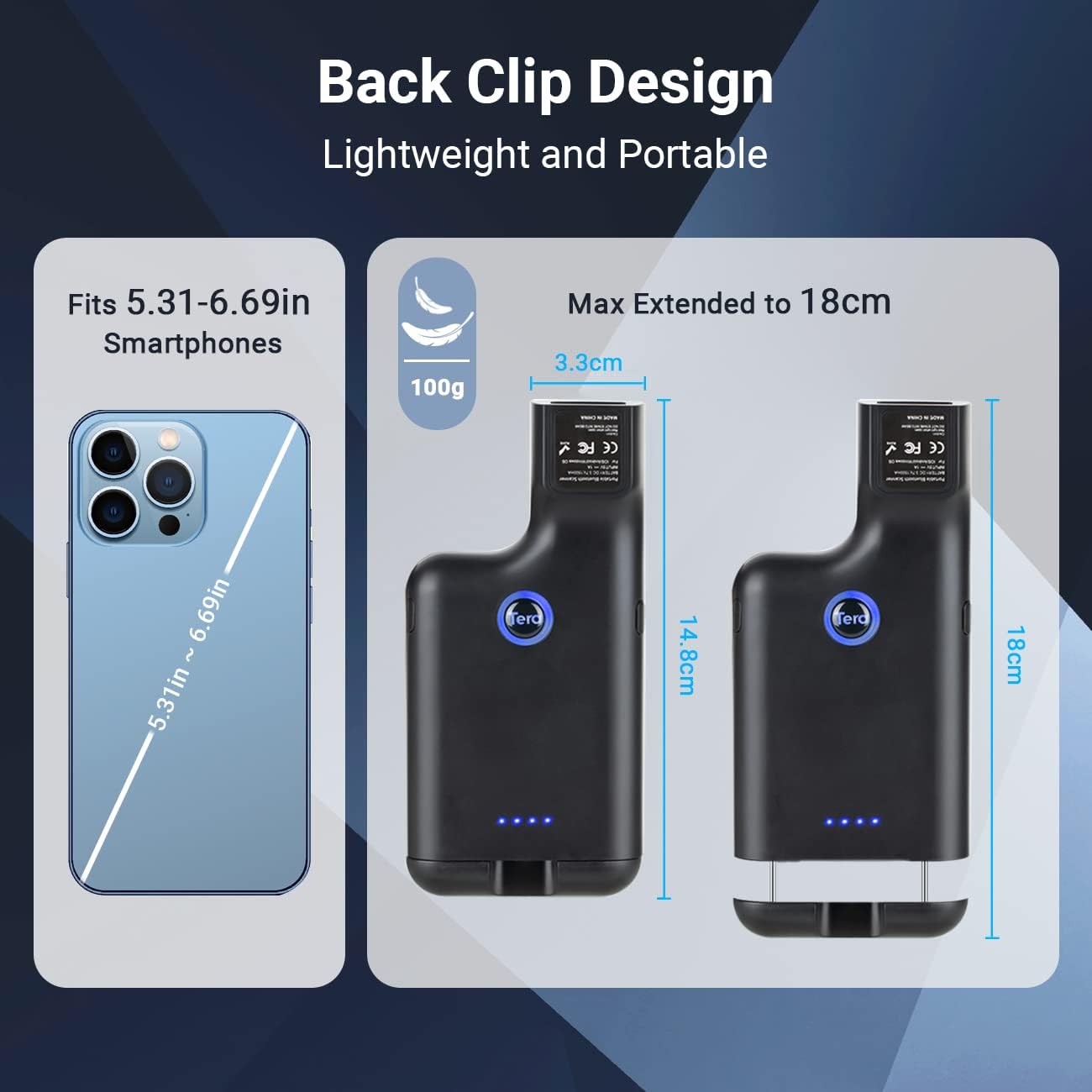
Image: A visual representation of the scanner's back clip design, highlighting its lightweight nature and extendable dimensions to fit various smartphone sizes.
טעינה ראשונית
Before first use, fully charge the scanner using the provided USB charging cable. A full charge takes less than 4 hours.
הוראות הפעלה
אפשרויות קישוריות
The Tera 0013 scanner offers three connectivity modes:
- בלוטות': Connect wirelessly to smartphones, tablets, and computers.
- 2.4G Wireless USB: Use the included USB dongle for wireless connection to devices. The transmission distance can reach 100m in obstacle-free environments and 35m with obstacles.
- כבל יו אס בי: Direct wired connection for data transfer and charging.
The scanner is compatible with Windows 11/10/8/7/XP, Mac OS, iOS, Android, and Linux operating systems, and can connect to smartphones, computers, POS systems, iPhones, and iPads.
פונקציות כפתור
The scanner features a 3-button design, strategically placed on the left, right, and upper sides of the device. This ergonomic design allows for comfortable use by both left and right-handed users, whether holding the scanner vertically or horizontally.

תמונה: מפורט view of the Tera 0013 scanner, highlighting the positions of its three operational buttons for versatile handling.
סריקת ברקוד
The Tera 0013 supports both 1D and 2D barcodes, including digital and printed formats. It features a fast and accurate scanning engine.
- 1D Decoding Capability: Codabar, Code 11, Code93, MSI, Code 128, UCC/EAN-128, Code 39, EAN-8, EAN-13, UPC-A, ISBN, Industrial 25, Interleaved 25, Standard 25, 2/5 Matrix.
- 2D Decoding Capability: QR, PDF417, Data Matrix, Aztec Code, Hanxin.

Image: The Tera 0013 scanner demonstrating its capability to quickly and accurately scan a QR code displayed on a digital screen.
תַחזוּקָה
טיפול בסוללה
The scanner is equipped with a 2500 mAh battery, providing up to 60 days of standby time after a full charge. The energy-efficient system helps prolong battery life. Recharge the device when the battery indicator shows low power.

Image: An infographic illustrating the enhanced 2500mAh rechargeable battery, showing 4 hours for full charge, 60 days standby time, and 4 hours scanning time.
ניקוי
To clean the scanner, gently wipe the exterior with a soft, dry cloth. Do not use abrasive cleaners or solvents.
פתרון בעיות
- הסורק לא מתחבר: Ensure Bluetooth is enabled on your device or the 2.4G USB dongle is properly inserted. Check if the scanner's battery is charged.
- בעיות סריקה: Ensure the barcode is clear and well-lit. Adjust the distance between the scanner and the barcode. Verify the scanner is in the correct mode for the barcode type (1D/2D).
- ביצועים איטיים: Ensure the scanner is fully charged. If using wireless connection, try moving closer to the connected device to reduce interference.
אם הבעיות נמשכות, עיין במדריך למשתמש המלא או צור קשר עם תמיכת הלקוחות.
מפרטים
| תכונה | פְּרָט |
|---|---|
| מותג | טרה |
| דֶגֶם | 0013 |
| תאימות מערכת הפעלה | Android, iOS, Windows 11/10/8/7/XP, Mac OS, Linux |
| טכנולוגיית קישוריות | Bluetooth, 2.4G Wireless USB, USB Cable |
| מכשירים תואמים | מחשב, מחשב נייד, סמארטפון, טאבלט |
| סוללה נטענת | כֵּן |
| קיבולת סוללה | 2500 מיליאמפר ליתיום יון |
| זמן טעינה | פחות משעתיים |
| זמן המתנה | עד 60 ימים |
| קצב סריקה | 200 Scans/Second |
| תמיכה בברקוד | 1D (Codabar, Code 11, Code93, MSI, Code 128, UCC/EAN-128, Code 39, EAN-8, EAN-13, UPC-A, ISBN, Industrial 25, Interleaved 25, Standard 25, 2/5 Matrix), 2D (QR, PDF417, Data Matrix, Aztec Code, Hanxin) |
| Smartphone Fit Range | 5.31 to 6.69 inches (extendable up to 7 inches / 18 cm) |
| ארץ מוצא | סִין |
מידע על אחריות
This product comes with a standard manufacturer's warranty. Please retain your proof of purchase for any warranty claims. For specific warranty terms and conditions, refer to the documentation included with your product or contact Tera customer support.
תמיכת לקוחות
For technical assistance, troubleshooting, or any inquiries regarding your Tera 0013 Barcode Scanner, please contact Tera customer support through their official webהאתר או פרטי הקשר המופיעים על אריזת המוצר.
For the latest drivers, firmware updates, and additional resources, please visit the official Tera product support page.


