1. הקדמה
The EDISION Picco S2 Pro is a Full HD DVB-S2 H.265/HEVC digital satellite receiver designed for receiving satellite signals. This dynamically designed receiver features a built-in card reader, Multistream support, and on-board Wi-Fi for accessing various internet applications. It also includes a 2-in-1 universal remote control and H.265 media player capabilities.

Image: EDISION Picco S2 Pro product packaging.
2. המוצר נגמרview
2.1 תכונות עיקריות
- DVB-S2 H.265/HEVC digital satellite receiver for satellite channels.
- On-board Wi-Fi, card reader, Multistream, Unicable & SCR Unicable 2 support.
- USB connection for PVR (Personal Video Recorder), Timeshift, Playback, software updates, and backup function.
- Internet connection for applications: YouTube, Stalker TV, Xtream, WebTV, Shoutcast, Dailymotion, Weather.
- H.265 media player (supports MP3/AC3/AAC/JPEG/PNG/MP4/MOV/AVI/MKV/MPG/MPEG/Xvid/DviX).
- Ergonomic 2-in-1 universal remote control for set-top box and TV, with 4 programmable buttons for TV.
2.2 תכולת החבילה
ודא שכל הפריטים נמצאים בחבילה:

Image: EDISION Picco S2 Pro package contents.
- EDISION Picco S2 Pro Receiver
- שלט רחוק אוניברסלי 2 ב-1
- Power Supply Unit (PSU 12V/1A)
- 2x סוללות AAA
- מדריך למשתמש מהיר
2.3 Front & Side Panel
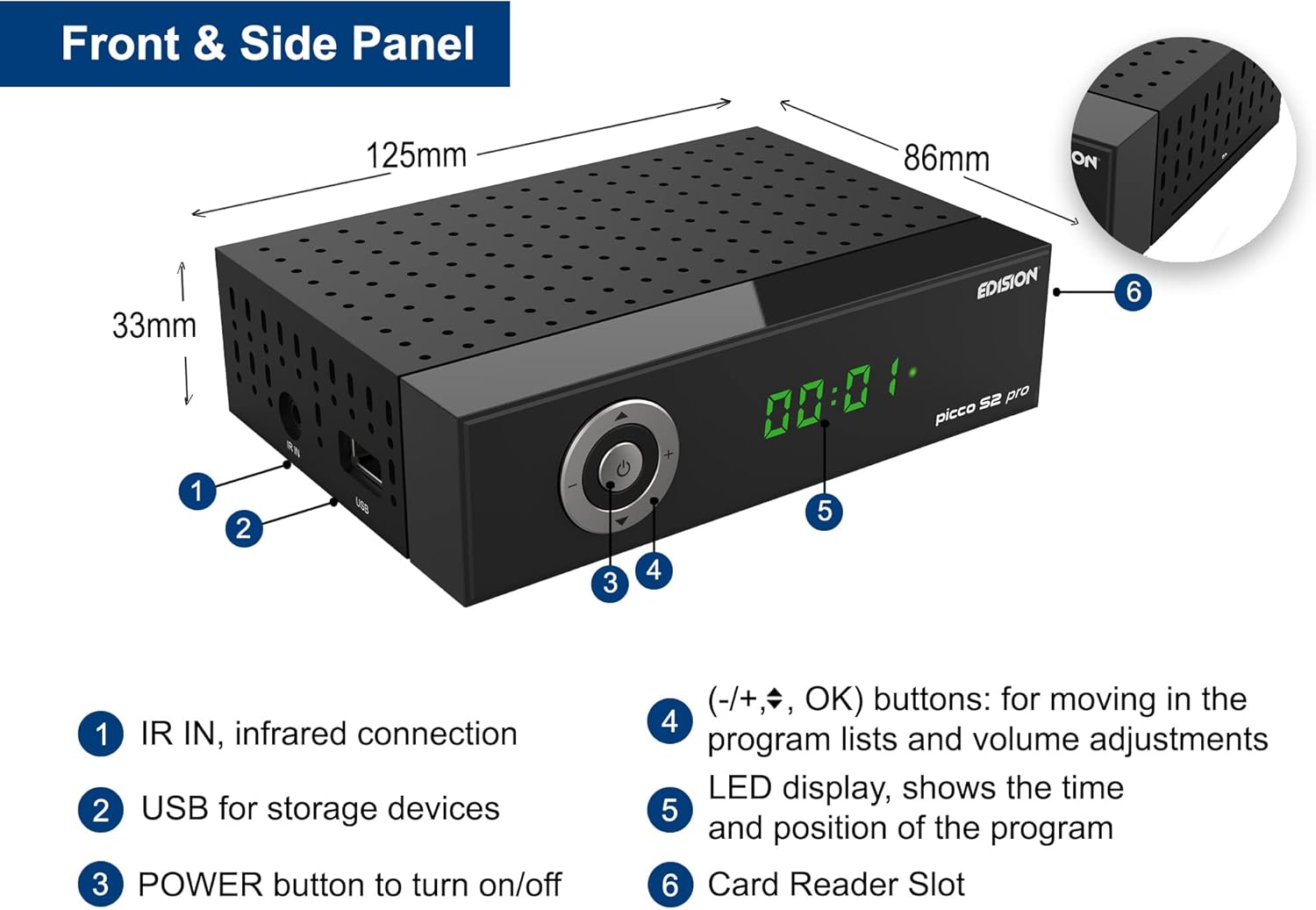
Image: Front and side panel layout with dimensions and labeled components.
- IR IN: Infrared connection for external IR sensor.
- USB: For storage devices (PVR, media playback, software updates).
- כפתור הפעלה: להפעלה/כיבוי של המכשיר.
- (-/+, OK) buttons: For navigating program lists and adjusting volume.
- תצוגת LED: Shows the time and current program position.
- Card Reader Slot: For conditional access cards.
2.4 חיבורי לוח אחורי

Image: Rear panel connections with labeled ports.
- LNB IN (13V/18V 400mA Max): DVB-S2 tuner to receive satellite channels.
- S/PDIF: Coaxial audio connection.
- HDMI: HDMI connection, up to Full HD 1080p.
- SCART: חיבור טלוויזיה אנלוגי.
- DC 12V: Connection for external power supply.
2.5 שלט רחוק אוניברסלי 2 ב-1

Image: EDISION 2-in-1 Universal Remote Control.
The remote control is designed for both the set-top box (STB) and your TV. It comes pre-programmed with the 4 most important functions for SAMSUNG and LG TVs. You can program these 4 buttons as desired for other TV brands.
3. התקנה
3.1 חיבור המקלט
Follow these steps to connect your EDISION Picco S2 Pro receiver:
- חיבור צלחת לוויין: Connect the LNB cable from your satellite dish to the 'LNB IN' port on the rear panel of the receiver.
- חיבור לטלוויזיה:
- For High Definition (HD) output, connect an HDMI cable from the 'HDMI' port on the receiver to an HDMI input on your television.
- For Standard Definition (SD) output, connect a SCART cable from the 'SCART' port on the receiver to the SCART input on your television.
- חיבור מערכת שמע (אופציונלי): If you have an external audio system, connect it to the 'S/PDIF' coaxial audio output for digital audio.
- חיבור חשמל: Connect the provided 12V/1A power adapter to the 'DC 12V' input on the receiver, then plug the adapter into a wall outlet.

Image: Receiver connected to a television, showing the main menu interface.
3.2 הפעלה ראשונית
After connecting all cables, press the POWER button on the front panel or the remote control to turn on the receiver. The LED display will show the current status. Follow the on-screen instructions for initial setup, which typically includes language selection, country, and satellite scanning.
4. הוראות הפעלה
4.1 פעולה בסיסית
- חיפוש ערוץ: Access the 'Installation' menu to perform an automatic or manual channel scan for available satellite channels.
- ניווט בערוץ: Use the CH+/CH- buttons on the remote to change channels. Use the numeric keypad to directly enter channel numbers.
- בקרת עוצמת הקול: השתמשו בכפתורי VOL+/VOL- כדי לכוונן את עוצמת הקול.
- גישה לתפריט: Press the 'MENU' button to access the main menu for settings, applications, and other functions.
4.2 Wi-Fi & Internet Applications
The built-in Wi-Fi allows you to connect the receiver to your home network and access various online applications:
- YouTube
- Stalker TV
- Xtream
- WebTV
- Shoutcast
- Dailymotion
- תחזיות מזג אוויר

Image: Stalker TV application logo, one of the supported internet applications.
4.3 Media Playback & PVR
Connect a USB storage device to the USB port on the front panel to utilize the following functions:
- PVR (מקליט וידאו אישי): Record live TV programs.
- שינוי הזמן: Pause, rewind, and fast-forward live TV.
- השמעת מדיה: Play various media files including MP3, AC3, AAC, JPEG, PNG, MP4, MOV, AVI, MKV, MPG, MPEG, Xvid, and DviX.
- Software Updates & Backup: Use the USB port for convenient software updates and system backups.
5. תחזוקה
To ensure optimal performance and longevity of your receiver:
- ניקוי: Use a soft, dry cloth to clean the exterior of the receiver. Do not use liquid cleaners or aerosols.
- אוורור: Ensure the receiver has adequate ventilation. Do not block the ventilation holes.
- עדכוני תוכנה: Regularly check for and install online software updates to improve performance and add new features. These can typically be found in the system settings menu or via USB.
- כיבוי: If the receiver will not be used for an extended period, disconnect it from the power supply.
6. פתרון תקלות
If you encounter issues with your EDISION Picco S2 Pro, consider the following basic troubleshooting steps:
- אין כוח: Check if the power adapter is securely connected to both the receiver and the wall outlet. Ensure the outlet is functional.
- אין קליטה: Verify that the satellite LNB cable is correctly connected to the 'LNB IN' port. Check your satellite dish alignment.
- אין תמונה/קול: Ensure the HDMI or SCART cable is securely connected to both the receiver and the TV. Check the TV's input source selection.
- השלט הרחוק לא עובד: בדוק את הסוללות בשלט הרחוק והחלף אותן במידת הצורך. ודא שאין חסימות בין השלט לחיישן ה-IR של המקלט.
- בעיות חיבור לאינטרנט: Verify your Wi-Fi network is active and the receiver is correctly connected. Re-enter Wi-Fi credentials if needed.
- מערכת קפואה/אי תגובה: Try restarting the receiver by unplugging it from the power outlet for a few seconds and then plugging it back in.
For persistent issues, consult the detailed user manual (if available) or contact EDISION customer support.
7. מפרטים
| תכונה | מִפרָט |
|---|---|
| מותג | מהדורה |
| צֶבַע | שָׁחוֹר |
| טכנולוגיית קישוריות | HDMI, SCART, USB, Wi-Fi |
| סך כל יציאות USB | 1 |
| סך כל יציאות HDMI | 1 |
| מצב פלט שמע | סטריאו |
| מכשירים תואמים | Television with HDMI, SCART, or 3RCA connection |
| פורמטי שמע נתמכים | Various formats (MP3/AC3/AAC) |
| כרך ידtage | 12 וולט (DC) |
| שימושים מומלצים במוצר | Watching high-definition satellite channels |
| מספר דגם של פריט | 01-07-0028 |
| יַצרָן | EDISION |
| ארץ מוצא | סִין |
| הרכב סוללה | בְּסִיסִי |
| סוללה נטענת | לֹא |
| זמינות חלקי חילוף | מידע לא זמין |
| עדכוני תוכנה מובטחים עד | מידע לא זמין |
8. אחריות ותמיכה
Information regarding specific warranty terms and conditions for the EDISION Picco S2 Pro is not available in the provided product details. For warranty claims or technical support, please refer to the documentation included with your purchase or contact EDISION customer service directly.
Spare parts availability and guaranteed software update periods are also not specified in the available information.


