מָבוֹא
This user manual provides detailed instructions for the MURPISO 3-in-1 Magnetic Foldable Wireless Charger. This versatile charging station is designed to simultaneously charge your compatible iPhone, Apple Watch, and AirPods, offering a convenient and space-saving solution for both home and travel. Please read this manual thoroughly before using the product to ensure optimal performance and safety.
מה יש בקופסה
Upon unboxing your MURPISO 3-in-1 Magnetic Foldable Wireless Charger, you should find the following items:
- 1 x MURPISO 3-in-1 Magnetic Foldable Wireless Charger
- 1 x USB Type C cable
- מדריך למשתמש אחד (מסמך זה)
- (Note: A QC 3.0 adapter is recommended for optimal charging speed, but may not be included in all packages.)

Image: Components of the MURPISO 3-in-1 Magnetic Foldable Wireless Charger, including the charging pad, USB-C cable, and power adapter.
המוצר נגמרview
The MURPISO 3-in-1 Magnetic Foldable Wireless Charger is designed for convenience and efficiency. Its key features include:
- עיצוב מתקפל: The soft silicone design allows for 180° folding, transforming it into a phone holder or a flat charging pad, saving space and enhancing portability.
- Strong Magnetic Snap: Built-in high-quality magnets ensure precise alignment of the wireless charging coil for fast and stable charging. Note: Magnetic suction is compatible only with iPhone 14/13/12 series devices. Vertical magnetic suction is not recommended for Pro or Pro Max models due to their size.
- טעינה 3 ב-1: Simultaneously charges compatible phones (iPhone and Android wireless charging models), Apple Watch (Series 2-7/SE), and AirPods (2 wireless/3/Pro).
- ידידותי לנסיעות: Compact folding design makes it easy to carry and prevents scratches during travel.
- Light Reminder Design: Features an indicator light with a switch to turn it off when not needed. Different light patterns indicate power status, charging status, full charge, and foreign object detection.

תמונה: תאימות מעלview for iPhone, Samsung, Apple Watch, and AirPods models.

Image: The compact, folded charger easily fits into a bag, highlighting its travel-friendly design.
הגדרה
- חבר חשמל: Connect the provided USB Type C cable to the charging station and plug the other end into a compatible power adapter (QC 3.0 adapter recommended for optimal performance).
- מחוון הפעלה: When powered on, the indicator light will show a green light for 0.5 seconds, then a blue light for 0.5 seconds, followed by both blue and green lights simultaneously for 0.5 seconds, before settling into a standby green light (for 9V input) or flashing green light (for 5V input).
- Prepare Devices: Ensure your devices (phone, Apple Watch, AirPods) are compatible with wireless charging. For phones, remove any thick cases or cases with metal attachments (thickness should be less than 4mm) before charging to ensure proper connection and efficiency.

Image: Illustration of connecting the charger to an 18W QC3.0 adapter for power.
הוראות הפעלה
The MURPISO 3-in-1 charger offers multiple charging configurations:
- Flat Charging Pad: Lay the charger flat on a surface. Place your phone on one of the outer charging pads, your Apple Watch on the center magnetic module, and your AirPods on the other outer charging pad.
- Foldable Stand (Horizontal Charging): Fold the charger into a triangular stand. This allows for horizontal charging of your iPhone 12/13/14 series devices using the magnetic suction feature.
- Foldable Stand (Vertical Charging - Limited): While the charger can be folded into a stand for vertical phone placement, vertical magnetic suction is not recommended for larger iPhone Pro or Pro Max models due to stability.
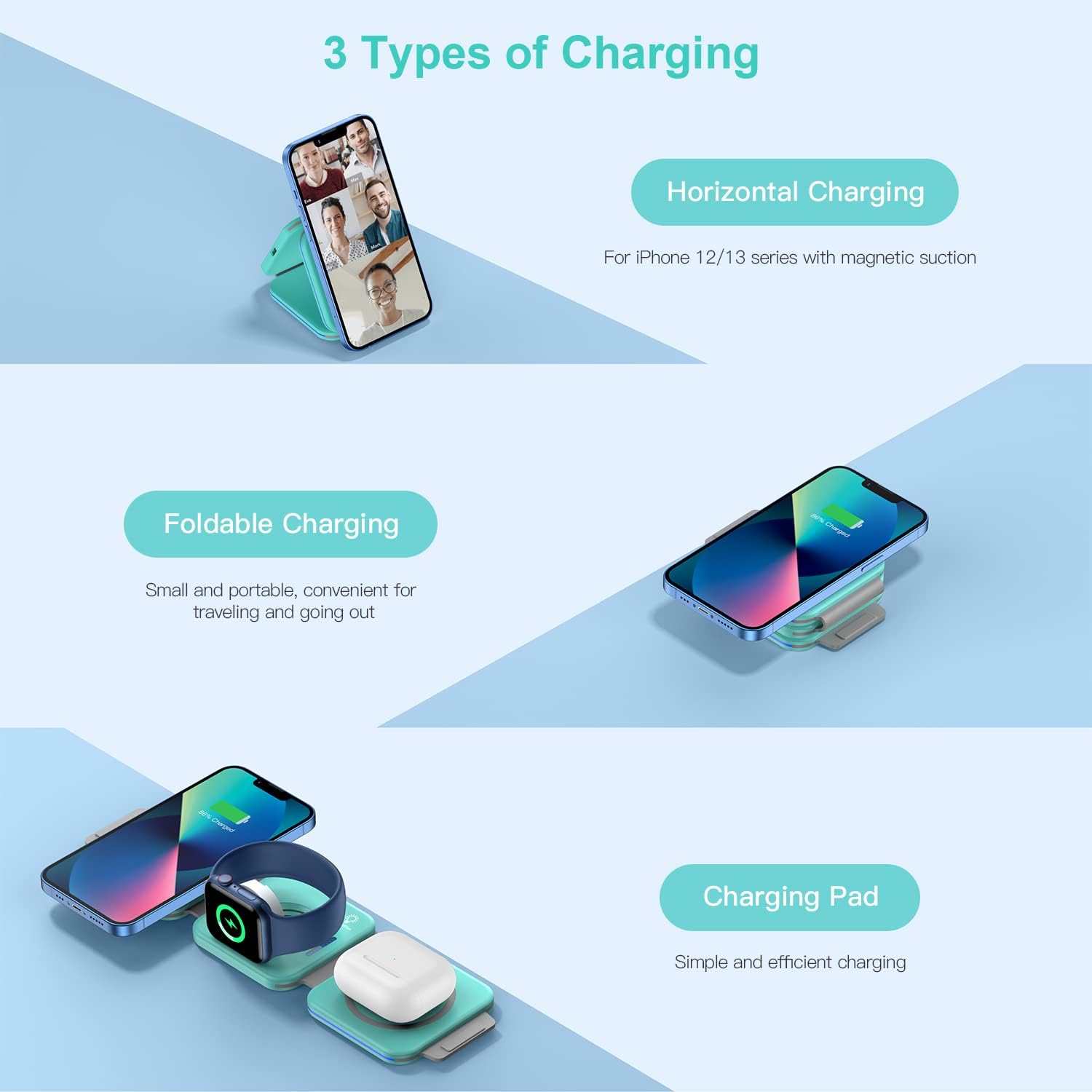
Image: Visual representation of the three charging modes: horizontal stand, folded for travel, and flat pad.
מצב נורית חיווי:
The charger features a smart touch light switch. Tap the light icon to turn the indicator lights on or off. Turning off the lights does not affect the charging process.
- הפעלה: Green light on 0.5S, blue light on 0.5S, blue and green light simultaneously on 0.5S, then turns to standby green light.
- המתנה: 9V input: Green light is always on. 5V input: Green light flashes.
- טְעִינָה: Blue pulsing.
- טעון מלא: האור הכחול דולק תמיד.
- Foreign Object Detection / Error: Blue light and green light flash alternately.

Image: Explanation of the LED indicator light behaviors for various charging states.
מפרטים
| תכונה | פְּרָט |
|---|---|
| מידות המוצר | 5.87 x 3.54 x 1.93 אינץ' |
| משקל פריט | 10 אונקיות |
| מותג | MURPISO |
| טכנולוגיית קישוריות | אַלחוּט |
| סוג מחבר | USB סוג C |
| תכונה מיוחדת | Magnetic Foldable Travel, Travel |
| סוג הרכבה | מתקן לשולחן |
| Ampלמחוק | 2.1 Amps |
| סך כל יציאות USB | 1 |
תַחזוּקָה
- Keep the charging station clean and free from dust and debris. Use a soft, dry cloth for cleaning.
- הימנע מחשיפת המכשיר לטמפרטורות קיצוניות, לאור שמש ישיר או לחות גבוהה.
- אין לפרק או לנסות לתקן את המטען בעצמך. פעולה זו עלולה לבטל את האחריות ולגרום נזק.
- Store the charger in a cool, dry place when not in use, especially during travel, utilizing its foldable design for protection.
פתרון בעיות
בעיות ופתרונות נפוצים:
- מכשיר לא נטען:
- ודא שהמטען מחובר כהלכה למקור מתח.
- Verify that your device is placed correctly on the charging coil. Reposition it if necessary.
- Check for any foreign objects (coins, keys) between the charger and your device.
- Remove thick phone cases or cases with metal attachments.
- Ensure your device is wireless charging compatible.
- Try using a different power adapter (QC 3.0 recommended) and USB-C cable.
- טעינה איטית:
- Use a QC 3.0 (Quick Charge 3.0) compatible power adapter. Standard 5V USB power supplies will result in slower charging.
- Ensure no background apps are heavily draining your device's battery during charging.
- Check for proper alignment of the device on the charging coil.
- Indicator lights flashing blue and green alternately:
- This indicates foreign object detection or an error. Remove your device and check for any metal objects or debris on the charging surface.
- If the issue persists, try unplugging and re-plugging the charger.
- התחממות יתר:
- Some heat generation is normal during wireless charging. However, if the device or charger becomes excessively hot, remove the device immediately.
- ודא אוורור נאות סביב המטען.
- הימנעו מטעינה באור שמש ישיר או בסביבות חמות.
- Ensure no foreign objects are interfering with charging.
אחריות ותמיכה
MURPISO products are manufactured with high-quality standards. For warranty information, technical support, or customer service inquiries, please refer to the contact details provided on the product packaging or visit the official MURPISO webאתר. אנא שמור את הוכחת הרכישה שלך לצורך תביעות אחריות.
For further assistance, you may contact MURPISO customer service via:
- אֶלֶקטרוֹנִי: support@murpiso.com (לְשֶׁעָבַרample email, replace if actual email is known)
- Webאֲתַר: Visit the MURPISO Store on Amazon