1. הקדמה
The XTOOL D9S PRO is a professional-grade automotive diagnostic scan tool designed for comprehensive vehicle diagnostics, ECU programming, and advanced maintenance services. This manual provides detailed instructions on how to set up, operate, and maintain your D9S PRO device, ensuring optimal performance and longevity.

The XTOOL D9S PRO diagnostic tool, featuring a large display tablet and a wireless VCI (Vehicle Communication Interface) module, designed for comprehensive vehicle diagnostics and programming. It highlights key features such as ECU programming, FCA AutoAuth, Topology Mapping, 4000+ Active Tests, 42+ Special Services, and 33-66ft WiFi diagnosis range, along with a 3-year free update.
2. המוצר נגמרview
The D9S PRO is equipped with a robust hardware configuration and a user-friendly interface to facilitate efficient vehicle diagnostics. Key components include the main tablet unit and the VCI (Vehicle Communication Interface) module.
2.1 תכונות עיקריות
- Advanced ECU Programming & Coding: Supports online and offline programming for specific vehicle brands.
- אישור אוטומטי של FCA: Access to Security Gateway Module (SGW) for 2018+ Chrysler, Dodge, Jeep, and Fiat vehicles.
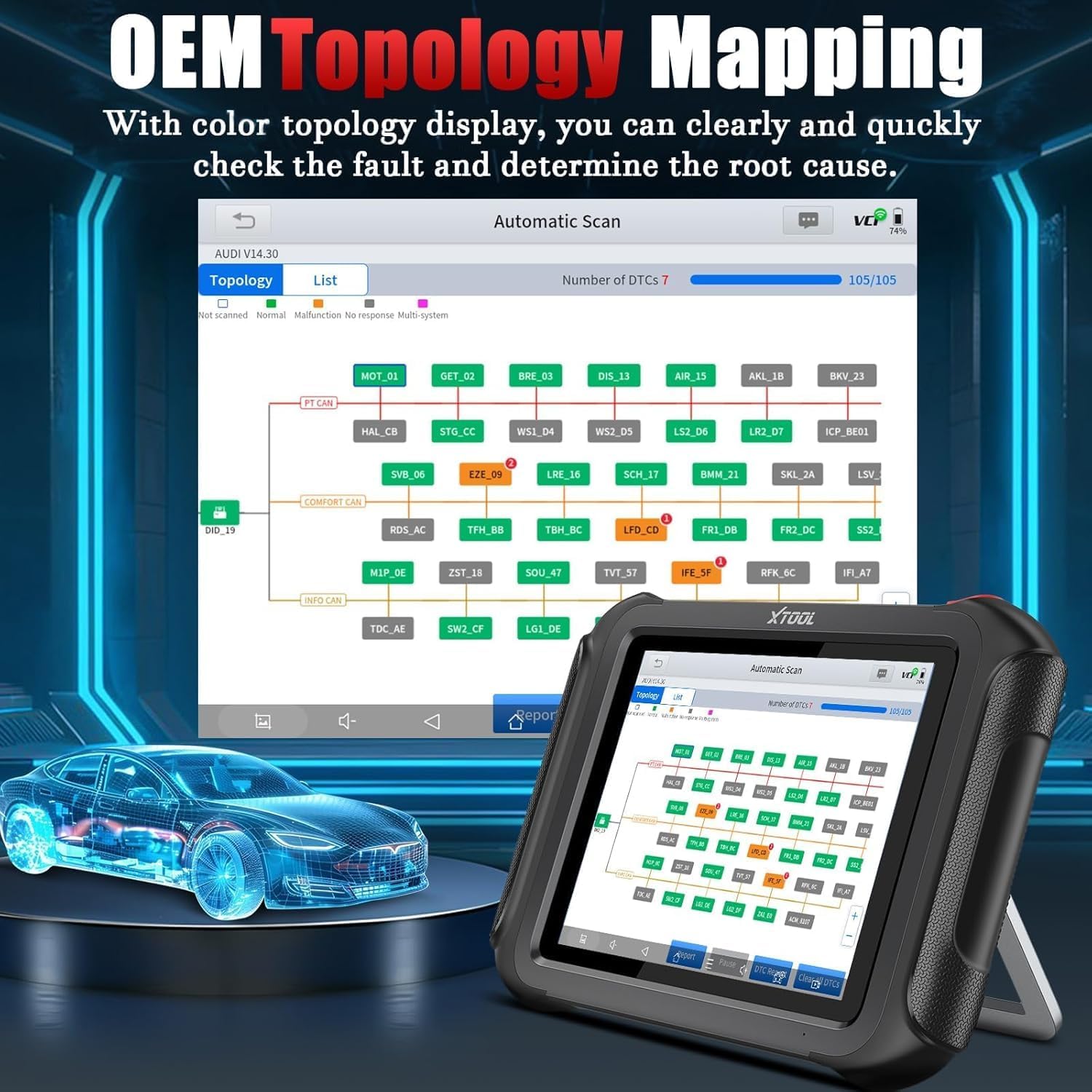
- Intelligent Topology Map: Visual representation of vehicle communication networks for faster fault identification.
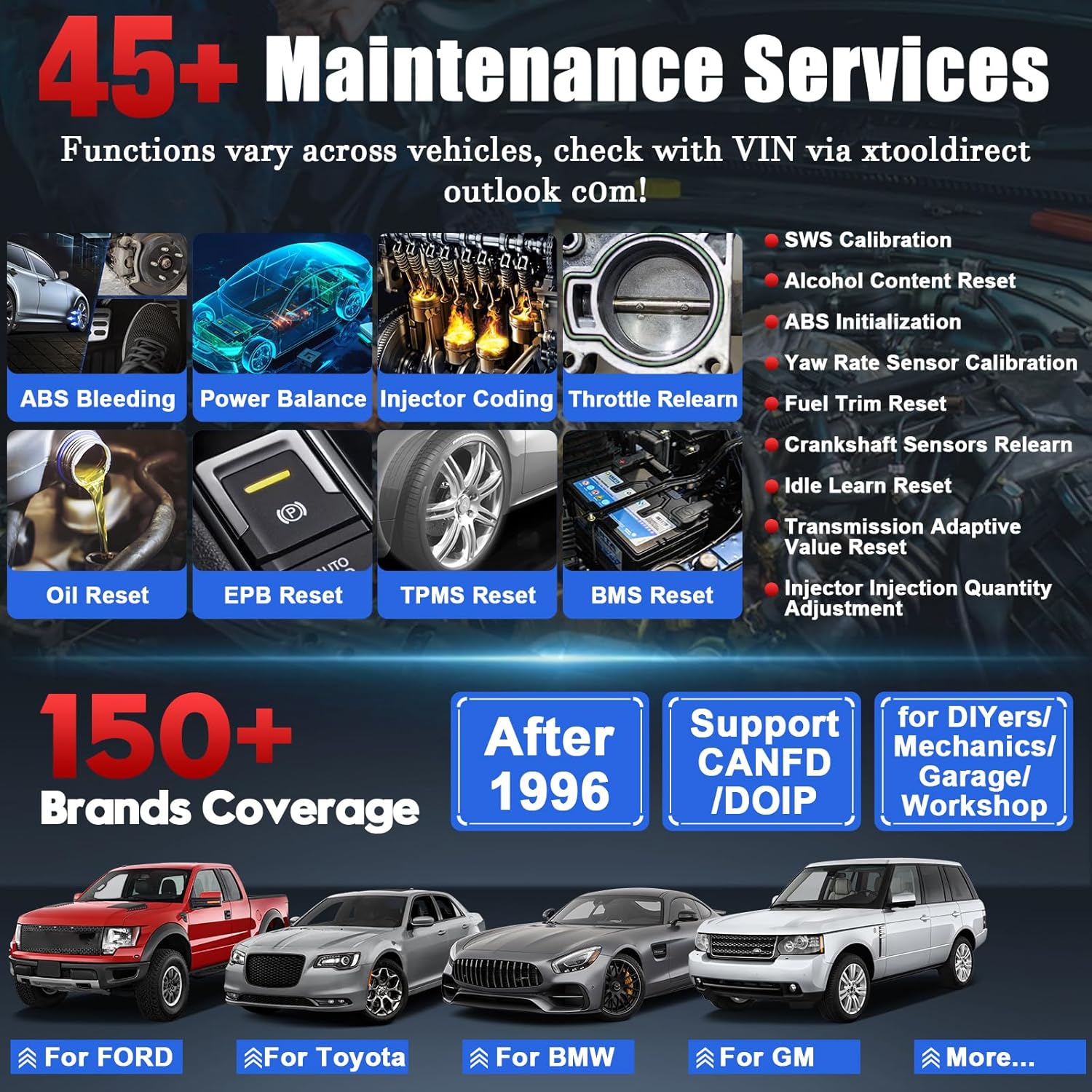
- 45+ שירותי תחזוקה: Comprehensive range of reset and service functions.
- 4000+ Bi-directional Controls/Active Tests: Perform component tests to pinpoint issues.
- OE-Level Full Systems Diagnostics: In-depth scanning of all vehicle modules.
- Enhanced Wireless Connection: Stable Wi-Fi connectivity with extended range (33-66ft).
- כיסוי רכב רחב: Supports over 150 vehicle brands.
- תמיכה מרובת שפות: Pre-installed English and Spanish, with 22 additional languages.
- 3 Years Free Software Updates: Ensures compatibility with the latest vehicle models.

תמונה זו מספקת סקירה מקיפהview of the XTOOL D9S PRO's capabilities, including online and offline ECU programming and coding, over 45 maintenance services, full system diagnostics, and support for advanced protocols like CAN FD and DoIP. It also emphasizes its wide vehicle coverage, multi-language support, and long-term software updates.
3. התקנה
Follow these steps to set up your XTOOL D9S PRO for first-time use.
3.1 טעינה ראשונית
Upon receiving your D9S PRO, ensure the tablet is fully charged using the provided power adapter. The device features a 6400 mAh (7.4V) quick-charging battery for extended performance.
3.2 הפעלה
Press and hold the power button located on the side of the tablet until the XTOOL logo appears on the screen.
3.3 חיבור מודול VCI
The D9S PRO utilizes a wireless VCI module for vehicle communication. Plug the VCI module into the vehicle's OBDII port. The tablet and VCI will automatically establish a wireless connection. The D9S PRO's enhanced Wi-Fi connection offers a more stable and extended diagnostic range compared to standard Bluetooth scanners.
The D9S PRO features an enhanced wireless connection, providing a more stable and extended diagnostic range of 33-66 feet, significantly improving mobility and efficiency in a workshop environment compared to traditional Bluetooth-based scanners.
3.4 עדכוני תוכנה
It is recommended to perform a software update upon initial setup to ensure you have the latest features and vehicle compatibility. Connect the tablet to a Wi-Fi network and navigate to the 'Updates' section in the main menu.
4. הוראות הפעלה
This section details the primary functions and operations of the XTOOL D9S PRO.
4.1 תכנות וקידוד של ECU
The D9S PRO supports advanced ECU programming and coding functionalities for specific vehicle brands. This includes:
- Online & Offline ECU Coding: For BENZ, BMW, and Mitsubishi to improve car performance and enhance efficiency.
- Online & Offline ECU Programming: For new module programming and module replacement for Ford, Lincoln, Mazda, BENZ, and BMW F/G Chassis.
- רענון פונקציות נסתרות: Activate hidden features like park assist to maximize car performance.
פֶּתֶק: Please send your VIN and module information to XTOOL support to check compatibility before attempting ECU programming or coding. Not supported for GM vehicles.

The XTOOL D9S PRO offers advanced ECU coding and programming functionalities for specific vehicle brands like BENZ, BMW, Ford, Lincoln, and Mazda. This includes the ability to reflash ECUs, activate hidden features such as park assist, and optimize vehicle performance. It supports both online and offline operations.
4.2 אימות אוטומטי של FCA
The D9S PRO supports FCA AutoAuth for accessing the Security Gateway Module (SGW) on 2018+ Chrysler, Dodge, Jeep, and Fiat vehicles. This allows for comprehensive diagnostics and bi-directional control on these models.
Steps to Activate the Function:
- Account Registration via XTOOLTECH Webאֲתַר.
- Set up your registered account on the D9S PRO scanner.
- Add your D9S PRO tool to your FCA account.
- Update software on the scanner to ensure the latest FCA AutoAuth features are available.

The D9S PRO supports FCA AutoAuth, allowing access to the Security Gateway Module (SGW) for 2018+ Chrysler, Dodge, Jeep, and Fiat vehicles. This enables comprehensive diagnostics and bi-directional control. Activation requires account registration and software updates.
4.3 Intelligent Topology Mapping
The D9S PRO features an intuitive OE-level Topology Map that visually displays the communication status of all vehicle modules. This color-coded diagram allows for quick identification of faults and their root causes, significantly improving diagnostic efficiency.

The intuitive OEM Topology Mapping feature of the XTOOL D9S PRO provides a visual representation of the vehicle's communication network. This color-coded display allows users to quickly identify the status of all modules, pinpoint faults, and determine the root cause of issues efficiently.
4.4 Diagnostic Functions: 45+ Maintenance Services & 4000+ Active Tests
The D9S PRO offers an extensive range of diagnostic and service functions:
- 45+ שירותי תחזוקה: Includes Oil Reset, EPB Reset, Throttle Relearn, ABS Bleeding, Injector Coding, Fuel Trim Reset, Crankshaft Sensors Relearn, ADAS Calibration, and many more. Functions may vary by vehicle model.
- 4000+ Bi-directional Control/Active Tests: Perform vehicle-specific active tests to quickly pinpoint car fault components. Examples include cycling A/C clutch, fuel injector pump test, ABS pump test, radiator fan test, and sound horn test.
- OE Full Systems Diagnostics: Perform in-depth full diagnostics previously available only to dealer tools, including Auto Scan, Read DTCs, Clear DTCs, Live Data, Freeze Frame, and ECU Information.

The XTOOL D9S PRO provides a wide array of over 45 maintenance and reset services, covering essential vehicle functions such as oil light reset, electronic parking brake (EPB) reset, throttle body relearn, and injector coding. It supports over 150 vehicle brands manufactured after 1996.

With over 4000 active tests, the XTOOL D9S PRO allows users to perform vehicle-specific tests to quickly pinpoint faulty components. This includes activating components like the A/C clutch, fuel pump, and ABS pump, providing in-depth diagnostic capabilities previously available only to dealer tools.
5. תחזוקה
Proper maintenance ensures the longevity and optimal performance of your XTOOL D9S PRO.
- עדכוני תוכנה: Regularly check for and install software updates. The D9S PRO comes with 3 years of free software updates, providing new features and compatibility with the latest vehicle models.
- ניקוי: השתמשו במטלית רכה ויבשה לניקוי מסך וגוף הטאבלט. הימנעו מחומרי ניקוי שוחקים או ממסים.
- אִחסוּן: יש לאחסן את המכשיר במקום קריר ויבש, הרחק מאור שמש ישיר וטמפרטורות קיצוניות.
- טיפול בסוללה: For long-term storage, ensure the battery is charged to approximately 50-70% to prevent deep discharge.
The D9S PRO offers versatile connectivity options, including both wireless and wired connections for stable diagnostics. It also features responsive technical support and comes with 3 years of free software updates, ensuring the tool remains current with the latest vehicle models and diagnostic functionalities.
6. פתרון תקלות
If you encounter issues with your XTOOL D9S PRO, consider the following general advice:
- המכשיר לא מופעל: Ensure the battery is sufficiently charged. Connect the power adapter and try again.
- אין תקשורת עם הרכב: Verify the VCI module is securely plugged into the OBDII port. Check the wireless connection between the tablet and VCI. Ensure the vehicle's ignition is on.
- קפיאה/השהיה של תוכנה: Close unnecessary applications. Perform a system restart. Ensure sufficient storage space is available.
- פונקציה לא עובדת: Verify vehicle compatibility for the specific function. Ensure the software is updated to the latest version.
For persistent issues or complex problems, please refer to the support section below.
7. מפרטים
| תכונה | מִפרָט |
|---|---|
| מותג | XTOOL |
| מַעֲרֶכֶת הַפעָלָה | אנדרואיד 10.0 |
| רזולוציית תצוגה | 1024x768 |
| סוג התאמה לרכב | Universal Fit |
| UPC | 758987845250, 753124716431 |
| מעבד מעבד | ארבע ליבות 1.8 גיגה-הרץ |
| אַיִל | 4 ג'יגה-בייט |
| ROM | 128 ג'יגה-בייט |
| סוֹלְלָה | 6400 mAh, 7.4V (equals to 12800 mAh, 3.7V) |
| מַצלֵמָה | 8MP |
8. אחריות ותמיכה
XTOOL is committed to providing excellent customer service and support for the D9S PRO.
8.1 עדכוני תוכנה
Your XTOOL D9S PRO includes שנתיים של עדכוני תוכנה בחינם from the date of purchase. These updates continuously provide new features, special functions, and ensure compatibility with the latest vehicle models, maximizing the tool's lifespan.
8.2 שירות טכני
XTOOL offers responsive and knowledgeable technical support for any car repair problems or operational queries you may have. For assistance, please contact XTOOL's official support channels. You can find more information and contact details on the XTOOL Store on Amazon או הפקיד שלהם webאֲתַר.


