1. הקדמה
This manual provides essential information for the proper setup, operation, and maintenance of your Sharp 32FG6EA 32-inch HD Android TV. The Sharp 32FG6EA offers a wide range of connection options and features the Android TV operating system, providing a modern and intuitive television experience. It functions as an all-in-one entertainment hub, integrating Google Assistant for a smarter viewing experience. Users can quickly access entertainment, control smart devices, and obtain on-screen information using voice commands.
2. מידע בטיחות
אנא קרא בעיון את כל הוראות הבטיחות לפני השימוש בטלוויזיה. שמור מדריך זה לעיון עתידי.
- ספק כוח: Ensure the TV is connected to a power source with the correct voltagה. אין להעמיס יתר על המידה על שקעי החשמל.
- אוורור: אין לחסום פתחי אוורור. יש להשאיר מרווח מספיק סביב הטלוויזיה לזרימת אוויר תקינה ולמנוע התחממות יתר.
- מים ולחות: Do not expose the TV to rain, moisture, or excessive humidity. Avoid placing objects filled with liquids on or near the TV.
- ניקוי: Unplug the TV before cleaning. Use a soft, dry cloth. Do not use liquid cleaners or aerosol sprays.
- מיקום: הנח את הטלוויזיה על משטח יציב ומאוזן. אם אתה מתקין אותה על הקיר, ודא שהמתלה מותקן היטב ויכול לתמוך במשקל הטלוויזיה.
- שֵׁרוּת: אל תנסו לטפל בטלוויזיה בעצמכם. כל טיפול ותיקונים נדרשים לאנשי שירות מוסמכים.
3. תכולת החבילה
ודא שכל הפריטים נמצאים באריזה:
- Sharp 32FG6EA 32-inch HD Android TV
- שלט רחוק (עם 2 סוללות AAA)
- Stand Type Base
- מדריך הוראות
- כבל חשמל
4. התקנה
4.1 פירוק
Carefully remove the TV and all accessories from the packaging. Retain the packaging materials for future transport or servicing.
4.2 חיבור המעמד
If you are not wall-mounting the TV, attach the included stand base:
- הנח את הטלוויזיה כשמסך הטלוויזיה כלפי מטה על משטח רך ושטוח כדי למנוע נזק.
- יישר את בסיס המעמד עם חורי ההרכבה בתחתית הטלוויזיה.
- אבטחו את המעמד באמצעות הברגים המצורפים. ודאו שהמעמד מחובר היטב.
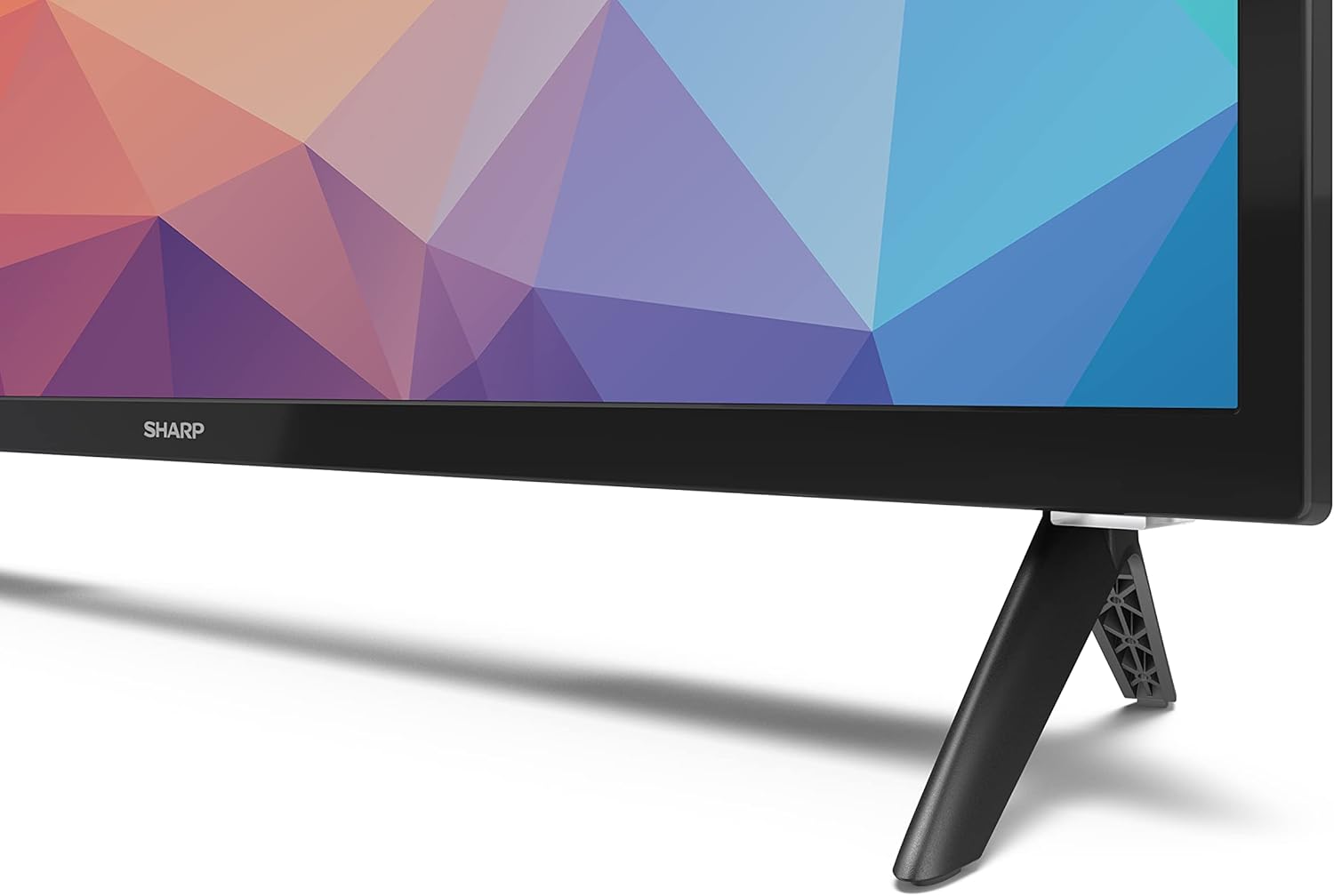
Image: Close-up of the TV stand attachment.
4.3 הרכבה על הקיר
The Sharp 32FG6EA supports VESA wall mounts with dimensions of 75 x 75 mm. Wall mount hardware is not included. Follow the instructions provided with your wall mount kit.
4.4 חיבור התקנים חיצוניים
הטלוויזיה שלך כוללת מספר יציאות לחיבור מכשירים שונים:
- HDMI: Connect Blu-ray players, game consoles, or set-top boxes to the 2 HDMI ports.
- USB: Connect USB storage devices for media playback to the 2 USB ports.
- אנטנה/כבל: חבר אנטנה או מקור טלוויזיה בכבלים עבור ערוצי שידור.
- אתרנט: עבור חיבור אינטרנט קווי.
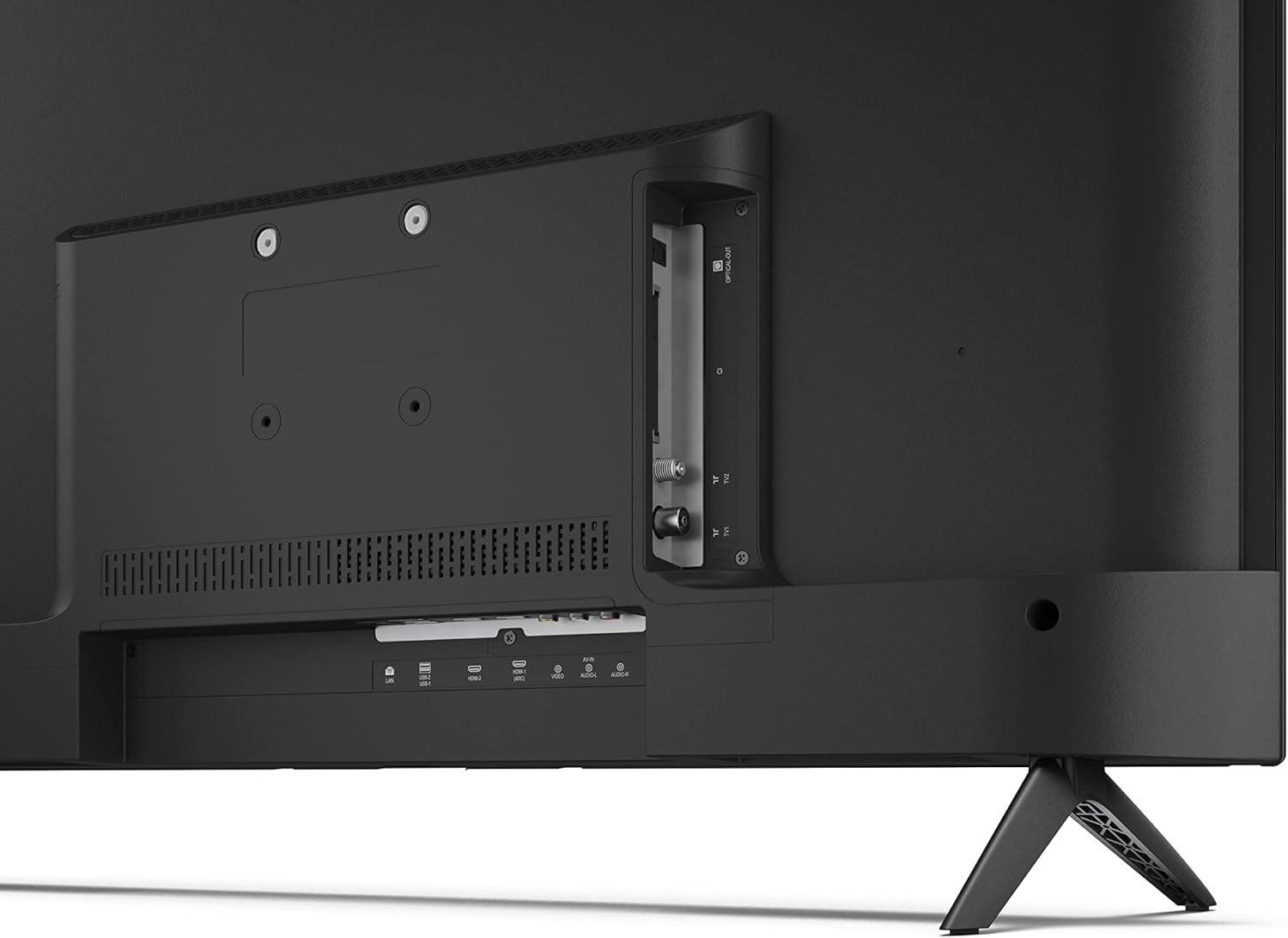
תמונה: אחורי view של הטלוויזיה עם יציאות חיבור.
4.5 חיבור מתח
After connecting all necessary devices, plug the power cable into the TV and then into a wall outlet.
4.6 אשף ההתקנה הראשונית
עם ההפעלה הראשונה, הטלוויזיה תדריך אותך בתהליך הגדרה ראשוני. זה כולל:
- בחירת שפה.
- חיבור רשת (Wi-Fi או Ethernet).
- Google account sign-in (required for full Android TV features).
- סריקת ערוצים.
5. הפעלה
5.1 שלט רחוק מעלview
השלט המצורף מאפשר לך לנווט בין תכונות הטלוויזיה. הכנס את 2 סוללות AAA לשלט לפני השימוש.
- לחצן הפעלה: מפעיל או מכבה את הטלוויזיה.
- משטח כיוון (D-Pad) וכפתור אישור: ניווט בתפריטים ואישור בחירות.
- כפתור חזרה: חוזר למסך הקודם.
- כפתור בית: גישה למסך הבית של Android TV.
- עוצמת הקול מעלה/הנמכת: מכוונן את עוצמת השמע.
- ערוץ למעלה/למטה: משנה ערוצי טלוויזיה.
- כפתור העוזר של גוגל: מפעיל את בקרת הקול.
- כפתורי קיצור דרך לאפליקציה: כפתורים ייעודיים לשירותי סטרימינג פופולריים כמו נטפליקס, פריים וידאו ויוטיוב.
5.2 Android TV Interface Navigation
The Android TV home screen provides access to your installed apps, recommended content, and settings. Use the directional pad on your remote to navigate through the interface.
עוזר גוגל אחד
Press the Google Assistant button on your remote and speak into the microphone to:
- חפש movies, shows, or information.
- שליטה במכשירי בית חכם.
- פתחו יישומים.
- התאם את הגדרות הטלוויזיה.
5.4 Chromecast Built-in
The TV includes Chromecast built-in, allowing you to cast content from compatible apps on your smartphone, tablet, or computer directly to the TV screen.
5.5 קישוריות בלוטות'
Connect Bluetooth devices such as headphones or speakers to your TV for a personalized audio experience. Navigate to the TV's settings menu to pair new Bluetooth devices.
5.6 הגדרות שמע
The TV supports Dolby Audio with 2 x 6 W RMS speakers. You can adjust audio settings, including sound modes and equalizer, through the TV's settings menu.
6. תחזוקה
6.1 ניקוי הטלוויזיה
כדי לנקות את מסך הטלוויזיה ואת הארון:
- נתק את כבל החשמל מהשקע בקיר.
- Use a soft, lint-free cloth to gently wipe the screen and surfaces.
- עבור סימנים עקשניים, מעט דמוי עורampשטפו את המטלית במים או בחומר ניקוי מיוחד למסכים (יש למרוח על המטלית, לא ישירות על המסך).
- אין להשתמש בחומרי ניקוי שוחקים, שעווה או ממיסים.
6.2 עדכוני תוכנה
ייתכן שמכשיר ה-Android TV שלך יקבל עדכוני תוכנה תקופתיים כדי לשפר את הביצועים ולהוסיף תכונות חדשות. ודא שהטלוויזיה שלך מחוברת לאינטרנט כדי לקבל עדכונים אלה. תוכל לבדוק עדכונים באופן ידני בתפריט ההגדרות של הטלוויזיה.
7. פתרון תקלות
אם נתקלת בבעיות עם הטלוויזיה שלך, עיין בבעיות הנפוצות ובפתרונות הבאים:
- אין כוח: ודא שכבל החשמל מחובר היטב הן לטלוויזיה והן לשקע חשמל תקין. נסה שקע אחר.
- אין תמונה/קול: Check that the correct input source is selected. Verify all cables (HDMI, antenna) are properly connected.
- השלט הרחוק לא עובד: Check the batteries and ensure they are inserted correctly. Point the remote directly at the TV's IR sensor.
- איכות תמונה ירודה: Check antenna/cable connections. Adjust picture settings in the TV menu. For streaming content, ensure a stable internet connection.
- אין חיבור אינטרנט: Verify Wi-Fi password or Ethernet cable connection. Restart your router and the TV.
- אפליקציות שלא עובדות: Ensure the TV's software is up to date. Try clearing the app's cache or reinstalling the app.
If problems persist, consult the Sharp support webאתר או צור קשר עם שירות הלקוחות.
8. מפרטים
| תכונה | מִפרָט |
|---|---|
| מספר דגם | 32FG6EA |
| מותג | חַד |
| גודל מסך | 32 אינץ' (81 ס"מ באלכסון) |
| טכנולוגיית תצוגה | LED |
| הַחְלָטָה | 720p (1366 x 768 פיקסלים) |
| יחס גובה-רוחב | 16:9 |
| קצב רענון | 50 הרץ |
| מַעֲרֶכֶת הַפעָלָה | אנדרואיד TV 11 |
| תכונות מיוחדות | Android TV, Google Assistant, Chromecast built-in |
| פלט אודיו | 2 x 6 W RMS, Dolby Audio |
| יציאות HDMI | 2 |
| יציאות USB | 2 |
| קישוריות | Wi-Fi, Bluetooth, Ethernet |
| מתקן קיר VESA | 75 x 75 מ"מ |
| מידות עם מעמד (B x H x D) | 731 x 486 x 177 מ"מ |
| מידות ללא מעמד (B x H x D) | 731 x 433 x 68 מ"מ |
| מידות המוצר (D x W x H) | 16 x 73 x 46.4 cm (approximate, with stand) |
| מִשׁקָל | 3.9 ק"ג |
| שיעור יעילות אנרגטית | E |

Image: TV dimensions diagram.

Image: Energy Label. For more details, visit מסד נתונים של EPREL.
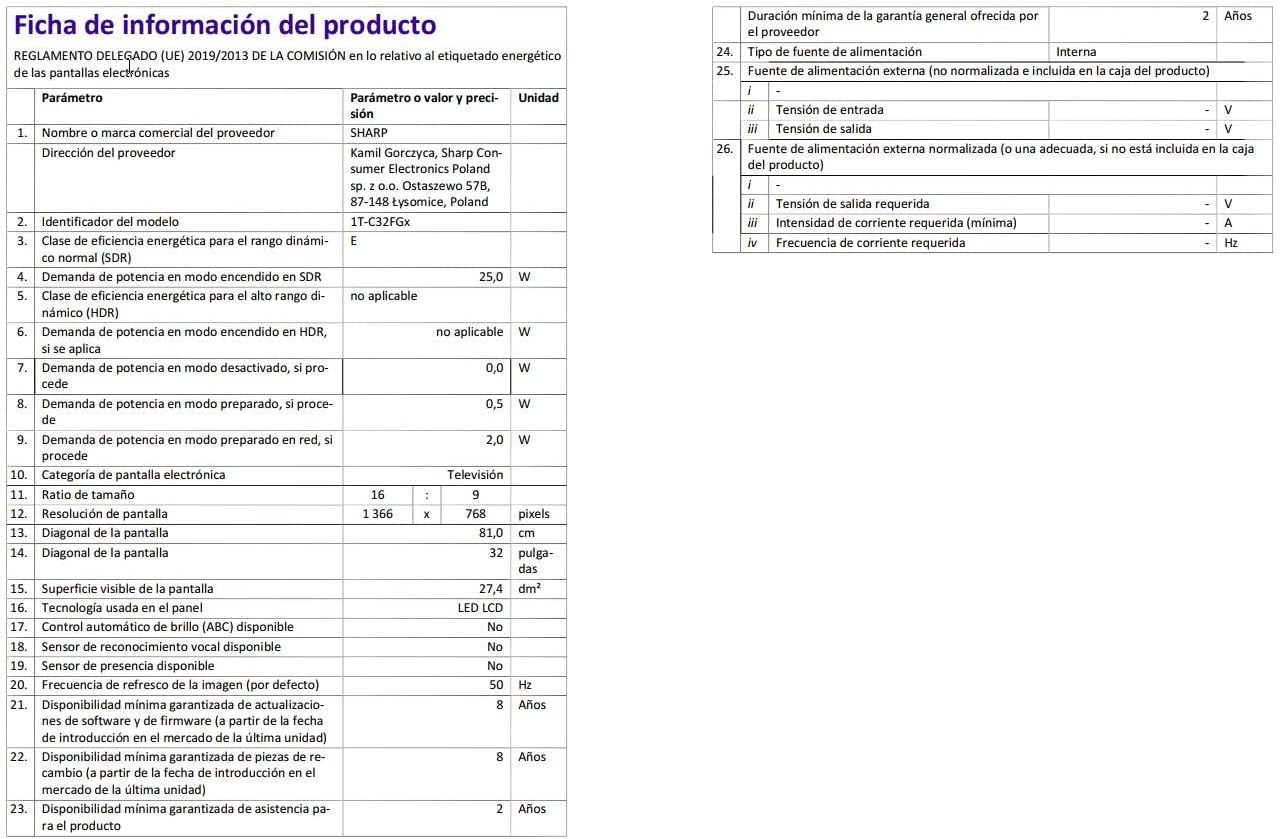
Image: Detailed product information sheet.
9. אחריות ותמיכה
The Sharp 32FG6EA television comes with a minimum general warranty duration of 2 years from the provider.
For technical support, warranty claims, or further assistance, please refer to the contact information provided with your purchase documentation or visit the official Sharp support webאתר עבור האזור שלך.


