1. נגמרview
The Sony XE300 is a portable Bluetooth speaker designed for high-quality audio in various environments. It features a unique Line-Shape Diffuser for wide sound distribution, X-Balanced Speakers for clear audio, and a robust IP67 rating for water and dust resistance. Enjoy extended playback with its long battery life and convenient connectivity options.
תכונות עיקריות:
- Line-Shape Diffuser: Creates a line source to distribute sound evenly across a wide area.
- דירוג IP67: Waterproof and dustproof design allows for use in various outdoor and indoor settings.
- חיי סוללה ארוכים: Up to 24 hours of playback on a single charge, with quick charging capabilities.
- רמקולים מאוזנים X: Engineered to deliver powerful, clear, and distortion-free sound.
- בקרת אפליקציה: Personalize sound settings via the Sony | Music Center app and enhance ambiance with the Fiestable app.
- קישוריות בלוטות': Seamlessly connect and stream music from compatible devices.
- שיחות ללא ידיים: Built-in microphone with echo canceling for clear communication.
- חיבור למסיבה: Link up to 100 compatible wireless speakers for synchronized audio.
2. התקנה
2.1 טעינת הרמקול
Before initial use, fully charge the speaker. The XE300 supports USB-C quick charging.
- Open the protective cap on the back of the speaker to reveal the USB-C port.
- Connect the supplied USB-C cable to the speaker's charging port and to a USB power adapter (not included).
- The CHARGE indicator will light up during charging and turn off when charging is complete.
A 10-minute quick charge provides approximately 70 minutes of playback.
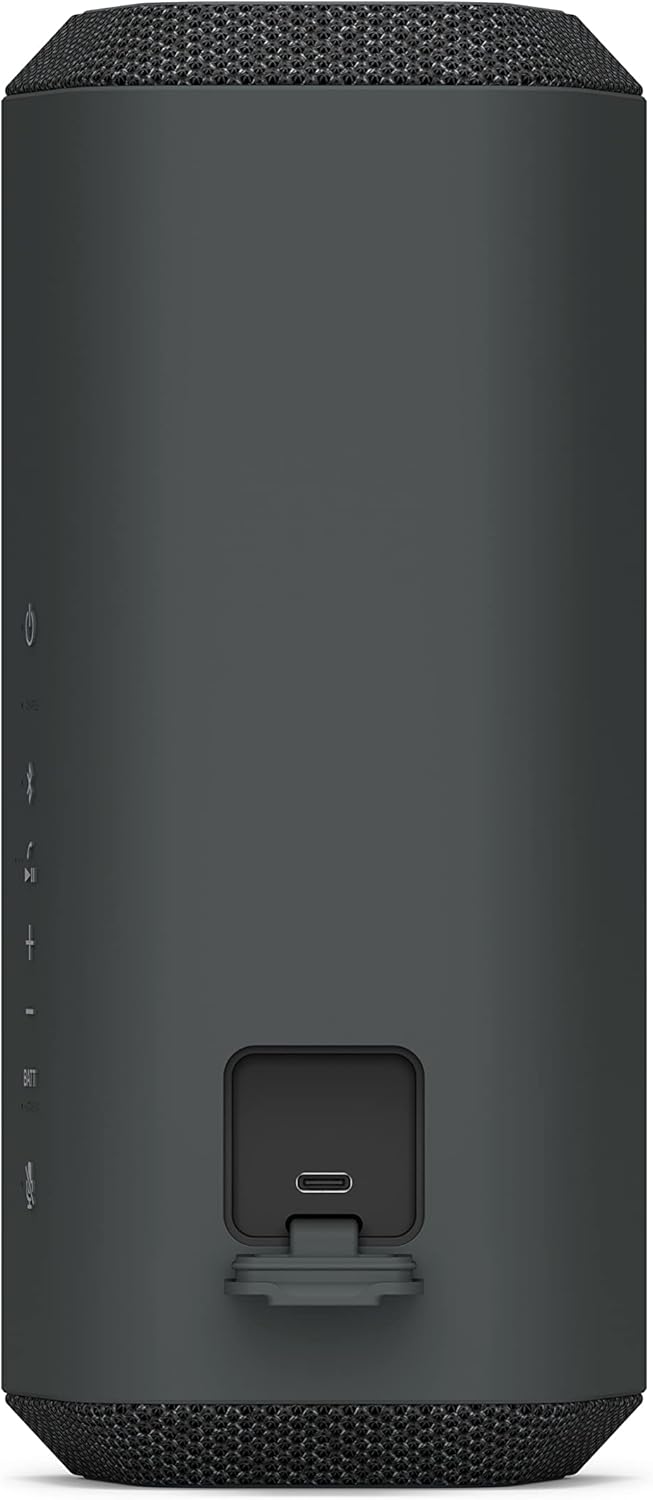
Figure 2.1: USB-C charging port located on the back of the speaker.
2.2 הפעלה/כיבוי
- כדי להפעיל, לחץ על כּוֹחַ button located on the control panel. The power indicator will light up.
- כדי לכבות, לחץ והחזק את המקש כּוֹחַ כפתור עד שמחוון ההפעלה יכבה.

Figure 2.2: Speaker control panel with power button.
2.3 זיווג בלוטות '
To connect your device to the speaker via Bluetooth:
- הפעל את הרמקול. מחוון ה-Bluetooth יהבהב באיטיות.
- הקש על בלוטות' button on the speaker. The Bluetooth indicator will start flashing rapidly, indicating pairing mode.
- בטלפון החכם או במכשיר השמע שלך, הפעל את Bluetooth וחפש מכשירים זמינים.
- Select "SRS-XE300" from the list of devices.
- לאחר החיבור, מחוון ה-Bluetooth ברמקול יפסיק להבהב ויישאר דולק.
3. תפעול
3.1 בקרות בסיסיות
לרמקול פקדים אינטואיטיביים בפאנל העליון שלו:
- לחצן הפעלה: מדליק/מכבה את הרמקול.
- לחצן בלוטות': יוזם צימוד Bluetooth.
- כפתורי עוצמת קול (+/-): מכוונן את עוצמת השמע.
- לחצן הפעלה/השהה: שולט בהשמעת מוזיקה.
- Battery Button (BATT): Checks battery level.
- לחצן מיקרופון: Mutes/unmutes the microphone during calls.

Figure 3.1: Speaker in use, highlighting the accessible control panel.
3.2 Line-Shape Diffuser Technology
The XE300 incorporates Sony's unique Line-Shape Diffuser, which creates a line source for sound. This design helps distribute audio more evenly and widely across a space, ensuring a consistent listening experience for everyone.

Figure 3.2: The Line-Shape Diffuser spreads sound widely for group enjoyment.
3.3 בקרת אפליקציות
Enhance your speaker experience by downloading the dedicated apps:
- Sony | Music Center app: Customize sound settings, manage music playback, and access other smart features.
- Fiestable app: Add fun effects and control party features to elevate your listening environment.
3.4 שיחות ללא ידיים
The built-in microphone with echo canceling technology allows for clear hands-free calls directly through the speaker. Press the microphone button to mute or unmute during a call.
3.5 חיבור למסיבות
For a more immersive audio experience, you can connect up to 100 compatible Sony wireless speakers using the Party Connect feature. Refer to the Sony | Music Center app for detailed instructions on setting up Party Connect.
4. תחזוקה
4.1 טיפול במים ואבק (IP67)
The XE300 has an IP67 rating, meaning it is protected against dust ingress and can withstand immersion in water up to 1 meter for 30 minutes. To maintain its waterproof and dustproof performance:
- Always ensure all ports and covers, especially the USB-C charging port, are securely closed before exposing the speaker to water or dust.
- Do not use the speaker in saltwater or chlorinated water.
- After exposure to water, wipe the speaker dry with a soft, clean cloth. Do not charge the speaker if it is wet.
- Avoid dropping the speaker or subjecting it to strong impacts, as this may compromise its water and dust resistance.

Figure 4.1: The speaker's IP67 rating ensures protection against water and dust.
5. פתרון תקלות
If you encounter issues with your Sony XE300 speaker, try the following basic troubleshooting steps:
- אין כוח: ודא שהרמקול טעון. חבר אותו למקור חשמל באמצעות כבל USB-C.
- אין צליל: Check the volume level on both the speaker and your connected device. Ensure the device is properly paired via Bluetooth.
- ניתוק בלוטות': Try re-pairing the speaker with your device. Ensure the speaker is within the Bluetooth range (up to 10 meters) of your device.
- איכות סאונד ירודה: Move the speaker closer to your device to reduce interference. Adjust equalizer settings via the Sony | Music Center app.
- הדובר לא מגיב: Press and hold the power button for an extended period (e.g., 10 seconds) to perform a soft reset.
לפתרון בעיות מפורט יותר או לבעיות מתמשכות, אנא עיינו בתמיכה הרשמית של סוני webאתר או צור קשר עם שירות הלקוחות.
6. מפרטים
| תכונה | פְּרָט |
|---|---|
| שם הדגם | Sony XE300 |
| סוג הרכבה | מתקן לשולחן |
| חוֹמֶר | פּלָסטִי |
| סוג רמקול | מולטימדיה |
| תכונה מיוחדת | Up to 24-hour battery life with quick charging, X-Balanced Speaker Unit |
| שימושים מומלצים | מוּסִיקָה |
| מכשירים תואמים | סמארטפון, טאבלט, נגן MP3, שולחן עבודה, מחשב נייד |
| תצורת ערוץ סאונד סראונד | 1.0 |
| צֶבַע | שָׁחוֹר |
| רכיבים כלולים | רַמקוֹל |
| מידות המוצר | 4.69" D x 4.13" W x 9.37" H |
| משקל פריט | 1.5 פאונד |
| עַכָּבָּה | 4 אוהם |
| הוא עמיד למים | TRUE (IP67) |
| סוג אחריות | מוּגבָּל |
| טווח מקסימלי | 10 מטרים (בלוטות') |
| שיטת בקרה | מרחוק (דרך אפליקציה) |
| טכנולוגיית תקשורת אלחוטית | בלוטות' |
| מקור כוח | מופעל על סוללה |
| מספר סוללות | 1 ליתיום יון (כלול) |
| סוג מנהל התקן שמע | נהג אבזור מאוזן |
| זמן טעינה | Approx. 24 hours for full charge (from empty) |
| רמקול כוח פלט מרבי | 10 וואט |
| תגובת תדר | 2.4 גיגה-הרץ (בלוטות') |
| מצב פלט שמע | סטריאו |
7. אחריות ותמיכה
The Sony XE300 Portable Bluetooth Speaker comes with a limited warranty. For specific warranty terms, registration, and support, please visit the official Sony support webאתר או צרו קשר עם שירות הלקוחות שלהם. שמרו את הוכחת הרכישה שלכם לצורך תביעות אחריות.


