1. הקדמה
This manual provides essential information for the safe and efficient operation of your Powertech MB3904 8 Step Intelligent Lead Acid and Lithium Battery Charger. Please read this manual thoroughly before use and retain it for future reference.
2. מידע בטיחות
הקפידו תמיד על אמצעי הזהירות הבאים:
- ודא שהמטען מנותק מאספקת החשמל לפני ביצוע או ניתוק חיבורים לסוללה.
- השתמשו במטען רק באזורים מאווררים היטב.
- הימנע מטעינת סוללות קפואות.
- אין לחשוף את המטען לגשם או לחות מוגזמת.
- הרחק מהישג ידם של ילדים.
- This charger is designed for 6V or 12V Lead Acid or LiFePO4 batteries only. Do not use with other battery types.
3. תכולת החבילה
ודא שכל הפריטים נמצאים בחבילה:
- Powertech MB3904 8 Step Intelligent Battery Charger Unit
- סוללה Clamp Connectors (Red and Black)
- Ring Terminal Connectors
- כבל מתח AC
- מדריך למשתמש (מסמך זה)
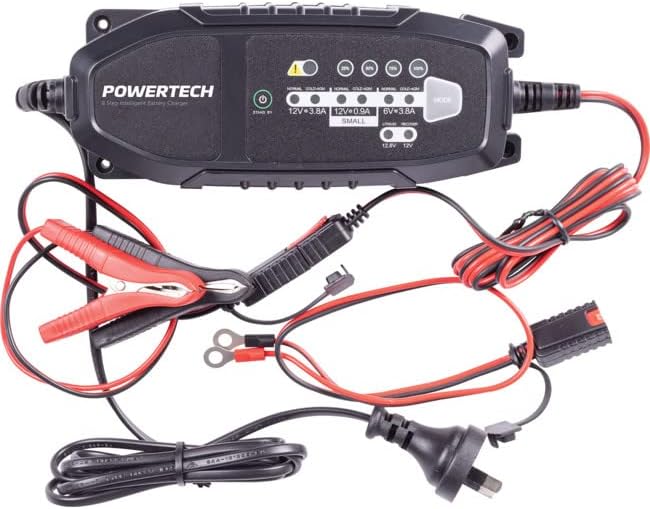
Image: The Powertech MB3904 battery charger unit shown with its various included accessories, including battery clamps, ring terminals, and the AC power cord.
4. תכונות מוצר
The Powertech MB3904 charger offers advanced features for optimal battery maintenance:
- 8-Step Charging Process: Ensures thorough and efficient charging for various battery types.
- רב כרךtage תאימות: Suitable for both 6V and 12V lead acid and LiFePO4 batteries.
- הגנה מקיפה: Includes overload, short circuit, reverse polarity, safety timer, and wrong battery protection.
- מחווני LED אינטואיטיביים: Clearly display charge status and selected mode.
- לחצן בחירת מצב: Allows easy switching between charging modes.
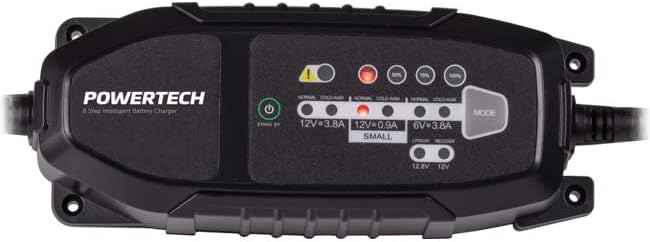
תמונה: מלמעלה למטה view of the Powertech MB3904 charger, highlighting the LED indicators for charge status and the 'MODE' button for selecting charging programs.
5. התקנה
- מיקום: Place the charger on a stable, flat surface in a well-ventilated area, away from direct sunlight or heat sources.
- חיבור סוללה: Ensure the battery terminals are clean. Connect the red (+) clamp/ring terminal to the positive (+) battery terminal and the black (-) clamp/ring terminal to the negative (-) battery terminal. Ensure a secure connection.
- חיבור חשמל: Plug the AC power cord into a suitable wall outlet. The charger will enter standby mode.
6. הוראות הפעלה
6.1. Selecting Charging Mode
After connecting the battery and power, press the MODE button to cycle through the available charging programs. The corresponding LED will illuminate to indicate the selected mode:
- 12V 3.8A (Normal): Standard charging for 12V lead acid batteries.
- 12V 3.8A (Cold/AGM): For charging 12V lead acid batteries in cold conditions or AGM batteries.
- 12V 0.9A (Small): For charging smaller 12V lead acid batteries.
- 6V 3.8A: For charging 6V lead acid batteries.
- Lithium (12.8V/12V): For charging 12V LiFePO4 batteries.
- לְתַקֵן: A special mode for desulfation of deeply discharged lead acid batteries.
6.2. תהליך טעינה
Once a mode is selected, the charger will automatically begin the 8-step charging process. The progress LEDs (25%, 50%, 75%, 100%) will illuminate sequentially to indicate the battery's charge level. When the 100% LED is solid, the battery is fully charged.
6.3. ניתוק המטען
- נתק את כבל החשמל מהשקע בקיר.
- נתק את השחור (-) clamp/ring terminal from the negative (-) battery terminal.
- נתק את האדום (+) clamp/ring terminal from the positive (+) battery terminal.
7. תחזוקה
- ניקוי: Clean the charger casinנגבו בעזרת מטלית רכה ויבשה. אין להשתמש בחומרי ניקוי שוחקים או ממסים.
- אִחסוּן: אחסן את המטען במקום קריר ויבש כאשר אינו בשימוש.
- בדיקת כבלים: Periodically inspect the power cord and battery cables for any signs of damage. Do not use the charger if cables are damaged.
8. פתרון תקלות
| בְּעָיָה | סיבה אפשרית | פִּתָרוֹן |
|---|---|---|
| מטען לא נדלק. | אין חשמל בשקע; חיבור רופף. | בדוק את שקע החשמל; ודא שכבל החשמל מחובר היטב. |
| Error LED illuminated. | Reverse polarity; short circuit; wrong battery type. | Check battery connections for correct polarity; inspect cables for shorts; ensure battery type matches selected mode. |
| סוללה לא נטענת. | Battery deeply discharged/damaged; incorrect mode selected. | Try "Repair" mode for lead acid batteries; test battery with a multimeter; ensure correct charging mode is selected. |
9. מפרטים
- דֶגֶם: MB3904
- קלט כרךtage: 220-240V AC, 50/60Hz
- פלט כרךtage: 6 וולט / 12 וולט DC
- זרם טעינה: 0.9A / 3.8A
- סוגי סוללות: Lead Acid (WET, MF, CA, EFB, GEL, AGM), LiFePO4
- הֲגָנָה: Overload, Short Circuit, Reverse Polarity, Safety Timer, Wrong Battery
- מידות: 20.4 על 7.4 על 4.8 ס"מ בערך
- מִשׁקָל: בערך 534 גרם
- הַתאָמָה: CE
10. אחריות ותמיכה
This Powertech product is covered by a standard manufacturer's warranty. For specific warranty terms and conditions, please refer to the warranty card included with your purchase or contact your retailer.
For technical support or service inquiries, please contact Jaycar Electronics customer service or visit their official webאתר. שמור את הוכחת הרכישה שלך לצורך תביעות אחריות.
ג'ייקאר אלקטרוניקה Webאֲתַר: www.jaycar.com.au


