מדריך למשתמש של דוושת אפקטים לגיטרה Strymon blueSky V2
Model: BLUESKYV2
מותג: סטרימון
מָבוֹא
The Strymon blueSky V2 is a trailblazing reverb pedal designed to unlock creativity with its rich and expansive three-dimensional ambiences. Featuring studio-quality Plate, Room, and Spring reverbs, along with a pitch-shifted Shimmer engine, the blueSky V2 offers unparalleled versatility for electric and acoustic guitar, synths, vocals, and keyboards. This manual provides detailed instructions for setup, operation, and maintenance to help you get the most out of your pedal.

איור 1: למעלה view of the Strymon blueSky V2 pedal.
תכונות מפתח
- Studio-Quality Reverbs: Features world-class Spring, Plate, and Room reverb machines.
- Shimmer Engine: Pitch-shifted Shimmer for infinite modulated soundscapes with a new variable Shimmer level control.
- בקרות אינטואיטיביות: Dedicated knobs for Reverb Type, Decay, Pre-delay, Hi and Lo EQ, Modulation depth.
- חומרה משופרת: Discrete Class A JFET preamp for touch sensitivity, dedicated Favorite preset footswitch, mono/stereo switch, and stereo inputs/outputs.
- קישוריות נרחבת: Complete MIDI functionality, 300 presets, USB-C port, and expression pedal/TRS MIDI jack for seamless integration.
הגדרה
ספק כוח
The blueSky V2 requires a 9V DC power supply. Use only the included 9V DC power supply or a compatible, regulated power supply to ensure proper operation and prevent damage.
חיבורים
The pedal features versatile input and output options:
- Input (Left In): Connect your instrument or the output of another pedal here.
- Output (Left Out, Right Out): התחבר לשלך amplifier(s) or the input of subsequent pedals.
- מתג מונו/סטריאו: A rear panel switch allows you to select between mono and stereo input sources. This provides flexible audio routing without needing to open the pedal.
- TRS MIDI / Expression Jack: This jack supports both TRS MIDI control and expression pedal input. It allows for full MIDI control, including continuous control messages and program changes, or connection of an expression pedal for real-time parameter manipulation.
- יציאת USB-C: Connect to your computer for firmware updates and MIDI communication with your Digital Audio Workstation (DAW) or other MIDI-compatible software.

Figure 2: Rear panel connections of the blueSky V2.
JFET Input
The blueSky V2 features a discrete Class A JFET preamp at its input. This high-quality input circuit ensures superb responsiveness to your playing, accurately translating and preparing high-impedance outputs from instruments for optimal conversion and processing. This design contributes to the pedal's excellent sound quality and feel.
פועל
השליטה נגמרהview
The blueSky V2 offers a comprehensive set of controls to shape your reverb sound:
- ריקבון: Controls the duration of the reverberated signal's decay, from short and snappy to nearly infinite.
- עיכוב מראש: Determines the time before the reverberated signal appears, adding space between the dry signal and the reverb.
- נָמוּך: Adjusts the low-frequency content of the reverb, cleaning up bass-heavy reverberations.
- גָבוֹהַ: Adjusts the high-frequency content of the reverb, allowing you to reduce highs for dark, moody reverbs.
- לְעַרְבֵּב: Controls the blend between your dry signal and the wet reverb signal, from 100% dry to 100% wet.
- נִצנוּץ: Controls the level of the pitch-shifted shimmer effect.
- MOD (מתג): Selects the modulation depth for each reverb type: Off, Light, or Deep.
- VERB (Toggle Switch): Selects the reverb type: Plate, Room, or Spring.

Figure 3: Main control knobs of the blueSky V2.
סוגי reverb
The blueSky V2 offers three distinct reverb algorithms:
- צַלַחַת: For smooth, crisp reverberations.
- חֶדֶר: Designed for spaces ranging from small rooms to massive arenas.
- אָבִיב: Classic spring reverb with expanded spring textures.
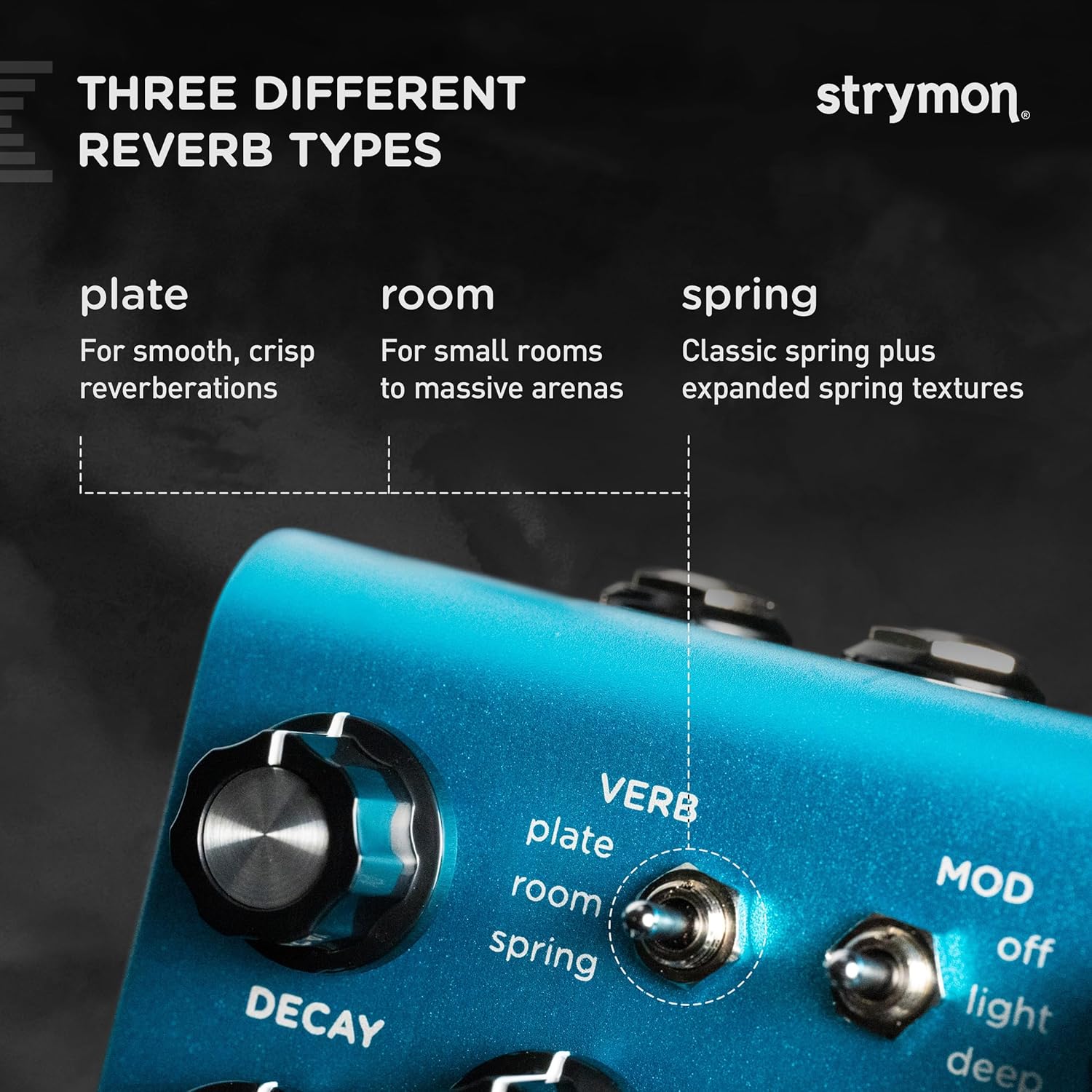
Figure 4: Reverb Type selection.
נִצנוּץ
The Shimmer engine adds pitch-shifted harmonies to the reverb tail, creating ethereal and expansive soundscapes. The new variable Shimmer level control allows for precise blending of this effect.
אִפְנוּן
The MOD switch introduces subtle to deep modulation to the reverb:
- אוֹר: Modulates the lengths of individual delay lines responsible for reflections in the reverb tank, adding subtle motion.
- עמוק: Modulates the signal entering the reverb in addition to the individual delay lines, creating a more pronounced modulation effect.

Figure 5: Modulation control.
מתג מועדף
The dedicated Favorite footswitch provides instant access to a stored setting, allowing you to quickly recall your preferred reverb configuration during performance or practice.
בקרת MIDI
The blueSky V2 offers comprehensive MIDI functionality:
- TRS MIDI / USB-C: Full MIDI control is available via the TRS MIDI/Expression jack or the USB-C port. This allows for remote control of almost every knob and switch setting.
- הגדרות קבועות מראש: Store and recall up to 300 presets, providing vast sonic possibilities without the need to manually adjust settings.
- MIDI Clock Sync: The pedal can sync to MIDI clock, ensuring that time-based effects are perfectly synchronized with your DAW or master pedalboard controller.
סרטון זה מספק סקירה מפורטתview of the blueSky V2 Reverb pedal, demonstrating its various features, controls, and the range of sounds it can produce. It highlights the different reverb types, modulation options, and the shimmer effect, offering a comprehensive look at the pedal's capabilities.
This video offers an extensive demonstration of the Strymon blueSky V2 Guitar Effects Pedal, showcasing its quality plate, room, and spring reverbs. It delves into the nuances of each setting and provides examples of how the pedal can be used to create a wide array of ambient and modulated sounds for various instruments.
תַחזוּקָה
To ensure the longevity and optimal performance of your Strymon blueSky V2 pedal, follow these general maintenance guidelines:
- ניקוי: השתמשו במטלית רכה ויבשה לניקוי החלק החיצוני של הדוושה. הימנעו מחומרי ניקוי שוחקים או ממסים שעלולים לפגוע בגימור או ברכיבים הפנימיים.
- אִחסוּן: יש לאחסן את הדוושה במקום קריר ויבש, הרחק מאור שמש ישיר, טמפרטורות קיצוניות ולחות גבוהה.
- הֲגָנָה: When not in use, consider storing the pedal in a protective case, especially during transport, to prevent physical damage.
- כּוֹחַ: Always use the specified 9V DC power supply. Incorrect voltage or polarity can damage the pedal.
פתרון בעיות
If you encounter any issues with your blueSky V2 pedal, consider the following common troubleshooting steps:
- אין צליל:
- ודא שספק הכוח מחובר כהלכה ומספק את עוצמת הקול הנכונהtage (9V DC).
- Check all audio cables for proper connection and integrity. Try swapping cables.
- ודא שהכלי שלך ו ampהמאיצים פועלים כראוי.
- Check the MIX knob setting; if it's fully dry, you won't hear the reverb effect.
- רעש/צליל בלתי צפוי:
- ודא שכל הכבלים מוגנים כראוי ואינם עוברים במקביל לכבלי החשמל.
- Check the power supply for noise or interference.
- Adjust the LOW and HIGH EQ knobs to shape the reverb's tonal characteristics.
- If using MIDI, ensure correct MIDI channel and CC messages are being sent.
- Footswitch Issues:
- Ensure the footswitches are clean and free from debris.
- If the Favorite switch isn't recalling correctly, ensure a preset has been properly saved to it.
For further assistance, please refer to the detailed online manual or contact Strymon support.
מפרטים
| תְכוּנָה | עֵרֶך |
|---|---|
| משקל פריט | 1.37 פאונד |
| מידות המוצר | 4.49 x 4.02 x 2.64 אינץ' |
| ASIN | B0B3TXJC2X |
| מספר דגם של פריט | BLUESKYV2 |
| חומר גוף | אֲלוּמִינְיוּם |
| שם צבע | כְּחוֹל |
| סוג מחבר | USB |
| ממשק חומרה | USB |
| פורמט אותות | אנלוגי |
| מקור כוח | מתאם DC |
| כרך ידtage | 9 וולט |
| סִגְנוֹן | הדהוד |
| תאריך ראשון זמין | 11 ביוני 2022 |
אחריות ותמיכה
Strymon products are known for their high quality and reliability. For detailed warranty information and support, please visit the official Strymon webאתר או צרו קשר ישירות עם שירות הלקוחות שלהם. שמרו את קבלת הרכישה כהוכחת קנייה עבור כל תביעת אחריות.
For the latest firmware updates, additional resources, and frequently asked questions, please visit www.strymon.net.


