1. הקדמה
תודה על הרכישהasing the ZEBRONICS Sound Bomb 7 True Wireless Stereo (TWS) Earbuds. This manual provides detailed instructions for setting up, operating, and maintaining your earbuds to ensure optimal performance and longevity. Please read this manual carefully before use.
2. תכולת החבילה
החבילה כוללת את הפריטים הבאים:
- Earbuds - 2 Units (Left and Right)
- Charging Case - 1 Unit
- Eartips - 4 Units (various sizes)
- Type-C Charging Cable - 1 Unit
- QR User Guide (digital access)
3. המוצר נגמרview
The ZEBRONICS Sound Bomb 7 earbuds are designed for a comfortable fit and high-quality audio experience. They feature touch controls, a portable charging case, and support for voice assistants.

Image: The ZEBRONICS Sound Bomb 7 TWS earbuds shown with their open charging case.

Image: A collage highlighting key features: Touch Control, 13mm Drivers, Splash Proof design, Portable Charging Case, Voice Assistant support, and Bluetooth v5.2 with Flash Connect.
4. התקנה
4.1 טעינה ראשונית
Before first use, ensure both the earbuds and the charging case are fully charged. Remove any protective stickers from the earbud charging contacts.
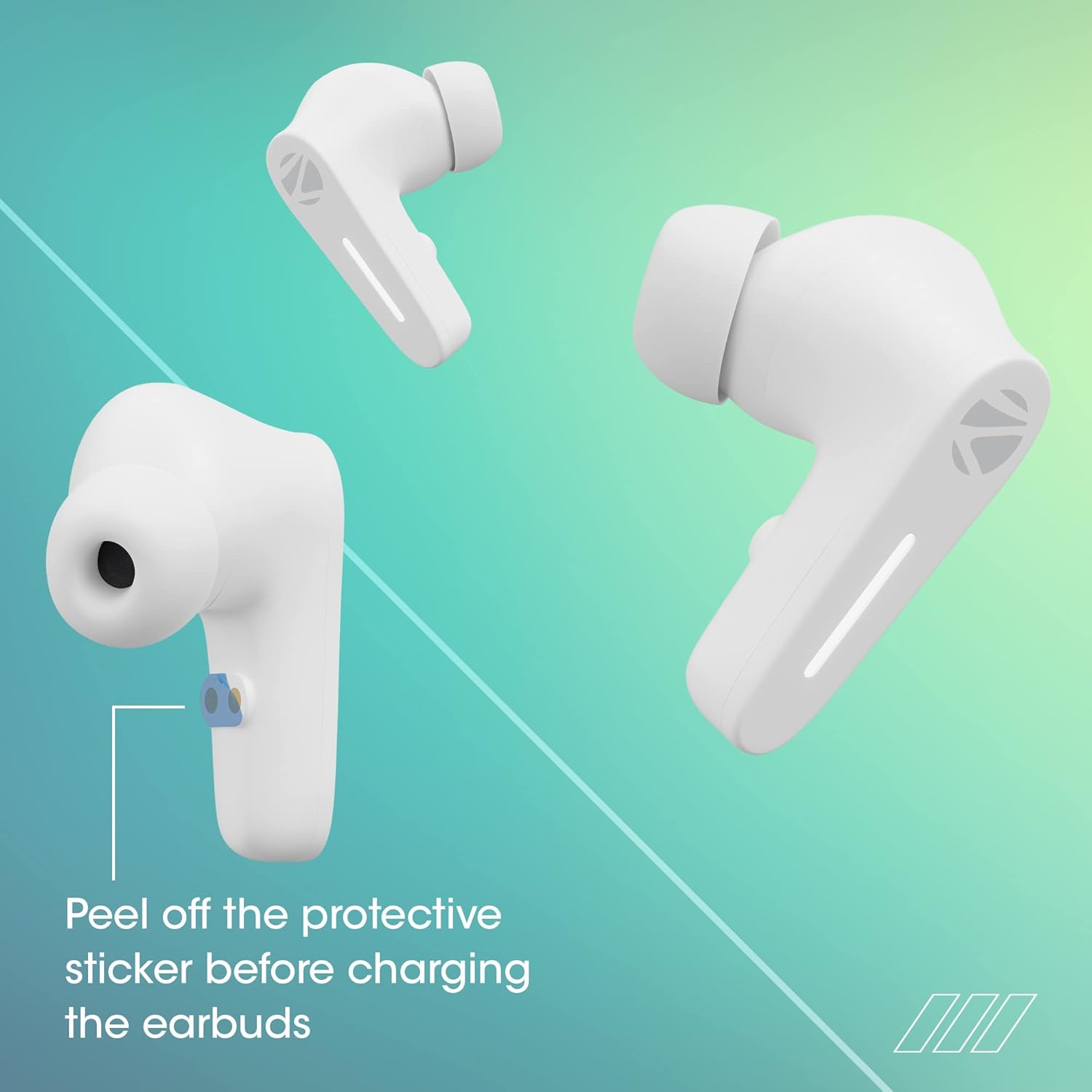
Image: Illustration showing the protective sticker on the earbud charging contacts that needs to be removed before charging.
- הכנס את שני האוזניות לתוך מארז הטעינה.
- חבר את כבל הטעינה מסוג C ליציאת הטעינה במארז ולמקור חשמל USB.
- מחווני ה-LED על המארז יציגו את מצב הטעינה.
- A full charge typically takes approximately 1 hour for the case and earbuds.
The Sound Bomb 7 features מטען מהיר, providing up to 180 minutes of playback with just 10 minutes of charging.

Image: A visual representation of the rapid charge feature and the Type-C charging port on the earbud case.
4.2 זיווג בלוטות '
Pair your earbuds with your device for wireless audio.
- Open the charging case. The earbuds will automatically power on and enter pairing mode (Flash Connect feature).
- בטלפון החכם או במכשיר התומך ב-Bluetooth שלך, עבור אל הגדרות Bluetooth.
- חפש available devices and select "ZEB-SOUND BOMB 7" from the list.
- לאחר החיבור, תשמע צליל אישור.
- האוזניות יתחברו מחדש אוטומטית למכשיר האחרון שקושרו לאחר הוצאתן מהמארז, אם Bluetooth מופעל במכשיר.

Image: An illustration demonstrating the Flash Connect feature, where opening the case initiates quick pairing with a smartphone.
5. הוראות הפעלה
5.1 פקדי מגע
לאוזניות יש בקרות מגע אינטואיטיביות למגוון פונקציות:
- לחיצה יחידה: השמעה/השהיה של מוזיקה, מענה/ניתוק שיחות.
- הקש פעמיים (אוזניה שמאלית): רצועה קודמת.
- הקש פעמיים (אוזניה ימנית): הרצועה הבאה.
- Triple Tap (Left/Right Earbud): הפעל את עוזר הקולי.
- Long Press (Left/Right Earbud for 2 seconds): דחה שיחה נכנסת.
- Long Press (Left/Right Earbud for 3 seconds): Toggle Gaming Mode (Low Latency).
5.2 מצב גיימינג (השהיה נמוכה)
Activate Gaming Mode for a low-latency audio experience, ideal for gaming. Long press either earbud for 3 seconds to toggle this mode on or off.

Image: A visual depicting the earbuds in Gaming Mode, emphasizing low latency and the 13mm audio drivers.
5.3 עוזר קולי
Access your smartphone's voice assistant (Siri or Google Assistant) by triple-tapping either earbud. This allows for hands-free control of your device.

Image: Icons for "Hey Siri" and "Google Assistant" indicating support for voice assistant functionality.
5.4 ביטול רעשי סביבה (ENC)
The earbuds feature Environmental Noise Cancellation (ENC) for clearer call quality by reducing ambient noise during conversations.

Image: A graphic illustrating the Environmental Noise Cancellation feature, showing sound waves being reduced around an earbud.
6. תחזוקה
טיפול נכון מבטיח את אורך חיי האוזניות שלכם.
- ניקוי: השתמשו במטלית רכה ויבשה לניקוי האוזניות ומארז הטעינה. אין להשתמש בכימיקלים חזקים או בחומרים שוחקים.
- עמידות במים: The earbuds are splash-proof/sweat-proof. Avoid submerging them in water or exposing them to heavy rain.
- אִחסוּן: כאשר אינן בשימוש, אחסנו את האוזניות בנרתיק הטעינה שלהן כדי להגן עליהן ולשמור עליהן טעונות.
- טֶמפֶּרָטוּרָה: הימנעו מחשיפת האוזניות לטמפרטורות קיצוניות (חמות או קור).

Image: An earbud being splashed with water, illustrating its splash-proof design.
7. פתרון תקלות
אם אתה נתקל בבעיות, נסה את הפתרונות הבאים:
| בְּעָיָה | פִּתָרוֹן |
|---|---|
| אוזניות לא מתאימות |
|
| רק אוזניה אחת עובדת |
|
| עוצמת קול נמוכה או איכות צליל ירודה |
|
| מארז טעינה לא נטען |
|
8. מפרטים
| תכונה | פְּרָט |
|---|---|
| שם הדגם | ZEB-Sound פצצת 7 |
| טכנולוגיית קישוריות | בלוטות' 5.2 |
| טכנולוגיית תקשורת אלחוטית | בלוטות' |
| מיקום אוזניים | אין אוזן |
| גורם צורה | אין אוזן |
| סוג בקרה | שליטה קולית, שליטה במגע |
| שיטת בקרה | לָגַעַת |
| בקרת רעש | ביטול רעש סביבתי (ENC) |
| גודל דרייבר | 13 מ"מ |
| זמן טעינה | Approx. 1 hour (earbuds & case) |
| זמן משחק | Up to 60 hours (with charging case, at 50% volume) |
| מטען מהיר | 10 min charge for 180 min use |
| מצב משחק | השהייה נמוכה של 50ms |
| רמת עמידות במים | Water Resistant (Splash Proof/Sweat Proof) |
| מַחבֵּר | USB סוג C |
| משקל פריט | 47 גרם |
| מידות המוצר | 5.5 x 5.5 x 3.2 ס"מ |
| מכשירים תואמים | Laptops, Mobile Phones, Tablets, PC, Smart TVs, All Bluetooth Devices, iOS, Android |
9. אחריות ותמיכה
Your ZEBRONICS Sound Bomb 7 TWS Earbuds come with a אחריות לשנה מתאריך הרכישה. אחריות זו מכסה פגמי ייצור בשימוש רגיל.
For warranty claims, technical support, or any product-related inquiries, please contact ZEBRONICS customer service. Keep your purchase receipt as proof of purchase.
You can find more information and support on the official ZEBRONICS webאֲתַר: www.zebronics.com


