1. הקדמה
This manual provides detailed instructions for the operation and maintenance of your CamGo 4K 30FPS WiFi HD Underwater Waterproof Action Camera. Please read this manual thoroughly before using the camera to ensure proper function and to maximize your experience. This camera is designed for capturing high-quality video and photos in various environments, including underwater up to 30 meters.
2. מידע בטיחות
- Ensure the waterproof case is properly sealed before submerging the camera in water. Failure to do so will result in water damage and void the warranty.
- אין לחשוף את המצלמה לטמפרטורות קיצוניות או לאור שמש ישיר למשך פרקי זמן ממושכים.
- השתמשו רק במטענים ובאביזרים שאושרו.
- הרחיקו את המצלמה והאביזרים מהישג ידם של ילדים.
- הימנעו מהפלת המצלמה או מחשיפתה לפגיעות חזקות.
- After underwater use, rinse the waterproof case with fresh water and allow it to dry completely before opening.
3. תכולת החבילה
ודא שכל הפריטים נמצאים בחבילה שלך:
- CamGo 4K Action Camera
- מארז עמיד למים
- סוללת ליתיום-יון נטענת
- כבל USB
- Various Mounts and Accessories (e.g., helmet mount, bicycle mount, adhesive mounts, bandages, cleaning cloth)
- מדריך למשתמש

איור 3.1: Included accessories for the CamGo 4K Action Camera. This image displays the camera's waterproof housing, various mounting brackets, straps, a USB charging cable, and a cleaning cloth, illustrating the comprehensive set of tools provided for diverse usage scenarios.
4. המוצר נגמרview
הכירו את רכיבי המצלמה ואת בקרותיה.
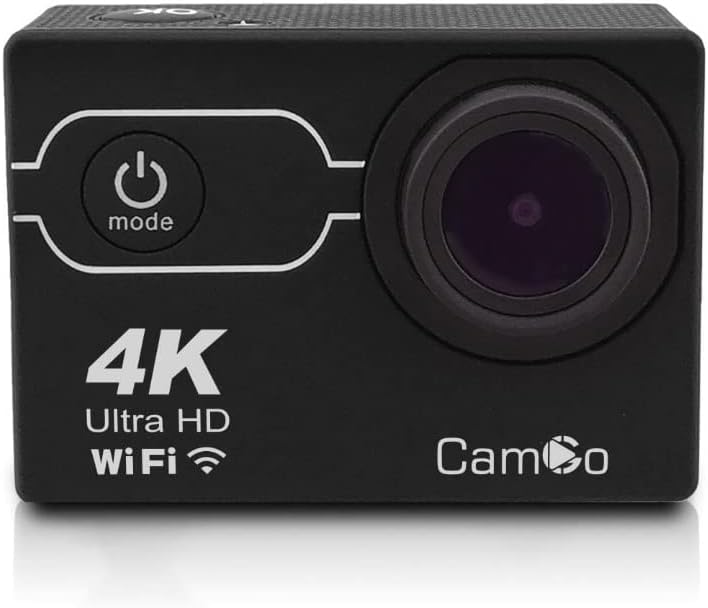
איור 4.1: חֲזִית view of the CamGo 4K Action Camera. This image shows the camera's lens, power/mode button, and the '4K Ultra HD WiFi' branding on the front panel, indicating its core features.
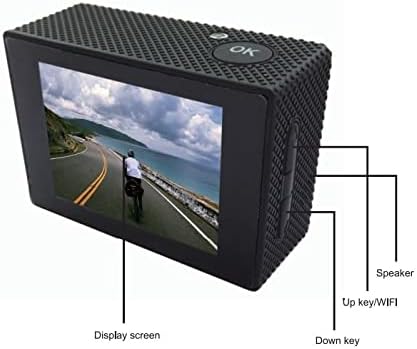
איור 4.2: בְּחֲזָרָה view of the CamGo 4K Action Camera. This image highlights the display screen, the 'OK' button, and labels for the 'Up key/WiFi' and 'Down key' on the side, along with the speaker, providing a clear guide to the camera's rear controls and display.

איור 4.3: צַד view diagram of the CamGo 4K Action Camera. This technical drawing illustrates the placement of the Micro SD card slot, USB port, HD OUT port, and MIC input, along with the Up/WiFi and Down buttons and speaker, detailing the camera's connectivity and controls.
4.1. כפתורים ויציאות
- לחצן הפעלה / מצב: Located on the front. Press to power on/off, short press to switch modes.
- לחצן אישור: Located on top. Press to confirm selections or start/stop recording.
- Up/WiFi Button: Located on the side. Used for navigation in menus and to activate WiFi.
- לחצן למטה: Located on the side. Used for navigation in menus.
- חריץ לכרטיס מיקרו SD: להכנסת כרטיס הזיכרון.
- יציאת USB: לטעינה והעברת נתונים.
- יציאת HDMI: לחיבור לטלוויזיה או למסך.
- רַמקוֹל: להשמעת אודיו.
5. התקנה
5.1. התקנה וטעינה של הסוללה
- פתחו את מכסה תא הסוללות בתחתית המצלמה.
- Insert the Lithium-Ion battery, ensuring correct polarity.
- סגור היטב את מכסה תא הסוללות.
- Connect the camera to a power source using the provided USB cable for charging. The charging indicator will illuminate during charging and turn off when fully charged.
5.2. התקנת כרטיס MicroSD
A Class 10 or higher MicroSD card (up to 64GB) is required for recording. The card is not included.
- אתר את חריץ כרטיס ה-MicroSD בצד המצלמה.
- הכנס את כרטיס ה-MicroSD כאשר המגעים הזהובים פונים לחלק האחורי של המצלמה עד שייכנס למקומו בנקישה.
- כדי להוציא, דחפו בעדינות את הכרטיס עד שייקפץ החוצה.
5.3. שימוש במארז העמיד למים
The waterproof case allows the camera to be submerged up to 30 meters.
- ודא שהמצלמה נקייה ויבשה לפני הכנסתה למארז.
- Carefully place the camera into the waterproof case.
- Close the latch securely. Ensure the rubber seal is clean and free of debris to prevent leaks.
- Before first use, or after any maintenance, it is recommended to test the waterproof case without the camera inside by submerging it in water for a short period to check for leaks.

איור 5.1: CamGo 4K Action Camera in its waterproof case. This image displays the camera securely housed within its transparent waterproof casing, ready for underwater use, highlighting the protective design.
6. הוראות הפעלה
6.1. הפעלה/כיבוי
- הפעלה: Press and hold the Power/Mode button for 3-5 seconds.
- כיבוי: Press and hold the Power/Mode button for 3-5 seconds.
6.2. בחירת מצב
After powering on, short press the Power/Mode button to cycle through the main modes:
- מצב הקלטת וידאו
- מצב צילום
- מצב השמעה
- תפריט הגדרות
6.3. הקלטת וידאו
- Switch to Video Recording Mode. The video icon will appear on the screen.
- Press the OK button to start recording. A red dot or timer will indicate recording is in progress.
- לחץ שוב על הלחצן אישור כדי להפסיק את ההקלטה.
6.4. צילום תמונות
- Switch to Photo Mode. The camera icon will appear on the screen.
- לחץ על הלחצן אישור לצילום.
6.5. WiFi Connectivity (XDV App)
The camera features built-in WiFi for remote control and file transfer via the XDV app.
- Download the 'XDV' app from your smartphone's app store (available for Android and iOS).
- On the camera, short press the Up/WiFi button to activate WiFi. The WiFi icon will appear on the screen.
- On your smartphone, go to WiFi settings and connect to the camera's WiFi network (e.g., 'CamGo_XXXX'). The default password is usually '1234567890'.
- Open the XDV app to control the camera, view פו חיtage, and download files.
6.6. Connecting to TV/PC
- יציאת HDMI: Connect the camera to a TV or monitor using an HDMI cable (not included) to view photos and videos on a larger screen.
- חיבור USB: חבר את המצלמה למחשב באמצעות כבל ה-USB. המצלמה תופיע כדיסק נשלף, שיאפשר לך להעביר files.
6.7. מצבי הקלטה מיוחדים
Access these modes via the Settings Menu:
- הקלטת לולאה: Records video in segments, overwriting the oldest files כאשר כרטיס הזיכרון מלא.
- זמן-lapse: Captures photos at set intervals to create a time-lapse video.
- הַקרָנָה אִיטִית: מקליט וידאו בקצב פריימים גבוה יותר להשמעה בהילוך איטי.
- מצב צלילה: Adjusts color balance for underwater shooting to compensate for blue/green hues.
- מצב רכב: Functions as a dashcam, starting recording automatically when powered on.
7. תחזוקה
- ניקוי: השתמשו במטלית רכה ונטולת סיבים כדי לנקות את עדשת המצלמה והמסך. במקרה של מארז עמיד למים, שטפו במים מתוקים לאחר השימוש במי מלח ותנו לו להתייבש באוויר.
- אִחסוּן: Store the camera in a cool, dry place away from direct sunlight. Remove the battery if storing for extended periods.
- טיפול בסוללה: טען את הסוללה במלואה לפני השימוש הראשון. הימנע מריקון מלא של הסוללה לעתים קרובות כדי להאריך את חייה.
8. פתרון תקלות
| בְּעָיָה | פתרון אפשרי |
|---|---|
| המצלמה לא נדלקת. | Ensure the battery is charged and correctly inserted. Try charging the camera. |
| לא ניתן להקליט וידאו/לצלם תמונות. | Check if a MicroSD card is inserted and has sufficient free space. Ensure the card is Class 10 or higher. Format the MicroSD card if necessary (this will erase all data). |
| דליפת מים במארז עמיד למים. | Ensure the rubber seal is clean and free of debris. Verify the latch is securely closed. Do not use the camera underwater if leaks persist. |
| בעיות חיבור WiFi. | Ensure WiFi is enabled on the camera. Check your smartphone's WiFi settings and reconnect. Verify the correct password. |
| איכות תמונה/וידאו ירודה. | Clean the camera lens. Ensure adequate lighting. Check resolution settings in the camera menu. |
9. מפרטים
| תכונה | מִפרָט |
|---|---|
| רזולוציית וידאו | 4K (30 פריימים לשנייה) |
| רזולוציית תמונה | 16MP (Sony 179 CMOS) |
| עֲדָשָׁה | זווית רחבה של 170° |
| ערכת שבבים | Allwinner V3 |
| עומק עמיד למים | עד 30 מטרים (עם מארז עמיד למים) |
| מסך תצוגה | LCD בגודל 2.0 אינץ' |
| אִחסוּן | Micro SD Card, Class 10 or higher, up to 64GB |
| קישוריות | WiFi (Android & iOS App: XDV), HDMI, USB |
| סוֹלְלָה | 1 ליתיום יון (כלול) |
| תכונות מיוחדות | Loop Recording, Diving Mode, Slow Motion, Time-Lapse, Car Mode |
10. אחריות ותמיכה
Your CamGo Action Camera is covered by a standard manufacturer's warranty against defects in materials and workmanship. Please refer to the warranty card included in your package for specific terms and conditions. For technical support or warranty claims, please contact your retailer or visit the official CamGo webאתר לסיוע.
For further information or to download the XDV app, please visit the CamGo Store on Amazon.