מָבוֹא
This manual provides comprehensive instructions for the use and care of your new Remote brand compatible remote control. This remote is specifically designed to function seamlessly with Nordmende ND40S3000J SMART televisions, offering full functionality without the need for complex programming.
אנא קרא מדריך זה בעיון כדי להבטיח התקנה ותפעול נכונים של השלט רחוק שלך.
הגדרה
1. התקנת סוללה
The remote control requires alkaline batteries (not included). Follow these steps to install them:
- אתר את מכסה תא הסוללות בגב השלט הרחוק.
- החלק את המכסה כלפי מטה או לחץ על התפס כדי לפתוח אותו.
- Insert two new alkaline batteries, ensuring the positive (+) and negative (-) terminals match the diagrams inside the compartment.
- החזר את מכסה תא הסוללה למקומו, והחלק אותו בחזרה עד שיישמע נקישה.
חָשׁוּב: Always use new alkaline batteries for optimal performance. Do not mix old and new batteries, or different types of batteries.
2. שימוש ראשוני (אין צורך בתכנות)
This compatible remote control is pre-programmed for the Nordmende ND40S3000J SMART TV model. No additional programming or setup steps are required. Once batteries are installed, the remote is ready for immediate use with your television.
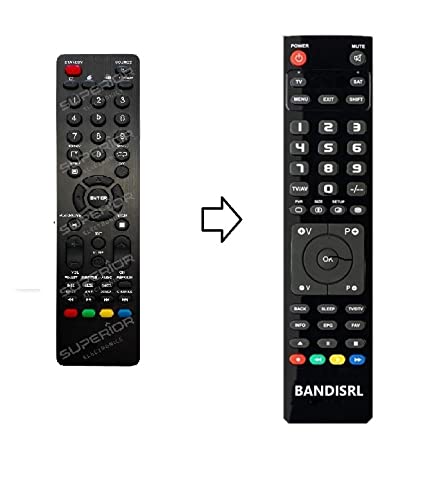
איור 1: The Remote compatible remote control. This image displays the layout of the buttons and the overall design of the remote, ready for use with your Nordmende TV.
הוראות הפעלה
To operate your Nordmende ND40S3000J SMART TV with this remote control, point the remote directly at the television's infrared receiver. Ensure there are no obstructions between the remote and the TV.
- לחצן הפעלה: לחץ כדי להפעיל או לכבות את הטלוויזיה.
- עוצמת הקול מעלה/הנמכת: מכוונן את עוצמת השמע.
- ערוץ למעלה/למטה: מחליף ערוצי טלוויזיה ברצף.
- לחצני מספרים (0-9): בחירה ישירה של ערוצי טלוויזיה.
- כפתורי ניווט (מקשי חצים, אישור): נווט בין תפריטים ובחר אפשרויות.
- כפתורי טלוויזיה חכמה: Access specific Smart TV functions or applications (e.g., Home, Apps, Netflix, YouTube, etc., depending on the remote's layout and TV's features).
- כפתור השתק: משתיק את שמע הטלוויזיה.
- לחצן מקור/קלט: עובר בין מקורות קלט זמינים (HDMI, AV וכו').
Refer to your Nordmende TV's original user manual for specific details on its menu structure and Smart TV functionalities.
תַחזוּקָה
ניקוי השלט הרחוק
לניקוי השלט רחוק, השתמשו במטלית רכה ויבשה. במקרה של לכלוך עיקש, שטפו מעטampen the cloth with water. Do not use abrasive cleaners, alcohol, or solvents, as these can damage the remote's surface and internal components.
החלפת סוללה
Replace batteries when the remote control's response becomes sluggish or stops working. Always replace both batteries simultaneously with new alkaline batteries. Dispose of used batteries according to local regulations.
אִחסוּן
יש לאחסן את השלט הרחוק במקום קריר ויבש, הרחק מאור שמש ישיר וטמפרטורות קיצוניות. אם השלט לא ישמש למשך תקופה ממושכת, מומלץ להוציא את הסוללות כדי למנוע דליפה.
פתרון בעיות
- השלט רחוק לא עובד:
- בדוק אם הסוללות מוכנסות כהלכה עם הקוטביות הנכונה (+/-).
- Replace the batteries with new alkaline batteries.
- ודא שאין מכשולים בין השלט רחוק למקלט האינפרא אדום של הטלוויזיה.
- ודא שאתה מכוון את השלט ישירות אל הטלוויזיה.
- ודא שהטלוויזיה דולקת.
- Some buttons are not responding:
- This remote is designed for the Nordmende ND40S3000J SMART TV. If you are using it with a different model, some advanced functions may not be compatible.
- ודא שהכפתורים נקיים וחופשיים מלכלוך.
- הטלוויזיה מגיבה לסירוגין:
- ייתכן שהסוללות חלשות; החליפו אותן.
- ודא קו ראייה ברור לחיישן האינפרא אדום של הטלוויזיה.
- Avoid strong light sources (like direct sunlight) that might interfere with the infrared signal.
If troubleshooting steps do not resolve the issue, please refer to the Support section.
מפרטים
| מותג: | Remote (Manufacturer: Bandisrl) |
| מכשירים תואמים: | Nordmende ND40S3000J SMART Television |
| טכנולוגיית קישוריות: | אינפרא אדום (IR) |
| תכונה מיוחדת: | אין צורך בתכנות |
| סוג סוללה: | בְּסִיסִי |
| סוללות כלולות: | לֹא |
| צֶבַע: | שָׁחוֹר |
| מספר כפתורים: | 25 |
| סוג בקר: | בקרת כפתור |
אחריות ותמיכה
מידע על אחריות
Specific warranty details for this compatible remote control are not provided in this manual. Please refer to the purchase documentation or contact the seller/manufacturer (Bandisrl) for information regarding warranty coverage and terms.
תמיכת לקוחות
For further assistance, technical support, or inquiries regarding compatibility with other TV models, please contact the manufacturer, Bandisrl. Contact information can typically be found on the product packaging or the seller's webאֲתַר.
If you own a different TV model than the Nordmende ND40S3000J SMART, it is recommended to contact Bandisrl to confirm compatibility before purchase or use.


