מָבוֹא
The WOLFANG GA300 Action Camera is a versatile device designed to capture high-quality video and photos in various environments. Featuring 4K/60FPS video recording and 24MP photo capabilities, it ensures crisp and detailed visuals. Its robust design includes 40M waterproofing with a dedicated dive mode, 6-axis EIS stabilization for smooth footage, and support for an external microphone for clear audio. The sensitive touchscreen and extensive functions like slow-motion, time-lapse, and burst recording make it an ideal companion for all your adventures.
מה יש בקופסה
- 1* WOLFANG GA300 Action Cam
- 1* Waterproof Case
- 1* מיקרופון
- 1* שלט רחוק
- 2* 1350mAh Batteries
- 1* כבל USB
- 1* Bicycle Mount
- 1* Helmet Mount
- 1* Extension Mount
- 1* J-hook Mount
- 1* Dust cover
- 1* Frame
- 1* Long Thumbscrew
- 1* Short Thumbscrew
- 1* 360° Rotating Screw
- 1* Backpack Clip
- 2* Adhesive Pads
- 2* Flat Adhesive Pads
- 4* Bandage
- 1* Release Buckle
- 1* Insurance Tether
- 1* מדריך למשתמש
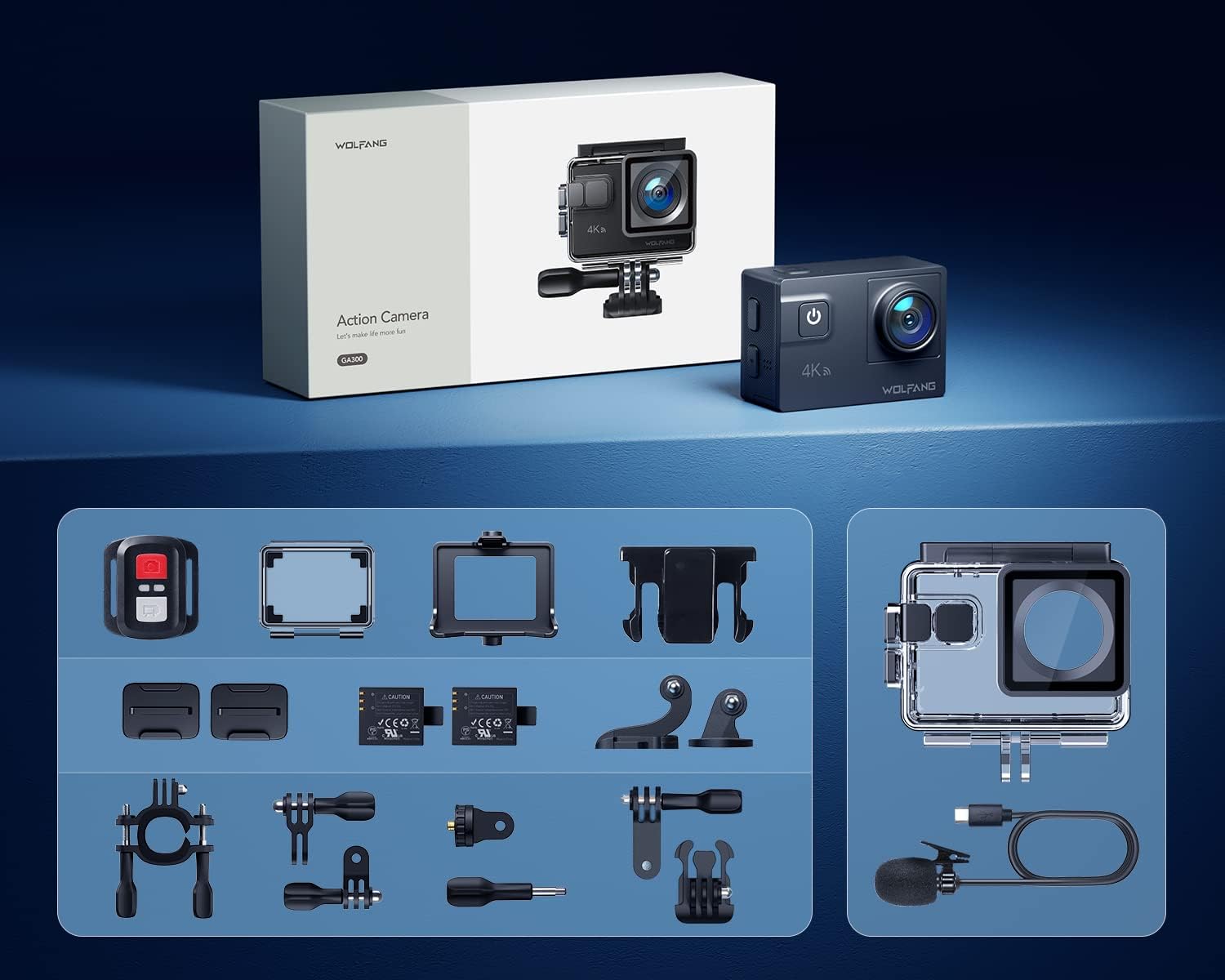
Image: All accessories included with the WOLFANG GA300 Action Camera, neatly arranged.
הגדרה
הגדרה ראשונית של המצלמה
Before first use, ensure the included 1350mAh batteries are fully charged using the provided USB cable. Insert a compatible Micro SD card (not included) into the camera's slot. Power on the camera and follow the on-screen prompts to set the language, date, and time.

Image: Illustration of the pop-up battery cover for easy battery insertion.
Connecting to Mobile App (Wi-Fi)
To control your WOLFANG GA300 remotely and view פוtage, download the iSmartDV2 app on your smartphone. Activate Wi-Fi on your camera and connect your phone to the camera's Wi-Fi network. The network name (SSID) and password will be displayed on the camera screen.
Video: Demonstrates how to connect the WOLFANG GA300 to a smartphone via Wi-Fi using the iSmartDV2 app for remote control and viewing.
הוראות הפעלה
פעולה בסיסית
The WOLFANG GA300 features a sensitive touchscreen for easy navigation. Use the power/mode button to switch between video and photo modes. The up/down buttons on the side allow for menu navigation and digital zoom adjustments. Ensure the protective film is removed from the lens and screen for optimal clarity.

Image: The WOLFANG GA300 camera displayed next to a smartphone showing its connected app interface, highlighting remote control capabilities.
הקלטת וידאו
Record stunning 4K video at 60 frames per second. The advanced 6-axis EIS stabilization ensures smooth footage even during strenuous activities. Utilize the 8x digital zoom to capture distant subjects. For underwater recording, use the included waterproof case and activate Dive Mode for color correction.
וידאו: סקירה מפורטתview of the WOLFANG GA300 Action Camera, showcasing its 4K 60FPS video capabilities and EIS stabilization in various scenarios.

Image: Icon representing the 6-axis Electronic Image Stabilization (EIS) feature of the WOLFANG GA300.

Image: Icon representing the 8x digital zoom capability of the WOLFANG GA300.
הקלטת אודיו
The GA300 comes with an external noise-canceling microphone for clearer sound capture in noisy environments. This is particularly useful for vlogging or recording in windy conditions.
Video: An audio test of the Wolfang GA300, demonstrating the sound quality with and without the external microphone.

Image: Icon representing the external microphone feature of the WOLFANG GA300.
צילום תמונה
Capture high-resolution 24MP photos. The camera supports various photo modes including time-lapse photography, slow-motion, and long exposure for creative shots.

תמונה: דוגמה חזותיתamples of Time Lapse, Slow Motion, and Long Exposure modes captured with the WOLFANG GA300.
תַחזוּקָה
- ניקוי: השתמשו במטלית רכה ונטולת סיבים כדי לנקות את עדשת המצלמה והמסך. במקרה של מארז עמיד למים, שטפו במים מתוקים לאחר השימוש במי מלח ותנו לו להתייבש באוויר.
- טיפול בסוללה: יש לאחסן את הסוללות במקום קריר ויבש. יש להימנע מפריקה מלאה של הסוללות למשך פרקי זמן ממושכים.
- אִחסוּן: When not in use, store the camera in a dry, dust-free environment. Remove batteries if storing for a long duration.
פתרון בעיות
- המצלמה לא נדלקת: ודא שהסוללות טעונות במלואן ומוכנסות כהלכה.
-
מסמכים קשורים - GA300

מצלמת אקשן Wolfang GA100: שאלות נפוצות
תשובות לשאלות נפוצות בנוגע למצלמת האקסטרים Wolfang GA100, כולל זיהוי כרטיסי זיכרון, קישוריות לטלפון נייד, עמידות למים, רכישת סוללהasinז, שימוש בשלט רחוק וטיפול בבעיות באריזה או באביזרים שבורים.
מדריך למשתמש למצלמת אקסטרים - WOLFANG GA200
מדריך למשתמש מקיף למצלמת האקסטרים WOLFANG GA200, המפרט תכונות, הגדרות ותפעול להקלטת וידאו 4K, עמידות למים, ייצוב EIS וקישוריות Wi-Fi.
שאלות ותשובות על מצלמת אקשן Wolfang GA200
שאלות ותשובות נפוצות עבור מצלמת האקסטרים Wolfang GA200, הכוללות חיבור לאפליקציה, שימוש בעמידות למים, שלט רחוק, עיצוב כרטיס זיכרון, איכות וידאו ובעיות באריזה.
WOLFANG GA300 מדריך למשתמש של מצלמת פעולה
מדריך למשתמש מקיף למצלמת האקסטרים WOLFANG GA300, הכולל התקנה, טעינה, שימוש בכרטיס TF, דיאגרמות מוצר, מפרטים ומצבי פעולה.
שאלות ותשובות על מצלמת אקשן Wolfang GA200
שאלות ותשובות נפוצות עבור מצלמת האקסטרים Wolfang GA200, הכוללות חיבור לאפליקציה, שימוש מתחת למים, שלט רחוק, עיצוב כרטיס זיכרון, איכות וידאו ותכולת האריזה.
שאלות ותשובות ומדריך למשתמש על מצלמת האקסטרים Wolfang GA420
שאלות נפוצות ומדריך למשתמש עבור מצלמת האקסטרים Wolfang GA420, הכוללים חיבור לאפליקציה, פונקציית EIS, שימוש בשלט רחוק ועיצוב כרטיס זיכרון.