1. הקדמה
Thank you for choosing the BenQ DVD-2019 DVD Player. This manual provides essential information for the safe and efficient use of your new device. Please read it thoroughly before operating the player and retain it for future reference.
מידע בטיחות חשוב:
- אין לחשוף את היחידה לגשם או לחות.
- אל תפתח את ה-casinז; הפנה את כל הטיפולים לצוות מוסמך.
- ודא אוורור נאות סביב היחידה.
- השתמשו רק בספק הכוח שצוין עבור מכשיר זה.
2. תכולת החבילה
אנא ודאו שכל הפריטים נמצאים בחבילה:
- BenQ DVD-2019 DVD Player
- שְׁלַט רָחוֹק
- כבל AV (RCA)
- כבל חשמל
- מדריך הוראות (מסמך זה)
3. המוצר נגמרview
3.1 לוח קדמי

Figure 1: Front Panel of the DVD-2019 Player
The front panel features the disc tray, power button, play/pause, stop, and skip buttons. It also includes a USB port and an SD card slot for playing media from external storage devices.
3.2 פאנל אחורי

Figure 2: Rear Panel of the DVD-2019 Player
The rear panel provides various connection ports for audio and video output, including HDMI, RCA (composite video and stereo audio), and component video outputs. The power input is also located here.
שלט רחוק 3.3
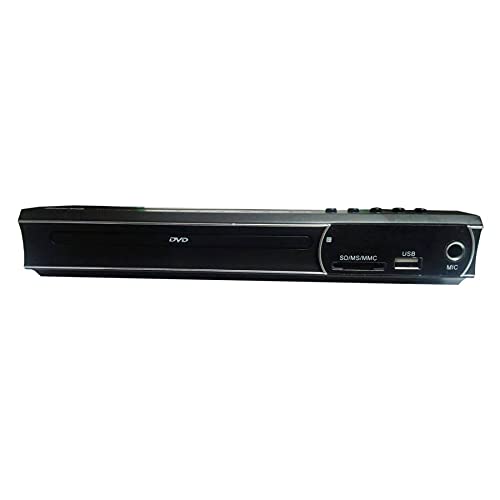
Figure 3: Remote Control for the DVD-2019 Player
The remote control allows you to operate all functions of the DVD player from a distance. It requires two AAA batteries (not included).
4. התקנה
4.1 חיבור לטלוויזיה
בחר אחת משיטות החיבור הבאות:
- חיבור HDMI (מומלץ לאיכות הטובה ביותר):
Connect one end of an HDMI cable (not included) to the HDMI OUT port on the DVD player and the other end to an HDMI IN port on your television. Select the corresponding HDMI input on your TV. - חיבור RCA:
Connect the yellow video cable to the VIDEO OUT port on the DVD player and the yellow video input on your TV. Connect the red and white audio cables to the AUDIO OUT (R/L) ports on the DVD player and the corresponding red and white audio input ports on your TV. Select the AV input on your TV.
4.2 חיבור מתח
After connecting the video and audio cables, plug the power cable into the AC IN port on the rear of the DVD player and then into a wall outlet.
5. הוראות הפעלה
5.1 ניגון DVD בסיסי
- Turn on your TV and the DVD player.
- Select the correct input source on your TV (e.g., HDMI 1, AV).
- לחץ על כפתור OPEN/CLOSE בלוח הקדמי או בשלט רחוק כדי לפתוח את מגש הדיסק.
- הנח בעדינות דיסק DVD במגש כאשר צד התווית פונה כלפי מעלה.
- Press the OPEN/CLOSE button again to close the tray. The disc will load automatically.
- Playback should begin automatically. If a menu appears, use the arrow keys and OK button on the remote to navigate.
5.2 ניגון באמצעות כרטיס USB/SD
- Insert a USB flash drive into the USB port or an SD card into the SD card slot on the front panel.
- The player should automatically detect the device and display a media browser. If not, press the SOURCE or USB/CARD button on the remote.
- Use the arrow keys and OK button to navigate through your files (סרטונים, מוזיקה, תמונות).
- בחר א file ולחץ על OK כדי להתחיל את ההשמעה.
5.3 הגדרות שמע ווידאו
Access the player's setup menu by pressing the SETUP button on the remote control. Here you can adjust settings such as:
- הגדרות וידאו: Aspect ratio (4:3, 16:9), video output resolution.
- הגדרות שמע: Audio output mode (Stereo, Dolby Digital, DTS), dynamic range control.
- הגדרות שפה: שפת תצוגה על המסך, שפת שמע, שפת כתוביות.
6. תחזוקה
6.1 ניקוי היחידה
- נגבו את החלק החיצוני של הנגן בעזרת מטלית רכה ויבשה.
- אין להשתמש בחומרי ניקוי נוזליים או בתרסיסים.
- For the disc tray, use a soft, lint-free cloth to gently remove dust.
6.2 טיפול בדיסק
- החזיקו תמיד את הדיסקים בקצוותיהם.
- Keep discs clean and free from scratches. Use a soft cloth to wipe from the center outwards.
- אחסן דיסקים במארזים כאשר הם אינם בשימוש.
7. פתרון תקלות
| בְּעָיָה | סיבה אפשרית | פִּתָרוֹן |
|---|---|---|
| אין כוח | כבל חשמל לא מחובר; שקע החשמל פגום. | ודא שכבל החשמל מחובר היטב. נסה שקע אחר. |
| אין תמונה | Incorrect TV input selected; video cable loose or faulty. | Select the correct HDMI/AV input on your TV. Check video cable connections. |
| אין קול | Audio cables loose or faulty; TV volume muted. | Check audio cable connections. Increase TV volume and ensure it's not muted. |
| דיסק לא מתנגן | הדיסק מלוכלך, שרוט או בפורמט לא תואם. | Clean the disc. Try a different disc. Ensure the disc format is supported (DVD). |
| השלט רחוק לא עובד | סוללות מתות או שהוכנסו בצורה שגויה; חסימה בין השלט לנגן. | החליפו סוללות. ודאו שהקוטביות נכונה. הסירו כל מכשול. |
8. מפרטים
| תכונה | פְּרָט |
|---|---|
| מספר דגם | DVD-2019 |
| מותג | BenQ |
| סוג מדיה | DVD |
| סוג מחבר | HDMI, RCA |
| טכנולוגיית קישוריות | HDMI, RCA, USB |
| פורמטי שמע נתמכים | Dolby Digital, DTS, PCM |
| מכשירים תואמים | טֵלֶוִיזִיָה |
9. אחריות ותמיכה
This BenQ DVD-2019 DVD Player comes with a standard manufacturer's warranty. Please refer to the warranty card included in your package for specific terms and conditions, including the warranty period and coverage details.
For technical support, service inquiries, or to obtain replacement parts, please contact BenQ customer service through their official website or the contact information provided on your warranty documentation. Keep your purchase receipt as proof of purchase for warranty claims.