1. הקדמה
Thank you for choosing the AUKEY Sprint Wireless Power Bank PB-Y32. This device is designed to provide portable power for your mobile devices, featuring both wired and wireless fast charging capabilities. Please read this manual carefully before use to ensure optimal performance and safety.
2. תכונות מוצר
- קיבולת 10000 mAh: High-capacity battery to charge your devices multiple times.
- תמיכה בטעינה מהירה: Supports Quick Charge 3.0 and Power Delivery for rapid charging of compatible devices.
- טעינה אלחוטית: Conveniently charge Qi-compatible devices at up to 10W.
- יציאות פלט מרובות: מצויד ביציאות USB-C ו-USB-A לטעינה רב-תכליתית.
- עיצוב קומפקטי ונייד: קל לנשיאה לכוח תוך כדי תנועה.
- תכונות בטיחות: Built-in protections against overcharge, over-discharge, overcurrent, and short circuits.
3. תכולת החבילה
- AUKEY Sprint Wireless Power Bank PB-Y32
- כבל USB-A ל-C
- מדריך למשתמש
4. התקנה ושימוש ראשוני
4.1 טעינת הסוללה
Before first use, fully charge the power bank. It takes approximately 7 hours to fully charge the power bank using a compatible USB-C power adapter.
- Connect the included USB-A to C cable to the power bank's USB-C input port.
- חבר את הקצה השני של הכבל למטען קיר USB (לא כלול).
- The LED indicators will light up to show the charging status. All four LEDs will be solid when fully charged.
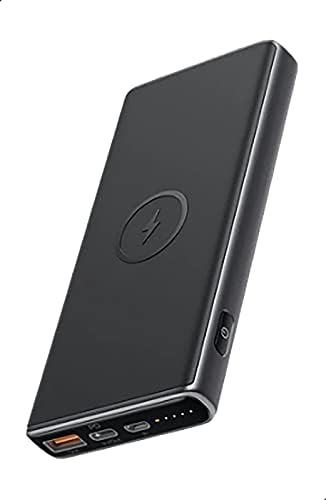
Image: The AUKEY Sprint Wireless Power Bank PB-Y32, showcasing its sleek black design and port layout.
5. הוראות הפעלה
5.1 טעינה קווית
To charge your device using a cable:
- חברו את כבל הטעינה של המכשיר שלכם ליציאת USB-A או ליציאת USB-C בסוללת הכוח.
- חבר את הקצה השני של הכבל למכשיר שלך.
- סוללת הסוללה תתחיל לטעון את המכשיר שלך באופן אוטומטי.
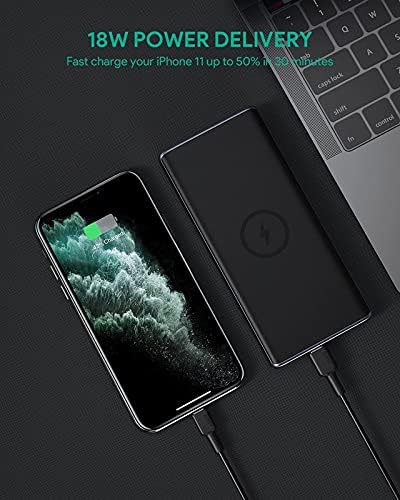
Image: The power bank connected via cable to a smartphone, demonstrating 18W Power Delivery fast charging.

Image: A smartphone connected to the power bank, illustrating Qualcomm Quick Charge 3.0 capabilities for rapid charging.
5.2 טעינה אלחוטית
To charge your Qi-compatible device wirelessly:
- Place your Qi-compatible device directly onto the wireless charging pad located on the top surface of the power bank. Ensure the device is centered on the charging symbol.
- The power bank will automatically detect your device and begin wireless charging.

Image: A smartphone placed on the power bank's surface, demonstrating the wireless charging feature.

תמונה: תקריב view of the power bank showing the silicone ring designed to keep the phone stable during wireless charging.
5.3 Low-Current Charging Mode
This mode is ideal for charging low-power devices like wireless earbuds or smartwatches.
- Press and hold the power button for 2 seconds to enter low-current charging mode. The first LED indicator will blink green.
- Connect your low-power device or place it on the wireless charging pad.
- To exit low-current charging mode, press the power button once, or it will automatically exit after 2 hours.
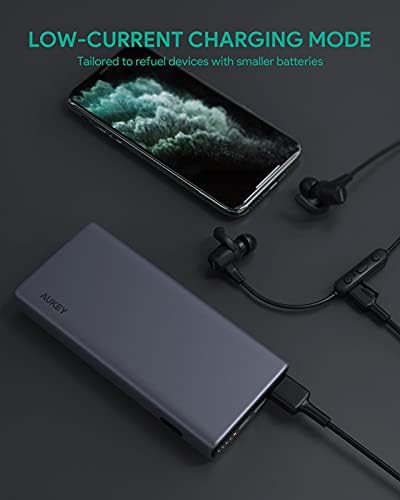
Image: The power bank connected to a smartphone and wireless earbuds, demonstrating its low-current charging mode for smaller devices.

Image: An illustration showing the power bank's broad compatibility with various devices, including smartphones, tablets, and gaming consoles.
6. תחזוקה
- Keep the power bank away from liquids, extreme heat, and strong magnetic fields.
- אין להפיל את סוללת הכוח ואל תחשוף אותה לפגיעות חזקות.
- נקו את סוללת הכוח בעזרת מטלית יבשה ורכה. אין להשתמש בחומרי ניקוי מאכלים.
- אחסן את בנק הכוח במקום קריר ויבש כאשר אינו בשימוש.
- Recharge the power bank at least once every 3 months to maintain battery health.
7. פתרון תקלות
7.1 סוללת הכוח לא נטענת
- ודא שכבל הטעינה מחובר היטב הן לסוללת הכוח והן למטען הקיר.
- נסה כבל USB-C אחר או מטען קיר אחר.
- Verify the wall charger's output meets the power bank's input requirements (DC 5V-3A / 9V-2A).
7.2 המכשיר לא נטען מסוללת הכוח
- ודא שסוללת הסוללה טעונה מספיק.
- נסה כבל טעינה אחר עבור המכשיר שלך.
- לטעינה אלחוטית, ודאו שהמכשיר שלכם תואם Qi ומיושר כראוי על משטח הטעינה. הסירו כיסויים עבים שעלולים להפריע.
- אם אתה טוען מכשיר בעל צריכת חשמל נמוכה, ודא שמצב טעינה בזרם נמוך מופעל.
7.3 התחממות יתר של סוללת הכוח
- זה נורמלי שסוללת הסוללה תתחמם מעט במהלך טעינה או פריקה.
- If it becomes excessively hot, disconnect all devices and the charging cable immediately. Allow it to cool down before resuming use.
- Ensure proper ventilation and avoid covering the power bank during use.
8. מפרטים
| תכונה | פְּרָט |
|---|---|
| שם הדגם | לָרוּץ |
| מספר דגם | PB-Y32 |
| קיבולת סוללה | 10000 מיליאמפר/שעה |
| כניסת USB מסוג C | DC 5V-3A / 9V-2A |
| יציאת USB Type-C | DC 5V-3A / 9V-2A / 12V-1.5A |
| פלט USB Type-A | 18W |
| כוח פלט מרבי | 18W |
| פלט טעינה אלחוטי | 5W, 7.5W, 10W |
| מידות | 144 x 67 x 17 מ"מ |
| מִשׁקָל | 210 גרם |
| הרכב תא הסוללה | ליתיום פולימר |
| תכונות מיוחדות | Short Circuit Protection, Wireless Charging |
| צֶבַע | שָׁחוֹר |
| זמן טעינת הסוללה | 7 שעות |
9. אחריות ותמיכה
According to the product specifications, this product comes with אין אחריות. For any product-related inquiries or support, please refer to the retailer or manufacturer's official webאתר ליצירת קשר.


