1. הקדמה
This manual provides essential information for the setup, operation, and maintenance of your LOUTOC Universal Replacement Remote Control. This remote is designed to provide a seamless replacement experience for compatible Roku streaming devices.
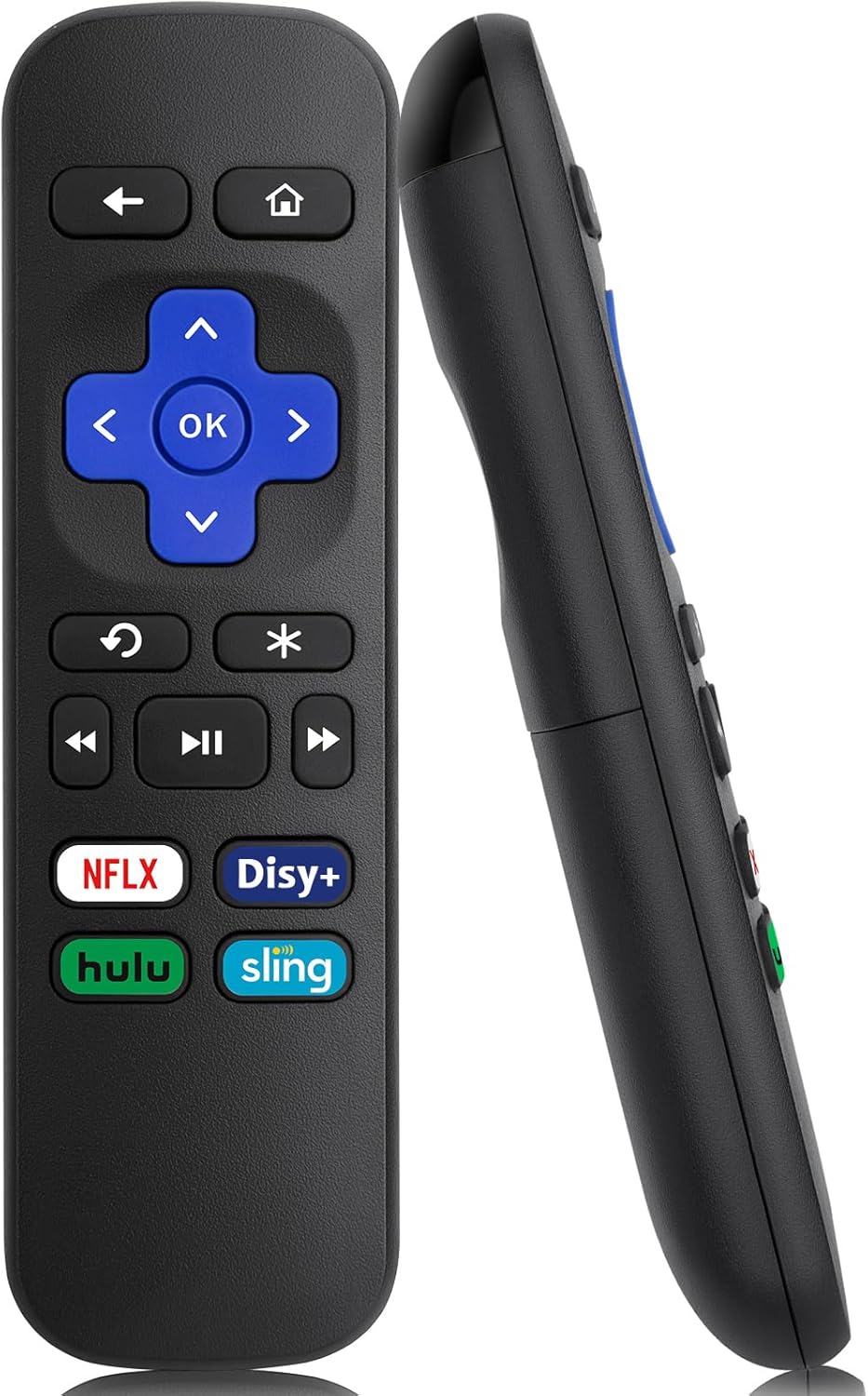
תמונה 1: חזית וצד view of the LOUTOC Universal Replacement Remote Control.
2. תאימות
The LOUTOC Universal Replacement Remote Control is compatible with a range of Roku streaming players and boxes. Please verify your Roku model against the list below to ensure compatibility.
2.1 Compatible Roku Models:
- Roku 1 SE (Model 2710)
- Roku 2 HD (Model 3000), Roku 2 XD (Model 3050), Roku 2 XS (Model 3100), Roku 2 (Models 2720, 4210)
- Roku 3 (Models 4200, 4230)
- Roku 4 (Model 4400)
- Roku HD (Models 2500, 2000, N1100), Roku LT (Models 2450, 2400), Roku XD (Model 2050), Roku XDS (Model 2100)
- Roku Express (Models 3700, 3900, 3930R)
- Roku Express+ (Models 3710, 3910, 3931W)
- Roku Premiere (Models 4620, 3920R)
- Roku Premiere+ (Models 4630, 3921RW)
2.2 התקנים לא תואמים:
שלט רחוק זה הוא לֹא compatible with the following devices:
- Any Roku Streaming Stick model
- Any Roku TV model (e.g., TCL Roku TV, Hisense Roku TV)
- Roku Ultra
- Roku devices requiring an RF (Radio Frequency) remote
- Roku Gaming devices
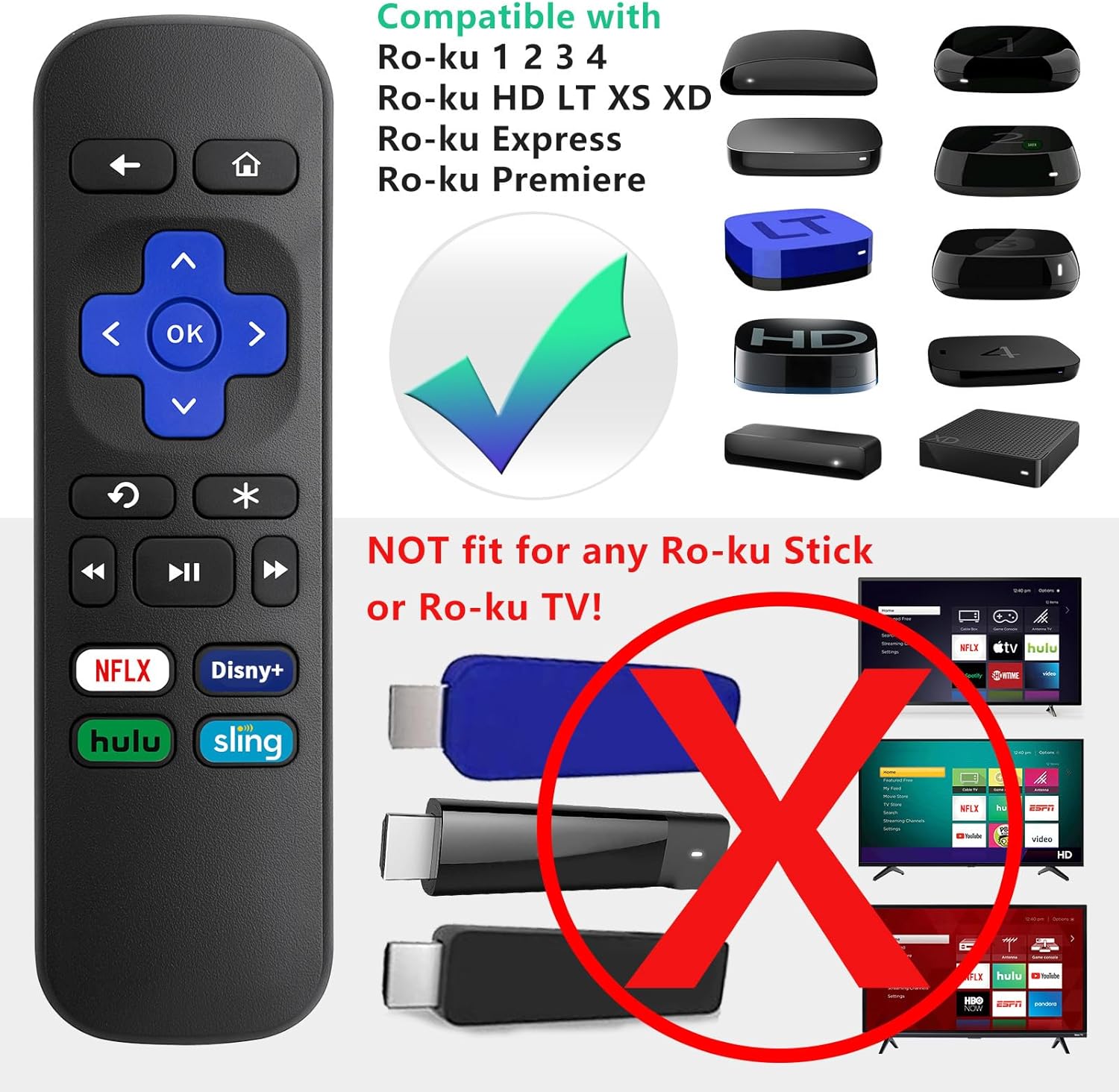
Image 2: Visual guide to compatible Roku players and incompatible Roku Sticks/TVs.

Image 3: Comprehensive compatibility chart for Roku devices.
3. Features and Limitations
3.1 תכונות עיקריות:
- טכנולוגיית אינפרא אדום (IR): Operates using infrared signals, requiring a direct line of sight to your Roku device.
- אין צורך בהתקנה: Functions immediately upon battery insertion with compatible Roku devices. No programming or pairing is needed.
- כפתורי קיצורי דרך ייעודיים: Includes four direct access buttons for popular streaming services: Netflix, Disney+, Hulu, and Sling.
- בנייה עמידה: Made from ABS material for longevity.

Image 4: Remote in use, emphasizing ease of use and IR technology.
3.2 Important Limitations:
Please note that this remote control does לֹא include the following functionalities:
- No Headphone Jack
- No Pairing Button
- אין בקרת עוצמת הקול
- אין חיפוש קולי
- No Power Button
- Not an RF (Radio Frequency) Model

Image 5: Visual representation of features not included (volume, pairing, headphone jack).

Image 6: Visual representation of features not included (power, voice search, RF model).
4. התקנה
4.1 התקנת סוללה:
- אתר את תא הסוללות בגב השלט הרחוק.
- החלק את מכסה הסוללה כלפי מטה כדי לפתוח.
- Insert two (2) AAA batteries, ensuring correct polarity (+ and -) as indicated inside the compartment. Batteries are not included.
- Replace the battery cover by sliding it upwards until it clicks into place.

Image 7: Battery compartment for AAA batteries.
4.2 שימוש ראשוני:
Once batteries are installed, the remote is ready for immediate use with your compatible Roku device. No additional programming or pairing steps are required.
5. הוראות הפעלה
Point the remote control directly at your Roku streaming device. Ensure there are no obstructions between the remote and the Roku player for optimal performance.
5.1 פונקציות כפתור:
| לַחְצָן | פוּנקצִיָה |
|---|---|
| בַּיִת | חוזר למסך הבית של Roku. |
| בְּחֲזָרָה | חוזר למסך או לתפריט הקודם. |
| כרית כיוון (למעלה, למטה, שמאלה, ימינה) | ניווט בין תפריטים ותוכן. |
| OK | בחירת פריט או אישור פעולה. |
| שידור חוזר מיידי | משמיע מחדש את השניות האחרונות של הסרטון. |
| אפשרויות (*) | Accesses additional options or settings within an app. |
| החזר לאחור | מריץ אחורה את הפעלת הווידאו. |
| הפעל/השהה | מפעיל או משהה תוכן וידאו. |
| Fast Forward | הפעלת וידאו קדימה. |
| נטפליקס | גישה ישירה לאפליקציית נטפליקס. |
| דיסני+ | Direct access to the Disney+ application. |
| הולו | Direct access to the Hulu application. |
| קֶלַע | Direct access to the Sling application. |

Image 8: Remote control highlighting the dedicated streaming service buttons.
6. פתרון תקלות
6.1 השלט רחוק אינו מגיב:
- בדוק סוללות: Ensure the batteries are inserted correctly with the proper polarity. Replace old or depleted batteries with fresh AAA batteries.
- קו הראיה: Confirm that there is a clear, unobstructed path between the remote control and the infrared receiver on your Roku device.
- תְאִימוּת: Double-check that your Roku model is listed as compatible in Section 2.1. This remote will not work with Roku Sticks or Roku TVs.
- הַפרָעָה: ודא שאין מקורות אור חזקים (כגון אור שמש ישיר או נורות פלורסנט בהירות) שמפריעים לאות ה-IR.
7. מפרטים
| מִפרָט | פְּרָט |
|---|---|
| מידות המוצר | 5.5 x 1.65 x 0.79 אינץ' (13.97 x 4.19 x 2.01 ס"מ) |
| משקל פריט | 1.76 אונקיות (50 גרם) |
| מקור כוח | 2 x סוללות AAA (לא כלולות) |
| טכנולוגיית קישוריות | אינפרא אדום (IR) |
| חוֹמֶר | ABS |

Image 9: Remote control dimensions.
8. אחריות ותמיכה
LOUTOC offers a החלפה ל-60 יום policy for this product. If you experience any issues within 60 days of purchase, please contact your retailer for a replacement.

Image 10: 60-Day Replacement icon.
For further assistance or inquiries, please refer to the contact information provided by your point of purchase or visit the official LOUTOC brand store.


