מָבוֹא
This manual provides comprehensive instructions for the Plantronics Voyager Focus B825 wireless Bluetooth headset. It covers setup, operation, maintenance, and troubleshooting to ensure optimal performance and user experience.
The Plantronics Voyager Focus B825 is designed for clear communication and immersive audio, featuring active noise cancellation and versatile connectivity options.

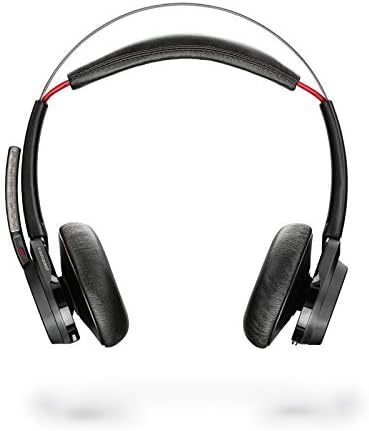
תמונה 1: The Plantronics Voyager Focus B825 headset shown with its accompanying USB dongle. The headset features an over-ear design with a microphone boom.
תכונות מפתח
- פונקציונליות אלחוטית: Bluetooth 5.0 for seamless wireless connection.
- ביטול רעשים פעיל (ANC): Reduces background noise for focused audio.
- קישוריות כפולה: Supports 3.5 mm and 6.35 mm audio connections for wired use.
- בקרת שיחות: Integrated controls for managing calls.
- עיצוב נוח: Lightweight (5.5 ounces) with an over-ear form factor for extended wear.
הגדרה
1. טעינת האוזניות
Before first use, fully charge your headset. Connect the charging cable (not explicitly listed but implied for a wireless headset) to the headset and a power source. The LED indicator will show charging status.
2. Connecting via Bluetooth (Wireless)
- Ensure the headset is powered on and in pairing mode. Refer to the headset's specific button combination for pairing (usually holding the power button).
- On your device (PC, laptop, mobile phone), navigate to Bluetooth settings.
- Select "Plantronics Voyager Focus B825" from the list of available devices.
- לאחר הצימוד, האוזניות יציינו חיבור מוצלח.
תמונה 2: תקריב view of the Plantronics USB Bluetooth dongle, used for connecting the headset wirelessly to a computer.
3. Connecting via Audio Cable (Wired)
The headset supports 3.5 mm and 6.35 mm audio connections. Use the appropriate audio cable (not included in "Camera Body, Battery Pack" but implied by specifications) to connect the headset directly to your audio source. This provides a wired alternative when wireless is not preferred or available.
הפעלת האוזנייה
הפעלה/כיבוי
Press and hold the power button (location not specified, general instruction) for a few seconds to turn the headset on or off.
בקרת שיחות
Use the integrated call control buttons (location not specified, general instruction) to answer, end, or reject calls. Specific functions may vary based on the connected device and application.

תמונה 3: The right earcup of the Plantronics Voyager Focus B825 headset, displaying the volume adjustment ring and media playback control buttons.
ביטול רעש פעיל (ANC)
Activate or deactivate the ANC feature to reduce ambient noise. This is particularly useful in noisy environments to enhance focus during calls or while listening to audio.
השמעת אודיו
Control media playback (play, pause, skip tracks) using the dedicated buttons on the headset. Adjust volume using the volume controls.
הווידאו 1: An official product video demonstrating the features and usage of the Plantronics Voyager Focus UC Headset. This video highlights key functionalities and design aspects.
תַחזוּקָה
- ניקוי: השתמשו במטלית רכה ויבשה לניקוי האוזניות. הימנעו מכימיקלים חזקים או מחומרים שוחקים.
- אִחסוּן: יש לאחסן את האוזניות במקום קריר ויבש, הרחק מאור שמש ישיר וטמפרטורות קיצוניות.
- טיפול בסוללה: להשגת חיי סוללה אופטימליים, הימנעו מפריקה מלאה של הסוללה לעתים קרובות. טען אותה באופן קבוע.
פתרון בעיות
- אין כוח: ודא שהדיבורית טעונה במלואה.
- אין שמע/איכות שמע ירודה:
- Check volume levels on both the headset and the connected device.
- Ensure the headset is properly paired via Bluetooth or the audio cable is securely connected.
- אם אתה משתמש ב-Bluetooth, נסה לזווג מחדש את המכשיר.
- Move closer to the Bluetooth source to avoid interference.
- המיקרופון לא עובד:
- ודא שזרוע המיקרופון ממוקמת כהלכה.
- בדוק את הגדרות המיקרופון במכשיר המחובר שלך.
מפרטים
| תכונה | פְּרָט |
|---|---|
| שם הדגם | וויאג'ר פוקוס UC |
| מספר דגם של פריט | 202652-103 |
| מותג | פלנטרוניקס |
| טכנולוגיית קישוריות | בלוטות' |
| טכנולוגיית תקשורת אלחוטית | בלוטות' |
| גרסת בלוטות' | 5.0 |
| בקרת רעש | ביטול רעשים אקטיבי |
| שקע אוזניות | 3.5 מ"מ, 6.35 מ"מ |
| מיקום אוזניים | מעל אוזן |
| גורם צורה | מעל אוזן |
| חוֹמֶר | פּלָסטִי |
| משקל פריט | 5.5 אונקיות |
| מידות המוצר | 10 x 2 x 2.7 אינץ' |
| רכיבים כלולים | Camera Body, Battery Pack (Note: "Camera Body" is likely a data entry error; refers to headset components) |
| סוללות | נדרשת סוללת ליתיום פולימר אחת (כלול) |
| מכשירים תואמים | PCs, Laptops, Mobile Phones |
אחריות ותמיכה
For warranty information and technical support, please refer to the official Plantronics (Poly) webאתר או צרו קשר ישירות עם שירות הלקוחות שלהם. תנאי האחריות הספציפיים עשויים להשתנות בהתאם לאזור ולקמעונאי.
ניתן למצוא מידע נוסף ומשאבי תמיכה באתר Plantronics official webאֲתַר.


