1. הקדמה
This manual provides detailed instructions for the installation, setup, operation, and maintenance of your Dioche DW80 Fingerprint Smart Lock. Please read this manual thoroughly before installation and use to ensure proper function and security. Keep this manual for future reference.
תכונות מפתח
- שיטות פתיחה מרובות: Fingerprint, IC Card, Password, Mechanical Key, and Mobile App (Wi-Fi).
- High-Performance Fingerprint Sensor: 550 DPI biometric sensor for accurate and fast recognition.
- שלט רחוק Wi-Fi: Unlock remotely and view unlock history via the mobile application.
- Virtual Password Function: Enhance security by entering random digits before or after the correct password.
- אזהרת סוללה חלשה: Visual and audible alerts for timely battery replacement.
- Emergency Power & Key Access: Micro USB port for emergency power and mechanical keys for backup access.
2. תכולת החבילה
ודא שכל הרכיבים נמצאים בחבילה לפני שתמשיך בהתקנה.

Image: Dioche DW80 Smart Lock package contents. Includes the main lock unit (front and rear panels), mortise, two mechanical keys, two IC cards, and various screws and pins for installation.
- Front Panel Assembly (with handle and keypad)
- Rear Panel Assembly (with handle and battery compartment)
- גוף מנעול מורטי
- לוחית תקיפה וקופסת תקיפה
- מפתחות מכניים (2)
- IC Cards (2)
- חומרת הרכבה (ברגים, צירים וכו')
- תבנית התקנה
- מדריך למשתמש
3. מפרטים
| תכונה | פְּרָט |
|---|---|
| מותג | דיוצ'ה |
| שם הדגם | DW80 |
| סוג מנעול | ביומטרי |
| חוֹמֶר | סגסוגת אבץ |
| צֶבַע | שָׁחוֹר |
| תכונות מיוחדות | Fingerprint, Smart Lock, Touchscreen, Wi-Fi |
| פרוטוקול קישוריות | Wi-Fi |
| שיטת בקרה | Remote, Voice (via compatible smart home systems) |
| מקור כוח | 4 x AAA Dry Batteries (not included) |
| חיי סוללה | Approximately 9+ months under normal use |
| תאימות עובי הדלת | 38mm - 55mm (1-3/8" to 2") |
| טמפרטורת הפעלה | Approximately -4°F to 140°F (-20°C to 60°C) |
| משקל פריט | 4.14 פאונד |
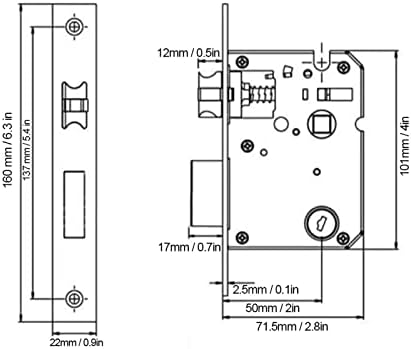
Image: Technical diagram illustrating the dimensions of the lock's mortise and faceplate, with measurements in millimeters and inches.
4. מדריך התקנה
Before installation, ensure your door meets the compatibility requirements (door thickness 38mm-55mm). Professional installation is recommended for optimal performance and security.
הֲכָנָה
- בדיקת תאימות דלתות: Confirm door thickness and backset (distance from door edge to center of door hole: 60mm or 70mm).
- איסוף כלים: You will need a screwdriver, drill, measuring tape, and pencil.
- Review תבנית: Use the provided installation template to mark drilling points accurately.
שלבי התקנה
- התקנת מנעול מורטיז: Insert the mortise into the door edge and secure it with screws.
- התקנת לוח קדמי: Route the cable through the door hole and attach the front panel, ensuring the spindle is correctly aligned.
- התקנת הפאנל האחורי: Connect the cable from the front panel to the rear panel. Secure the rear panel to the door using the provided screws.
- התקן סוללות: Open the battery compartment on the rear panel and insert 4 AAA batteries (ensure correct polarity).
- פעולת בדיקה: After installation, test the mechanical key and ensure the handles operate smoothly.

Image: The Dioche DW80 Smart Lock, showcasing its sleek black design with a keypad on the front panel and a fingerprint sensor integrated into the handle.
5. הגדרה ראשונית וניהול משתמשים
After installation, you need to set up the lock and register users for various unlocking methods.
5.1 Mobile App Connection (Tuya Smart)
The Dioche DW80 Smart Lock supports Wi-Fi connectivity via the Tuya Smart app for remote control and monitoring.
- הורד אפליקציה: Scan the QR code or search for "Tuya Smart" in your app store. הורד את אפליקציית Tuya Smart
- הרשמה/התחברות: צור חשבון או התחבר לאפליקציית Tuya Smart.
- הוסף מכשיר: Follow the in-app instructions to add your smart lock. Ensure your phone is connected to a 2.4GHz Wi-Fi network during pairing.

Image: QR code for quick download of the Tuya Smart mobile application, essential for Wi-Fi features.
5.2 רישום טביעות אצבע
- Access the lock's programming mode (refer to the specific instructions in your app or the lock's voice prompts).
- Place your finger on the fingerprint sensor multiple times as prompted, slightly shifting its position each time for comprehensive registration.
- Confirm successful registration via voice prompt or app notification.
5.3 הגדרת סיסמאות
- היכנסו למצב תכנות.
- Input your desired password (typically 6-8 digits) and confirm.
- To use the virtual password feature, you can enter random digits before or after your actual password, then press '#' to confirm. This prevents others from guessing your code by observing finger movements.

Image: Demonstration of the virtual password feature, where a correct 6-digit password is embedded within a longer sequence of random numbers to deter observation.
5.4 Registering IC Cards
- היכנסו למצב תכנות.
- Present the IC card to the designated sensing area on the lock.
- The lock will confirm successful registration.
6. הפעלת המנעול החכם
The Dioche DW80 offers multiple convenient ways to unlock your door.
6.1 ביטול נעילה באמצעות טביעת אצבע
- Place your registered finger on the fingerprint sensor located on the handle.
- The lock will emit a confirmation sound/light, and the handle will engage.
- Push down the handle to open the door.
6.2 Unlocking with Password
- גע בלוח המקשים כדי להפעיל אותו.
- Enter your registered password (or virtual password sequence).
- Press '#' to confirm. The lock will unlock if the password is correct.
6.3 Unlocking with IC Card
- Present the registered IC card to the card reader area on the lock.
- The lock will confirm and unlock.
6.4 פתיחת דלת באמצעות מפתח מכני
- Insert the mechanical key into the keyhole located on the front panel.
- סובב את המפתח כדי לפתוח את הדלת.
6.5 Remote Unlocking via Mobile App
- פתחו את אפליקציית Tuya Smart בטלפון החכם שלכם.
- Select your Dioche DW80 Smart Lock from the device list.
- Tap the unlock button within the app. Confirm the remote opening when prompted.

Image: A smartphone screen showing the Tuya Smart app, indicating a successful remote unlock command sent to the smart handle lock via Wi-Fi.

Image: An infographic highlighting the five primary unlocking methods: fingerprint, IC card, password, mechanical key, and mobile app, with Wi-Fi and Tuya integration.
7. תחזוקה
תחזוקה שוטפת מבטיחה את אורך החיים והביצועים האופטימליים של המנעול החכם שלכם.
7.1 החלפת סוללה
The lock will provide a low battery warning (red light flashing, audible beep) when the batteries are running low. Replace all four AAA batteries promptly.
- Open the battery compartment cover on the rear panel.
- הסר את הסוללות הישנות.
- Insert four new AAA batteries, ensuring correct polarity (+/-).
- סגור את מכסה תא הסוללות.
Note: If you miss all low battery warnings, the lock can be temporarily powered via the Micro USB port for emergency access, or unlocked with a mechanical key.
7.2 ניקוי
- נגבו את פני המנעול בעזרת מטלית רכה ויבשה.
- הימנעו משימוש בחומרי ניקוי שוחקים, ממסים או כימיקלים חזקים, מכיוון שאלה עלולים לפגוע בגימור וברכיבים האלקטרוניים.
- Keep the fingerprint sensor and keypad clean and free of debris for accurate recognition.
8. פתרון תקלות
עיין בסעיף זה לקבלת פתרונות לבעיות נפוצות.
| בְּעָיָה | סיבה אפשרית | פִּתָרוֹן |
|---|---|---|
| מנעול לא מגיב. | סוללות מתות. | Replace batteries. Use emergency Micro USB power or mechanical key. |
| טביעת האצבע לא זוהתה. | האצבע לא ממוקמת נכון; חיישן מלוכלך; טביעת אצבע לא נרשמה. | Ensure finger covers the sensor completely. Clean the sensor. Re-register fingerprint, ensuring slight shifts during registration. |
| הסיסמה לא עובדת. | Incorrect password entered; keypad not active. | Ensure correct password is entered. Touch keypad to activate. Try virtual password method. |
| IC Card not recognized. | Card not registered; card damaged. | Register the IC card. Try a different registered card. |
| לא ניתן להתחבר ל-Wi-Fi/אפליקציה. | Incorrect Wi-Fi password; 5GHz Wi-Fi network; poor signal; lock not in pairing mode. | Ensure 2.4GHz Wi-Fi. Check Wi-Fi password. Move closer to router. Re-enter pairing mode on the lock. |
9. אחריות ותמיכה
Dioche products are designed for reliability and performance. For warranty information, technical support, or service inquiries, please refer to the contact information provided with your purchase documentation or visit the official Dioche website. Please have your model number (DW80) and purchase date ready when contacting support.