מָבוֹא
The Petcube Cam is an indoor Wi-Fi pet and security camera designed to help you monitor your pets and home 24/7. It features vivid 1080p HD video, 30-ft night vision, crystal-clear 2-way audio, and AI-powered live motion and sound alerts. This manual provides detailed instructions for setting up, operating, maintaining, and troubleshooting your Petcube Cam.
מה יש בקופסה
- מצלמת פטקוב
- כבל USB 2 מטר
- Petcube power adapter
- קלטת 3M
- מדריך להתחלה מהירה
הגדרה
Setting up your Petcube Cam is a quick and straightforward process, typically taking less than 60 seconds. Follow these steps to get your camera up and running:
- הורידו את אפליקציית Petcube: חפש "Petcube" in your smartphone's app store (iOS or Android) and download the official application.
- Plug in the Camera: Connect the 2m USB cable to your Petcube Cam and the Petcube power adapter. Plug the adapter into a standard power outlet. The camera will power on and indicate its status.
- התחבר ל-Wi-Fi: פתחו את אפליקציית Petcube ופעל לפי ההוראות שעל המסך כדי לחבר את המצלמה לרשת ה-Wi-Fi הביתית שלכם. ודאו שאתם מתחברים לרשת Wi-Fi בתדר 2.4GHz, מכיוון שהמצלמה אינה תומכת ב-Wi-Fi בתדר 5GHz.
- מיקום: מקמו את מצלמת ה-Petcube שלכם במיקום המספק את התוצאות הטובות ביותר view of your pet's activity or the area you wish to monitor. The camera offers flexible mounting options, including standing on a flat surface or being mounted to a wall using the included 3M tape.
הוראות הפעלה
Once your Petcube Cam is set up, you can begin monitoring and interacting with your pets and home through the Petcube app.
הזרמת וידאו בשידור חי
Access a live 1080p HD video feed of your home anytime, anywhere. The camera provides a 110° wide-angle view and an 8x digital zoom, allowing you to see a large portion of the room and zoom in on specific details.

אודיו דו-כיווני
Engage with your pets using the built-in microphone and speaker. You can talk to them to soothe separation anxiety or reinforce positive behavior, and also hear their barks or meows in return.

ראיית לילה
The Petcube Cam is equipped with 30-ft night vision, providing clear visibility even in low-light or no-light conditions. This ensures you can monitor your pets and home effectively around the clock.

Smart Alerts and Video History
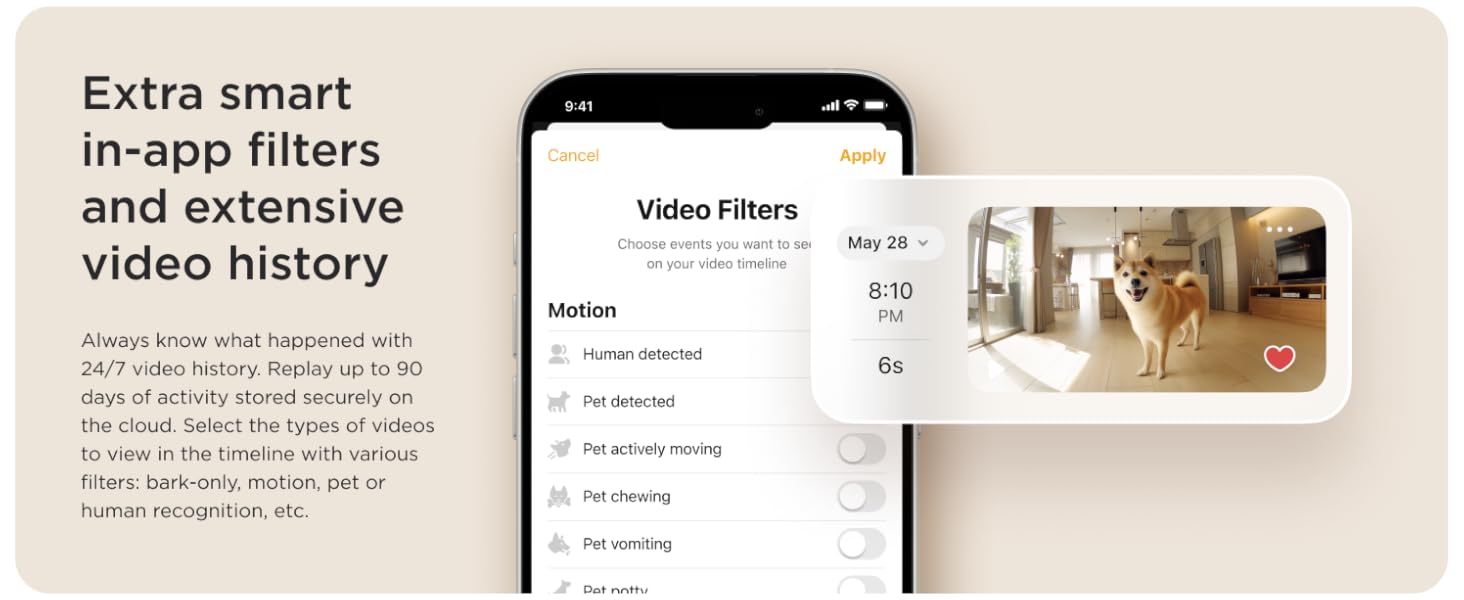
Receive AI-powered instant sound and motion alerts directly to your phone. These alerts feature real-time identification for humans and pets. With an optional Petcube Care subscription, you can access up to 90 days of video history, save your favorite moments, and utilize smart filters for specific events like barking, motion, or pet recognition.

תַחזוּקָה
To ensure optimal performance and longevity of your Petcube Cam, regular maintenance is recommended:
- ניקוי: Gently wipe the camera lens and body with a soft, dry, lint-free cloth. Avoid using harsh chemicals or abrasive materials that could damage the device.
- עדכוני תוכנה: Keep your Petcube app and camera firmware updated to the latest versions. Updates often include performance improvements, new features, and security enhancements. The app will typically notify you when an update is available.
- מחזור הפעלה: If you experience minor issues, try unplugging the camera from the power outlet for 10-15 seconds and then plugging it back in. This can often resolve temporary glitches.
פתרון בעיות
אם נתקלתם בבעיות עם מצלמת ה-Petcube שלכם, עיינו בטיפים הנפוצים הבאים לפתרון בעיות:
- מצלמה במצב לא מקוון:
- Ensure the camera is properly plugged into a working power outlet.
- Check your Wi-Fi connection. The camera requires a stable 2.4GHz Wi-Fi network.
- הפעל מחדש את נתב ה-Wi-Fi שלך.
- קרב את המצלמה לנתב ה-Wi-Fi שלך כדי לשפר את עוצמת האות.
- איכות וידאו ירודה:
- Verify your internet speed. A stable and fast internet connection is crucial for HD streaming.
- ודא שעדשת המצלמה נקייה וחופשיה מאבק או כתמים.
- Check for any obstructions in the camera's field of view.
- 2-Way Audio Issues:
- בדוק את הגדרות המיקרופון והרמקול בתוך אפליקציית Petcube.
- ודא שעוצמת הקול של הטלפון שלך גבוהה.
- Minimize background noise near the camera for clearer audio.
- התראות שלא התקבלו:
- Check your app's notification settings and your phone's system notification settings for the Petcube app.
- Ensure the camera is in an active monitoring mode (e.g., Petcube Care Awake mode if subscribed).
- Adjust the sensitivity settings for motion and sound detection in the app.
For further assistance, please refer to the Petcube app's help section or contact Petcube customer support.
מפרטים
| תכונה | פְּרָט |
|---|---|
| שם הדגם | מצלמת פטקוב |
| מספר דגם | CC10US |
| רזולוציית לכידת וידאו | 1080p HD |
| Viewזווית | 110 מעלות |
| זום דיגיטלי | 8x |
| טווח ראיית לילה | 30 רגל |
| שֶׁמַע | אודיו דו-כיווני |
| טכנולוגיית קישוריות | אלחוטי (Wi-Fi) |
| תאימות Wi-Fi | 2.4GHz (לא תומך ב-5GHz) |
| שימוש בפנים/חוץ | מקורה |
| מקור כוח | חשמלי עם כבלים |
| סוג הרכבה | Wall Mount (with 3M tape) |
| מידות (L x W x H) | 2.13 x 2.39 x 3.22 אינץ' |
| משקל פריט | 8.4 אונקיות |
| UPC | 854592007318 |
אחריות ותמיכה
For information regarding the product warranty, please refer to the documentation included with your Petcube Cam or visit the official Petcube website. For technical support, troubleshooting assistance beyond this manual, or any other inquiries, please contact Petcube customer support directly through their website or the Petcube app.


