1. הקדמה
This manual provides detailed instructions for the setup, operation, maintenance, and troubleshooting of your iProda T1045A 10.1 inch Android Tablet. Please read this manual thoroughly before using your device to ensure proper functionality and to maximize your user experience.
The iProda T1045A is a 10.1-inch tablet featuring an HD IPS display with 1280x800 resolution, powered by a 64-bit Quad-core processor running Android 9 Pie. It includes 3GB RAM, 64GB internal storage expandable up to 128GB via TF card, dual-band Wi-Fi, HDMI output, and a 5000mAh battery for extended use.
2. המוצר נגמרview
2.1 תכולת החבילה
עם פתיחת האריזה, יש לוודא שכל הפריטים נמצאים:
- iProda T1045A 10.1 inch Android Tablet
- כבל USB
- מתאם מתח
- מדריך למשתמש (מסמך זה)

Image: Contents of the iProda T1045A tablet package.
2.2 פריסת מכשיר
Familiarize yourself with the physical components and ports of your tablet:
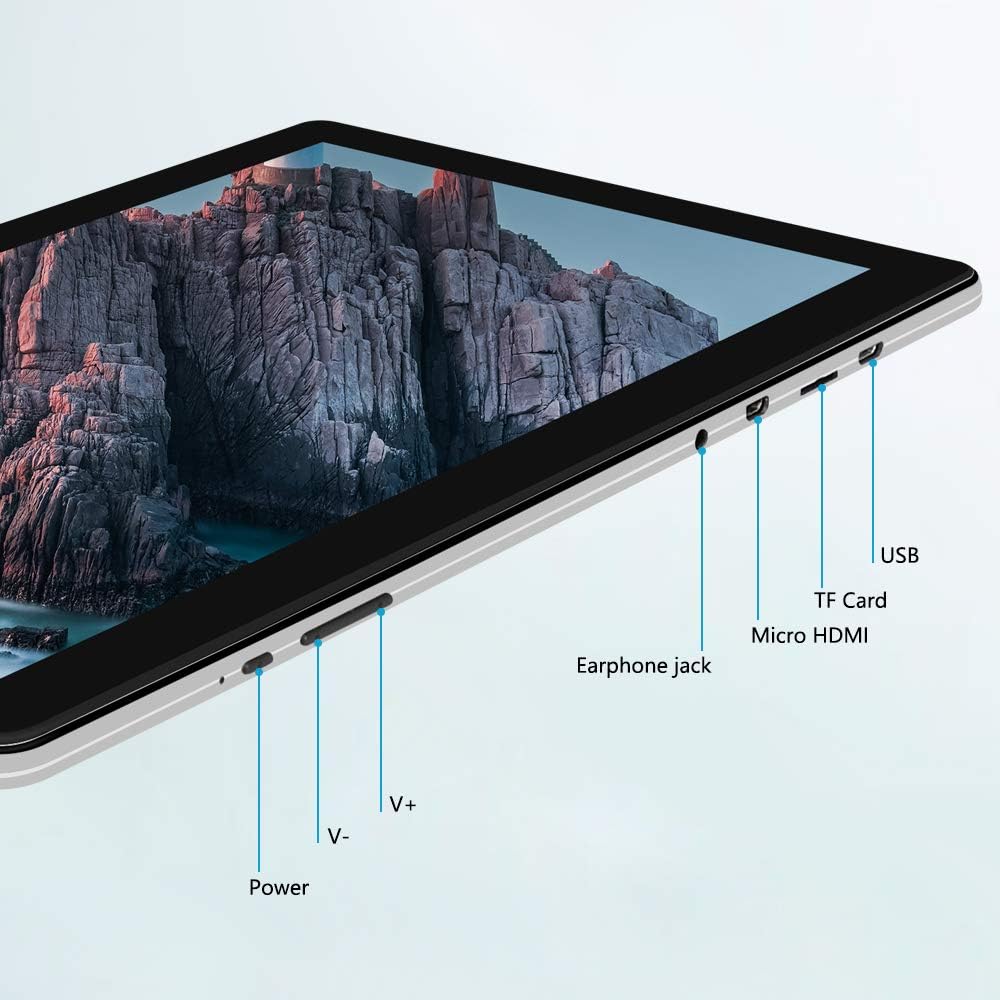
תמונה: צד view of the iProda T1045A tablet highlighting port locations.
- לחצן הפעלה: Press and hold to power on/off or restart the tablet. Short press to turn the screen on/off.
- Volume Buttons (V+, V-): כוונן את עוצמת השמע.
- שקע אוזניות: חבר אוזניות 3.5 מ"מ.
- חריץ כרטיס TF: Insert a microSD card for expandable storage (up to 128GB).
- יציאת מיקרו HDMI: Connect to an external display using a Micro HDMI to HDMI cable.
- יציאת USB: Connect to a computer for data transfer or for charging the device.
3. התקנה
3.1 טעינה ראשונית
Before first use, fully charge the tablet. Connect the provided USB cable to the tablet's USB port and the power adapter, then plug the adapter into a wall outlet. The charging indicator will typically illuminate. A full charge may take several hours.
3.2 הפעלה/כיבוי
- כדי להפעיל: לחץ והחזק את לחצן ההפעלה עד שהמסך נדלק.
- כדי לכבות: לחץ והחזק את לחצן ההפעלה עד שיופיע תפריט הפעלה על המסך. בחר "כיבוי" ואשר.
- לאתחל: מתפריט ההפעלה, בחר "הפעלה מחדש".
- מסך הפעלה/כיבוי: Briefly press the Power button to turn the screen off (sleep mode) or wake it up.
3.3 אשף ההתקנה הראשונית
The first time you power on the tablet, you will be guided through an initial setup process. Follow the on-screen prompts to:
- בחר את השפה המועדפת עליך.
- התחבר לרשת Wi-Fi.
- הגדר את חשבון גוגל שלך (אופציונלי, אך מומלץ להורדות אפליקציות).
- הגדר את הגדרות התאריך והשעה.
3.4 Inserting a TF Card (MicroSD)
כדי להרחיב את נפח האחסון של הטאבלט:
- אתר את חריץ כרטיס ה-TF בצד הטאבלט.
- Carefully insert a microSD card (up to 128GB) into the slot with the gold contacts facing down until it clicks into place.
- כדי להוציא, דחפו בעדינות את הכרטיס פנימה עד שייחלץ.
4. הוראות הפעלה
4.1 ניווט בסיסי
The iProda T1045A uses a touch-sensitive screen for navigation:
- בֶּרֶז: בחר פריט או פתח יישום.
- הקש והחזק: גישה לתפריטי הקשר או הזזת סמלים.
- לִגנוֹב: גלול בין רשימות או מעבר בין מסכי בית.
- קַמצוּץ: הגדלה או הקטנה של תמונות ו web דפים.
4.2 חיבור Wi-Fi
כדי להתחבר לרשת אלחוטית:
- עבור אל הגדרות > רשת ואינטרנט > Wi-Fi.
- הפעל/הפעל את ה-Wi-Fi On.
- בחר את הרשת הרצויה מהרשימה.
- הזינו את הסיסמה אם תתבקשו, ולאחר מכן הקישו על לְחַבֵּר.
The tablet supports both 2.4G and 5G dual-band Wi-Fi for faster and more stable connections.
4.3 זיווג בלוטות '
To pair with Bluetooth devices (e.g., headphones, speakers):
- עבור אל הגדרות > מכשירים מחוברים > בלוטות'.
- החלף את ה-Bluetooth On.
- ודא שמכשיר ה-Bluetooth שלך נמצא במצב צימוד.
- בחר את המכשיר שלך מרשימת המכשירים הזמינים ופעל לפי ההנחיות שעל המסך כדי להשלים את הצימוד.
4.4 שימוש במצלמות
The tablet is equipped with a 2MP front camera and a 5MP rear camera.
- פתח את מַצלֵמָה application from the app drawer.
- הקש על סמל המצלמה כדי לעבור בין המצלמה הקדמית לאחורית.
- הקש על כפתור הצילום כדי לצלם תמונות או להתחיל/להפסיק הקלטת וידאו.

Image: Tablet in use, showcasing its camera capabilities.
4.5 Connecting to an External Display (HDMI)
To display your tablet's screen on a larger monitor or TV:
- Connect one end of a Micro HDMI cable to the tablet's Micro HDMI port.
- Connect the other end of the cable to an HDMI input on your external display.
- Select the correct HDMI input source on your external display.
- The tablet's screen content should now be mirrored on the external display.
4.6 ניהול אפליקציות
The tablet runs Android 9 Pie and supports applications from the Google Play Store.
- התקנת אפליקציות: פתח את חנות Play אפליקציה, חפש את האפליקציה הרצויה והקש על לְהַתְקִין.
- הסרת התקנה של אפליקציות: Tap and hold an app icon on the home screen or in the app drawer, then drag it to "Uninstall" or select "App info" and choose "Uninstall". Alternatively, go to הגדרות > אפליקציות והתראות, בחר את האפליקציה והקש על הסר את ההתקנה.
5. תחזוקה
5.1 ניקוי ההתקן
כדי לנקות את הטאבלט שלך:
- Power off the tablet before cleaning.
- השתמשו במטלית רכה ונטולת סיבים, מעט רטובהampנשטפו במים או בחומר ניקוי מסכים, כדי לנגב את המסך והגוף.
- הימנעו משימוש בכימיקלים חזקים, חומרי ניקוי שוחקים או לחות מוגזמת.
5.2 עדכוני תוכנה
Periodically check for software updates to ensure optimal performance and security:
- עבור אל הגדרות > מַעֲרֶכֶת > מִתקַדֵם > עדכון מערכת.
- Follow the on-screen instructions to download and install any available updates. Ensure your tablet is sufficiently charged or connected to power during updates.
5.3 ניהול אחסון
To manage internal storage and the TF card:
- עבור אל הגדרות > אִחסוּן.
- כאן אתה יכול view שימוש באחסון, פינוי מקום וניהול files on both internal storage and the inserted TF card.
6. פתרון תקלות
This section addresses common issues you might encounter with your iProda T1045A tablet.
6.1 המכשיר לא נדלק
- Ensure the tablet is sufficiently charged. Connect it to the power adapter and allow it to charge for at least 30 minutes before attempting to power on again.
- נסה להחזיק את כפתור ההפעלה למשך 10-15 שניות כדי לאלץ הפעלה מחדש.
6.2 בעיות חיבור Wi-Fi
- ודא ש-Wi-Fi מופעל ב הגדרות.
- ודא שאתה מזין את סיסמת ה-Wi-Fi הנכונה.
- הפעל מחדש את נתב ה-Wi-Fi ואת הטאבלט.
- Try connecting to a different Wi-Fi network to determine if the issue is with the tablet or the network.
6.3 ביצועים איטיים
- סגור יישומי רקע מיותרים.
- Clear cached data for apps in הגדרות > אפליקציות והתראות > [שם האפליקציה] > אחסון ומטמון > נקה את המטמון.
- Ensure sufficient free storage space. Uninstall unused apps or move large files to a TF card.
- הפעל מחדש את הטאבלט.
6.4 התרוקנות מהירה של הסוללה
- הפחת את בהירות המסך.
- השבת את ה-Wi-Fi, בלוטות' ו-GPS כאשר אינם בשימוש.
- סגור אפליקציות רקע שצורכות הרבה חשמל.
- בדוק את צריכת הסוללה ב הגדרות > סוֹלְלָה כדי לזהות אפליקציות זוללות חשמל.
- Ensure the tablet is not allowed to run below 15% charge frequently, as this can impact battery longevity.
6.5 איפוס להגדרות היצרן
אם מתרחשות בעיות מתמשכות, איפוס להגדרות היצרן עשוי לפתור אותן. אַזהָרָה: פעולה זו תמחק את כל הנתונים בטאבלט שלך. גבה נתונים חשובים לפני שתמשיך.
- עבור אל הגדרות > מַעֲרֶכֶת > מִתקַדֵם > אפס אפשרויות.
- לִבחוֹר מחק את כל הנתונים (איפוס להגדרות היצרן).
- אשר את החלטתך ופעל לפי ההנחיות שעל המסך.
7. מפרטים
Below are the technical specifications for the iProda T1045A tablet:
| שם הדגם | T1045A |
| מַעֲרֶכֶת הַפעָלָה | אנדרואיד 9 פאי |
| גודל תצוגה | 10.1 אינץ' |
| רזולוציית תצוגה | 1280 x 800 פיקסלים (HD IPS) |
| מעבד | MediaTek Quad-core 1.5Ghz |
| אַיִל | 3 ג'יגה-בייט |
| אחסון פנימי | SSD 64 גיגה-בייט |
| אחסון ניתן להרחבה | Up to 128 GB via TF Card (MicroSD) |
| מעבד גרפי | ARM Mali-T720 MP2 |
| מצלמה אחורית | 5 מגה פיקסל |
| מצלמה קדמית | 2 מגה פיקסל |
| קיבולת סוללה | פולימר ליתיום 5000 mAh |
| חיי סוללה ממוצעים | עד 8 שעות |
| קישוריות אלחוטית | Dual-Band Wi-Fi (802.11a/b/g/n), Bluetooth 4.0 |
| נמלים | 1x USB 2.0, 1x Micro HDMI, 3.5mm Earphone Jack, TF Card Slot |
| מידות | 34.5 x 19.7 x 5.5 ס"מ |
| מִשׁקָל | 550 גרם |

Image: Key performance specifications of the tablet.

Image: Tablet portability and battery details.
8. אחריות ותמיכה
8.1 אחריות למוצר
The iProda T1045A tablet comes with a אחריות ל-12 חודשים מתאריך הרכישה. אחריות זו מכסה פגמי ייצור ותקלות בשימוש רגיל. היא אינה מכסה נזק שנגרם כתוצאה משימוש לרעה, תאונות, תיקונים לא מורשים או בלאי רגיל.
8.2 תמיכת לקוחות
If you encounter any issues not covered in the troubleshooting section or require further assistance, please contact iProda customer support. Refer to your purchase documentation or the iProda official webאתר ליצירת קשר.
When contacting support, please have your tablet's model number (T1045A) and purchase details readily available.


