1. הקדמה
The Audiolab 6000N Play is a wireless audio streaming player designed to integrate high-resolution music streaming into your home audio system. It utilizes DTS Play-Fi technology, allowing for seamless streaming over your wireless network and supporting multi-room audio configurations. This device enables streaming from various sources, including smartphones, tablets, PCs, and Network Attached Storage (NAS) drives.
2. המוצר נגמרview
2.1 תכונות עיקריות
- Wireless audio streaming via DTS Play-Fi.
- High-resolution audio support up to 192kHz/24bit.
- Multi-room audio capability.
- Integrated Digital-to-Analog Converter (DAC).
- Compatibility with various streaming services and local network sources.
2.2 בקרות בלוח הקדמי
The front panel of the Audiolab 6000N Play features essential controls for basic operation.

איור 1: חֲזִית view of the Audiolab 6000N Play. This image displays the sleek black chassis with the "6000N Play" branding on the left, six preset buttons (1-6) in the center, and the power button on the right, along with the "audiolab" logo.
- לחצן הפעלה: Located on the right side, used to turn the unit on or off.
- כפתורים מוגדרים מראש (1-6): Allow for quick access to pre-saved radio stations or playlists.
2.3 חיבורי לוח אחורי
The rear panel provides all necessary input and output connections for integrating the 6000N Play into your audio system.
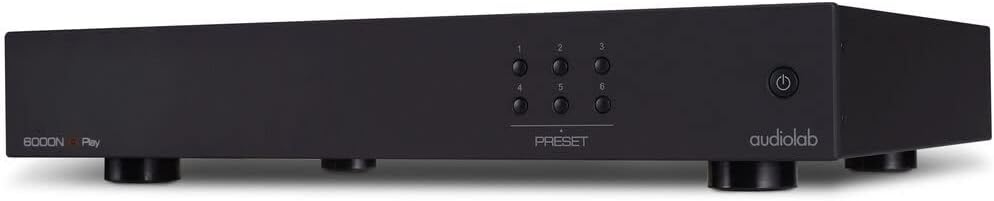
איור 2: בזווית view of the Audiolab 6000N Play, showing the front panel and a glimpse of the side. This perspective highlights the compact design and the arrangement of the preset and power buttons.
- יציאות אנלוגיות (RCA): לצורך חיבור ל- ampליפר או קדם-ampחיים יותר.
- Digital Outputs (Coaxial, Optical): For connecting to an external DAC or AV receiver.
- יציאת אתרנט: עבור חיבור רשת קווי.
- מחבר אנטנת Wi-Fi: עבור קישוריות רשת אלחוטית.
- קלט כוח: לחיבור כבל החשמל.
3. התקנה
3.1 פריקה ומיקום
Carefully remove the 6000N Play from its packaging. Place the unit on a stable, level surface away from direct heat sources and excessive moisture. Ensure adequate ventilation around the unit.
3.2 חיבור למערכת השמע שלך
- חיבור אנלוגי: Connect the RCA analog outputs of the 6000N Play to an available analog input on your ampליפר או קדם-ampמגבר באמצעות כבלי RCA איכותיים.
- חיבור דיגיטלי (אופציונלי): If using an external DAC or AV receiver, connect the Coaxial or Optical digital output of the 6000N Play to the corresponding digital input on your external device.
3.3 חיבור רשת
The 6000N Play requires a network connection for streaming.
- חיבור קווי: Connect an Ethernet cable from your router or network switch to the Ethernet port on the rear panel of the 6000N Play.
- חיבור אלחוטי: Attach the supplied Wi-Fi antenna to the connector on the rear panel. The wireless setup will be completed via the DTS Play-Fi app.
3.4 חיבור מתח
Connect the supplied power cable to the power input on the rear panel of the 6000N Play, then plug the other end into a suitable AC power outlet (100V—120V~50/60Hz).
4. הוראות הפעלה
4.1 הפעלה/כיבוי
Press the power button on the front panel to turn the unit on or off. The unit will enter standby mode when powered off.
4.2 DTS Play-Fi App Installation
To control the 6000N Play and access streaming services, you must install the DTS Play-Fi app on your smartphone, tablet, or PC.
- Download the "DTS Play-Fi" app from your device's app store (Apple App Store, Google Play Store, Amazon Appstore, or Windows Store).
- Launch the app and follow the on-screen instructions to set up your Audiolab 6000N Play on your network. This includes connecting to Wi-Fi if you chose a wireless setup.
4.3 הזרמת מוזיקה
Once the 6000N Play is connected to your network and configured with the Play-Fi app:
- Open the DTS Play-Fi app.
- Select your desired music source (e.g., Amazon Music, Deezer, Spotify, or local media server).
- Choose the Audiolab 6000N Play as the playback device.
- Begin playback.
4.4 שימוש בקביעות מוגדרות מראש
The six preset buttons on the front panel can be configured via the Play-Fi app to quickly access your favorite internet radio stations or playlists.
- In the DTS Play-Fi app, navigate to the desired content you wish to save as a preset.
- Look for an option to "Save as Preset" or similar within the app interface.
- Assign it to one of the six available preset numbers.
- Once saved, pressing the corresponding preset button on the 6000N Play's front panel will initiate playback of the saved content.
5. תחזוקה
5.1 ניקוי
To clean the unit, disconnect it from the power supply. Use a soft, dry, lint-free cloth to wipe the surfaces. Avoid using abrasive cleaners, solvents, or chemical sprays, as these can damage the finish.
5.2 עדכוני תוכנה
Periodically check the DTS Play-Fi app or the Audiolab website for firmware updates. Updates can improve performance, add new features, or resolve issues. Follow the instructions provided by the app or website for performing updates.
6. פתרון תקלות
If you encounter issues with your Audiolab 6000N Play, refer to the following common troubleshooting steps:
- אין כוח:
- ודא שכבל החשמל מחובר היטב הן ליחידה והן לשקע החשמל.
- ודא ששקע החשמל תקין.
- אין צליל:
- Check all audio cable connections between the 6000N Play and your ampמקלט/מקלט.
- ודא שהקלט הנכון נבחר במכשיר שלך ampמקלט/מקלט.
- Verify the volume level on both the 6000N Play (via app) and your ampמקלט/מקלט.
- Confirm that music is actively playing in the DTS Play-Fi app.
- בעיות חיבור לרשת:
- For Wi-Fi, ensure the antenna is securely attached.
- Restart your router and the 6000N Play.
- ודא שרשת ה-Wi-Fi שלך פעילה ונמצאת בטווח קליטה.
- אם אתה משתמש בחיבור קווי, בדוק את כבל ה-Ethernet.
- Re-run the network setup process in the DTS Play-Fi app.
- DTS Play-Fi App Problems:
- ודא שהאפליקציה מעודכנת לגרסה העדכנית ביותר.
- הפעל מחדש את האפליקציה או את המכשיר הנייד שלך.
- אם הבעיות נמשכות, נסה להתקין מחדש את האפליקציה.
If these steps do not resolve the issue, please contact Audiolab customer support for further assistance.
7. מפרטים
| תכונה | מִפרָט |
|---|---|
| Digital Output Level | 500 +/- 50mVpp |
| רזולוציה מקסימלית | 192kHz/24bit |
| עיוות הרמוני מוחלט (THD) | <0.003% (1kHz @0dBFS BW=20-20kHz) |
| דרישות חשמל | 100V—120V~50/60Hz |
| משקל נטו | 10.78 פאונד (4.89 ק"ג) |
| מידות המוצר (רוחב x דק) | 17.8 x 12.52 x 2.62 אינץ' (45.2 x 31.8 x 6.65 ס"מ) |
| טכנולוגיית קישוריות | Wi-Fi, Ethernet |
| שירותי אינטרנט נתמכים | Amazon Music, Deezer, Spotify (via DTS Play-Fi app) |
| סוג מחבר | RCA (Analog Out), Coaxial (Digital Out), Optical (Digital Out) |
8. אחריות ותמיכה
Audiolab products are designed and manufactured to the highest quality standards. For detailed warranty information, please refer to the warranty card included with your product or visit the official Audiolab website. For technical support, product registration, or service inquiries, please contact your local Audiolab dealer or distributor, or visit the Audiolab support page online.
Official Audiolab Webאֲתַר: www.audiolab.co.uk


