מָבוֹא
The Amazon Echo Show 10 (3rd Gen) is a smart display designed to move with you, offering a dynamic visual and audio experience. It features a 10.1" HD screen, premium sound, and the intelligent Alexa voice assistant. This manual provides essential information to help you get the most out of your device.
מה יש בקופסה
- מכשיר Echo Show 10
- Glacier white power adapter (30W) / cable (5 ft.)
- Motion footprint template
- מדריך להתחלה מהירה
הגדרה
Setting up your Echo Show 10 is designed to be straightforward. Ensure you have a stable Wi-Fi connection available.
השמה ראשונית
Due to its motion capabilities, the Echo Show 10 requires adequate space. The recommended footprint is 15"W x 10"D to allow for its +/- 175° rotation. Use the included motion footprint template to ensure proper clearance from objects.
Powering On and Wi-Fi Connection
- Connect the power adapter to your Echo Show 10 and plug it into a wall outlet.
- The device will power on automatically. Follow the on-screen instructions to select your language and connect to your Wi-Fi network.
- The Echo Show 10 supports 802.11a/b/g/n/ac Wi-Fi networks (dual-band, dual-antenna MIMO). Wi-Fi 6 (802.11ax) is not currently supported.
- If your device was purchased through your Amazon account, it may come pre-configured for easy setup using Amazon WiFi simple setup.
Alexa App and System Requirements
The Alexa app is compatible with Fire OS, Android, and iOS devices and is also accessible via your web browser. It is recommended to install the Alexa app on your mobile device for full control and customization of your Echo Show 10.
הפעלת Echo Show שלך 10
The Echo Show 10 is designed for intuitive voice control and touch interaction. Simply say "Alexa" to activate the device.
Motion and Display

The Echo Show 10 features a 10.1" HD touchscreen that rotates to keep you in view, enhancing interactions for music, timers, smart home control, and more.
The device's brushless motor allows the screen to rotate +/- 175° to follow your movement, ensuring the display is always facing you during video calls, while watching content, or interacting with Alexa. You can manually tilt the screen up and down to your desired vertical position. Motion can be disabled at any time by saying "Alexa, disable Motion" or through the Alexa app settings.
תכונות המצלמה

Monitor your home by viewing multiple camera live feeds simultaneously on the Echo Show 10.
Equipped with a 13MP camera, the Echo Show 10 offers high-quality video calls with auto-framing, keeping you centered in the frame as you move. You can also use the camera to securely monitor your home remotely via the Alexa app or other Echo Show devices. For privacy, a built-in camera shutter is available to physically cover the lens.

The physical camera shutter provides an easy way to ensure privacy by covering the lens.
אודיו ובידור

Enjoy premium sound and view lyrics with Amazon Music HD on your Echo Show 10.
The Echo Show 10 features a 2.1 audio system with two 1.0" tweeters and a 3.0" woofer, delivering premium, directional sound. You can stream music and podcasts from services like Amazon Music and Spotify. Additionally, you can watch shows and movies from Prime Video, Netflix, Hulu, and more.
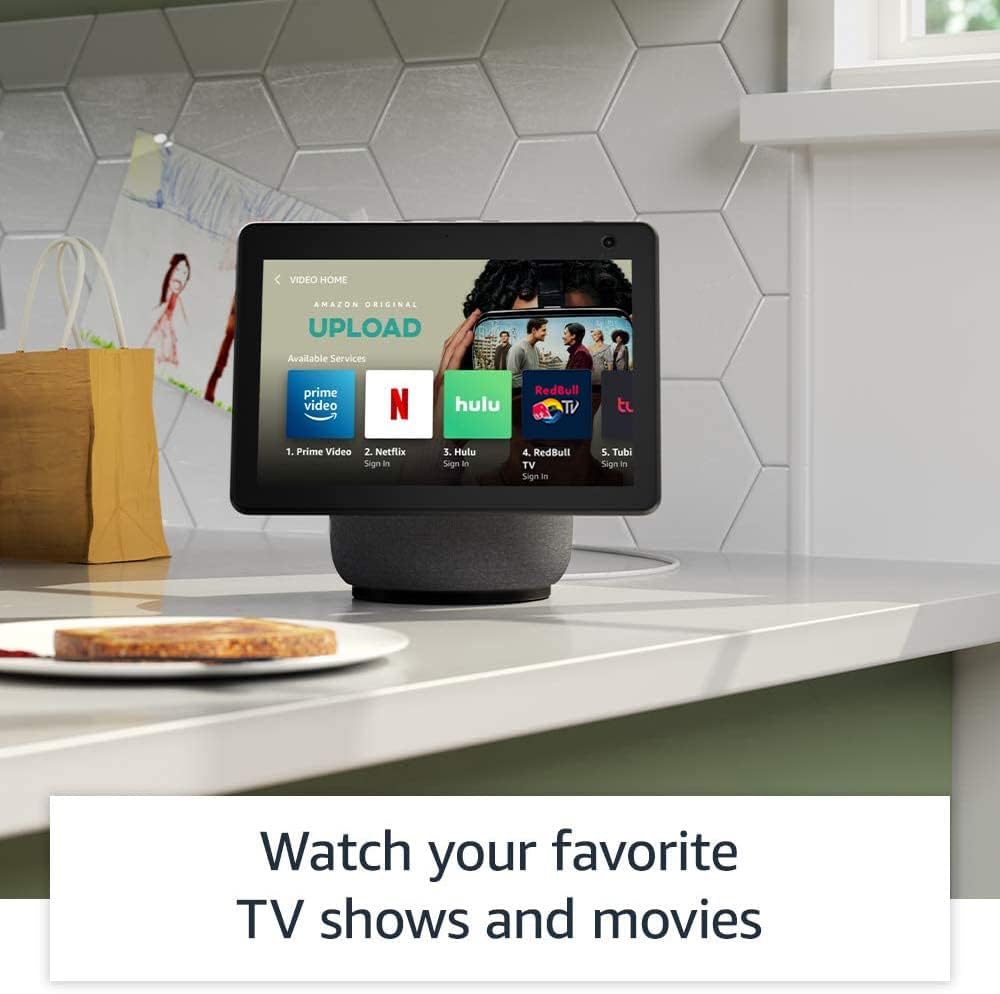
Access a wide range of entertainment options, including popular streaming services, directly on your Echo Show 10.
שילוב בית חכם
The Echo Show 10 includes a built-in Zigbee, Sidewalk, and Matter smart home hub, allowing you to set up compatible devices without a separate hub. Use voice commands to control lights, adjust thermostats, and view מצלמות אבטחה.
Daily Assistance and Productivity

Get personalized recipes and hands-free cooking instructions by asking Alexa.
Alexa can assist with daily tasks such as providing personalized recipes, offering step-by-step cooking instructions, setting timers, and managing your grocery list. You can also use Amazon Photos to turn your home screen into a digital photo frame.
תכונות פרטיות
The Echo Show 10 is designed with multiple layers of privacy controls. These include:
- Wake word technology: The device only begins listening after detecting the wake word ("Alexa").
- Streaming indicators: אינדיקטורים חזותיים מראים מתי אודיו או וידאו מוזרמים לענן.
- Microphone/camera off button: כפתור פיזי לניתוק אלקטרוני של המיקרופונים והמצלמה.
- תריס מצלמה: מחוון פיזי לכיסוי עדשת המצלמה.
- Voice recording management: יכולת ל view ולמחוק את הקלטות הקול שלך.
- Motion disable: Option to turn off the device's motion tracking.
לפרטים נוספים, בקרו במרכז הפרטיות של Alexa.
תכונות נגישות
The Echo Show 10 offers various accessibility features to personalize Alexa to your abilities. These can be accessed via הגדרות → נְגִישׁוּת במכשיר שלך.
- הקש כדי להגיע לאלכסה: Interact with Alexa via touch through on-screen tiles or a keyboard.
- האזנה אדפטיבית: מספק יותר זמן לסיים את הדיבור לפני שאלכסה תגיב.
- קצב דיבור מועדף: שלוט במהירות או באיטיות של דיבור של אלקסה.
- כיתוב: כתוביות Alexa, כתוביות לשיחות וכתוביות סמויות עבור תוכן נתמך.
- הראה וספר: מסייע בזיהוי מוצרים עבור משתמשים עיוורים או לקויי ראייה.
- קוֹלView קורא מסך: עבור משתמשים עיוורים או לקויי ראייה.
- מגדיל מסך: הגדלה/הקטנה של התצוגה וזיזת מסך.
- הודע כשנמצא בקרבת מקום: משמיע צלילי התראות כאשר מזוהה בקרבת המכשיר.
- קינדל קרא בקול רם: אלכסה קוראת בקול רם את ספרי הקינדל שלך.
- טקסט בזמן אמת: הקלד טקסט חי בשיחת וידאו.
- הגדרות נוספות כוללות היפוך צבע, תיקון צבע, בקשת צליל ועוד.
תַחזוּקָה
כדי להבטיח את אורך החיים והביצועים האופטימליים של ה-Echo Show 10 שלכם, יש לפעול לפי הנחיות התחזוקה הכלליות הבאות:
- ניקוי: Gently wipe the screen and device exterior with a soft, lint-free cloth. Avoid using abrasive cleaners or sprays directly on the device.
- מיקום: Keep the device in a dry environment, away from direct sunlight, heat sources, and excessive dust.
- עדכוני תוכנה: Ensure your device receives regular software security updates. These are guaranteed for at least four years after the device is last available for purchase as a new unit.
פתרון בעיות
If you encounter issues with your Echo Show 10, consider the following common troubleshooting steps:
- אין כוח: ודא שמתאם החשמל מחובר היטב הן למכשיר והן לשקע חשמל תקין.
- בעיות קישוריות Wi-Fi:
- Check if your Wi-Fi router is on and functioning correctly.
- Restart your router and the Echo Show 10.
- Verify your Wi-Fi password in the device settings.
- אלכסה לא מגיבה:
- Ensure the microphone is not muted (check the mic/camera off button).
- דבר בצורה ברורה ובעוצמת קול רגילה.
- Try moving closer to the device.
- Motion Not Working:
- Check if motion tracking is enabled in the device settings or via voice command ("Alexa, enable Motion").
- Ensure there are no obstructions in the device's rotation path.
- בעיות מסך: אם המסך אינו מגיב, נסה להפעיל מחדש את המכשיר על ידי ניתוקו לכמה שניות וחיבורו מחדש.
For further assistance, refer to the Alexa app or Amazon's online support resources.
מפרטים
| תכונה | פְּרָט |
|---|---|
| דוֹר | Echo Show (דור שלישי) |
| גוֹדֶל | 251 x 230 x 172 מ"מ (9.9 אינץ' x 9 אינץ' x 6.7 אינץ') |
| מִשׁקָל | 90.3 אונקיות (2560 גרם) |
| לְהַצִיג | 10.1" touchscreen. Rotating screen with manual tilt. |
| מַצלֵמָה | 13MP + Shutter (Photo quality/size may vary) |
| תְנוּעָה | Brushless Motor +/- 175° rotation |
| שֶׁמַע | 2.1 System: 2 x 1.0" tweeters and a 3.0" woofer |
| מעבד | MediaTek 8183 main processor plus second processor with Amazon AZ1 Neural Edge |
| קישוריות Wi-Fi | Dual-band, dual-antenna WiFi (MIMO). Supports 802.11a/b/g/n/ac WiFi networks. (WiFi 6 not supported) |
| קישוריות בלוטות' | תמיכה ב-A2DP להזרמת אודיו, AVRCP לשליטה קולית במכשירים ניידים מחוברים. |
| רכזת בית חכם | Zigbee + Sidewalk + Matter |
| חיישן | ALS RGB |
| שָׂפָה | אלכסה דוברת אנגלית וספרדית |
| Recommended Device Footprint | רוחב 15 אינץ' x עומק 10 אינץ' |
אחריות ותמיכה
Your Echo Show 10 comes with a 1-year limited warranty and service included. Optional 1-year, 2-year, and 3-year extended warranties are available for U.S. customers, sold separately.
For detailed warranty terms and conditions, please refer to the documentation provided with your device or visit Amazon's official support website. For general support, troubleshooting, and managing your device, use the Alexa app or visit the "Manage Your Content and Devices" section on Amazon's webאֲתַר.
מכשיר זה מקבל עדכוני אבטחת תוכנה מובטחים עד לפחות ארבע שנים לאחר שהמכשיר יהיה זמין לרכישה לאחרונה כיחידה חדשה באתר האינטרנט של אמזון. webאתרים.


