1. הקדמה
The Audiolab 8300XP is a high-performance stereo power amplifier designed to deliver exceptional audio fidelity and power. It can operate in stereo mode, providing 280 Watts per channel, or be bridged to deliver 480 Watts as a monoblock amplifier. This manual provides essential information for the safe and optimal use of your 8300XP ampחיים יותר.

Figure 1.1: Audiolab 8300XP Power Ampמגביר, קדמי בזווית view. This image shows the sleek black chassis with the power button and Audiolab logo visible on the front panel.
2. מידע בטיחות
Please read all safety instructions carefully before operating the ampמרים. שמור מדריך זה לעיון עתידי.
- מקור כוח: Connect the unit only to an AC power source of the type marked on the rear panel. Ensure the voltage תואם לספק הכוח המקומי שלך.
- אוורור: אין לחסום פתחי אוורור. יש לוודא זרימת אוויר מספקת סביב היחידה כדי למנוע התחממות יתר.
- מים ולחות: אין לחשוף את המכשיר לגשם או לחות. אין להניח חפצים מלאים בנוזלים, כגון אגרטלים, על המכשיר.
- חוֹם: אין למקם את היחידה ליד מקורות חום כגון רדיאטורים, אוגרי חום, תנורים או מכשירים אחרים (כולל ampמחצבים) המייצרים חום.
- שֵׁרוּת: אל תנסה לתת שירות למוצר זה בעצמך. הפנה את כל השירות לאנשי שירות מוסמכים.
- הַאֲרָקָה: ודא שכבל החשמל מחובר כראוי להארקה כדי למנוע התחשמלות.
3. פריקה ותכולה
פרק בזהירות את ה amplifier. Retain the packing materials for future transport. Inside the box, you should find:
- Audiolab 8300XP Power Ampחיים יותר
- כבל מתח AC
- מדריך למשתמש (מסמך זה)
אם פריטים כלשהם חסרים או ניזוקים, פנו מיד לסוכן שלכם.
4. חיבורים
4.1 לוח קדמי

Figure 4.1: Audiolab 8300XP Power Ampליפר, קדמי view. This image highlights the minimalist front panel design, featuring only the power button on the right and the Audiolab logo on the bottom right.
The front panel of the 8300XP is designed for simplicity and elegance. It features:
- לחצן הפעלה: Located on the right side, used to turn the ampחיים יותר לסירוגין.
- נורית מחוון כוח: A small LED (typically red) indicates the power status of the unit.
4.2 פאנל אחורי
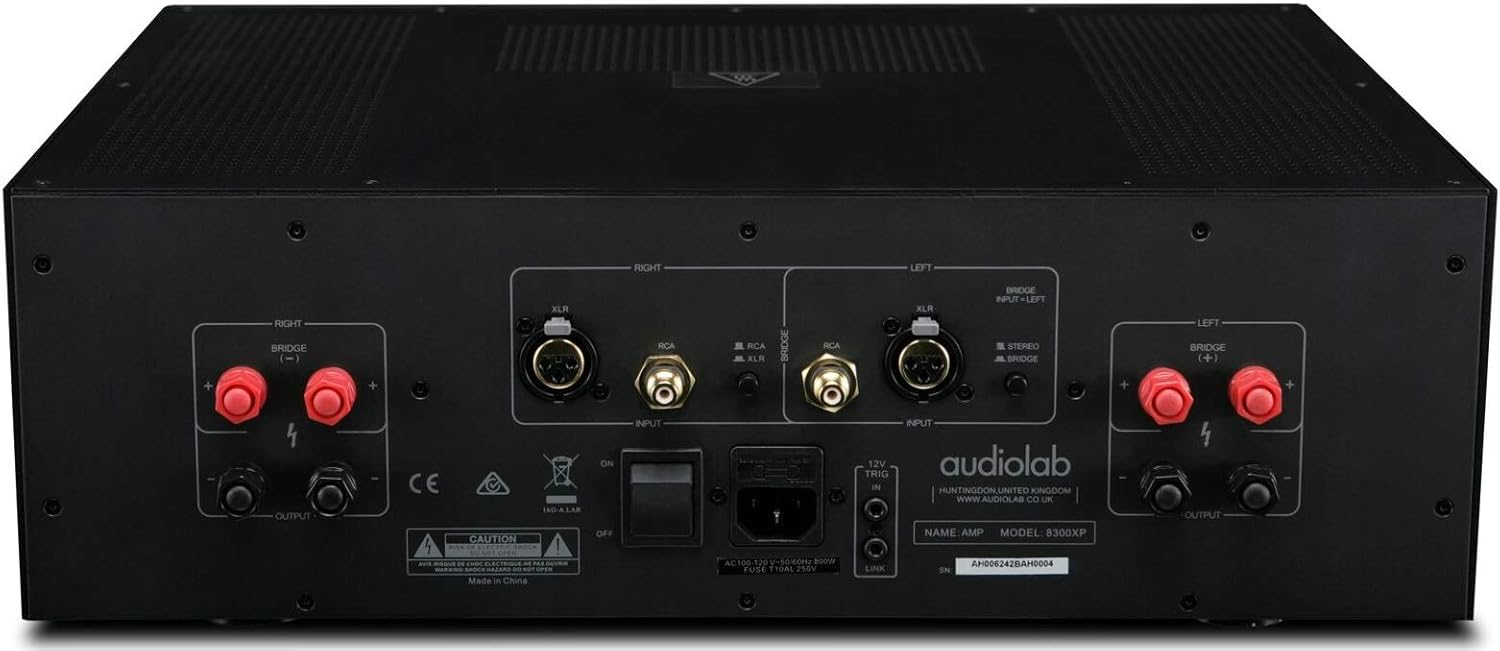
Figure 4.2: Audiolab 8300XP Power Amplifier, rear panel. This detailed view shows all input and output terminals, including XLR and RCA inputs, speaker terminals, and the power inlet.
The rear panel provides all necessary connections for integrating the 8300XP into your audio system:
- Balanced XLR Inputs (Left/Right): For connecting sources with balanced outputs, offering superior noise rejection.
- Unbalanced RCA Inputs (Left/Right): For connecting sources with unbalanced outputs.
- Speaker Outputs (Left/Right): High-quality binding posts for connecting your loudspeakers. Ensure correct polarity (+ to + and - to -).
- Bridge Mode Switch: A switch to select between Stereo and Bridged (Mono) operation. When in bridged mode, only use the designated input and speaker terminals.
- 12V טריגר כניסה/יציאה: Allows for remote power control with other compatible components.
- כניסת מתח AC: For connecting the supplied AC power cord.
5. התקנה
5.1 מיקום
Place the 8300XP on a stable, level surface away from direct sunlight, heat sources, and excessive moisture. Ensure there is adequate space around the unit for ventilation, especially above and behind it.
5.2 חיבור רמקולים
- להבטיח את amplifier is turned off and unplugged from the mains power.
- Connect your loudspeakers to the corresponding speaker output terminals on the rear panel.
- For stereo operation, connect the left speaker to the 'LEFT' terminals and the right speaker to the 'RIGHT' terminals. Ensure the positive (+) terminal on the amplifier connects to the positive (+) terminal on the speaker, and similarly for the negative (-) terminals.
- For bridged (mono) operation, set the 'BRIDGE' switch to 'ON'. Connect your single speaker to the designated bridged output terminals (refer to the markings on the rear panel).
5.3 חיבור מקורות שמע
- Connect your pre-amplifier or audio source to either the Balanced XLR Inputs or Unbalanced RCA Inputs. Do not use both simultaneously for the same channel.
- If using balanced connections, ensure the XLR cables are securely connected.
- If using unbalanced connections, ensure the RCA cables are securely connected.
5.4 חיבור מתח
- Once all audio and speaker connections are made, connect the supplied AC power cord to the AC inlet on the rear panel of the ampחיים יותר.
- Plug the other end of the power cord into a suitable mains power outlet.
6. הוראות הפעלה
6.1 הפעלה/כיבוי
- כדי להפעיל את amplifier, press the Power button on the front panel. The power indicator LED will illuminate.
- כדי לכבות את amplifier, press the Power button again. The power indicator LED will turn off.
6.2 Stereo vs. Bridged Mode
The 8300XP can operate as a two-channel stereo amplifier or a single-channel monoblock amplifier (bridged mode).
- מצב סטריאו: For typical two-channel audio systems. Ensure the 'BRIDGE' switch on the rear panel is set to 'OFF'.
- מצב מגשר: For higher power output to a single speaker. Ensure the 'BRIDGE' switch on the rear panel is set to 'ON'. When in bridged mode, use only the designated input (typically the Left channel) and the specified bridged speaker terminals. Consult the rear panel markings for precise connections.
Caution: Ensure the amplifier is powered off before changing the Stereo/Bridge mode switch to prevent damage to the ampחיים או רמקולים.
7. תחזוקה
- ניקוי: השתמש במטלית רכה ויבשה כדי לנקות את amplifier's exterior. Do not use abrasive cleaners, waxes, or solvents.
- אוורור: בדקו מעת לעת שפתחי האוורור נקיים מאבק ופסולת.
- כבל חשמל: Inspect the power cord regularly for any signs of damage. If damaged, replace it with an approved cord of the same type.
8. פתרון תקלות
If you experience issues with your Audiolab 8300XP, please consult the following table before contacting service personnel.
| בְּעָיָה | סיבה אפשרית | פִּתָרוֹן |
|---|---|---|
| אין כוח | Power cord not connected; Power outlet faulty; Internal fuse blown | Check power cord connection; Try a different outlet; Contact service for fuse replacement |
| אין קול | Input cables loose/incorrect; Speaker cables loose/incorrect; Source component off/faulty; Amplifier in standby mode | Check all cable connections; Ensure source is active; Press power button to exit standby |
| צליל מעוות | Input signal too high; Speaker impedance mismatch; Faulty cables | Reduce source volume; Check speaker impedance (should be 4-16 ohms); Replace cables |
| התחממות יתר | Insufficient ventilation; Blocked vents | Ensure adequate space around amplifier; Clear any obstructions from vents |
9. מפרטים
Key technical specifications for the Audiolab 8300XP Power Ampחיים יותר:
- מספר דגם של פריט: 8300XP
- יַצרָן: Audiolab
- כרך ידtage: 100 Volts, 12 Volts (Trigger)
- סוג הרכבה: מתקן משטח
- מספר ערוצים: 2 (סטריאו)
- Power Output (Stereo): 280 וואט לערוץ
- Power Output (Bridged Mono): 480 וואט
10. אחריות ותמיכה
Your Audiolab 8300XP amplifier is covered by a manufacturer's warranty. Please refer to the warranty card included with your product or visit the official Audiolab webבאתר לקבלת תנאי אחריות מפורטים הספציפיים לאזורך.
For technical support, service, or further inquiries, please contact your authorized Audiolab dealer or distributor. You can also find support information on the official Audiolab webאֲתַר: www.audiolab.co.uk


