1. מבוא ומעלהview
Thank you for choosing the Lorex Analog 4K Weatherproof Indoor/Outdoor HD Wired Add-On Security Camera. This manual provides essential information for the proper installation, operation, and maintenance of your new security camera. This camera is designed as an add-on unit and requires a compatible Lorex recorder (DVR/NVR) for full functionality.
This camera features 4K resolution for superior image clarity, robust weatherproof construction for reliable indoor and outdoor use, and advanced deterrence features such as motion-activated lights and remote-triggered sirens. Its long-range night vision ensures comprehensive surveillance even in low-light conditions.
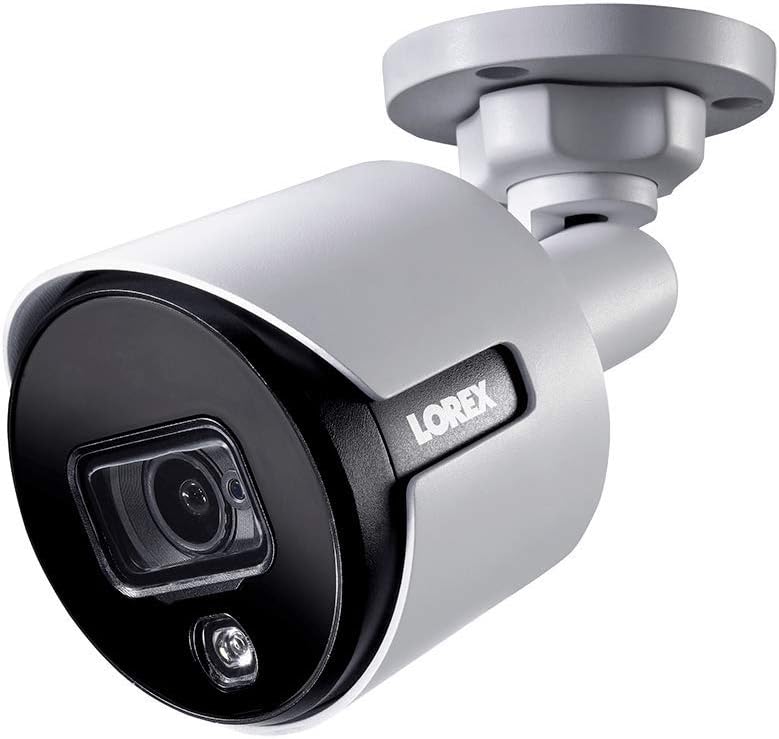
איור 1.1: זווית קדמית view of the Lorex 4K Weatherproof Security Camera. This image shows the camera's bullet form factor, lens, and integrated light.
2. תכולת החבילה
The Lorex Analog 4K Weatherproof Indoor/Outdoor HD Wired Add-On Security Camera package includes:
- 1 x Lorex Analog 4K Weatherproof Indoor/Outdoor HD Wired Add-On Security Camera (Model: LBV8543XW)
- ערכת הרכבה (ברגים ותקעים)
- Allen Key (for adjustment)
Note: This is an add-on camera. Video cables, power adapters, and a compatible Lorex recorder are sold separately and are required for operation.
3. תכונות עיקריות
- רזולוציית 4K Ultra HD: Provides exceptional detail and clarity with an 8MP effective still resolution.
- עיצוב עמיד למים (IP67): Durable metal housing ensures reliable performance in various weather conditions, suitable for both indoor and outdoor installation.
- Long Range Night Vision: See clearly up to 150 feet (45m) in ambient night conditions and up to 98 feet (30m) in total darkness. Features Color Night Vision for enhanced detail in low light.
- נורית אזהרה המופעלת על ידי תנועה: Integrated LED light can be triggered by motion to deter intruders.
- סירנה מופעלת מרחוק: Activate a loud siren directly from your Lorex recorder or connected app to scare away unwanted visitors.
- Wired Connectivity (BNC): Ensures a stable and secure connection to your Lorex DVR/NVR system.
- טמפרטורת פעולה רחבה: Functions reliably in temperatures up to 60 degrees Celsius.
4. התקנה והתקנה
Before installation, ensure you have a compatible Lorex recorder (DVR/NVR) and necessary video/power cables.
4.1 בחירת מיקום
בחר מיקום המספק את הרצוי viewing angle and is within reach of your Lorex recorder and a power source. Consider areas prone to intrusion, such as entry points or vulnerable perimeters. The camera is suitable for ceiling mount and wall mount applications.

איור 4.1: צד view of the Lorex 4K Weatherproof Security Camera, showing its adjustable mounting base.
4.2 הרכבת המצלמה
- סמן חורים לקדוח: Use the mounting template (if provided) or the camera base to mark the positions for drilling.
- חורים לקדוח: Drill pilot holes for the mounting screws. If mounting on drywall or masonry, insert the provided wall plugs.
- מצלמה מאובטחת: יישר את בסיס המצלמה עם החורים שנקדחו וחזק אותו באמצעות הברגים המצורפים.
- התאם זווית: Loosen the adjustment screws on the camera body using the Allen key to position the camera for the optimal viewזווית הכיוון. הדקו את הברגים לאחר הכוונון.
4.3 חיבור המצלמה
- חבר כבל וידאו: Connect one end of the BNC video cable (not included) to the camera's BNC port and the other end to an available video input channel on your Lorex recorder.
- חבר חשמל: Connect the camera's power input to a compatible power adapter (not included). Ensure the power adapter is connected to a power outlet.
- הפעלת המקליט: Ensure your Lorex recorder is powered on and properly configured.
5. הוראות הפעלה
Once the camera is physically installed and connected to your Lorex recorder, you can begin operation.
5.1 Viewבעדכון חי
Access your Lorex recorder's interface (via monitor, Lorex Home app, or client software) to view the live video feed from the camera. Ensure the correct channel is selected.

איור 5.1: תקריב view of the Lorex 4K Weatherproof Security Camera's lens and integrated light.
5.2 Motion Detection and Smart Deterrence
Your Lorex recorder manages motion detection settings. Refer to your recorder's manual for detailed instructions on configuring motion zones and sensitivity.
- Motion-Activated Light: The camera's integrated light can be set to activate automatically upon motion detection. This setting is typically configured within your Lorex recorder's deterrence or alarm settings.
- סירנה מופעלת מרחוק: You can manually activate the camera's siren through your Lorex recorder's interface or the Lorex Home app. This feature is useful for immediate deterrence.

Figure 5.2: The Lorex 4K Weatherproof Security Camera mounted on a brick wall at night, demonstrating its motion-activated light feature.
5.3 ראיית לילה
The camera automatically switches to night vision mode in low-light conditions. The infrared (IR) LEDs provide illumination for clear black and white video. Color Night Vision (CNV) may be available if there is sufficient ambient light, providing full-color video in low-light scenarios.
6. תחזוקה
תחזוקה שוטפת מבטיחה ביצועים אופטימליים ואורך חיים של מצלמת האבטחה שלכם.
- ניקוי: נקו מעת לעת את עדשת המצלמה ואת ביתה בעזרת מטלית רכהamp cloth. Avoid abrasive cleaners or solvents that could damage the finish or lens.
- בדוק חיבורים: Ensure all cable connections (BNC and power) are secure and free from corrosion, especially for outdoor installations.
- עדכוני קושחה: בדוק את הלורקס באופן קבוע website or your recorder's settings for available firmware updates for your camera and recorder to ensure the latest features and security enhancements.
- תנאים סביבתיים: While weatherproof, extreme conditions outside the specified operating temperature range (up to 60°C) may affect performance.
7. פתרון תקלות
If you encounter issues with your Lorex camera, refer to the following common troubleshooting steps:
| בְּעָיָה | סיבה אפשרית | פִּתָרוֹן |
|---|---|---|
| אין הזנת וידאו מהמצלמה | חיבור כבל רופף אין חשמל למצלמה Incorrect channel selected on recorder | Check BNC and power connections. ודא שמתאם החשמל פועל ומחובר. Verify the correct input channel on your Lorex recorder. |
| איכות תמונה ירודה / וידאו מטושטש | עדשה מלוכלכת מיקוד לא תקין (אם ניתן לכוונון) Cable interference/damage | נקה את עדשת המצלמה עם מטלית רכה. Ensure the camera is properly focused (if applicable). Check video cable for damage or interference. Use high-quality cables. |
| ראיית לילה לא עובדת | נוריות אינפרא אדום חסומות כוח לא מספיק הגדרות מצלמה | Ensure nothing is blocking the IR LEDs. ודא אספקת חשמל יציבה. Check night vision settings on your Lorex recorder. |
| זיהוי תנועה לא מופעל | Incorrect motion zone setup רגישות נמוכה מדי חסימה פנימה view | Review and adjust motion detection zones on your recorder. הגברת רגישות לתנועה. נקה כל מכשול משדה הראייה של המצלמה view. |
For more advanced troubleshooting, consult your Lorex recorder's user manual or visit the Lorex support webאֲתַר.
8. מפרטים
| תכונה | מִפרָט |
|---|---|
| מספר דגם | LBV8543XW |
| רזולוציית לכידת וידאו | 4K (רזולוציית סטילס אפקטיבית של 8MP) |
| טכנולוגיית קישוריות | BNC (Wired) |
| שימוש בפנים/חוץ | פנימי, חיצוני |
| דירוג הגנה בינלאומי | IP67 (עמיד בפני מזג אוויר) |
| טווח ראיית לילה | 150 רגל (45 מ') |
| תכונות מיוחדות | Motion Sensor, Night Vision, Motion Activated Lights, Remote-Triggered Siren |
| גורם צורה | כַּדוּר |
| חוֹמֶר | מַתֶכֶת |
| Operating Temperature (Upper) | 60 מעלות צלזיוס |
| מידות המוצר (L x W x H) | 16 x 6 x 6 אינץ' |
| משקל פריט | 0.01 אונקיות |
| UPC | 695529017136 |
| שיטת בקרה | App, Remote (via compatible Lorex recorder) |
9. אחריות ותמיכה
מוצרי לורקס מיועדים לאמינות וביצועים. למידע בנוגע לאחריות המוצר, אנא עיינו במדיניות האחריות הזמינה באתר הרשמי של לורקס. website or the documentation included with your Lorex recorder.
For technical support, product registration, or to download the latest software and firmware updates, please visit the official Lorex support page or the Lorex Store:
- Lorex Store: Visit the Lorex Store on Amazon
- מדריך למשתמש (PDF): מדריך למשתמש מקיף בפורמט PDF זמין גם להורדה: הורד מדריך למשתמש
When contacting support, please have your product model number (LBV8543XW) and serial number ready.


