1. מבוא ומעלהview
The Luminous Shakti Charge+ 1150 900Va Square Wave Inverter is designed to provide reliable power backup for your home or office. This inverter features advanced technology to ensure efficient performance and protection for your appliances. It is built with quality materials and advanced techniques to meet high standards.
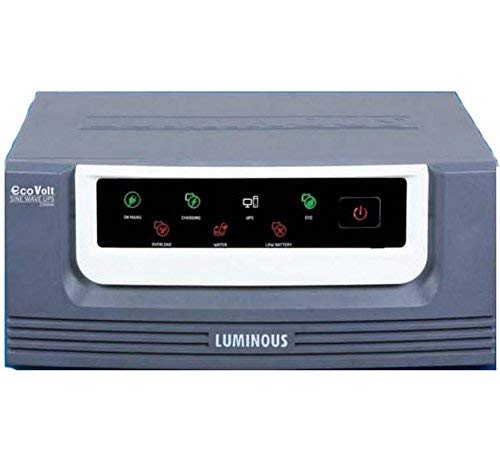
איור 1: חֲזִית view of the Luminous Shakti Charge+ 1150 900Va Square Wave Inverter, showcasinהעיצוב הקומפקטי וממשק המשתמש שלו.
תכונות עיקריות:
- Fast charging and efficient low voltage charging capability.
- Inbuilt battery gravity builder for enhanced battery life.
- Powerful charging mechanism for quick replenishment.
- Dual operating modes: Eco Mode for energy saving and UPS Mode for sensitive appliances.
- Ability to charge the battery with full current even at 95V input.
2. הוראות בטיחות
Please read all safety instructions carefully before installing or operating the inverter. Failure to follow these instructions may result in electric shock, fire, or serious injury.
- הַתקָנָה: Ensure the inverter is installed by a qualified technician.
- אוורור: Place the inverter in a well-ventilated area, away from direct sunlight, heat sources, and flammable materials. Maintain adequate clearance around the unit for airflow.
- מים ולחות: Do not expose the inverter to water, rain, or excessive humidity. Avoid operating it with wet hands.
- הַאֲרָקָה: Always ensure the inverter is properly grounded to prevent electric shock.
- בטיחות סוללה: Batteries contain corrosive acid. Wear protective gear (gloves, eye protection) when handling batteries. Do not short-circuit battery terminals.
- ילדים וחיות מחמד: Keep the inverter and batteries out of reach of children and pets.
- לְהַעֲמִיס יוֹתֵר מִדַי: Do not overload the inverter beyond its specified capacity. This can damage the unit and connected appliances.
- תַחזוּקָה: Disconnect all power before performing any maintenance or cleaning.
- תיקונים: אל תנסה לפתוח או לתקן את הממיר בעצמך. יש לפנות לכל מטלות שירות מורשות.
3. מדריך התקנה
Follow these steps for the initial setup of your Luminous Shakti Charge+ 1150 inverter. It is recommended to have a qualified electrician assist with the installation.
- פריקת אריזה: Carefully unpack the inverter and inspect it for any damage. Report any damage to your dealer immediately.
- מיקום: Choose a cool, dry, and well-ventilated location. Ensure the inverter is placed on a stable, non-flammable surface.
- חיבור סוללה:
- Connect the positive (+) terminal of the battery to the positive (+) terminal of the inverter.
- Connect the negative (-) terminal of the battery to the negative (-) terminal of the inverter.
- Ensure connections are tight and secure. Incorrect polarity can cause severe damage.
- חיבור כניסת AC: Connect the inverter's AC input cord to a properly grounded wall outlet. Ensure the mains supply voltage נמצא בטווח הפעולה של הממיר.
- חיבור עומס: Connect your appliances (lights, fans, etc.) to the output sockets of the inverter. Do not exceed the inverter's rated capacity.
- הפעלה ראשונית: After all connections are secure, switch on the inverter's main power switch. Observe the indicator lights for normal operation.
4. הוראות הפעלה
Understanding the basic operation of your inverter will ensure optimal performance and longevity.
- הפעלה/כיבוי: Use the main power switch on the front panel to turn the inverter ON or OFF.
- מצב רשת: When the mains supply is present and within acceptable limits, the inverter will charge the battery and pass the mains power to the connected loads.
- מצב מהפך: במקרה של כוח outage או mains voltage fluctuation, the inverter will automatically switch to battery power, providing backup to your connected appliances.
- מצב לסביבה: This mode is suitable for general appliances like lights and fans. It optimizes battery usage by allowing a wider input voltage range, reducing frequent switching to battery mode.
- מצב UPS: This mode is ideal for sensitive electronic devices such as computers, ensuring a stable and uninterrupted power supply with a narrower input voltage window.
- טְעִינָה: The inverter features fast charging and an inbuilt battery gravity builder to maintain battery health. It can charge the battery effectively even at low input voltages (down to 95V).
- אינדיקטורים: Pay attention to the LED indicators on the front panel, which typically show Mains ON, Battery Charging, Inverter ON, Overload, and Battery Low status. Refer to the specific indicator guide in your product's physical manual for detailed explanations.
5. תחזוקה
Regular maintenance ensures the long life and efficient operation of your inverter and battery.
- ניקוי: Keep the inverter clean and free from dust. Use a dry, soft cloth to wipe the exterior. Do not use liquid cleaners.
- אוורור: Ensure that the ventilation openings are not blocked. Clear any dust or debris that might obstruct airflow.
- Battery Water Level (for lead-acid batteries): If using a lead-acid battery, regularly check the electrolyte level and top up with distilled water as needed. Do not overfill.
- חיבורי מסוף: Periodically check battery and inverter terminal connections for tightness. Loose connections can cause overheating and power loss.
- תנאים סביבתיים: ודא שהממיר פועל בטווחי הטמפרטורה והלחות שצוינו.
- בדיקה מקצועית: Consider having a qualified technician inspect your inverter and battery system annually.
6. פתרון תקלות
סעיף זה מספק פתרונות לבעיות נפוצות שאתה עשוי להיתקל בהן. עבור בעיות שאינן מופיעות כאן, צור קשר עם תמיכת הלקוחות.
| בְּעָיָה | סיבה אפשרית | פִּתָרוֹן |
|---|---|---|
| הממיר לא נדלק | Main switch OFF, loose battery connections, discharged battery. | Ensure main switch is ON. Check and tighten battery terminals. Allow battery to charge if mains is present. |
| No output power in Inverter Mode | Battery low, overload, inverter fault. | Reduce load. Check battery charge level. If problem persists, contact service. |
| אזעקת עומס יתר | Too many appliances connected. | Disconnect some appliances to reduce the load below the inverter's capacity. |
| סוללה לא נטענת | Mains supply absent, loose AC input connection, charger fault. | Check mains supply. Ensure AC input cord is securely plugged in. Contact service if charger fault is suspected. |
| Unusual noise from inverter | Loose components, fan obstruction, internal fault. | Ensure inverter is on a stable surface. Check for fan obstruction. If noise persists, contact service. |
7. מפרטים
Detailed technical specifications for the Luminous Shakti Charge+ 1150 900Va Square Wave Inverter.
| תכונה | פְּרָט |
|---|---|
| מותג | זוֹרֵחַ |
| מספר דגם | Shakti Charge+ 1150 |
| סוּג | Square Wave Inverter |
| דירוג VA | 900 VA |
| כרך ידtage | 95 Volts (minimum charging) |
| משקל פריט | 11 ק"ג 700 גרם |
| יַצרָן | זוֹרֵחַ |
| שם כללי | Home Inverter & UPS |
הערה: המפרטים עשויים להשתנות ללא הודעה מוקדמת לצורך שיפור המוצר.
8. אחריות ותמיכה
Luminous products are known for their quality and reliability.
- אַחֲרָיוּת: Please refer to the warranty card provided with your product for detailed terms and conditions regarding the warranty period and coverage. Keep your purchase receipt for warranty claims.
- אחריות מורחבת: Extended warranty plans may be available from authorized providers to further protect your investment. For example, 1-Year and 2-Year Extended Warranty Plans by Onsitego are often available.
- תמיכת לקוחות: For technical assistance, service requests, or any queries, please contact Luminous customer support. You can find contact details on the official Luminous webהאתר או תיעוד המוצר שלך.
- משאבים מקוונים: בקר אצל הפקיד Luminous Store on Amazon למידע נוסף על המוצר ועדכונים.


