1. המוצר נגמרview
The JOWAY H32 is a wireless Bluetooth earphone designed for audio playback and communication. It features Bluetooth connectivity for seamless pairing with compatible devices, active noise cancellation for an enhanced listening experience, and an in-ear design for comfortable wear.
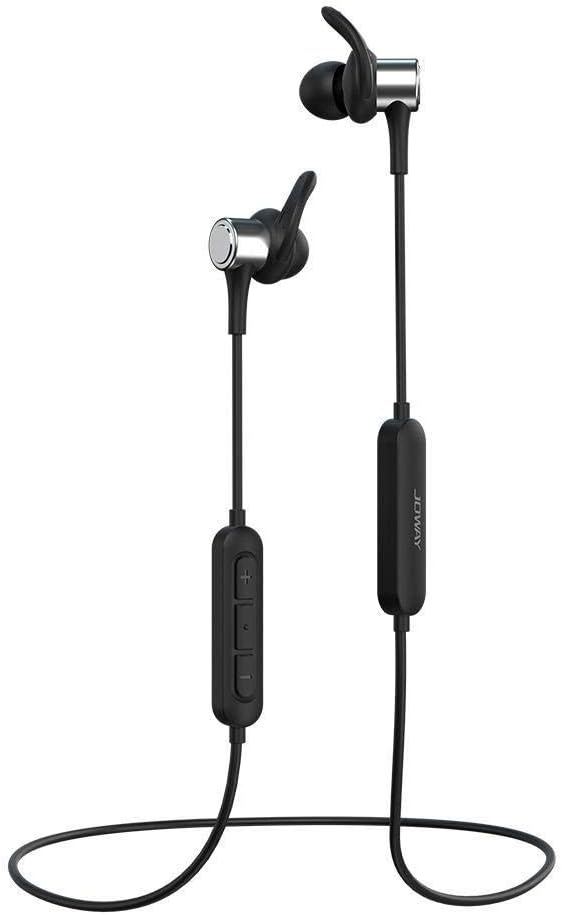
Image 1.1: The JOWAY H32 Bluetooth Earphones, showcasing their in-ear design and inline control panel.
2. תכולת החבילה
אנא ודא שכל הפריטים נמצאים בחבילה שלך:
- JOWAY H32 Bluetooth Earphones
- כריות אוזניים (בגדלים שונים להתאמה אופטימלית)
- USB Charging Cable (typically included, for charging the earphones)
- מדריך למשתמש (מסמך זה)
3. התקנה
3.1. טעינת האוזניות
Before first use, fully charge the earphones. Connect the USB charging cable to the charging port on the earphone's inline control panel and plug the other end into a USB power source (e.g., computer USB port, wall adapter). The indicator light will typically show red during charging and turn blue or off when fully charged. A full charge usually takes approximately 1-2 hours.
3.2. זיווג Bluetooth
- ודא שהאוזניות כבויות.
- Press and hold the multi-function button (usually the center button on the inline control) for approximately 5-7 seconds until the indicator light flashes red and blue alternately. This indicates pairing mode.
- במכשיר שלך (סמארטפון, טאבלט, מחשב), הפעל את Bluetooth וחפש מכשירים זמינים.
- Select "JOWAY H32" from the list of found devices.
- Once paired, the indicator light on the earphones will typically flash blue slowly or turn off, and you will hear an audible confirmation.
- אם תתבקש להזין סיסמה, הזן "0000".

Image 3.1: The JOWAY H32 earphones featuring the inline control panel for power, volume, and call management.
4. הפעלת האוזניות
4.1. פונקציות בסיסיות
- הפעלה: לחץ לחיצה ארוכה על הלחצן הרב-פונקציונלי למשך 3 שניות.
- כיבוי: Press and hold the multi-function button for 3-5 seconds.
- הפעל/השהה: לחץ פעם אחת על הלחצן הרב-פונקציונלי.
- הגבר קול: לחץ על כפתור '+'.
- להנמיך קול: לחץ על כפתור '-'.
- הרצועה הבאה: לחץ והחזק את כפתור '+'.
- רצועה קודמת: לחץ והחזק את כפתור '-'.
4.2. ניהול שיחות
- מענה/סיום שיחה: לחץ פעם אחת על הלחצן הרב-פונקציונלי.
- דחה שיחה: לחץ לחיצה ארוכה על הלחצן הרב-פונקציונלי למשך 2 שניות.
- חיוג חוזר למספר האחרון: לחץ פעמיים על כפתור הרב-תכליתי.
4.3. ביטול רעשים
The JOWAY H32 earphones feature active noise cancellation to reduce ambient sounds, providing a clearer audio experience. This function is typically activated automatically or via a dedicated button (refer to specific product markings if available). The DSP (Digital Signal Processing) technology further enhances sound quality.

Image 4.1: The JOWAY H32 earphones, illustrating their advanced sound processing capabilities for an immersive audio experience.

תמונה 4.2: תיאור מפורט view of the JOWAY H32 earphone's design, showing how the ear tip and ear hanger provide a secure fit and contribute to sound insulation within the ear canal.
5. תחזוקה
5.1. ניקיון
Regularly clean your earphones to maintain optimal performance and hygiene. Use a soft, dry, lint-free cloth to wipe the exterior. For ear tips, remove them and clean with a mild soap solution, then rinse thoroughly and allow to dry completely before reattaching. Avoid using harsh chemicals or abrasive materials.
5.2. אחסון
When not in use, store the earphones in a cool, dry place, away from direct sunlight and extreme temperatures. Avoid tangling the cable to prevent damage. The cable is designed for durability, as shown in Image 5.1.

Image 5.1: An illustration demonstrating the tensile strength of the JOWAY H32 earphone cable, indicating its robust construction.
6. פתרון תקלות
If you encounter issues with your JOWAY H32 earphones, refer to the following common solutions:
- אין כוח: Ensure the earphones are fully charged. Connect them to a power source and check the charging indicator.
- לא ניתן לזווג: Make sure the earphones are in pairing mode (flashing red and blue). Turn off and on your device's Bluetooth. Ensure the earphones are within range (typically 10 meters) and not connected to another device.
- אין צליל: Check the volume level on both the earphones and your connected device. Ensure the earphones are properly paired and connected. Try playing audio from a different application or device.
- איכות סאונד ירודה: Ensure the earphones are fully charged. Move closer to your connected device to reduce interference. Check for any physical obstructions between the earphones and the device.
7. מפרטים
| מותג | JOWAY |
| מספר דגם | H32 |
| טכנולוגיית קישוריות | אלחוטי (Bluetooth) |
| מיקום אוזניים | On Ear (In-Ear design with ear hangers) |
| גורם צורה | על אוזן |
| בקרת רעש | ביטול רעשים אקטיבי |
| מיקרופון כלול | כֵּן |
| תוֹאֵם | כל המכשירים התומכים ב-Bluetooth |
| צֶבַע | שָׁחוֹר |
| מידות חבילה | 18 x 12 x 4.2 ס"מ |
| משקל פריט | 89.99 גרם |
| רכיבים כלולים | כריות אוזניים |
8. אחריות ותמיכה
למידע על אחריות ותמיכת לקוחות, אנא עיין בתיעוד שסופק בעת הרכישה או פנה לספק שלך. שמור את הוכחת הרכישה שלך עבור כל תביעת אחריות.


