1. המוצר נגמרview
The JBL TUNE 110 In-Ear Headphones are designed to deliver JBL Pure Bass Sound in a lightweight, comfortable, and compact form factor. These wired headphones feature 9mm drivers for powerful audio reproduction and include a convenient one-button remote with a built-in microphone for easy control of music playback and calls. The tangle-free flat cable ensures hassle-free use and storage.

Image 1.1: The JBL TUNE 110 In-Ear Headphones in Blue, showcasinהעיצוב החלקלק שלהם.
2. מה בקופסה
Upon unboxing your JBL TUNE 110 In-Ear Headphones, you should find the following components:
- JBL TUNE 110 In-Ear Headphones
- Multiple sizes of ear tips (typically Small, Medium, Large) to ensure a comfortable and secure fit.
- A carrying pouch for convenient storage and portability.
סרטון 2.1: אובר רשמיview of the JBL TUNE 110 In-Ear Headphones, demonstrating key features and components.
3. התקנה
Follow these steps to set up your JBL TUNE 110 In-Ear Headphones:
- בחר טיפים לאוזניות: Choose the ear tips that provide the most comfortable and secure fit for your ears. A good seal is crucial for optimal sound quality and bass performance. Gently attach them to the earbuds.
- הכנסת אוזניות: Carefully insert the earbuds into your ear canals. Ensure they are seated snugly.
- התחבר למכשיר: Plug the 3.5mm audio jack into the headphone port of your audio device (smartphone, tablet, laptop, etc.).

תמונה 3.1: צד view of the JBL TUNE 110 earbud, illustrating its in-ear design.
4. הוראות הפעלה
The JBL TUNE 110 features a convenient one-button remote for easy control:
- הפעל/השהה מוזיקה: לחץ על הכפתור פעם אחת כדי להשמיע או להשהות את המוזיקה שלך.
- מענה/סיום שיחה: לחץ על הכפתור פעם אחת כדי לענות לשיחה נכנסת או לסיים שיחה פעילה.
- דחה שיחה: לחץ והחזק את הלחצן למשך כ-2 שניות כדי לדחות שיחה נכנסת.
- הרצועה הבאה: לחץ על הכפתור פעמיים במהירות כדי לדלג לרצועה הבאה.
- רצועה קודמת: לחץ על הכפתור שלוש פעמים במהירות כדי לחזור לרצועה הקודמת.
- עוזר קולי: Press and hold the button for approximately 3 seconds to activate your device's voice assistant (if supported).
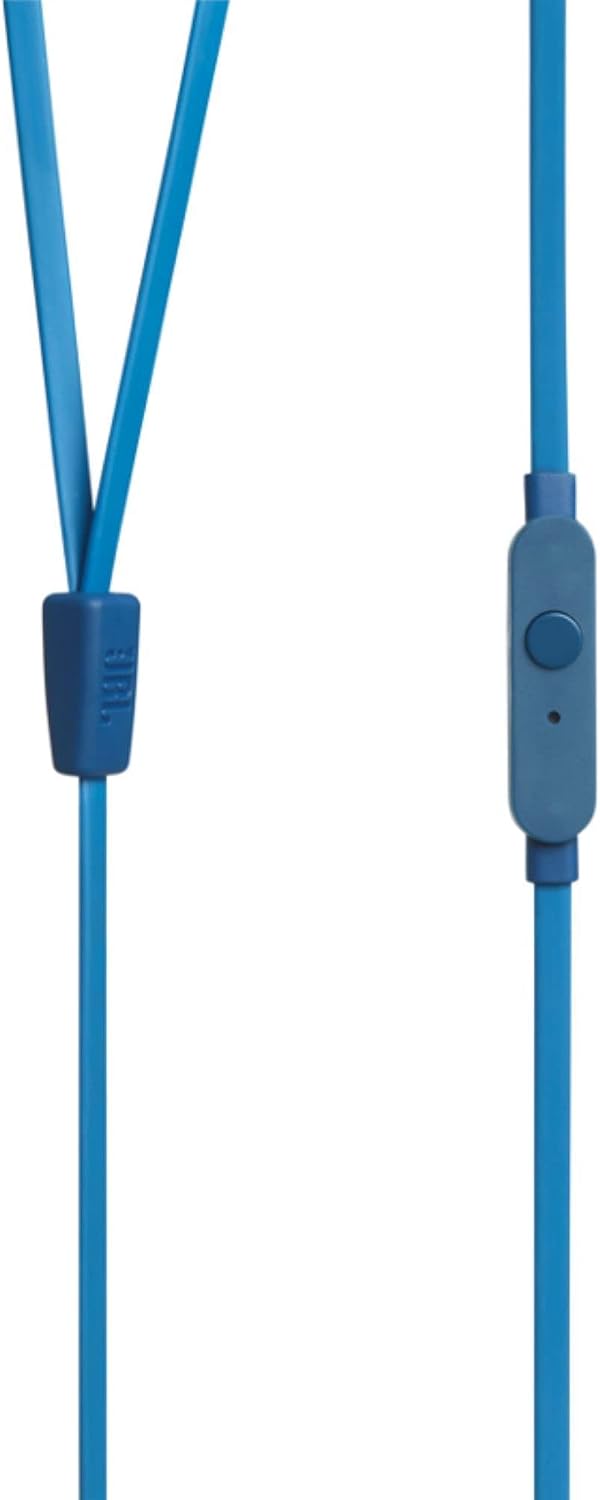
Image 4.1: Close-up of the one-button remote control and built-in microphone on the JBL TUNE 110 cable.
5. תכונות
- סאונד JBL Pure Bass: Experience powerful and clear bass, a signature of JBL audio.
- דרייברים של 9 מ"מ: Equipped with dynamic 9mm drivers for high-quality sound reproduction.
- One-Button Remote with Microphone: Seamlessly manage music playback and hands-free calls.
- כבל שטוח ללא סבכים: Designed to prevent tangles, making the headphones easy to store and use.
- קל משקל ונוח: Ergonomically designed for extended listening comfort.
- ביטול רעשים פסיבי: The in-ear design provides a degree of passive noise isolation.
6. מפרטים
| תכונה | מִפרָט |
|---|---|
| מותג | JBL |
| שם הדגם | JBL TUNE 110 |
| מספר דגם | JBLT110BLUAM |
| טכנולוגיית קישוריות | חוטי |
| שקע אוזניות | 3.5 מ"מ ג 'ק |
| גודל דרייבר | דרייבר דינמי 9 מ"מ |
| עַכָּבָּה | 16 אוהם |
| בקרת רעש | ביטול רעש פסיבי |
| משקל פריט | 0.32 אונקיות (כ-9 גרם) |
| מידות המוצר | 2.36 x 1.18 x 6.89 אינץ' |
| חוֹמֶר | פּלָסטִי |
| צֶבַע | כְּחוֹל |
| תכונת כבלים | סבך חינם |
7. תחזוקה
טיפול נכון יאריך את חיי האוזניות והביצועים שלהן:
- ניקוי קצוות אוזניים: Regularly remove the silicone ear tips and wash them with mild soap and water. Ensure they are completely dry before reattaching.
- ניקוי אוזניות: Gently wipe the earbuds with a soft, dry cloth. Avoid using harsh chemicals or abrasive materials.
- טיפול בכבלים: Although the cable is tangle-free, avoid excessive pulling or sharp bends to prevent internal damage. When not in use, coil the cable neatly.
- אִחסוּן: Store your headphones in the provided carrying pouch to protect them from dust, dirt, and physical damage.
8. פתרון תקלות
If you encounter any issues with your JBL TUNE 110 headphones, refer to the following common solutions:
- אין צליל:
- ודא ששקע ה-3.5 מ"מ מוכנס במלואו ליציאת השמע של המכשיר.
- בדוק את עוצמת הקול במכשיר השמע שלך.
- בדוק את האוזניות עם מכשיר שמע אחר כדי לשלול בעיה ספציפית למכשיר.
- Poor Sound Quality / Lack of Bass:
- Verify that the ear tips are correctly sized and provide a good seal in your ear canal.
- Ensure the ear tips are clean and free from debris.
- המיקרופון לא עובד:
- Confirm the 3.5mm jack is fully inserted.
- בדוק את הגדרות קלט השמע של המכשיר שלך כדי לוודא שהמיקרופון החיצוני נבחר.
- בדוק את המיקרופון עם מכשיר או אפליקציה אחרים.
9. אחריות ותמיכה
JBL products are manufactured to high standards and undergo rigorous quality control. For detailed warranty information, product registration, and technical support, please visit the official JBL website or contact your local JBL customer service center. Keep your proof of purchase for warranty claims.