1. הקדמה
This manual provides detailed instructions for the installation, operation, and maintenance of your MOES Smart Thermostat WiFi, Model BHT-002-GCLWW. This thermostat is designed to control water and gas boiler heating systems, offering both manual and smart control options via a smartphone application and voice assistants. Please read this manual thoroughly before installation and use to ensure proper function and safety.
2. המוצר נגמרview
The MOES Smart Thermostat WiFi provides precise temperature control and energy-saving programming for your home heating system. Key features include:
- מצבי בקרה כפולים: Supports fully automatic programming or manual operation.
- תאימות רחבה: Suitable for most water heating systems and gas boilers (95-240V, 50/60 Hz, 5A max current).
- שְׁלַט רָחוֹק: Manage your heating system from anywhere using the Smart Life/Tuya smartphone application.
- שילוב עוזר קולי: Compatible with Amazon Alexa and Google Home for convenient voice control.
- לוחות זמנים ניתנים לתכנות: Features 5+1+1 (weekday/Saturday/Sunday) programming with seven periods to optimize comfort and energy efficiency.
- רב תכליתיות: Includes power-off protection, date memory, and language synchronization.
- דיוק גבוה: Temperature precision of 0.5°C with an adjustable range of 5-35°C.
- ממשק ידידותי למשתמש: LCD screen with touch buttons for easy readability and operation.
3. מידע בטיחות
- Always disconnect power to the heating system at the circuit breaker before installation or maintenance.
- Installation should be performed by a qualified electrician or heating technician.
- Ensure the thermostat is compatible with your heating system's voltage והדרישות הנוכחיות.
- מכשיר זה דורש חוט ניטרלי לפעולה.
- Only use the thermostat with 2.4GHz Wi-Fi networks; 5GHz networks are not supported.
- אין לחשוף את התרמוסטט למים או ללחות מוגזמת.
4. התקנה
4.1. התקנה פיזית
The thermostat is designed for in-wall installation. Ensure you have a standard electrical box for mounting. Refer to the wiring diagram for correct connections.

תמונה 1: Wiring diagram for the MOES Smart Thermostat (GC model) for gas/water boilers. Terminals 1 and 2 connect to the dry contact of the boiler. Terminals 3 and 4 are for AC 95-240V power (L for Live, N for Neutral). Terminals 5 and 6 are for an optional NTC external sensor. If your boiler has more than three wires, consult a professional.

תמונה 2: Technical drawing showing the dimensions of the MOES Smart Thermostat. The front panel measures 86.0mm x 86.0mm (3.39in x 3.39in). The recessed part measures 60.0mm x 50.1mm (2.36in x 1.97in) with a depth of 24.4mm (0.96in) from the wall surface.
4.2. Important Installation Notes
- The thermostat operates only on 2.4GHz Wi-Fiזה לא תואם לרשתות 5GHz.
- A חוט ניטרלי נדרש להפעלה תקינה.
- תָמִיד install without power כדי למנוע התחשמלות.
- This specific model (GC) is designed to control Gas/Water Boilers.
תמונה 3: Visual representation of important installation notes: 2.4GHz Wi-Fi only, Neutral wire required, install without power, and designed for Gas/Water Boiler control.
4.3. הגדרת Wi-Fi ואפליקציה
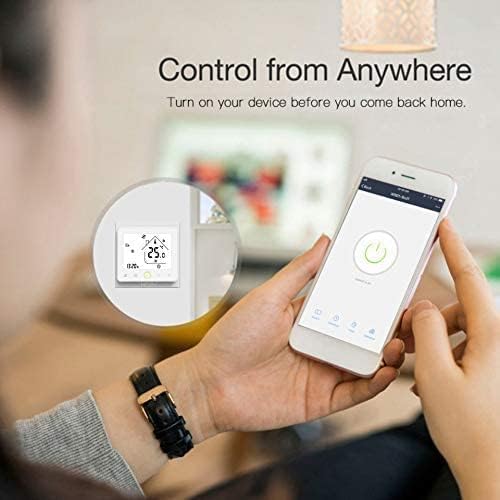
To connect your thermostat to your smartphone, download the 'Smart Life' or 'Tuya Smart' application from your device's app store. Follow the in-app instructions to add your device. Ensure your phone is connected to a 2.4GHz Wi-Fi network during the pairing process.

תמונה 4: A smartphone displaying the control interface for the MOES Smart Thermostat, demonstrating remote control capabilities. The thermostat is visible in the background, showing a temperature of 25.0°C.
4.4. שילוב עוזר קולי
Once connected to the Smart Life/Tuya app, you can link your thermostat to Amazon Alexa or Google Home for voice control. Refer to the respective voice assistant's app for instructions on connecting third-party smart devices.

תמונה 5: The MOES Smart Thermostat integrated with Amazon Alexa and Google Home devices, illustrating its voice control capabilities within a home environment.
5. הוראות הפעלה
5.1. בקרה ידנית
You can adjust the temperature directly on the thermostat's touch screen. Use the up and down arrows to set your desired temperature. The current room temperature and set temperature will be displayed.

תמונה 6: The MOES Smart Thermostat display showing a set temperature of 25.0°C, current time 13:20, and various icons indicating heating status, Wi-Fi connectivity, and mode.
5.2. Programmable Modes
The thermostat supports 5+1+1 (weekday/Saturday/Sunday) programming with up to seven periods per day. This allows you to set different temperatures for various times of the day and week, optimizing comfort and energy savings.
- Access the programming settings via the thermostat's menu or the Smart Life/Tuya app.
- Set desired start times and temperatures for each period.
- The thermostat will automatically follow the programmed schedule.

תמונה 7: A smartphone screen displaying the programmable schedule interface for the MOES Smart Thermostat, showing time slots (e.g., 6:00-8:00, 11:00-12:00) and toggle switches for activation.
5.3. שיתוף מכשיר
You can share control of your MOES Smart Thermostat with family members or other authorized users through the Smart Life/Tuya application. This allows multiple individuals to manage the heating system from their own devices.

תמונה 8: Two individuals interacting with smartphones, illustrating the device sharing feature of the MOES Smart Thermostat, allowing multiple users to control the device.
6. תחזוקה
The MOES Smart Thermostat requires minimal maintenance. Follow these guidelines:
- Clean the screen and exterior with a soft, dry cloth. Do not use abrasive cleaners or solvents.
- Ensure the thermostat's vents (if any) are free from dust and obstructions to allow for accurate temperature readings.
- בדוק מעת לעת את חיבורי החיווט כדי לוודא שהם מאובטחים.
7. פתרון תקלות
If you encounter issues with your MOES Smart Thermostat, refer to the following common problems and solutions:
| בְּעָיָה | סיבה אפשרית | פִּתָרוֹן |
|---|---|---|
| Thermostat is offline/cannot connect to Wi-Fi | Incorrect Wi-Fi frequency (5GHz), weak signal, incorrect password, router issues. | Ensure your router is broadcasting a 2.4GHz signal. Move the thermostat closer to the router. Verify Wi-Fi password. Restart your router and the thermostat. Re-pair the device in the app. |
| Thermostat loses time/program after power cut | Internal clock reset due to power interruption. | The thermostat should ideally retain settings. If it consistently resets, ensure stable power supply. Re-synchronize time via the app. If the issue persists, contact support. |
| קריאת טמפרטורה לא מדויקת | Thermostat placed near heat sources/drafts, sensor obstruction. | Relocate the thermostat away from direct sunlight, drafts, or heat-emitting appliances. Ensure no objects are blocking the internal sensor. |
| מערכת החימום לא מגיבה | Wiring error, boiler malfunction, thermostat in incorrect mode. | Check wiring according to the diagram. Ensure the boiler is functioning correctly. Verify the thermostat is in heating mode and the set temperature is above the ambient temperature. |
8. מפרטים
| תכונה | מִפרָט |
|---|---|
| מספר דגם | BHT-002-GCLWW |
| מקור כוח | Wired Electric (AC 95-240V, 50/60Hz) |
| עומס נוכחי | 5A (מקסימום) |
| טכנולוגיית קישוריות | Wi-Fi (2.4GHz בלבד) |
| סוג בקרת טמפרטורה | הַסָקָה |
| מידות המוצר (L x W x H) | 8.6 x 8.6 x 3.8 ס"מ |
| משקל פריט | 220 גרם |
| תכונה מיוחדת | ניתן לתכנות |
| סוג בקר | אמזון אלקסה, גוגל הום |
| דיוק טמפרטורה | 0.5 מעלות צלזיוס |
| טווח טמפרטורות מתכוונן | 5 מעלות צלזיוס עד 35 מעלות צלזיוס |
| צֶבַע | לָבָן |
9. אחריות ותמיכה
For warranty information and technical support, please refer to the documentation included with your purchase or visit the official MOES website. You can also contact MOES customer service through the contact details provided on their website or within the Smart Life/Tuya application.


