מָבוֹא
The Official Luna Wireless Controller is designed to provide an optimal gaming experience with Amazon's cloud gaming service, Luna, and offers versatile connectivity options for a wide range of devices. This manual provides detailed instructions for setup, operation, and maintenance to ensure you get the most out of your controller.
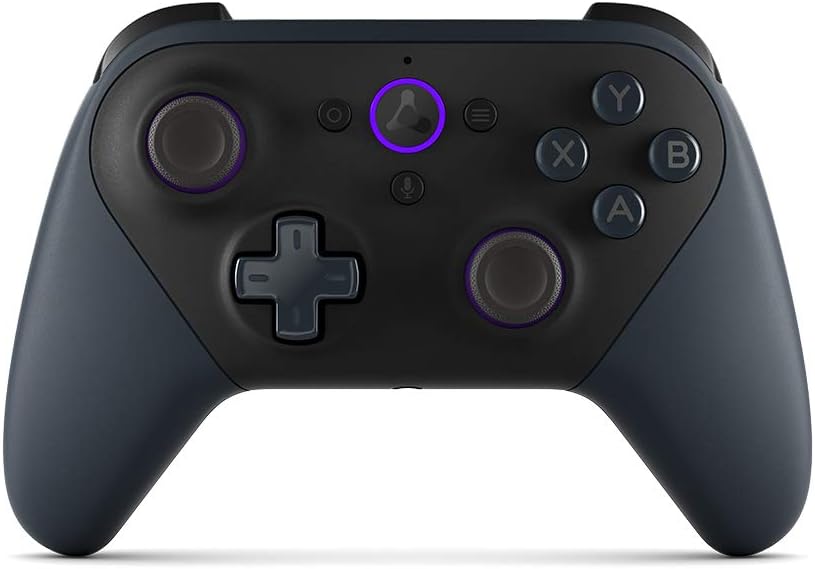
תמונה: חזית view of the Luna Wireless Controller, showcasing its ergonomic design and button layout. The controller is black with purple accents on the thumbsticks and the Luna button.
תכונות מפתח
- Cloud Direct Technology: Connects directly to Amazon’s custom game servers via Wi-Fi for low-latency gameplay on Luna.
- תאימות לריבוי מכשירים: Works across Windows, Mac, Fire TV, Fire tablet, iPhone, iPad, Chromebook, and Android devices.
- Seamless Screen Switching: Pause your game on one screen and resume on another when playing on Luna.
- אפשרויות קישוריות מרובות: Supports Wi-Fi, Bluetooth, and USB connections.
- עיצוב ארגונומי: Features offset thumbsticks, easy-access bumpers, precise triggers, and responsive action buttons for comfortable and accurate control.
- אלקסה משולבת: Press the microphone button to ask Alexa to launch games and more on Fire TV.

Image: The Luna Controller with graphical icons illustrating its core features: low-latency gameplay, Wi-Fi connectivity, Bluetooth connectivity, USB connectivity, and seamless screen switching support.
הגדרה
1. פתיחת האריזה והתקנת הסוללה
Your Luna Wireless Controller comes with 2 AA Amazon Basics batteries. To install:
- אתר את תא הסוללה בגב הבקר.
- פתח את מכסה התא.
- הכניסו את שתי סוללות ה-AA, תוך הקפדה על קוטביות נכונה (+/-).
- סגור היטב את מכסה תא הסוללות.
2. Setting Up with the Luna Controller App
The Luna Controller app is essential for connecting your controller to Wi-Fi for Cloud Direct gameplay. Download the app from:
- אמזון אפליקציות לאנדרואיד
- חנות Google Play
- חנות האפליקציות של iOS
Follow the in-app instructions to connect your controller to your Wi-Fi network. This enables Cloud Direct functionality for optimal Luna gaming.
3. התחברות למכשירים
The Luna Controller offers multiple ways to connect to your devices:
- Cloud Direct (Wi-Fi): For the best Luna experience, connect your controller to Wi-Fi via the Luna Controller app. This reduces latency by connecting directly to Amazon's game servers.
- בלוטות': Use Bluetooth Low Energy 5.0 for gameplay on Windows PC, Mac, Fire Tablets, Chromebooks, Fire TV, Android devices, or select Samsung Smart TVs. For Windows PC support outside of Luna, a specific Windows driver may be required (downloadable from Amazon's support page).
- USB-C: Connect directly to your Windows PC or Mac using a USB-C cable (sold separately) for wired gameplay.
הפעלת הבקר
Controller Layout and Inputs
The Luna Controller features a standard gaming controller layout for intuitive use:
- כפתורי פעולה: X,Y,A,B
- Triggers & Bumpers: LT (Left Trigger), LB (Left Bumper), RT (Right Trigger), RB (Right Bumper)
- מקלות אצבעות: Two offset thumbsticks (left and right) for precise movement and camera control.
- משטח כיווני (D-Pad): 4-way directional pad (up, down, left, right).
- כפתורי מערכת: Home, Action, Menu, Microphone.

תמונה: תקריב view of the Luna Controller's top-right side, highlighting the precise and responsive triggers (RT) and bumpers (RB) designed for gaming.
משוב הפטי
The controller includes vibration motors that provide tactile feedback during gameplay, enhancing immersion and responsiveness to in-game actions.
תצוגת LED
An LED indicator on the controller displays its connectivity status, low battery warnings, and software update notifications.
אינטגרציה של אלקסה
Press the dedicated microphone button on the controller to activate Alexa. You can use voice commands to launch games and perform other actions on compatible Fire TV devices.
פלט אודיו
A 3.5 mm stereo audio output jack is available for connecting a headset, allowing for private audio and communication during gameplay.

תמונה: צד view of the Luna Controller, emphasizing its textured grip and contoured shape, designed for comfort during extended gaming sessions.
תַחזוּקָה
To ensure the longevity and optimal performance of your Luna Wireless Controller, follow these maintenance guidelines:
- ניקוי: השתמש במטלית רכה ויבשה כדי לנגב את הבקר. במקרה של לכלוך עיקש, נגבו מעטampשטפו את המטלית במים. הימנעו משימוש בכימיקלים חזקים או בחומרי ניקוי שוחקים.
- אִחסוּן: יש לאחסן את הבקר במקום קריר ויבש, הרחק מאור שמש ישיר וטמפרטורות קיצוניות.
- טיפול בסוללה: If the controller will not be used for an extended period, remove the batteries to prevent leakage and potential damage.
- הימנע מטיפות: למרות היותו עמיד, נפילות חוזרות ונשנות עלולות לגרום נזק לרכיבים פנימיים. יש לטפל בבקר בזהירות.
פתרון בעיות
If you encounter issues with your Luna Wireless Controller, try the following solutions:
- הבקר לא מגיב:
- בדוק את רמות הסוללה והחלף במידת הצורך.
- ודא שהבקר מופעל.
- Try re-pairing the controller via Wi-Fi (Luna app) or Bluetooth.
- Connect via USB-C cable to check if it functions in wired mode.
- השהיה/השהיה גבוהה:
- For Luna gameplay, ensure your controller is connected via Cloud Direct (Wi-Fi) and your Wi-Fi network is stable and strong.
- Reduce interference by moving closer to your Wi-Fi router or reducing other network activity.
- If using Bluetooth, ensure your device's Bluetooth is enabled and there are no other interfering Bluetooth devices nearby.
- בעיות קישוריות Bluetooth:
- ודא שה-Bluetooth של המכשיר שלך מופעל וניתן לגילוי.
- Forget the controller from your device's Bluetooth settings and attempt to pair again.
- Update Bluetooth drivers on your PC if applicable.
- Buttons/Thumbsticks Not Working:
- Ensure no debris is lodged around the buttons or thumbsticks.
- Restart the controller and the device it's connected to.
For further assistance, refer to the official Amazon Luna support resources.
מפרטים
| תכונה | פְּרָט |
|---|---|
| צֶבַע | שָׁחוֹר |
| קישוריות Wi-Fi | Cloud Direct gameplay supports dual-band 802.11 a/b/g/n (2.4 and 5 GHz) networks |
| קישוריות בלוטות' | Supports Bluetooth Low Energy 5.0 for gameplay on Windows PC, Mac, Fire Tablets, Chromebooks, Fire TV, Android device, or select Samsung Smart TV |
| יציאת USB-C | For wired gameplay on Windows PC and Mac (cable sold separately) |
| גוֹדֶל | 156.4 x 107.6 x 58.5 מ"מ |
| מִשׁקָל | 235.5 g (without batteries), 281.5 g (with batteries) |
| תשומות | 12 buttons (home, action, menu, microphone, X, Y, A, B, LT, LB, RT, RB), 1 direction pad, 2 offset thumbsticks |
| הפטיקה | Vibration motors for tactile feedback |
| לְהַצִיג | LED for connectivity status, low battery, software updates |
| שֶׁמַע | 3.5 mm stereo audio output for headset |
| רַמקוֹל | אַף לֹא אֶחָד |
| אלכסה | Press and ask Alexa to launch games and more on Fire TV |
| תְאִימוּת | Works on compatible Windows PC, Mac, Fire TV, Fire Tablet, iPhone, iPad, Android Phones, and select Samsung Smart TVs via Cloud Direct. Does not work with gaming consoles. |
| אביזרים בקופסה | 2 AA Amazon Basics batteries, setup guide |
אחריות ותמיכה
Your Luna Wireless Controller comes with a אחריות ושירות מוגבלים ל-1 שנים. Optional 1-year, 2-year, and 3-year extended warranties are available for U.S. customers, sold separately. Use of the Amazon Luna Controller is subject to these terms.
For detailed warranty information, technical support, or to purchase extended warranty options, please visit the official Amazon Luna support webאתר או צרו קשר עם שירות הלקוחות של אמזון.


