1. הקדמה
This manual provides detailed instructions for the installation, operation, and maintenance of your SEBSON Motion Sensor with Alarm and Chime. Please read this manual thoroughly before using the device to ensure proper function and safety.
The SEBSON Motion Sensor is designed to detect movement of people, large animals, and vehicles within its detection field. It can function as either an alarm or a chime, making it suitable for various applications such as entry alerts or security notifications.
2. הוראות בטיחות
- Ensure the device is installed in a dry, indoor environment. Avoid exposure to moisture or extreme temperatures.
- Use only 9V alkaline batteries. Do not mix old and new batteries, or different types of batteries.
- השלך סוללות משומשות בהתאם לתקנות המקומיות.
- Do not attempt to open or modify the device. This may void the warranty and pose a safety risk.
- הרחק את המכשיר מהישג ידם של ילדים.
3. תכולת החבילה
ודא שכל הפריטים נמצאים בחבילה:
- 2 x SEBSON Motion Sensor units
- 4 x ברגי הרכבה
- 4 x Wall Plugs (Ø6mm)
Note: 9V batteries are not included and must be purchased separately.
4. המוצר נגמרview
The SEBSON Motion Sensor consists of the main sensor unit and a rotatable mounting bracket. Key components include the motion detection lens, the speaker grille, and the mode selection switch.

Image: Two SEBSON Motion Sensor units, showing their compact design and white casing.
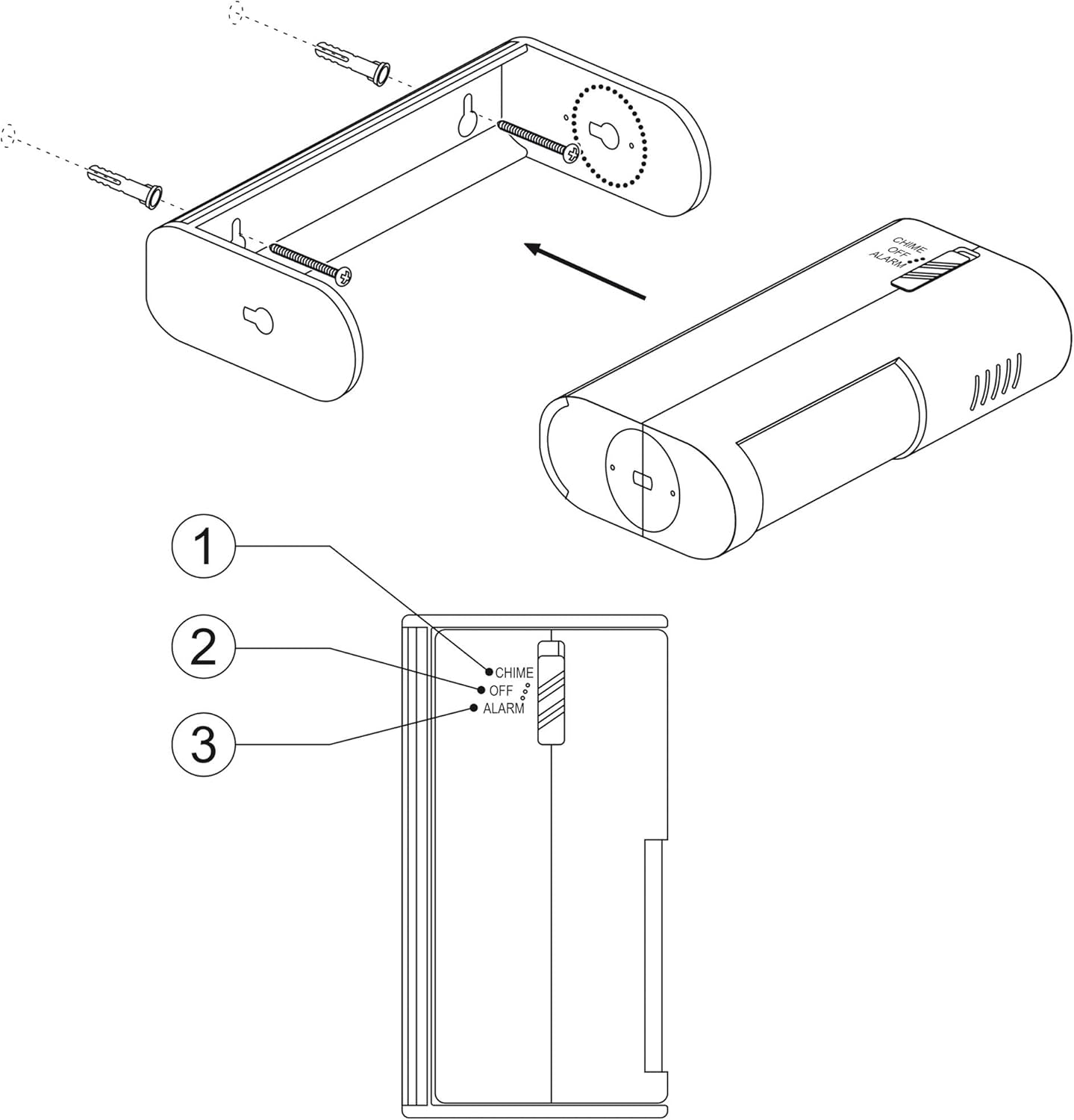
תמונה: מפורט view of the motion sensor, highlighting the mode switch with 'CHIME', 'OFF', and 'ALARM' settings.
5. התקנה
5.1 התקנת סוללה
- Gently slide open the battery compartment cover located on the back of the sensor unit.
- Insert two 9V alkaline batteries, ensuring correct polarity (+/-).
- סגור היטב את מכסה תא הסוללות.
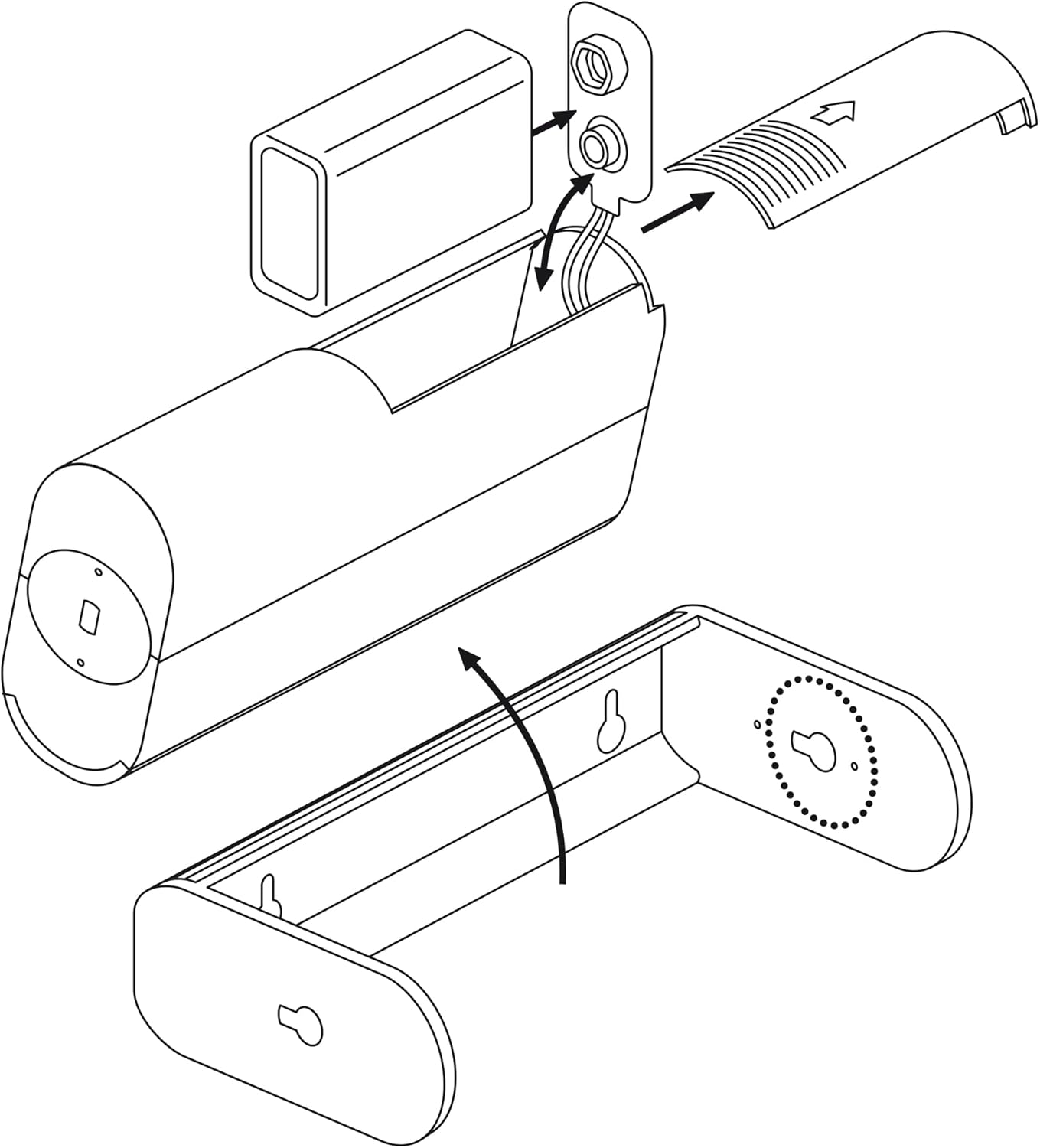
Image: Exploded diagram illustrating how to open the battery compartment and insert batteries, along with the separate mounting bracket.
5.2 הרכבת החיישן
- Choose a suitable location for the sensor. The detection range is 8 meters with a 60° angle. Consider areas where movement needs to be monitored.
- Mark the positions for the mounting screws on the wall using the mounting bracket as a template.
- Drill two holes (Ø6mm) at the marked positions.
- הכנס את תקעי הקיר המסופקים לתוך החורים הקדוחים.
- אבטחו את תושבת ההרכבה לקיר באמצעות הברגים המצורפים.
- Slide the motion sensor unit onto the mounted bracket. The sensor housing can be rotated 360° within the bracket to adjust the detection area.

Image: Technical diagram showing the sensor's 8-meter detection range, 60-degree detection angle, and the 360-degree rotation feature of the sensor unit within its bracket.
6. הוראות הפעלה
The SEBSON Motion Sensor features a three-position switch to select its operating mode:
- מצב צלצול: When movement is detected, the sensor will emit a short, pleasant chime sound. This mode is ideal for entry alerts in shops or offices.
- מצב כבוי: The sensor is powered off and will not detect movement or emit any sound.
- ALARM Mode: When movement is detected, the sensor will emit a loud alarm sound. This mode is suitable for security purposes.
To select a mode, slide the switch on the side of the sensor to the desired position (CHIME, OFF, or ALARM).
תמונה: מפורט view of the sensor's side, clearly showing the three-position switch for selecting between Chime, Off, and Alarm modes.
7. תחזוקה
- ניקוי: נגבו את החלק החיצוני של החיישן בעזרת מטלית רכה ויבשה. אין להשתמש בחומרי ניקוי שוחקים או ממסים.
- החלפת סוללה: If the sound becomes weak or the sensor stops responding, replace the 9V batteries. Follow the battery installation steps in Section 5.1.
- טיפול בעדשה: Keep the motion detection lens clean and free from obstructions to ensure optimal performance.
8. פתרון תקלות
| בְּעָיָה | סיבה אפשרית | פִּתָרוֹן |
|---|---|---|
| חיישן לא מזהה תנועה. |
|
|
| הצליל נמוך מדי או מעוות. |
|
|
| אזעקות שווא. |
|
|
9. מפרטים
| תכונה | פְּרָט |
|---|---|
| מותג | סבסון |
| מספר דגם | 2_X_BWM_ALARM_B |
| מקור כוח | Battery Powered (2x 9V batteries, not included) |
| Battery Type Recommended | בְּסִיסִי |
| טווח זיהוי | עד 8 מטר |
| זווית זיהוי | 60 מעלות |
| יכולת סיבוב | 360 degrees (within bracket) |
| סוג הרכבה | מתקן קיר |
| צֶבַע | לָבָן |
| מידות (חבילה) | 12 x 9 x 8 ס"מ |
| משקל (פריט) | 280 גרם |
10. אחריות ותמיכה
SEBSON products are designed and manufactured to high-quality standards. This product comes with a standard manufacturer's warranty. For specific warranty details, technical support, or assistance with your device, please contact SEBSON customer service through their official webהאתר או הקמעונאי שבו המוצר נרכש.
אנא שמור את הוכחת הרכישה שלך עבור תביעות אחריות.