מָבוֹא
This manual provides essential instructions for the safe and efficient use of your Smart Kingfisher Rechargeable Lithium Battery and USB Charger. Please read this manual thoroughly before use and retain it for future reference.
מידע בטיחות
- אַזהָרָה: אל תנסה להטעין סוללות שאינן נטענות.
- אַזהָרָה: Do not charge batteries from other suppliers unless explicitly stated as compatible.
- Keep the charger and batteries away from water and moisture.
- Do not disassemble, crush, or puncture the batteries or charger.
- הימנעו מחשיפת סוללות לטמפרטורות קיצוניות או לאור שמש ישיר.
- יש להשליך סוללות בצורה אחראית בהתאם לתקנות המקומיות.
תוכן החבילה
ודא שכל הפריטים נמצאים בחבילה שלך:
- 2 x 425 Rechargeable Lithium Batteries
- 1 x Dual-Port USB Charger
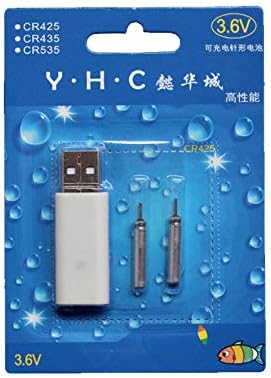
Image: Retail packaging showing the USB charger and two 425 rechargeable batteries.

Image: A pair of Smart Kingfisher 425 rechargeable lithium batteries.
הגדרה
The Smart Kingfisher USB charger is designed for ease of use. No complex setup is required.
- Identify the USB charger and the 425 rechargeable batteries.
- Connect the USB charger to a compatible power source (see "Operating Instructions" for options).

Image: The USB charger unit with its two charging pins visible.
הוראות הפעלה
טעינת הסוללות
The charger features two ports, allowing for simultaneous charging of two batteries.
- Insert the 425 rechargeable batteries into the charging ports of the USB charger. Ensure a secure connection.
- Connect the USB charger to a power source. Compatible power sources include:
- USB power adapter (wall charger)
- בנק כוח
- מטען לרכב
- Laptop or PC USB port
- Observe the LED indicator on the charger:
- A LED ירוק indicates that the batteries are currently charging.
- A LED אדום indicates that the batteries are fully charged.
- טעינה מלאה אורכת בדרך כלל כ-3 שעות.
- Once fully charged, disconnect the charger from the power source and remove the batteries.
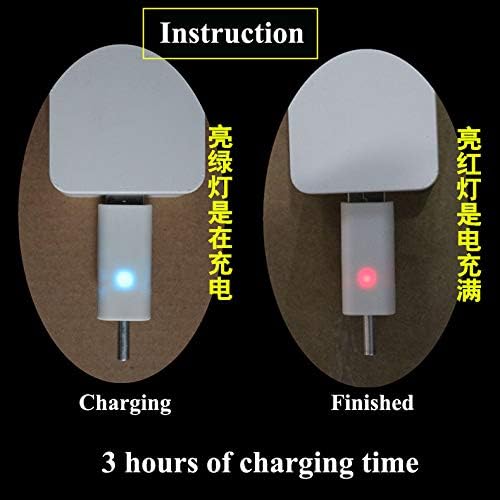
Image: Visual guide for charging status: green light for charging, red light for fully charged. Indicates a 3-hour charging time.

Image: Diagram illustrating multiple methods for charging the device, including car chargers, wall adapters, power banks, and laptops.
תַחזוּקָה
- Clean the charger and batteries with a dry, soft cloth. Do not use liquids or abrasive cleaners.
- Store the batteries and charger in a cool, dry place when not in use.
- Avoid storing fully discharged batteries for extended periods to prolong their lifespan.
פתרון בעיות
| בְּעָיָה | סיבה אפשרית | פִּתָרוֹן |
|---|---|---|
| Batteries not charging (no LED indication) |
|
|
| Charging takes longer than 3 hours |
|
|
| Red LED does not turn on after extended charging |
|
|
מפרטים
- חוֹמֶר: פּלָסטִי
- משקל מוצר: 20 g (total for charger and batteries)
- סוג סוללה: 425 Rechargeable Lithium Battery (compatible with CR425, CR435, CR535)
- סוג מטען: מטען USB בעל יציאה כפולה
- קֶלֶט: USB (compatible with various USB power sources)
- מחוון טעינה: Green LED (charging), Red LED (fully charged)
- זמן טעינה משוער: 3 שעות
אחריות ותמיכה
For warranty information or technical support, please refer to the retailer's return policy or contact the manufacturer directly. Keep your purchase receipt as proof of purchase.
לסיוע נוסף, ניתן לבקר באתר product page on Amazon.com.mx.