מָבוֹא
The Insignia NS-SPBTWAVE2-BK Wave 2 Portable Bluetooth Speaker provides high-quality wireless audio streaming from your compatible devices. Designed for versatility, its robust construction and rubberized feet allow for stable placement in both horizontal and vertical orientations. Enjoy hands-free communication with the built-in speakerphone and extended listening sessions thanks to its 12-hour battery life.
This manual provides essential information for setting up, operating, maintaining, and troubleshooting your speaker. Please read it thoroughly before use and retain it for future reference.
תוכן החבילה
ודא שכל הפריטים נמצאים בחבילה:
- Insignia NS-SPBTWAVE2-BK Wave 2 Portable Bluetooth Speaker
- כבל טעינה USB
- 3.5mm Audio Cable (Auxiliary)
- Quick Setup Guide (or similar documentation)
תכונות המוצר
- קישוריות אלחוטית: Connects wirelessly to smartphones, tablets, and other Bluetooth-enabled devices.
- חיי סוללה ארוכים: Features a rechargeable 2,000 mAh battery, providing up to 12 hours of playback on a full charge.
- מיקרופון מובנה: Enables hands-free calling directly through the speaker.
- קלט שמע עזר: Allows for wired connection to audio devices via a 3.5mm audio cable.
- מיקום רב תכליתי: Designed to stand securely in both horizontal and vertical positions.
חלקים של הדובר
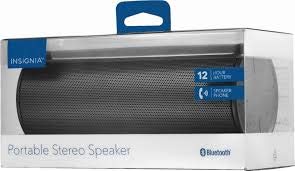
איור 1: חזית view of the Insignia Wave 2 Speaker in horizontal orientation.

Figure 2: Vertical view of the speaker, illustrating the power button, charging port, and auxiliary input port at the bottom.
Refer to the images above for the location of key components such as the power button, volume controls, Bluetooth indicator, charging port, and auxiliary input.
הגדרה
1. טעינת הרמקול
- Connect the small end of the USB charging cable to the charging port on the speaker (refer to Figure 2).
- Connect the large end of the USB charging cable to a USB power adapter (not included) or a powered USB port on a computer.
- The charging indicator light will illuminate. Allow approximately 12 hours for a full charge before first use. The indicator light will change or turn off once charging is complete.
2. זיווג Bluetooth
- Ensure the speaker is fully charged. Press and hold the Power button to turn on the speaker. The Bluetooth indicator light will begin to flash, indicating it is in pairing mode.
- On your Bluetooth-enabled device (smartphone, tablet, etc.), navigate to the Bluetooth settings and ensure Bluetooth is enabled.
- חפש available devices. Select "Insignia Wave 2" from the list.
- Once paired, the Bluetooth indicator light on the speaker will become solid, and you may hear an audible confirmation.
- אם תתבקש להזין סיסמה, הזן "0000".
3. Auxiliary (Wired) Connection
- Connect one end of the 3.5mm audio cable to the AUX input port on the speaker (refer to Figure 2).
- Connect the other end of the 3.5mm audio cable to the headphone jack or audio output port of your audio device.
- The speaker will automatically switch to auxiliary mode when a cable is detected.
הפעלת הרמקול
הפעלה/כיבוי
- To turn on: Press and hold the Power button until the indicator lights illuminate.
- To turn off: Press and hold the Power button until the indicator lights turn off.
בקרת עוצמת הקול
- כוונן את עוצמת הקול באמצעות לחצני הווליום ברמקול.
- You can also control the volume from your connected Bluetooth device or auxiliary audio source.
שיחות ללא ידיים
כאשר הרמקול מחובר באמצעות Bluetooth, ניתן להשתמש בו לשיחות ללא ידיים:
- ענה לשיחה: לחץ פעם אחת על כפתור ההפעלה/השהיה/התקשר.
- סיום שיחה: לחץ על כפתור ההפעלה/השהיה/התקשרות פעם אחת במהלך שיחה.
- דחה שיחה: Press and hold the Play/Pause/Call button.
- Speak clearly towards the speaker's built-in microphone for optimal voice pickup.
תַחזוּקָה
- ניקוי: השתמשו במטלית רכה, יבשה ונטולת סיבים לניקוי החלק החיצוני של הרמקול. אין להשתמש בחומרי ניקוי נוזליים, תרסיסים או ממסים.
- טיפול בסוללה: To prolong battery life, avoid fully discharging the battery frequently. Recharge the speaker regularly, even if not in use. Avoid exposing the speaker to extreme temperatures (hot or cold).
- אִחסוּן: When not in use for extended periods, store the speaker in a cool, dry place away from direct sunlight and moisture.
- עמידות במים: הדובר הזה הוא לֹא עמיד למים. יש להימנע מחשיפה למים או ללחות מוגזמת.
פתרון בעיות
| בְּעָיָה | פתרון אפשרי |
|---|---|
| הרמקול לא נדלק. | ודא שהסוללה טעונה. חבר את הרמקול למקור חשמל באמצעות כבל טעינה USB. |
| אין קול מהרמקול. | Check the volume level on both the speaker and the connected device. Ensure the correct input source (Bluetooth or AUX) is selected. Verify the Bluetooth connection or auxiliary cable. |
| לא ניתן לבצע צימוד דרך בלוטות'. | Ensure the speaker is in pairing mode (flashing Bluetooth indicator). Turn off and on Bluetooth on your device. Move the speaker closer to your device. Forget the speaker from your device's Bluetooth list and try pairing again. |
| איכות צליל או עיוות ירודים. | Ensure the speaker is within Bluetooth range (approx. 33 ft / 10 m). Reduce the volume on the source device or speaker. Check for interference from other wireless devices. Try a different audio source or file. |
| המיקרופון לא עובד במהלך שיחות. | Ensure the speaker is properly connected via Bluetooth. Speak directly towards the speaker. Check your phone's call settings to ensure audio is routed to the Bluetooth speaker. |
מפרטים
- שם הדגם: גל 2
- מספר דגם: NS-SPBTWAVE2-BK
- טכנולוגיית קישוריות: בלוטות'
- חיי סוללה: עד 12 שעות
- סוג סוללה: 1 ליתיום יון (כלול)
- זמן טעינה: בערך 12 שעות
- מידות המוצר: 6.8 x 2.8 x 2.8 אינץ' (17.3 x 7.1 x 7.1 ס"מ)
- משקל פריט: 1 פאונד (0.45 ק"ג)
- מצב פלט אודיו: סטריאו
- יחס אות לרעש: 80 dB
- מיקרופון מובנה: כֵּן
- קלט עזר: כן (3.5 מ"מ)
- אֲטִימוּת: לֹא
- חוֹמֶר: פּלָסטִי
- UPC: 600603230455
אחריות ותמיכה
This Insignia NS-SPBTWAVE2-BK Wave 2 Portable Bluetooth Speaker comes with a אחריות מוגבלת. For specific terms and conditions of your warranty, please refer to the warranty card included with your purchase or visit the official Insignia webאֲתַר.
For technical support, troubleshooting assistance, or warranty claims, please contact Insignia Customer Service. Contact information can typically be found on the Insignia webבאתר או בתיעוד המוצר שלך.


