מָבוֹא
This manual provides instructions for the proper use and maintenance of your AW B990BL Neckband Wireless Bluetooth Earphones. Please read this manual thoroughly before using the product to ensure optimal performance and longevity.
The AW B990BL Neckband Wireless Bluetooth Earphones offer a convenient audio solution with a neckband design. Featuring Bluetooth V4.2 connectivity, these earphones provide up to 6 hours of talk or music time on a 1-hour charge. They are designed for wide compatibility with various devices, offering a reliable wireless experience.
תוכן החבילה
- AW B990BL Neckband Wireless Bluetooth Earphones
- כבל טעינה USB
- קצות אוזניים (גדלים שונים)
- מדריך למשתמש

Image: The AW B990BL Neckband Wireless Bluetooth Earphones, showcasing the neckband design, earbuds, and inline control panel.
הגדרה
1. טעינת האוזניות
- Connect the micro-USB end of the charging cable to the charging port on the earphone's control unit.
- Connect the USB-A end of the charging cable to a USB power source (e.g., computer USB port, wall adapter).
- The indicator light will illuminate during charging. Once fully charged (approximately 1 hour), the indicator light will change or turn off.
- נתק את כבל הטעינה לאחר השלמת הטעינה.
פֶּתֶק: ודאו שהאוזניות טעונות במלואן לפני השימוש הראשון לקבלת ביצועי סוללה אופטימליים.
2. זיווג Bluetooth
- ודא שהאוזניות כבויות.
- Press and hold the Multi-function button (usually the center button on the control unit) for approximately 5-7 seconds until the indicator light flashes red and blue alternately. This indicates pairing mode.
- במכשיר שלך (סמארטפון, טאבלט וכו'), הפעל את Bluetooth וחפש מכשירים זמינים.
- Select "B990BL" from the list of found devices.
- Once successfully paired, the indicator light will flash blue slowly, and you may hear a confirmation tone.
- אם תתבקש להזין סיסמה, הזן "0000".
פֶּתֶק: האוזניות ינסו להתחבר מחדש באופן אוטומטי למכשיר האחרון שזווג לאחר הפעלתן.
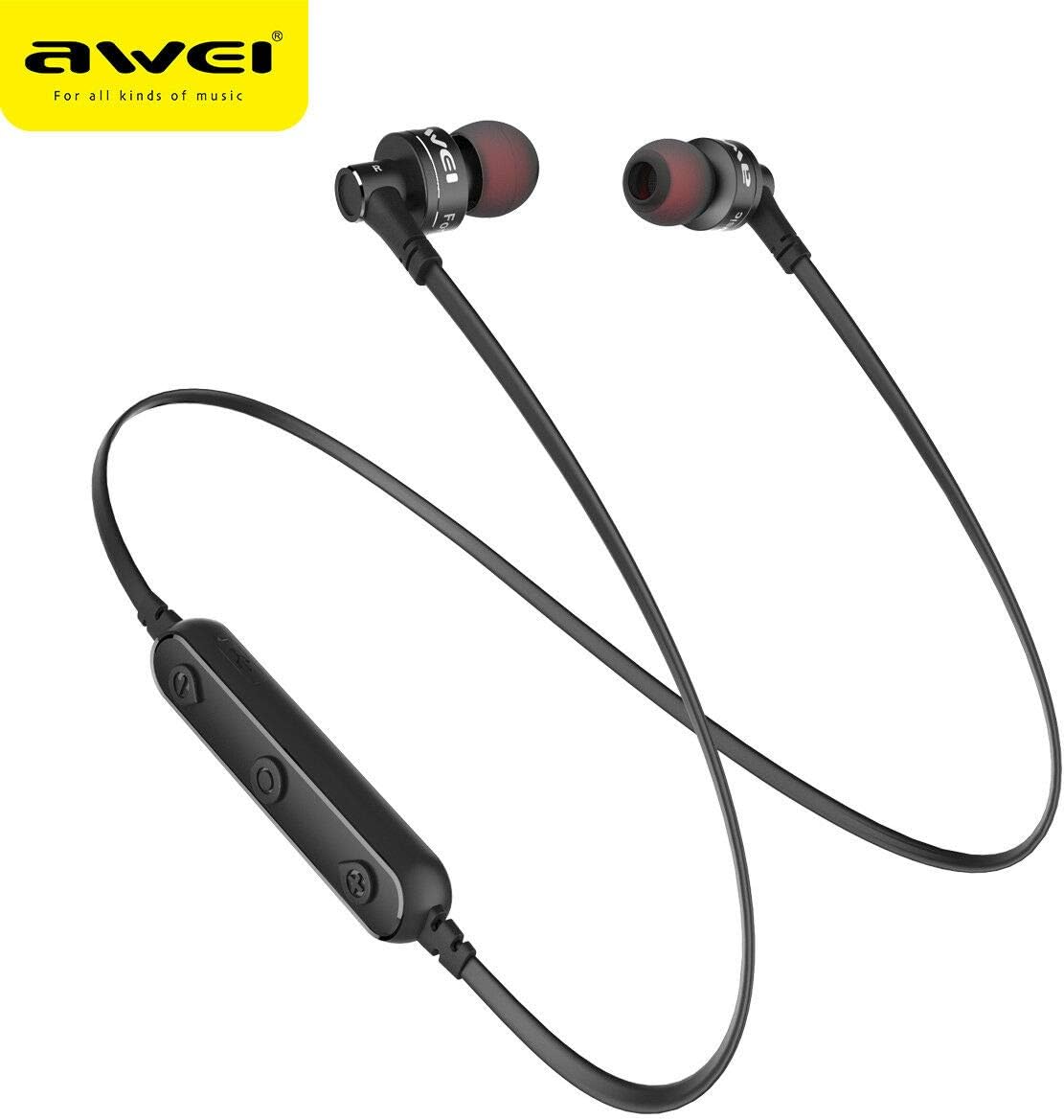
תמונה: תקריב view of the AW B990BL earphones, highlighting the inline control panel with its buttons and charging port.
הוראות הפעלה
פונקציות בסיסיות
- הפעלה: לחץ והחזק את הלחצן הרב-תכליתי למשך 3 שניות.
- כיבוי: לחץ והחזק את הלחצן הרב-תכליתי למשך 3 שניות.
- הפעל/השהה: לחץ פעם אחת על כפתור הרב-פונקציה.
- הגבר קול: לחץ על כפתור "+".
- להנמיך קול: לחץ על כפתור "-".
- הרצועה הבאה: לחץ והחזק את כפתור "+".
- רצועה קודמת: לחץ והחזק את הכפתור "-".
ניהול שיחות
- תשובה לשיחה: לחץ פעם אחת על כפתור הרב-פונקציה.
- סיום שיחה: לחץ על לחצן הרב-תכליתי פעם אחת במהלך שיחה.
- דחה שיחה: לחץ והחזק את הלחצן הרב-תכליתי למשך 2 שניות.
- חיוג חוזר למספר האחרון: לחץ פעמיים על כפתור הרב פונקציות.
תַחזוּקָה
- Keep the earphones dry. Avoid exposure to extreme temperatures, humidity, or corrosive materials.
- Clean the earphones regularly with a soft, dry cloth. Do not use harsh chemicals or abrasive cleaners.
- Store the earphones in a clean, dry place when not in use.
- הימנעו מהפלת האוזניות או מחשיפתן לפגיעות חזקות.
- אל תנסו לפרק או לשנות את האוזניות, שכן פעולה זו תגרום לביטול האחריות ולגרום נזק.
פתרון בעיות
- לא ניתן להתאים למכשיר:
- Ensure the earphones are in pairing mode (red and blue indicator light flashing alternately).
- ודא ש-Bluetooth מופעל במכשיר שלך ושהוא נמצא בטווח של 10 מטרים מהאוזניות.
- Turn off and restart both the earphones and your device, then attempt pairing again.
- נקה חיבורי Bluetooth קודמים במכשיר שלך במידת הצורך.
- אין צליל או עוצמת קול נמוכה:
- בדקו את עוצמת הקול הן באוזניות והן במכשיר המחובר.
- ודא שהאוזניות מחוברות כראוי למכשיר שלך.
- נסה להפעיל מקורות שמע שונים כדי לשלול בעיה עם המדיה file.
- האוזניות לא נטענות:
- ודא שכבל הטעינה מחובר היטב הן לאוזניות והן למקור החשמל.
- נסה כבל טעינה USB או מקור חשמל אחר.
- בדוק את יציאת הטעינה עבור כל פסולת או נזק.
מפרטים
| תכונה | פְּרָט |
|---|---|
| שם הדגם | B990BL |
| גרסת בלוטות' | V4.2 |
| זמן טעינה | שעה אחת |
| זמן דיבור | 6 שעות |
| זמן מוזיקה | 6 שעות |
| טכנולוגיית קישוריות | אַלחוּט |
| רְגִישׁוּת | 96 dB |
| מידות המוצר | 4 x 10 x 16.5 ס"מ |
| מִשׁקָל | 4.54 גרם |
| יַצרָן | אווי |
אחריות ותמיכה
For warranty information or technical support, please refer to the documentation provided with your purchase or contact the retailer where the product was acquired. Keep your proof of purchase for warranty claims.