1. הקדמה
The Flashpoint Zoom Li-Ion Mini R2 TTL Flash is a compact and powerful flash unit designed for use with select Sony mirrorless cameras, including models such as A7RIII, a7rII, a7R, a58, a99, ILCE6000L, a77II, RX10, and the a9. This flash features an integrated R2 radio transceiver, enabling wireless triggering and control. It can function as a master unit to command other Flashpoint and Godox R2-compatible slave units, offering versatile lighting solutions for various photographic scenarios.
2. אמצעי בטיחות
- אין לפרק או לשנות את יחידת הפלאש. תיקונים יבוצעו אך ורק על ידי אנשי שירות מורשים.
- שמור על יחידת הפלאש יבשה. אין לחשוף אותה לגשם, לחות או לחות גבוהה.
- אין לגעת בצינור הפלאש לאחר הצילום, מכיוון שהוא עלול להיות חם.
- הרחק מהישג ידם של ילדים.
- Use only the specified battery and charger. Improper use can lead to fire, explosion, or electric shock.
- הימנעו מחשיפה ישירה של העיניים לפלאש, במיוחד מטווח קרוב, מכיוון שהיא עלולה לפגוע בראייה.
3. המוצר נגמרview
3.1 תכולת החבילה
- Flashpoint Zoom Li-Ion Mini Flash Unit
- מיני סטנד
- תיק הגנה
- Diffuser (assumed from 'Dif' in product data)
3.2 Flash Components
Familiarize yourself with the main components of your Flashpoint Zoom Li-Ion Mini R2 TTL Flash.

איור 3.2.1: חֲזִית view of the Flashpoint Zoom Li-Ion Mini R2 TTL Flash, showing the flash head and main body.
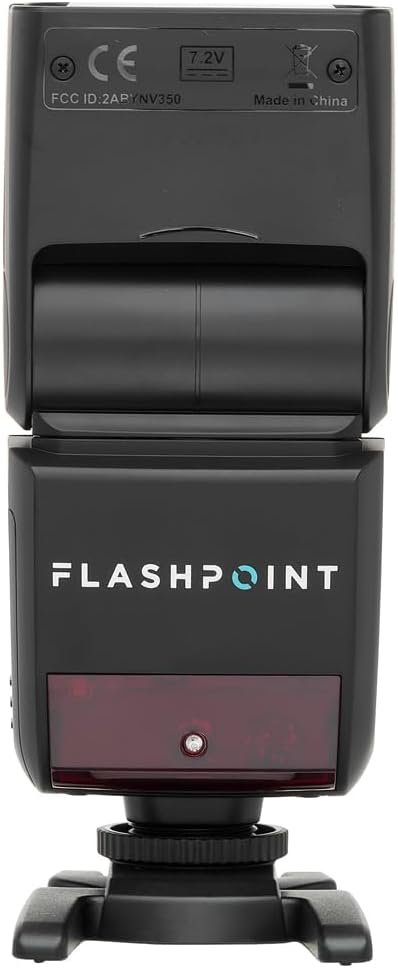
איור 3.2.2: אֲחוֹרִי view of the flash, highlighting the LCD display and control buttons for mode, zoom, sync, and power.

איור 3.2.3: The flash unit with its built-in wide-angle diffuser panel extended from the flash head.
4. התקנה
4.1 התקנת סוללה
- אתר את תא הסוללה בצד יחידת הפלאש.
- Slide the battery cover release latch and open the compartment.
- Insert the Li-Ion battery, ensuring correct polarity as indicated inside the compartment.
- סגור את מכסה תא הסוללות עד שייכנס למקומו בנקישה.

איור 4.1.1: צַד view of the flash unit, indicating the battery compartment with a 'BATT.PUSH' label.
4.2 הרכבה על מצלמה
- ודא שיחידת הפלאש כבויה.
- Slide the flash's hot shoe foot into your Sony camera's hot shoe mount.
- Tighten the locking ring on the flash foot to secure it to the camera. Do not overtighten.
4.3 הפעלה/כיבוי
Press and hold the power button (usually marked with a ⚡ or power symbol) on the rear control panel to turn the flash on or off.
5. הוראות הפעלה
5.1 מצבי פעולה בסיסיים
The Flashpoint Zoom Li-Ion Mini R2 TTL Flash supports various operating modes:
- מצב פלאש אוטומטי TTL: מגדיר אוטומטית את עוצמת הפלאש לחשיפה נכונה.
- מצב ידני (M): מאפשר כוונון ידני של עוצמת הפלאש.
- מצב רב (סטרובוסקופי): מפעיל סדרה של הבזקים מהירים במהלך חשיפה אחת.
- מצבי עבד אופטי S1/S2: Triggers the flash optically when another flash fires.
השתמש ב- MODE בלוח הבקרה כדי לעבור בין המצבים הללו.

איור 5.1.1: מְפוֹרָט view of the flash control panel, showing buttons for MODE, ZOOM, SYNC, SLAVE, GR/CH, and the SET dial.
5.2 R2 Wireless System
The integrated R2 radio transceiver provides wireless control. Set the flash to Master or Slave mode and configure the group (GR) and channel (CH) settings to match your R2-compatible transmitter or other R2 flashes. Refer to your R2 transmitter's manual for detailed wireless setup.
5.3 כוונון ראש הפלאש
The flash head can be rotated and tilted to bounce light off ceilings or walls for softer illumination.
- סיבוב אופקי: 0 עד 270 מעלות.
- הטיה אנכית: -7 עד 90 מעלות.

איור 5.3.1: Illustration demonstrating the flexible rotation and tilt capabilities of the flash head.
5.4 פונקציית זום
The flash features an automatically zooming flashhead from 24-105mm. This adjusts the flash coverage to match the focal length of your lens. In manual mode, you can also adjust the zoom manually using the זום לַחְצָן.
6. תחזוקה
- ניקוי: השתמשו במטלית רכה ויבשה לניקוי יחידת הפלאש. במקרה של לכלוך עיקש, השתמשו במטלית רכה ויבשה.amp cloth with mild detergent, then wipe dry. Do not use organic solvents like thinner or benzene.
- אִחסוּן: When not in use for extended periods, remove the battery and store the flash in a cool, dry place, preferably in its protective case.
- טיפול בסוללה: Recharge the Li-Ion battery regularly, even if not in use, to maintain its lifespan. Avoid fully discharging the battery.
7. פתרון תקלות
If you encounter issues with your Flashpoint Zoom Li-Ion Mini R2 TTL Flash, refer to the following common problems and solutions:
| בְּעָיָה | סיבה / פתרון אפשרי |
|---|---|
| הפלאש לא יופעל. | Check if the flash is powered on. Ensure the battery is charged and correctly installed. Verify the flash is securely mounted on the camera hot shoe. Check camera flash settings. |
| Flash output is inconsistent or incorrect. | Ensure TTL mode is selected for automatic exposure, or adjust manual power settings. Check for obstructions between the flash and subject. Verify flash head zoom matches lens focal length. |
| ההפעלה האלחוטית נכשלת. | Confirm that the flash and transmitter are set to the same R2 group and channel. Ensure both units are within range and have fresh batteries. Check for radio interference. |
| Difficulty mounting flash on camera hot shoe. | Ensure the locking ring is fully loosened. Some camera hot shoes may have tighter tolerances; apply firm, even pressure. If persistent, verify compatibility with your specific camera model. |
| Unable to update firmware via micro-USB port. | The micro-USB port may be recessed. Try using a micro-USB cable with a very slim connector housing. If issues persist, contact Flashpoint customer support for guidance on compatible cables or alternative update methods. |
8. מפרטים
| תכונה | מִפרָט |
|---|---|
| מספר מנחה | 82ft / 25m (at ISO 100) |
| זמן המיחזור | 0.1 עד 1.7 שניות |
| טווח זום | 24-105 מ"מ (אוטומטי/ידני) |
| Bounce Head Rotation | Horizontal: 0 to 270 degrees |
| Bounce Head Tilt | Vertical: -7 to 90 degrees |
| מידות (L x W x H) | 8.4 x 7.2 x 2.8 אינץ' |
| משקל פריט | 1.87 פאונד |
| תואמים תואמים | סוני אלפא |
| מספר דגם | Zoom-Lion Mini |
| ASIN | B07CV42KFV |
9. אחריות ותמיכה
9.1 מידע אחריות
Flashpoint products typically come with a limited manufacturer's warranty. For specific details regarding the warranty period and terms for your Zoom Li-Ion Mini R2 TTL Flash, please refer to the warranty card included with your product or visit the official Flashpoint webאֲתַר.
9.2 תמיכת לקוחות
For technical assistance, troubleshooting beyond this manual, or service inquiries, please contact Flashpoint customer support. Contact information can usually be found on the Flashpoint webבאתר או בתיעוד המוצר שלך.


