1. הקדמה
This manual provides comprehensive instructions for the installation, operation, and maintenance of your BlueBird A1390 Automatic Irrigation Tap Programmer. This device is designed to automate your garden watering schedule, ensuring efficient and consistent irrigation. Please read this manual thoroughly before using the product to ensure correct operation and to prevent damage.
2. מידע בטיחות
- Do not immerse the unit in water. The unit is designed to be weather-resistant, but not submersible.
- השתמשו רק בסוללות אלקליין AA של 1.5V. אין לערבב סוללות ישנות וחדשות, או סוגים שונים של סוללות.
- הוציאו את הסוללות אם לא נעשה שימוש ביחידה למשך תקופה ממושכת כדי למנוע דליפות.
- הרחק מהישג ידם של ילדים.
- אל תנסה לפרק או לתקן את היחידה בעצמך. פנה לאנשי מקצוע מוסמכים לקבלת שירות.
- ודאו שכל החיבורים מאובטחים כדי למנוע דליפות.
3. תכולת החבילה
אנא בדקו את החבילה עבור הפריטים הבאים:
- 1x BlueBird A1390 Automatic Irrigation Tap Programmer
- מדריך למשתמש אחד (מסמך זה)
Note: 2 AA 1.5V batteries are required for operation and are not included in the package.
4. המוצר נגמרview
The BlueBird A1390 features two main rotary dials for setting irrigation frequency and duration, along with a battery indicator and an ON/OFF switch.
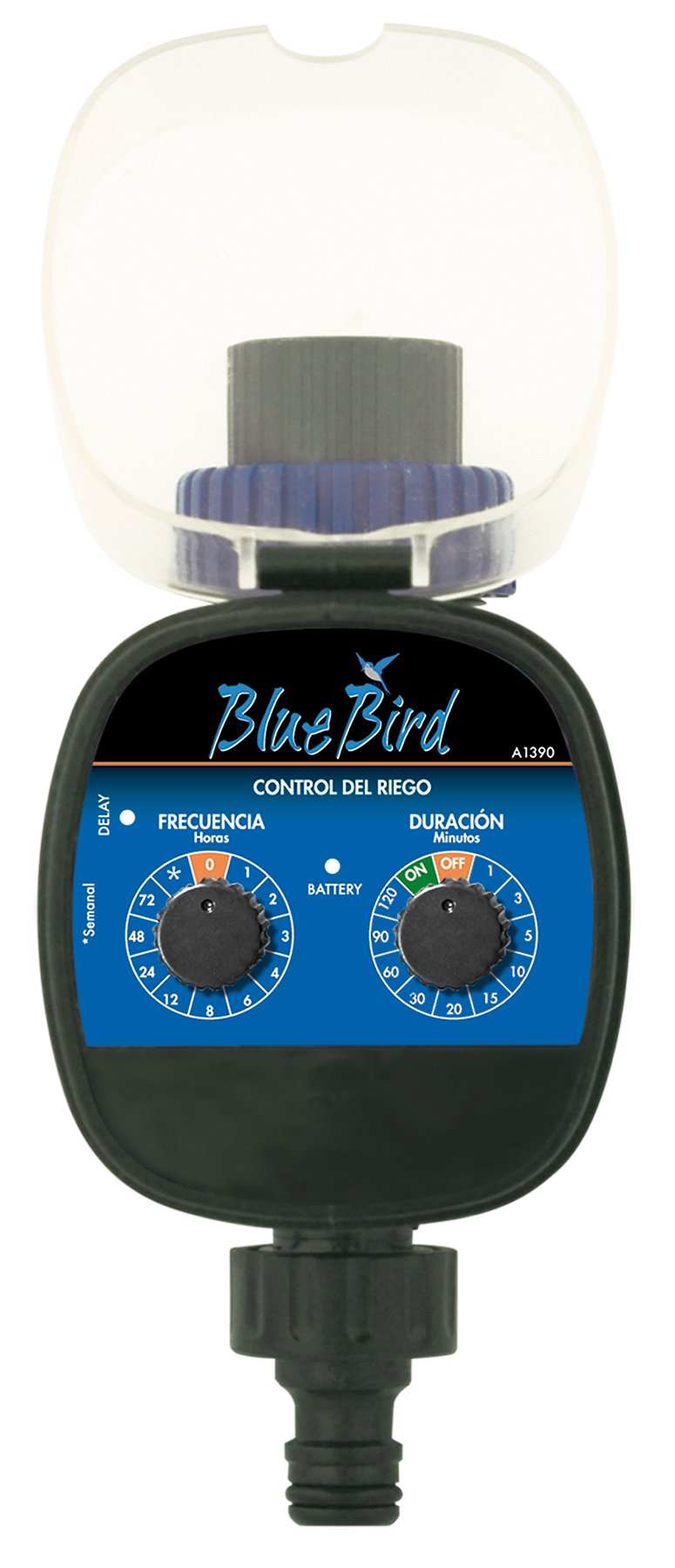
איור 1: חֲזִית view of the BlueBird A1390 Irrigation Programmer. The left dial controls irrigation frequency, and the right dial controls irrigation duration. A battery indicator light is located between the dials.
רכיבים:
- Frequency Dial (Frecuencia): Sets how often the irrigation occurs. Options include 0 (off), 1, 2, 3, 4, 6, 8, 12, 24, 48, 72 hours, and a '*' setting for manual or weekly operation.
- Duration Dial (Duración): Sets how long each irrigation cycle lasts. Options include 0 (off), 1, 3, 5, 10, 15, 20, 30, 60, 90, 120 minutes.
- מתג הדלק / כבה: Located on the Duration Dial, allows for manual override or turning the unit off.
- מחוון סוללה: A light that indicates battery status.
- תא סוללות: Located at the rear of the unit (not visible in Figure 1).
- כניסת/יציאת מים: Standard tap and hose connections.
5. התקנה
5.1 התקנת סוללה
- אתר את מכסה תא הסוללה בגב היחידה.
- Remove the cover by twisting or sliding it open.
- הכניסו שתי (2) סוללות אלקליין חדשות של 1.5V AA, תוך הקפדה על קוטביות נכונה (+/-).
- Replace the battery compartment cover securely to maintain water resistance.
5.2 Connecting to the Tap
- Ensure your outdoor tap is turned off.
- Screw the BlueBird A1390 programmer onto your tap. Hand-tighten only to prevent damage.
- Connect your garden hose or irrigation system to the outlet of the programmer. Ensure a tight connection to prevent leaks.
- Slowly turn on your outdoor tap. Check for any leaks at the connections.
6. הוראות הפעלה
The BlueBird A1390 is designed for simple, intuitive programming using its two rotary dials.
6.1 Setting Irrigation Frequency
- סובב את ה חיוג תדרים (left dial) to your desired irrigation interval.
- ההגדרות הזמינות הן:
- 0: No irrigation (off).
- 1, 2, 3, 4, 6, 8, 12, 24, 48, 72: Irrigation every X hours.
- *: This setting typically indicates a manual mode or a weekly cycle, depending on the specific model's internal logic. Refer to the example below for common usage.
6.2 Setting Irrigation Duration
- סובב את ה Duration Dial (right dial) to your desired watering time per cycle.
- ההגדרות הזמינות הן:
- OFF No irrigation.
- עַל: Continuous irrigation (use with caution).
- 1, 3, 5, 10, 15, 20, 30, 60, 90, 120: Irrigation for X minutes.
6.3 דוגמאותampתכנות
To water every 6 hours for 10 minutes:
- הגדר את חיוג תדרים אֶל 6 (שעה (ות).
- הגדר את Duration Dial אֶל 10 (פּרוֹטוֹקוֹל).
The programmer will automatically begin the cycle based on these settings. The first cycle will typically start shortly after programming, or after a short delay.
6.4 Manual ON/OFF
To manually turn on the water, rotate the Duration Dial to the ON position. To stop manual watering, rotate the dial back to כבוי or a timed setting.
7. תחזוקה
7.1 החלפת סוללה
When the battery indicator light dims or the unit stops functioning, it's time to replace the batteries. Follow the steps in Section 5.1 for battery installation.
7.2 ניקוי
Clean the exterior of the programmer with a damp cloth. Do not use abrasive cleaners or solvents. Ensure no water enters the battery compartment or internal electronics.
7.3 אחסון חורף
Before the first frost, disconnect the programmer from the tap and hose. Remove the batteries. Store the unit indoors in a dry, frost-free location to prevent damage from freezing water.
8. פתרון תקלות
| בְּעָיָה | סיבה אפשרית | פִּתָרוֹן |
|---|---|---|
| Unit does not turn on/display. | סוללות מתות או מותקנות בצורה שגויה. | החליפו את הסוללות, תוך הקפדה על קוטביות נכונה. |
| מים לא זורמים. | Tap is off; programmer set to '0' or 'OFF'; low water pressure; clogged filter. | Ensure tap is fully open. Check frequency/duration settings. Verify water pressure. Clean any filters. |
| Unit leaks at connections. | חיבורים רופפים; דיסקית חסרה או פגומה. | Tighten connections. Check and replace washers if necessary. |
| Irrigation schedule is incorrect. | Incorrect frequency or duration settings. | Re-check and adjust the Frequency and Duration Dials according to your desired schedule. |
9. מפרטים
- דֶגֶם: A1390
- מותג: ציפור כחולה
- יַצרָן: אלטדקס
- מקור כוח: 2 סוללות אלקליין AA 1.5V x (לא כלולות)
- תדירות השקיה: 0, 1, 2, 3, 4, 6, 8, 12, 24, 48, 72 hours, or '*' (manual/weekly)
- משך השקיה: OFF, ON, 1, 3, 5, 10, 15, 20, 30, 60, 90, 120 minutes
- מידות המוצר: 19.4 על 10.6 על 10 ס"מ בערך
- משקל מוצר: בערך 280 גרם
- מספר GTIN (UPC): 8426375113909
10. אחריות ותמיכה
This product is covered by a standard manufacturer's warranty. For specific warranty details, please refer to the documentation provided at the time of purchase or contact your retailer. For technical support or inquiries, please contact the seller or manufacturer directly.


