1. הקדמה
תודה על הרכישהasing the Sharp HT-SB140MT 2.0 150W Soundbar. This soundbar is designed to enhance your audio experience, providing clear and powerful sound for your television, music, and other media. With its sleek design and versatile connectivity options, including Bluetooth, HDMI ARC/CEC, Optical, and Auxiliary inputs, it integrates seamlessly into any home entertainment setup. This manual provides essential information for safe and effective use, including setup, operation, maintenance, and troubleshooting.
2. מידע בטיחות
- מקור כוח: ודא את אספקת החשמל כרךtage matches the requirements specified on the soundbar. Use only the provided power cable.
- אוורור: Do not block any ventilation openings. Maintain adequate space around the soundbar for proper airflow.
- מים ולחות: Do not expose the soundbar to dripping or splashing water. Do not place objects filled with liquids, such as vases, on the apparatus.
- חוֹם: Do not place the soundbar near heat sources such as radiators, heat registers, stoves, or other apparatus (including ampמחצבים) המייצרים חום.
- ניקוי: Unplug the soundbar from the power outlet before cleaning. Use a dry, soft cloth for cleaning. Do not use liquid cleaners or aerosol cleaners.
- שֵׁרוּת: אל תנסה לתת שירות למוצר זה בעצמך. הפנה את כל השירות לאנשי שירות מוסמכים.
- סוללות: The remote control uses a CR2 battery. Ensure correct polarity when inserting batteries. Do not mix old and new batteries.
3. תכולת החבילה
אנא ודאו שכל הפריטים נמצאים בחבילה:
- Sharp HT-SB140MT Soundbar
- שְׁלַט רָחוֹק
- כבל חשמל
- מדריך למשתמש (מסמך זה)
4. המוצר נגמרview

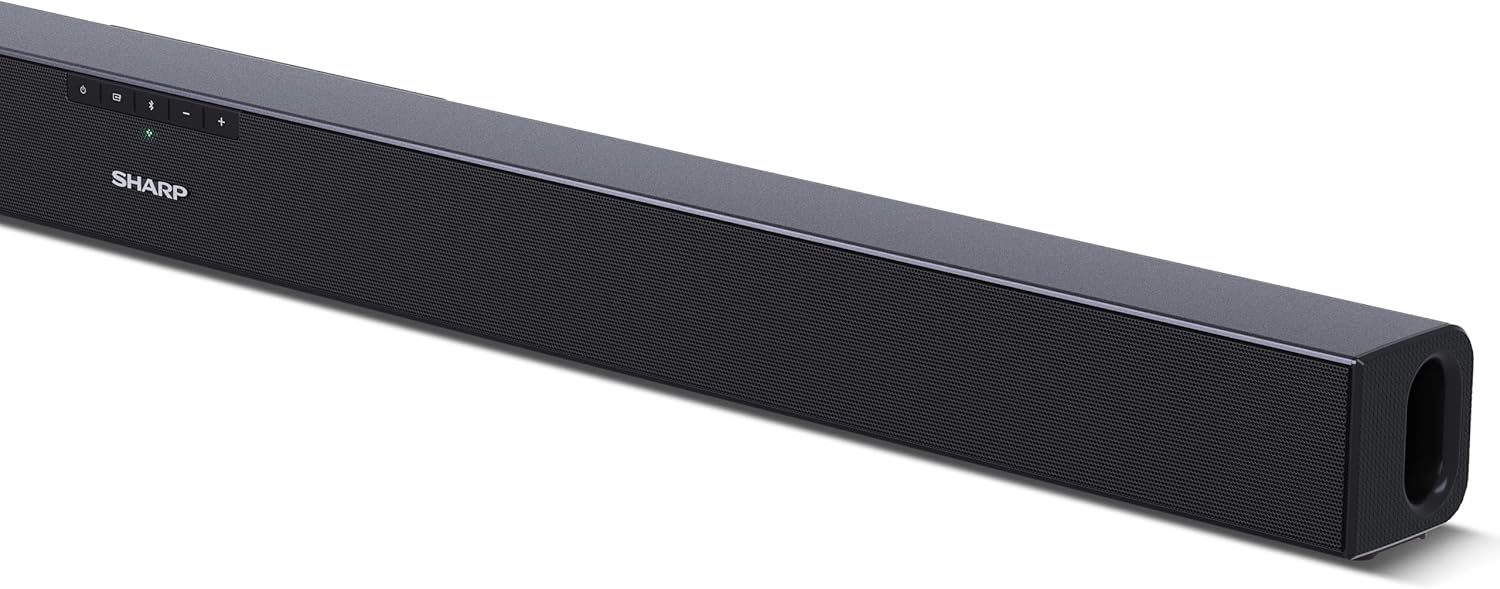
איור 4.1: חזית View
The front of the soundbar features the Sharp logo and LED indicators for source selection and status. Control buttons for power, input, and volume are located on the top panel.
איור 4.2: אחורי View (חיבורים)
The rear panel provides all necessary connection ports: HDMI ARC, Optical (S/PDIF), and Auxiliary (3.5mm) input, along with the power input.

איור 4.3: שלט רחוק
The included remote control allows for convenient operation of the soundbar, including power, input selection, volume, bass, and treble adjustments.
5. התקנה
5.1 מיקום
The Sharp HT-SB140MT Soundbar can be placed on a flat surface, such as a TV stand, or wall-mounted. Its slim profile of 6 cm allows it to fit easily under most TV screens without obstructing the view.

Figure 5.1: Soundbar Placement
The soundbar is ideally positioned directly in front of your television for optimal sound projection.
5.2 חיבור לטלוויזיה שלך
בחר אחת משיטות החיבור הבאות:
- HDMI ARC/CEC (Recommended): Connect an HDMI cable (not included) from the HDMI ARC port on your TV to the HDMI ARC port on the soundbar. This allows your TV remote to control the soundbar's volume and power. Ensure HDMI ARC/CEC is enabled in your TV's settings.
- Digital Optical Audio (S/PDIF): Connect an optical cable (not included) from the Optical Out port on your TV to the OPTICAL IN port on the soundbar. Select the Optical input on the soundbar.
- עזר (AUX): Connect a 3.5mm audio cable (not included) from the headphone jack or AUX Out port on your TV to the AUX IN port on the soundbar. Select the AUX input on the soundbar.
5.3 חיבור מתח
After connecting the audio cable, plug the power cable into the soundbar's power input and then into a wall outlet (220-240V / 50Hz).
6. הוראות הפעלה
6.1 הפעלה/כיבוי
לחץ על כפתור ההפעלה/כיבוי בסאונד בר או בשלט רחוק כדי להפעיל או לכבות את היחידה.
6.2 בחירת מקור
Press the Input button on the soundbar or the remote control repeatedly to cycle through the available input sources: HDMI ARC, Optical, AUX, and Bluetooth. The LED indicator on the soundbar will change to reflect the selected source.
6.3 התאמת עוצמת הקול
Use the Volume Up (+) and Volume Down (-) buttons on the soundbar or the remote control to adjust the sound level.
6.4 זיווג בלוטות '
כדי לחבר מכשיר בלוטות':
- Select Bluetooth input on the soundbar. The Bluetooth LED indicator will flash, indicating pairing mode.
- במכשיר החכם שלך (סמארטפון, טאבלט וכו'), הפעל את Bluetooth וחפש מכשירים זמינים.
- Select "SHARP HT-SB140MT" from the list of devices.
- Once connected, the Bluetooth LED indicator will stop flashing and remain solid. You can now stream audio wirelessly to the soundbar.
6.5 Sound Modes (Equalizer)
The soundbar features an equalizer with different sound modes to optimize audio for various content types. Use the EQ button on the remote control to cycle through these modes (e.g., Movie, Music, News). You can also adjust Bass and Treble levels using dedicated buttons on the remote.
7. תחזוקה
7.1 ניקוי
To clean the soundbar, unplug it from the power outlet. Use a soft, dry, lint-free cloth to wipe down the surfaces. Do not use abrasive cleaners, waxes, or solvents as they may damage the finish.
7.2 אחסון
If you plan to store the soundbar for an extended period, disconnect it from the power supply and store it in a cool, dry place, away from direct sunlight and extreme temperatures.
8. פתרון תקלות
אם אתם נתקלים בבעיות עם הסאונד בר שלכם, עיינו בבעיות הנפוצות ובפתרונות הבאות:
| בְּעָיָה | סיבה אפשרית | פִּתָרוֹן |
|---|---|---|
| אין קול מהסאונדבר. | סאונד בר כבוי או מושתק. נבחר מקור קלט שגוי. הכבלים אינם מחוברים כראוי. הגדרות פלט השמע של הטלוויזיה שגויות. | ודא שהסאונד בר דולק ואינו מושתק. Select the correct input source (HDMI ARC, Optical, AUX). בדוק את כל חיבורי הכבלים (HDMI, אופטי, AUX). Verify your TV's audio output settings are set to external speakers or the correct digital output. |
| מכשיר בלוטות' לא יכול להתחבר. | הסאונד בר אינו במצב צימוד. המכשיר מחוץ לטווח. הפרעות ממכשירים אחרים. | Ensure the soundbar is in Bluetooth input mode and the LED is flashing. Move your Bluetooth device closer to the soundbar (within 10 meters). Turn off other Bluetooth devices nearby. Try unpairing and re-pairing. |
| השלט רחוק לא עובד. | Battery is low or inserted incorrectly. חסימה בין השלט לסאונד בר. Remote control is faulty. | Replace the CR2 battery and ensure correct polarity. Remove any obstructions between the remote and the soundbar's sensor. אם הבעיות נמשכות, צור קשר עם תמיכת הלקוחות. |
9. מפרטים
| שם הדגם | HT-SB140(MT) |
| סוג רמקול | סרגל סאונד |
| תצורת ערוץ סאונד סראונד | 2.0 |
| עוצמת פלט מקסימלית של הרמקול | 150 וואט |
| תגובת תדר | 60 הרץ |
| טכנולוגיית קישוריות | Bluetooth, HDMI ARC/CEC, Digital Optical Audio (S/PDIF), 3.5mm Auxiliary (AUX) |
| טכנולוגיית תקשורת אלחוטית | בלוטות' |
| טווח מקסימלי (בלוטות') | 10 מטר |
| שיטת בקרה | שְׁלַט רָחוֹק |
| מקור כוח | AC (Mains) |
| קלט כרךtage | 220-240 וולט |
| צֶבַע | שָׁחוֹר |
| חוֹמֶר | פלסטיק, מתכת |
| סוג הרכבה | מתקן קיר, שולחן |
| מידות המוצר (L x W x H) | 95 x 6 x 6 ס"מ |
| משקל פריט | 1.5 קילוגרם |
| רכיבים כלולים | שְׁלַט רָחוֹק |
| נדרש סוללה | סוללת CR1 אחת |
| אֲטִימוּת | לֹא |
| זמינות חלקי חילוף | 5 שנים |
| עדכוני תוכנה מובטחים עד | מידע לא זמין |
10. אחריות ותמיכה
The Sharp HT-SB140MT Soundbar comes with a Limited Warranty. Please refer to the warranty card included in your package for specific terms and conditions. Spare parts are available for up to 5 years from the date of purchase.
For technical support, service, or warranty claims, please contact Sharp customer service through their official website or the contact information provided in your product documentation. When contacting support, please have your product model number (HT-SB140(MT)) and purchase details ready.


