1. המוצר נגמרview
The Sharp EL-531TG-GY is a scientific calculator designed for students and professionals requiring advanced mathematical functions. It features a 2-line display and Multi-Line Playback, facilitating the input and review of complex equations. This model is suitable for general math, algebra, geometry, trigonometry, statistics, biology, chemistry, and general science applications.
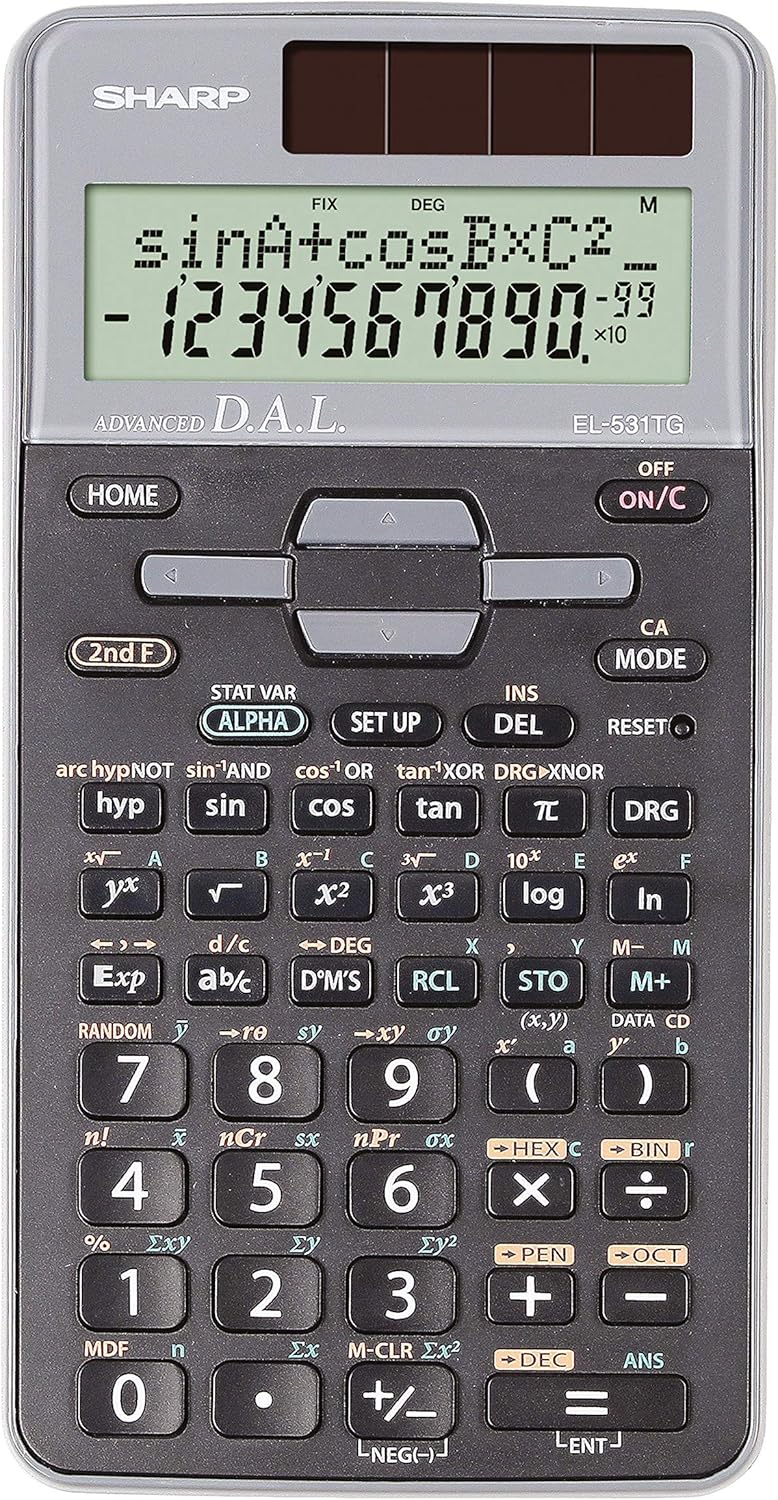
איור 1: חזית view of the Sharp EL-531TG-GY Scientific Calculator, showing the display, keypad, and solar panel.
2. התקנה ושימוש ראשוני
2.1 מקור כוח
The EL-531TG-GY calculator operates using both solar power and a single LR44 button cell battery. The solar panel provides power in well-lit environments, while the battery ensures operation in low-light conditions or when solar power is insufficient. An LR44 battery is included with the calculator.
2.2 הפעלה/כיבוי
- כדי להפעיל את המחשבון ON, לחץ על ON/C מַפְתֵחַ.
- כדי להפעיל את המחשבון כבוי, לחץ על חמישייה שנייה מפתח ואחריו כבוי key (which is typically the same as ON/C).
2.3 Initial Display Settings
Upon first use or after a reset, the calculator will typically default to certain settings (e.g., DEG for angle units). Refer to Section 3.3 for details on changing mode settings.
3. הוראות הפעלה
3.1 פעולות חשבון בסיסיות
הזינו מספרים באמצעות לוח המקשים המספרי. השתמשו ב +, -, ×, ו ÷ מקשי חיבור, חיסור, כפל וחילוק, בהתאמה. לחץ = to obtain the result.
3.2 פונקציות מדעיות
The calculator performs over 273 advanced scientific functions. Many functions are accessed by pressing the חמישייה שנייה key before the desired function key.
- פונקציות טריגונומטריות: לְהִשְׁתַמֵשׁ חֵטְא, חַסַת עָלִים, לְהִשְׁתַזֵף. Inverse functions (sin⁻¹, cos⁻¹, tan⁻¹) are accessed via חמישייה שנייה.
- פונקציות לוגריתמיות: לְהִשְׁתַמֵשׁ עֵץ (בסיס 10) ו ln (לוגריתם טבעי).
- כוחות ושורשים: לְהִשְׁתַמֵשׁ x², √, x³, ³√.
- שברים: השתמש ב- d/c מפתח להזנת שברים והמרה.
3.3 Mode Settings (DEG/RAD/GRAD)
To change the angle unit mode (Degrees, Radians, Gradians):
- הקש על DRG מַפְתֵחַ.
- לחץ שוב ושוב DRG to cycle through DEG (Degrees), RAD (Radians), and GRAD (Gradians). The current mode is indicated on the display.
3.4 פונקציות זיכרון
The calculator includes memory functions for storing and recalling values.
- חנות (STO): לִלְחוֹץ STO followed by a variable key (e.g., A, B) to store the displayed value.
- RCL (ריקול): לִלְחוֹץ RCL followed by the variable key to recall the stored value.
- M+ (זיכרון פלוס): מוסיף את הערך המוצג לזיכרון העצמאי.
- M- (זיכרון מינוס): מחסר את הערך המוצג מהזיכרון העצמאי.
3.5 Multi-Line Playback
The 2-line display allows for Multi-Line Playback, enabling users to review previous calculations and expressions. Use the directional arrow keys (up/down) to scroll through past entries and results. This feature is useful for checking work or re-using parts of previous calculations.
4. תחזוקה
4.1 ניקוי
To clean the calculator, wipe the surface gently with a soft, dry cloth. Do not use abrasive cleaners, solvents, or excessive moisture, as these can damage the display or internal components.
4.2 החלפת סוללה
The calculator uses one LR44 button cell battery. If the display becomes dim or erratic in low-light conditions, the battery may need replacement. To replace the battery:
- ודא שהמחשבון כבוי.
- אתר את תא הסוללה בגב המחשבון.
- פתח בזהירות את מכסה התא.
- הוציאו את סוללת LR44 הישנה והכניסו חדשה, תוך הקפדה על קוטביות נכונה (+/-).
- סגור היטב את מכסה תא הסוללות.
4.3 אחסון
When not in use, store the calculator in a cool, dry place away from direct sunlight and extreme temperatures. The hard cover included with the calculator provides protection from scratches and minor impacts.
5. פתרון תקלות
5.1 בעיות תצוגה
- תצוגה ריקה או עמומה: Ensure sufficient light for the solar panel. If the issue persists, replace the LR44 battery.
- Erratic Display: This may indicate a low battery. Replace the LR44 battery.
5.2 תוצאות שגויות
- Check Mode Settings: Verify that the angle unit (DEG, RAD, GRAD) is set correctly for trigonometric calculations.
- שגיאת קלט: Review your input using the Multi-Line Playback feature to ensure the expression was entered correctly.
- Memory Contents: If using memory functions, ensure the stored values are correct.
5.3 המחשבון לא מגיב
If the calculator becomes unresponsive, try performing a reset. Locate the אִתחוּל button (often a small recessed button requiring a thin object like a paperclip to press). Pressing this button will clear all memory and return the calculator to its factory default settings.
6. מפרטים

איור 2: חזית view of the Sharp EL-531TG-GY Scientific Calculator, illustrating its dimensions.
| תכונה | תֵאוּר |
|---|---|
| מספר דגם | SH-EL531TGGY |
| סוג תצוגה | 2-line LCD with Multi-Line Playback |
| פונקציות | Over 273 advanced scientific functions |
| מקור כוח | Solar and 1 x LR44 battery (included) |
| חוֹמֶר | פּלָסטִי |
| מידות (L x W x H) | 16.1 x 8 x 1.5 ס"מ (בקירוב) |
| מִשׁקָל | 100 גרם (בערך) |

איור 3: צד view of the Sharp EL-531TG-GY Scientific Calculator, showing its slim profile.
7. אחריות ותמיכה
7.1 מידע אחריות
This product is covered by a manufacturer's warranty. Please refer to the warranty card included with your purchase or visit the official Sharp webבאתר לקבלת תנאי אחריות מפורטים הספציפיים לאזורך.
7.2 תמיכת לקוחות
For technical assistance, troubleshooting not covered in this manual, or service inquiries, please contact Sharp customer support. Contact information can typically be found on the Sharp official webבאתר או על אריזת המוצר.


