1. הקדמה
תודה על הרכישהasing the Sharp HT-SBW110 2.1 Bluetooth Soundbar System. This manual provides essential information for setting up, operating, and maintaining your soundbar system. Please read it thoroughly before use to ensure proper functionality and safety.
The HT-SBW110 is a powerful 2.1 channel soundbar system designed to enhance your audio experience, featuring 180W total RMS power, a dedicated wireless subwoofer, and versatile connectivity options including Bluetooth, HDMI ARC, Optical, and AUX inputs.

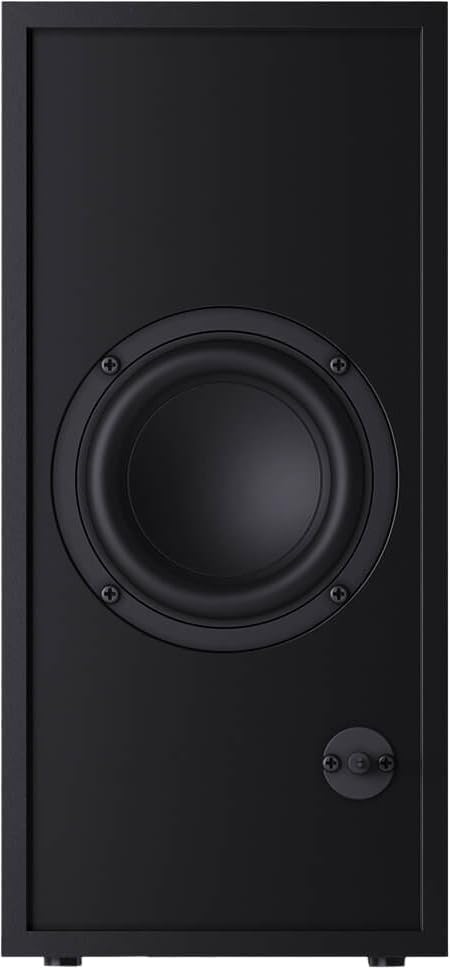
Figure 1.1: Sharp HT-SBW110 Soundbar and Subwoofer
This image displays the Sharp HT-SBW110 soundbar and its accompanying separate subwoofer, showcasinהעיצוב השחור והחלקלק שלהם.
2. תכולת החבילה
אנא ודאו שכל הפריטים נמצאים בחבילה:
- Sharp HT-SBW110 Soundbar
- סאב וופר אלחוטי
- שְׁלַט רָחוֹק
- Power Cable for Soundbar
- Power Cable for Subwoofer
- מדריך למשתמש (מסמך זה)
- Batteries for Remote Control (1 x CR2)
3. מידע בטיחות
Always follow basic safety precautions when using this product to reduce the risk of fire, electric shock, or injury:
- אין לחשוף מכשיר זה לטפטופים או להתזות.
- אל תניח חפצים מלאים בנוזלים, כגון אגרטלים, על המכשיר.
- יש לוודא אוורור נאות. אין לחסום פתחי אוורור.
- Do not place the soundbar or subwoofer near heat sources such as radiators, heat registers, stoves, or other apparatus (including ampמחצבים) המייצרים חום.
- השתמש רק בתוספות/אביזרים שצוינו על ידי היצרן.
- נתק את המכשיר מהחשמל במהלך סופות ברקים או כאשר אינו בשימוש לפרקי זמן ארוכים.
- הפנה כל טיפול לצוות שירות מוסמך.
4. התקנה
4.1 מיקום
סרגל קול: Place the soundbar on a flat, stable surface directly in front of your TV, centered for optimal sound dispersion. Ensure there are no obstructions in front of the soundbar's speakers.
Subwoofer: The wireless subwoofer can be placed anywhere in the room, ideally within 5-10 meters of the soundbar, for best bass response. Avoid placing it in enclosed spaces that might muffle the sound.
The soundbar is also wall-mountable. Refer to the included wall-mounting template (if provided) for proper installation.
4.2 חיבורים
Connect your soundbar to your TV or other audio sources using one of the following methods:

Figure 4.1: Soundbar Rear Panel Connections
This image shows the rear panel of the Sharp HT-SBW110 soundbar, highlighting the various input ports including HDMI ARC, Optical, and AUX.
- HDMI ARC (מומלץ):
Connect an HDMI cable from the HDMI ARC port on your soundbar to the HDMI ARC port on your TV. This allows audio from your TV to be sent to the soundbar and enables control of the soundbar volume using your TV remote (if your TV supports HDMI CEC).
- אוֹפּטִי:
Connect an optical audio cable from the OPTICAL input on your soundbar to the optical digital audio output on your TV or other audio source.
- AUX:
Connect a 3.5mm audio cable from the AUX input on your soundbar to the headphone jack or audio output of your device (e.g., smartphone, MP3 player).
- חיבור חשמל:
Connect the power cables to the soundbar and subwoofer, then plug them into a wall outlet (AC 220-240V, 50Hz).
The subwoofer will automatically pair with the soundbar once both are powered on. A blue indicator light on the subwoofer will confirm a successful connection.
5. הוראות הפעלה
5.1 שלט רחוק מעלview
איור 5.1: שלט רחוק
This image displays the sleek, minimalist remote control for the Sharp HT-SBW110 soundbar, showing its various buttons for power, input selection, volume, bass, treble, and EQ modes.
The remote control allows you to manage all functions of your soundbar system. Insert the provided CR2 battery into the remote control before first use.
- כפתור הפעלה (⏷): מפעיל/מכבה את סאונד בר.
- כפתור קלט/מקור (↵): Switches between HDMI ARC, Optical, AUX, and Bluetooth inputs.
- עוצמת הקול מעלה/הנמכת (+/-): כוונון עוצמת הקול הראשית.
- לחצן השתקה (🔇): השתקה או ביטול השתקת הצליל.
- בס +/-: Adjusts the bass level of the subwoofer.
- טרבל +/-: מכוון את רמת הטרבל.
- לחצן EQ: Cycles through preset equalizer modes: Music, Film, Talk.
- לחצן בלוטות' (Ⓘ): נכנס למצב צימוד Bluetooth.
5.2 פעולה בסיסית
- הפעלה/כיבוי: Press the Power button on the remote or on the soundbar's top panel.
- בחר קלט: Press the Input/Source button repeatedly to cycle through available inputs (HDMI ARC, Optical, AUX, Bluetooth). The LED indicator on the soundbar will change color to indicate the selected input.
- התאם את עוצמת הקול: Use the Volume +/- buttons on the remote or the soundbar to adjust the listening level.
- שינוי מצב EQ: Press the EQ button to select between Music, Film, or Talk sound modes.
5.3 זיווג בלוטות '
- Press the Input/Source button on the soundbar or remote until the Bluetooth input is selected (usually indicated by a blue LED).
- The soundbar will automatically enter pairing mode, and the Bluetooth LED will flash.
- במכשיר ה-Bluetooth שלך (סמארטפון, טאבלט וכו'), הפעל את Bluetooth וחפש מכשירים זמינים.
- Select "SHARP HT-SBW110" from the list of devices.
- Once paired, the Bluetooth LED on the soundbar will stop flashing and remain solid blue. You can now play audio from your device through the soundbar.
6. תחזוקה
- ניקוי: השתמשו במטלית רכה ויבשה לניקוי משטחי הסאונד בר והסאב וופר. אין להשתמש בחומרי ניקוי נוזליים או תרסיסים.
- אוורור: Ensure that the ventilation openings on the soundbar and subwoofer are not blocked by dust or debris.
- אִחסוּן: אם מאחסנים את המכשיר לתקופה ממושכת, נתקו אותו משקע החשמל ואחסנו אותו במקום קריר ויבש.
7. פתרון תקלות
| בְּעָיָה | סיבה אפשרית | פִּתָרוֹן |
|---|---|---|
| אין כוח | כבל חשמל לא מחובר; שקע החשמל אינו פעיל. | Ensure power cables are securely connected to the soundbar, subwoofer, and wall outlet. Try a different outlet. |
| אין קול | נבחרה קלט שגויה; עוצמת קול נמוכה מדי; כבלים אינם מחוברים כראוי. | Select the correct input source. Increase volume. Check all audio cable connections. Ensure TV audio output is set to external speakers. |
| צימוד Bluetooth נכשל | סאונד בר לא במצב צימוד; המכשיר רחוק מדי; הפרעות. | Ensure soundbar is in Bluetooth pairing mode (flashing blue LED). Move device closer to soundbar. Avoid strong electromagnetic interference. Try unpairing and re-pairing. |
| השלט רחוק לא עובד | Batteries depleted; Obstruction between remote and soundbar. | Replace batteries. Ensure clear line of sight between remote and soundbar's IR receiver. |
אם הבעיה נמשכת, אנא עיין בסעיף האחריות והתמיכה לקבלת סיוע נוסף.
8. מפרטים
| ערוצי אודיו | 2.1 ערוצים |
| כוח RMS כולל | 180 W |
| Soundbar RMS Power | 30 W |
| עוצמת RMS של סאב וופר | 30 W |
| טווח תדרים | 60 - 20000 הרץ |
| טכנולוגיית קישוריות | קווי ואלחוטי |
| גרסת בלוטות' | 4.2 |
| יציאות HDMI | 1 (ARC) |
| כניסת אודיו אופטית | 1 |
| כניסת AUX | כֵּן |
| כניסת AC כרךtage | 220 - 240 וולט |
| תדר כניסה AC | 50 הרץ |
| צריכת חשמל אופיינית | 30 W |
| צריכת חשמל במצב המתנה | 0.5 W |
| Soundbar Dimensions (W x D x H) | 800 x 60 x 60 מ"מ (31.5 x 2.4 x 2.4 אינץ') |
| משקל סרגל סאונד | 1.3 ק"ג (2.9 פאונד) |
| Subwoofer Dimensions (W x D x H) | 150 x 320 x 220 מ"מ (5.9 x 12.6 x 8.7 אינץ') |
| משקל סאב וופר | 2.7 ק"ג (6 פאונד) |
| צֶבַע | שָׁחוֹר |
| ניתן לתלייה על הקיר | כֵּן |
| שְׁלַט רָחוֹק | כּוֹלֵל |
| הסמכות | CE (EMC), CB (Safety), ErP (Energy) |
9. אחריות ותמיכה
This Sharp HT-SBW110 Soundbar System comes with a limited warranty. Please refer to the warranty card included in your package for specific terms and conditions.
Spare parts availability is guaranteed for 1 year from the date of purchase.
For technical support, troubleshooting beyond this manual, or warranty claims, please contact Sharp customer service or visit the official Sharp website for your region. Contact information can typically be found on the product packaging or Sharp's official webאֲתַר.


