מָבוֹא
This manual provides essential instructions for the Jam Audio Out There Active Noise Cancelling On-Ear Bluetooth Headphones. Please read this guide thoroughly to ensure proper use, maintenance, and to maximize your listening experience. These headphones offer active noise cancellation, Bluetooth connectivity, hands-free calling, and a comfortable on-ear design.
מה יש בקופסה
ודא שכל הפריטים נמצאים באריזה:
- Out There Headphones
- כבל AUX (3.5 מ"מ)
- כבל טעינה USB
- מדריך התחלה מהירה (עיין במדריך זה לקבלת הוראות מפורטות)

Image: Contents of the Jam Audio Out There headphone package, including the headphones, AUX cable, and USB charging cable.
המוצר נגמרview ובקרות
Familiarize yourself with the headphone's layout and controls for optimal use.
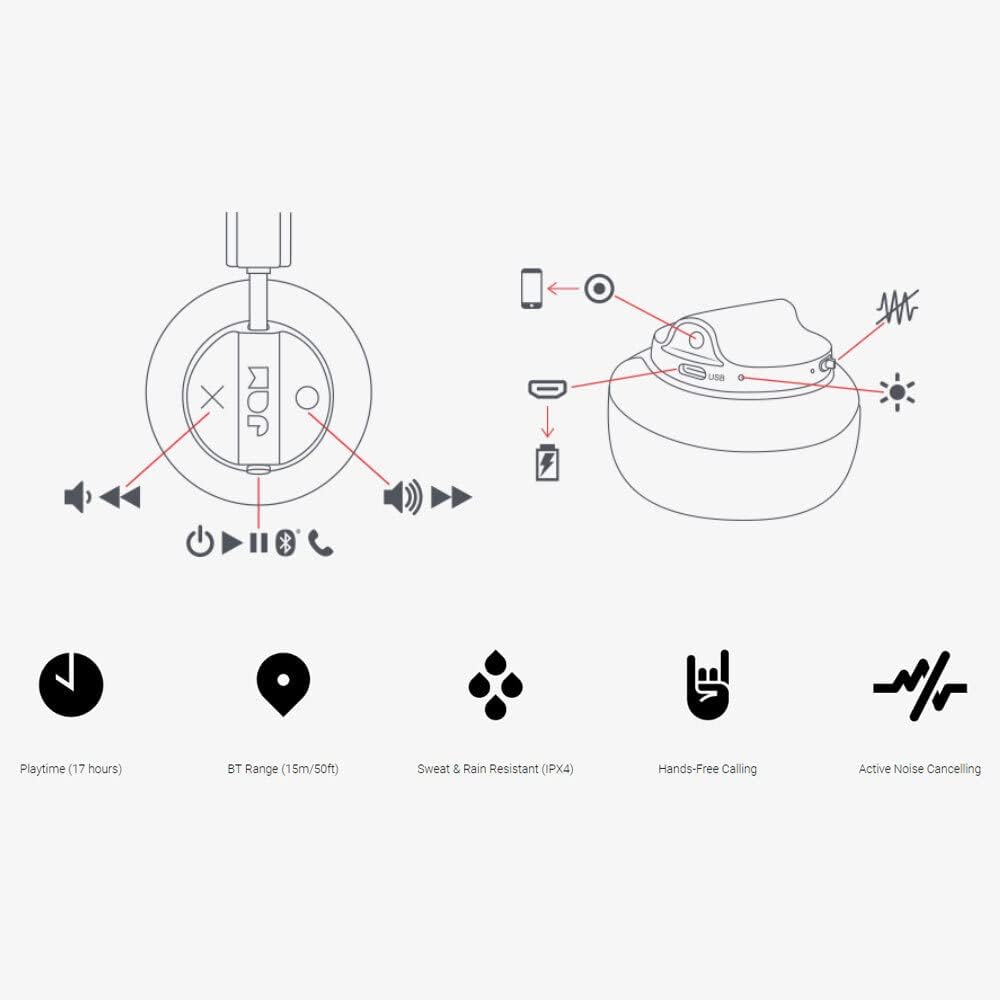
Image: Detailed diagram illustrating the control buttons and ports on the Jam Audio Out There headphones, including power, volume, track navigation, call management, and the charging port.
- לחצן הפעלה: לחץ והחזק להפעלה/כיבוי.
- הגברת עוצמת הקול/הרצועה הבאה: לחיצה קצרה להגברת עוצמת הקול, לחיצה ארוכה לרצועה הבאה.
- הורדת עוצמת הקול/הרצועה הקודמת: לחיצה קצרה להנמכת עוצמת הקול, לחיצה ארוכה לרצועה הקודמת.
- הפעל/השהה/ענה לשיחה: Single press to play/pause music or answer/end a call.
- Active Noise Cancelling (ANC) Switch: Toggle to activate or deactivate noise cancellation.
- יציאת טעינה: יציאת מיקרו USB לטעינה.
- יציאת AUX-in: שקע 3.5 מ"מ לחיבור אודיו קווי.
הגדרה
1. טעינת האוזניות
Before first use, fully charge your headphones. Connect the provided USB charging cable to the charging port on the headphones and the other end to a USB power source. The LED indicator will show charging status and turn off when fully charged. A full charge takes approximately 2 hours and provides up to 17 hours of playtime.

Image: The Jam Audio Out There headphones provide up to 17 hours of playtime on a single charge.
2. הפעלה / כיבוי
- To power on: Press and hold the Power button for 3 seconds. The LED indicator will flash.
- To power off: Press and hold the Power button for 3 seconds. The LED indicator will turn off.
3. זיווג Bluetooth
- ודא שהאוזניות כבויות.
- Press and hold the Power button for 5 seconds until the LED indicator flashes red and blue, indicating pairing mode.
- במכשיר שלך (סמארטפון, טאבלט, מחשב), הפעל את Bluetooth וחפש מכשירים זמינים.
- Select "JAM Out There" from the list of devices.
- Once paired, the LED indicator on the headphones will turn solid blue.
- The headphones have a Bluetooth range of up to 15 meters (50 feet).

Image: The Jam Audio Out There headphones offer Bluetooth compatibility, allowing a range of up to 15 meters or 50 feet from your connected device.
הוראות הפעלה
השמעת מוסיקה
- הפעל/השהה: לחץ על לחצן הפעל/השהה פעם אחת.
- הרצועה הבאה: לחץ לחיצה ארוכה על כפתור הגברת עוצמת הקול.
- רצועה קודמת: לחץ לחיצה ארוכה על כפתור הנמכת עוצמת הקול.
- התאמת עוצמת הקול: Short press the Volume Up or Volume Down buttons.
שיחות ללא ידיים
- מענה/סיום שיחה: לחץ על לחצן הפעל/השהה פעם אחת.
- דחה שיחה: לחץ והחזק את לחצן ההפעלה/השהה למשך 2 שניות.
- להתקשר: Initiate the call from your connected device. The audio will automatically transfer to the headphones.
- Music will automatically pause during a call and resume after the call ends.
ביטול רעשים פעיל (ANC)
- To activate ANC: Slide the ANC switch to the ON position. The ANC indicator light will illuminate.
- To deactivate ANC: Slide the ANC switch to the OFF position. The ANC indicator light will turn off.
- Using ANC can reduce ambient noise, enhancing your listening experience. Note that ANC can be used independently or with Bluetooth audio.
Wired Connection (AUX-in)
For a wired connection, use the provided 3.5mm AUX cable. Plug one end into the headphone's AUX-in port and the other into your audio device. This allows you to continue listening even if the headphone battery is depleted or if Bluetooth is not available.
תַחזוּקָה
- ניקוי: נגבו את האוזניות בעזרת מטלית רכה ויבשה. אין להשתמש בכימיקלים חזקים או בחומרים שוחקים.
- אִחסוּן: יש לאחסן את האוזניות במקום קריר ויבש, הרחק מטמפרטורות קיצוניות.
- עמידות במים: These headphones are IPX4 rated, meaning they are resistant to sweat and light splashes of water. Do not submerge them in water or expose them to heavy rain. Ensure the charging port cover is securely closed when not charging to maintain water resistance.
- טיפול בסוללה: כדי להאריך את חיי הסוללה, הימנעו מפריקה מלאה של האוזניות לעתים קרובות. טען אותן באופן קבוע, גם אם אינן בשימוש למשך פרקי זמן ממושכים.
פתרון בעיות
| בְּעָיָה | פִּתָרוֹן |
|---|---|
| האוזניות לא נדלקות | ודא שהאוזניות טעונות. חבר למקור חשמל באמצעות כבל ה-USB. |
| לא ניתן לצמד דרך בלוטות' |
|
| אין קול או עוצמת קול נמוכה |
|
| ביטול רעשים אקטיבי לא עובד | Ensure the ANC switch is in the ON position and the ANC indicator light is illuminated. |
| Headphones falling apart or breaking | While the product is designed for durability, excessive force or improper handling can cause damage. Handle with care. If issues persist, refer to warranty information. |
מפרטים
- שם הדגם: שם בחוץ
- מספר דגם: HX-HP303BK
- קישוריות: Bluetooth, 3.5 mm Jack (AUX-in)
- טווח אלחוטי: עד 15 מטר (50 רגל)
- חיי סוללה: עד 17 שעות
- בקרת רעש: ביטול רעשים אקטיבי
- עמידות במים: IPX4 Rated (Sweat and Rain Resistant)
- מיקום אוזניים: על אוזן
- חוֹמֶר: גומי, סיליקון
- משקל פריט: 5.1 אונקיות (0.32 פאונד)
- מידות המוצר: 8.58 x 3.19 x 8.66 אינץ'
- רכיבים כלולים: Headphones, Charging Cord, AUX Cable
סרטון המוצר נגמרview
צפו בסרטון המוצר הרשמי הזה לקבלת הצצה חזותיתview of the Jam Audio product line, including the Out There headphones.
Video: An official Jam Audio sizzle video showcasing various products, including the Out There headphones, highlighting their design and features.
אחריות ותמיכה
For warranty information, product registration, or technical support, please refer to the official Jam Audio webאתר או צרו קשר עם שירות הלקוחות שלהם. שמרו את הוכחת הרכישה שלכם לצורך תביעות אחריות.


