1. הקדמה
This manual provides detailed instructions for the installation, operation, and maintenance of the LevelOne FVT-2202 Fast Ethernet Media Converter. The FVT-2202 is designed to convert 10/100Base-TX Fast Ethernet signals to 100Base-FX fiber optic signals, extending network reach over fiber optic cable. It supports both 10Mbps and 100Mbps network speeds, making it suitable for various network environments.
אנא קרא מדריך זה בעיון לפני הפעלת המכשיר כדי להבטיח תפקוד תקין ולמנוע נזק.
2. תכולת החבילה
ודא שהחבילה שלך מכילה את הפריטים הבאים:
- LevelOne FVT-2202 Fast Ethernet Media Converter
- Power Adapter (5VDC)
- מדריך למשתמש (מסמך זה)
אם פריטים כלשהם חסרים או ניזוקים, אנא צרו קשר עם הספק שלכם באופן מיידי.
3. תיאור פיזי
The LevelOne FVT-2202 is a compact media converter designed for reliable performance. It features standard RJ45 and fiber optic (SC) ports, along with LED indicators for status monitoring.
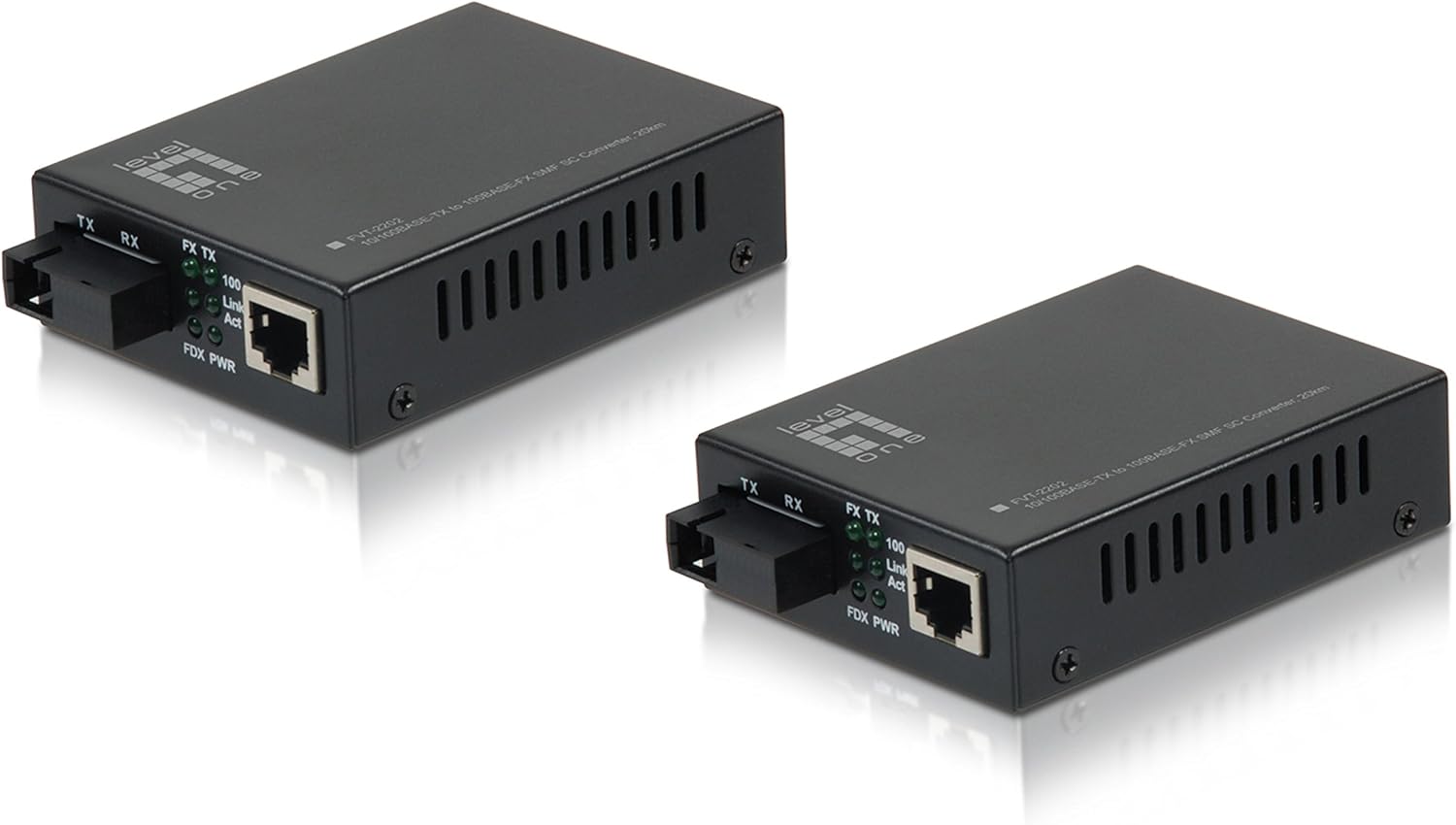
איור 3.1: חֲזִית view of the LevelOne FVT-2202 Media Converter, showing the RJ45 Ethernet port, SC fiber optic port, and LED indicators for TX, RX, Link/Act, and Power.

איור 3.2: אֲחוֹרִי view of the LevelOne FVT-2202 Media Converter, highlighting the 5VDC power input and DIP switches for configuration.
3.1. מחווני LED
| LED | סטָטוּס | תֵאוּר |
|---|---|---|
| PWR | ירוק (מופעל) | המכשיר מקבל חשמל. |
| FX Link/Act | ירוק (מופעל) | Fiber optic link is established. |
| FX Link/Act | ירוק (מהבהב) | Data is being transmitted or received over the fiber optic link. |
| TX קישור/אקט | ירוק (מופעל) | קישור Ethernet נוצר. |
| TX קישור/אקט | ירוק (מהבהב) | נתונים מועברים או מתקבלים דרך קישור ה-Ethernet. |
3.2. מתגי DIP
The FVT-2202 features DIP switches for advanced configuration. Refer to the markings on the device for specific switch functions, which typically include settings for LFP (Link Fault Pass-through), speed, and duplex mode.
- מתג 1: LFP (Link Fault Pass-through) Enable/Disable
- מתג 2: Auto-Negotiation Enable/Disable
- מתג 3: 100Mbps/10Mbps Speed Selection (when Auto-Negotiation is disabled)
- מתג 4: Full-Duplex/Half-Duplex Selection (when Auto-Negotiation is disabled)
זְהִירוּת:
Ensure the device is powered off before changing DIP switch settings to prevent potential damage or incorrect configuration.
4. התקנה והתקנה
Follow these steps to properly install and connect your LevelOne FVT-2202 Media Converter:
- הכנת הסביבה: Ensure the installation location is clean, dry, and has adequate ventilation. Avoid areas with extreme temperatures or humidity.
- כיבוי מכשירים: Before making any connections, ensure that all network devices (switches, routers, computers) that will connect to the media converter are powered off.
- Configure DIP Switches (if necessary): If specific network settings are required (e.g., fixed speed/duplex, LFP), adjust the DIP switches on the rear of the converter according to your network requirements. Refer to Section 3.2 for details.
- חיבור כבל סיב אופטי: Connect one end of the fiber optic cable (SC connector) to the FX port on the FVT-2202. Connect the other end to your fiber optic network device (e.g., fiber switch, another media converter). Ensure the transmit (TX) and receive (RX) fibers are correctly matched.
- חיבור כבל אתרנט: Connect a standard RJ45 Ethernet cable from your copper-based network device (e.g., Ethernet switch, computer) to the TX port on the FVT-2202.
- חבר מתאם מתח: Plug the provided 5VDC power adapter into the power input jack on the FVT-2202. Then, plug the power adapter into a suitable electrical outlet.
- הפעלה של התקנים: Power on the FVT-2202. The PWR LED should illuminate green. Then, power on your connected network devices.
- אמת חיבורים: Check the Link/Act LEDs for both the FX (fiber) and TX (Ethernet) ports. A solid green light indicates a successful link. Blinking lights indicate data activity.
חָשׁוּב:
Always handle fiber optic cables with care. Avoid bending them sharply or exposing the connectors to dust and dirt, which can degrade performance.
5. תפעול
Once the LevelOne FVT-2202 is properly installed and powered on, it operates automatically as a transparent media converter. It translates Ethernet signals between copper and fiber optic mediums without requiring any software configuration.
5.1. פונקציונליות בסיסית
- The converter transparently passes Ethernet frames between the RJ45 (copper) and SC (fiber) interfaces.
- It supports both 10Mbps and 100Mbps Fast Ethernet speeds.
- Auto-negotiation is typically enabled by default on the RJ45 port to automatically detect the speed and duplex mode of the connected device.
- The fiber optic port operates at 100Mbps full-duplex.
5.2. סטטוס ניטור
The LED indicators provide a quick visual status of the converter's operation:
- LED PWR: Confirms the device is powered.
- FX Link/Act LED: Indicates the status of the fiber optic link and data activity.
- TX Link/Act LED: Indicates the status of the Ethernet link and data activity.
Refer to Section 3.1 for a detailed explanation of LED behaviors.
6. תחזוקה
The LevelOne FVT-2202 Media Converter is designed for minimal maintenance. However, following these guidelines can help ensure its longevity and reliable performance:
- ניקוי: Keep the device clean and free from dust. Use a soft, dry cloth for cleaning the exterior. Do not use liquid or aerosol cleaners.
- Fiber Optic Connectors: Ensure fiber optic connectors are clean. Dust or dirt on the fiber end-faces can significantly degrade signal quality. Use appropriate fiber optic cleaning tools if necessary.
- אוורור: Ensure that the ventilation holes on the device are not blocked to prevent overheating.
- ספק כוח: Use only the power adapter provided with the device. Using an incorrect power adapter can damage the converter.
- תנאים סביבתיים: Operate the device within its specified environmental conditions (temperature, humidity) to prevent malfunction.
7. פתרון תקלות
If you encounter issues with your LevelOne FVT-2202 Media Converter, refer to the following troubleshooting steps:
| בְּעָיָה | סיבה אפשרית | פִּתָרוֹן |
|---|---|---|
| אין חשמל (נורית PWR כבויה) | מתאם החשמל לא מחובר או פגום. | Check power adapter connection to the device and wall outlet. Ensure the outlet is functional. Try a different power adapter if available and compatible. |
| No Fiber Link (FX Link/Act LED Off) | Fiber cable disconnected, damaged, or incorrect TX/RX connection. | Verify fiber cable connections at both ends. Ensure TX/RX are correctly matched. Inspect cable for damage. Clean fiber connectors. Check the remote fiber device. |
| No Ethernet Link (TX Link/Act LED Off) | Ethernet cable disconnected, damaged, or incorrect speed/duplex settings. | Verify Ethernet cable connection. Inspect cable for damage. Ensure the connected device is powered on and functioning. Check DIP switch settings for speed/duplex if auto-negotiation is disabled. |
| Poor Network Performance | Cable issues, duplex mismatch, or excessive network traffic. | Check cable quality and length. Ensure duplex settings are consistent across connected devices (auto-negotiation recommended). Monitor network traffic. |
If the problem persists after trying these solutions, please contact LevelOne technical support for further assistance.
8. מפרטים
| שם הדגם | FVT-2202 |
| מותג | רמה |
| תקן רשת | 10/100Base-TX, 100Base-FX |
| קצב העברת נתונים | 100 Megabits Per Second (10/100Mbps) |
| Connector Type (Copper) | RJ45 |
| Connector Type (Fiber) | SC (Single-Mode Fiber, 20km range) |
| סוג כבל | Ethernet, Fiber Optic |
| תכונה מיוחדת | Data Transfer, Link Fault Pass-through (LFP) via DIP switch |
| צֶבַע | שָׁחוֹר |
| שימוש בפנים/חוץ | בָּחוּץ |
| הַתאָמָה | RoHS, FCC Part 15 |
| משקל פריט | 11.3 אונקיות |
| מידות המוצר (LxWxH) | 2.8 x 3.7 x 1.02 אינץ' |
| קלט כוח | 5VDC |
9. אחריות ותמיכה
LevelOne products are backed by a manufacturer's warranty. For specific warranty terms and conditions, please refer to the warranty card included with your product or visit the official LevelOne webאתר. שמור את קבלת הרכישה כהוכחת קנייה.
For technical support, product registration, or to download the latest drivers and firmware, please visit the LevelOne support portal or contact their customer service department. Contact information can typically be found on the LevelOne webאֲתַר: www.level1.com


