1. הקדמה
This user manual provides comprehensive instructions for the AABCOOLING 120mm Plastic Dust Filter. This product is designed to effectively prevent dust accumulation inside computer cases, protecting sensitive components and maintaining optimal system performance. Please read this manual thoroughly before installation and use.
2. המוצר נגמרview
The AABCOOLING 120mm Plastic Dust Filter consists of a durable plastic frame and a high-permeability foam filter mesh. It is specifically designed for 120mm computer fans and features a removable cover for easy maintenance.

Figure 2.1: Assembled AABCOOLING 120mm Plastic Dust Filter. This image shows the complete filter unit, ready for installation, with its black plastic frame and visible internal mesh.

איור 2.2: צד view of the assembled dust filter. This perspective highlights the slim profile of the filter, demonstrating how it can be integrated into a PC case without significant bulk.
3. התקנה והתקנה
The AABCOOLING 120mm Plastic Dust Filter is designed for easy installation on any standard 120mm fan intake or exhaust port. The filter's hole spacing is 105 x 105 mm, compatible with most 120mm fan mounting points.
שלבי התקנה:
- Identify Fan Location: Determine the 120mm fan location on your computer case where you wish to install the dust filter. This is typically an intake fan.
- מקם את המסנן: Align the dust filter with the mounting holes of the 120mm fan or the fan mounting points on your PC case. Ensure the filter mesh faces the direction from which dust is expected (usually outwards if it's an intake fan).
- אבטח את המסנן: Use appropriate screws (not included) to secure the filter to the fan or case. The filter features four corner holes for mounting. Do not overtighten screws to avoid damaging the plastic frame.

Figure 3.1: Disassembled filter showing the outer frame and the inner foam filter. This illustrates the two main components of the filter, highlighting its simple design for easy assembly and disassembly.
4. תחזוקה
Regular cleaning of the dust filter is crucial for maintaining optimal airflow and dust prevention. The filter's design allows for easy removal and cleaning of the foam mesh.
שלבי ניקוי:
- הסר את המסנן: If the filter is screwed into place, carefully unscrew it from the fan or case.
- רכיבים נפרדים: Gently pry open the plastic frame to separate the outer cover from the main body, exposing the foam filter.
- Remove Foam Filter: Carefully remove the foam filter mesh from its housing.
- Clean the Foam:
- For light dust, simply tap the foam against a hard surface or use compressed air to blow off the dust.
- For heavier dust or grime, rinse the foam under lukewarm water. You may use a mild soap if necessary.
- יבש היטב: Ensure the foam filter is completely dry before reassembling. Air drying is recommended. Do not use heat sources that could deform the foam.
- הרכיבו מחדש: Place the dry foam filter back into the main body of the plastic frame, then snap the outer cover back into place.
- התקן מחדש: Reattach the cleaned filter to your computer case or fan.

Figure 4.1: The foam filter being removed from the plastic frame. This image demonstrates the ease with which the filter can be disassembled for cleaning or replacement of the foam element.
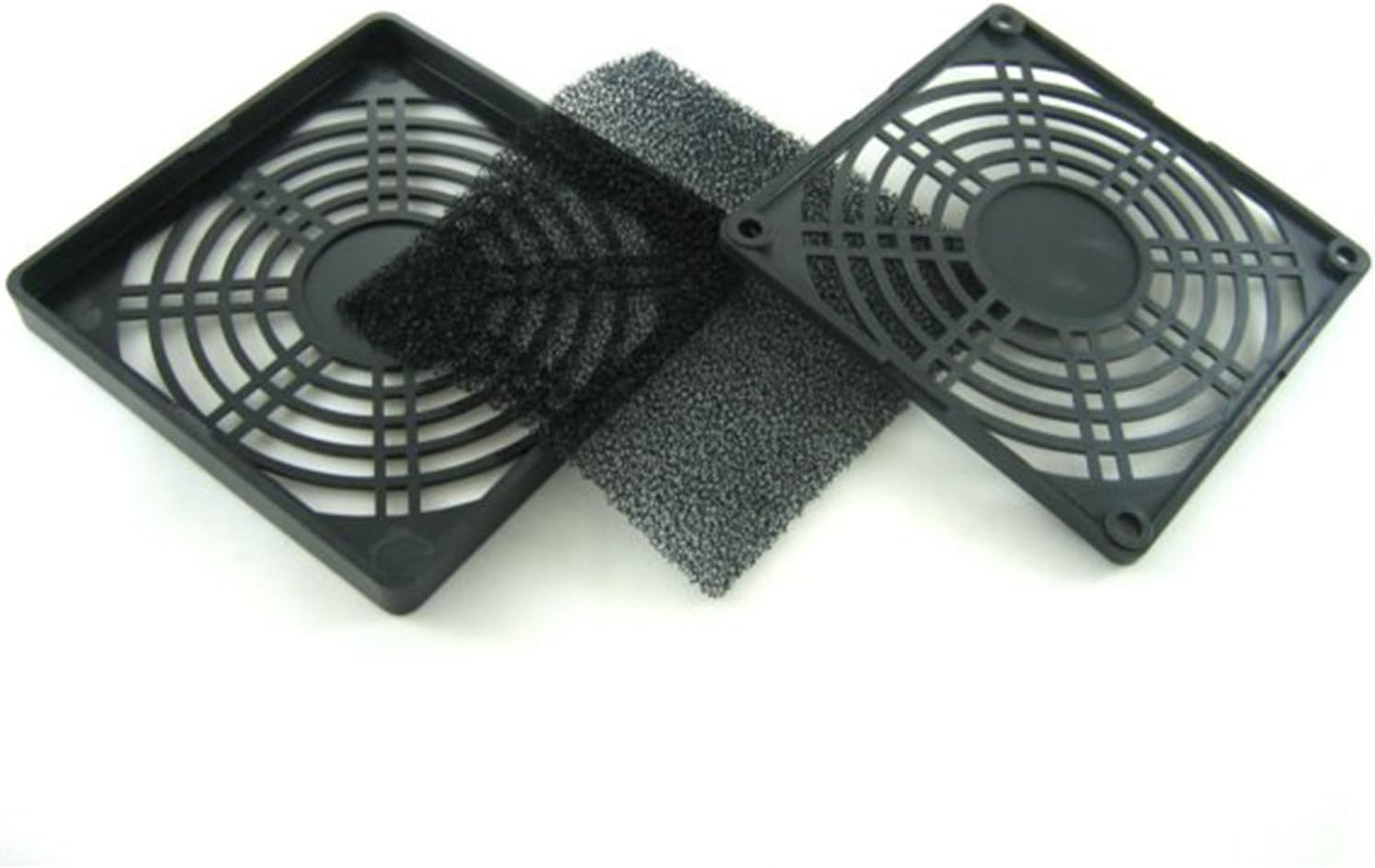
Figure 4.2: Two disassembled filter units, showcasing the separate plastic frames and foam inserts. This view emphasizes the modular design, simplifying maintenance and component replacement.
5. פתרון תקלות
If you encounter issues with your dust filter, consider the following common problems and solutions:
- זרימת אוויר מופחתת:
לִגרוֹם: The most common cause is a clogged filter due to excessive dust accumulation.
פִּתָרוֹן: Refer to Section 4, "Maintenance," and clean the foam filter thoroughly. Ensure the foam is completely dry before reinstallation.
- Filter Not Fitting Properly:
לִגרוֹם: Incorrect size filter or misalignment during installation.
פִּתָרוֹן: Verify that your fan is indeed 120mm. Ensure the filter is correctly aligned with the mounting holes before securing it. Do not force the filter into place.
- ריח חריג:
לִגרוֹם: New product odor or accumulation of certain types of dust/debris.
פִּתָרוֹן: For new product odor, allow the filter to air out in a well-ventilated area for a few hours before installation. For accumulated odors, clean the filter thoroughly as per Section 4. If the odor persists, consider replacing the foam filter.
6. מפרטים
| מותג | AABCOOLING |
| מספר דגם | OFG016 |
| Compatible Fan Size | 120 מ"מ x 120 מ"מ |
| מרווח חורים | 105 מ"מ x 105 מ"מ |
| חוֹמֶר | Plastic (Frame), Foam (Filter Mesh) |
| צֶבַע | שָׁחוֹר |
| מכשירים תואמים | Computer (PC Case Fans) |
7. מידע על אחריות
Specific warranty details for the AABCOOLING 120mm Plastic Dust Filter are not provided in the product information. Please refer to the retailer's return policy or contact AABCOOLING directly for warranty inquiries.
8. תמיכת לקוחות
For further assistance or technical support regarding your AABCOOLING product, please visit the official AABCOOLING webאתר או צרו קשר עם מחלקת שירות הלקוחות שלהם. פרטי הקשר עשויים להשתנות בהתאם לאזור.
פֶּתֶק: Always refer to the latest information provided by the manufacturer or your point of purchase for the most accurate and up-to-date support details.