המוצר נגמרview
This manual provides instructions for the Delock USB 2.0 A-B Cable, model 83687. This cable is designed for connecting devices with a USB Type-A port to devices with a USB Type-B port, facilitating data transfer.
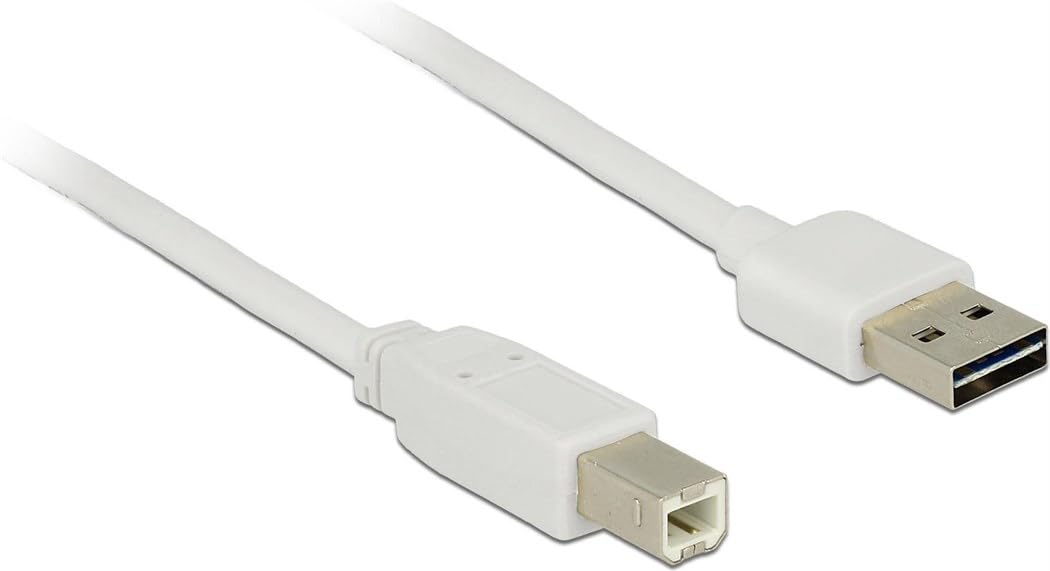
Image: The Delock USB 2.0 A-B Cable, featuring a white cable and gold-plated connectors. The USB Type-A connector is visible on the right, and the USB Type-B connector is on the left.
הגדרה
The Delock USB 2.0 A-B Cable is designed for simple plug-and-play operation. Follow these steps to connect your devices:
- זיהוי יציאות: Locate the USB Type-A port on your host device (e.g., computer, laptop) and the USB Type-B port on your peripheral device (e.g., printer, scanner, external hard drive).
- Connect USB Type-A: Insert the USB Type-A connector of the cable into the corresponding USB Type-A port on your host device. Ensure it is fully seated.
- Connect USB Type-B: Insert the USB Type-B connector of the cable into the corresponding USB Type-B port on your peripheral device. Ensure it is fully seated.
- אמת חיבור: Once both ends are connected, your operating system should automatically detect the peripheral device. If necessary, install any required drivers for your peripheral device as per its manufacturer's instructions.
This cable is compatible with devices such as laptops and personal computers.
הוראות הפעלה
Once the cable is properly connected, it facilitates data transfer between the connected devices. The cable supports USB 2.0 specifications, allowing for data transfer rates of up to 480 Mbit/s.
- Ensure both connected devices are powered on for proper communication.
- Initiate data transfer operations (e.g., printing, scanning, file transfer) through the software or operating system interface of your host device.
- For optimal performance, avoid disconnecting the cable during active data transfer.
תַחזוּקָה
To ensure the longevity and optimal performance of your Delock USB 2.0 A-B Cable, follow these maintenance guidelines:
- אִחסוּן: Store the cable in a cool, dry place away from direct sunlight and extreme temperatures. Avoid tightly coiling or bending the cable, especially near the connectors, to prevent internal damage.
- ניקוי: אם הכבל או המחברים מתלכלכים, נגבו אותם בעדינות בעזרת מטלית רכה, יבשה ונטולת סיבים. אין להשתמש בחומרי ניקוי נוזליים או בחומרים שוחקים.
- טיפול: Always grasp the connector housing when plugging or unplugging the cable, rather than pulling on the cable itself. This prevents strain on the cable's internal wires and connections.
- הֲגָנָה: Keep the cable away from sharp objects, heavy furniture, or areas where it might be stepped on or pinched, as this can damage the insulation and internal conductors.
פתרון בעיות
If you encounter issues with your Delock USB 2.0 A-B Cable, consider the following troubleshooting steps:
| בְּעָיָה | סיבה / פתרון אפשרי |
|---|---|
| המכשיר לא מזוהה |
|
| העברת נתונים איטית |
|
| חיבור לסירוגין |
|
מפרטים
| תכונה | פְּרָט |
|---|---|
| מותג | דלוק |
| מספר דגם | 83687 |
| סוג כבל | כבל USB 2.0 AB |
| אורך כבל | 2 מטר (6.56 רגל) |
| מחבר 1 | USB Type-A זכר |
| מחבר 2 | USB Type-B Male |
| גרסת USB | 2.0 |
| קצב העברת נתונים (מקסימום) | 480 Mbit/s |
| אנשי קשר | מצופה זהב |
| צֶבַע | לָבָן |
| מכשירים תואמים | Laptop, Personal Computer, and other devices with USB A and B ports |
| תכונה מיוחדת | העברת נתונים |
אחריות ותמיכה
For information regarding warranty coverage and technical support for your Delock USB 2.0 A-B Cable, please refer to the official Delock webאתר או צרו קשר ישירות עם שירות הלקוחות שלהם. תנאי האחריות הספציפיים עשויים להשתנות בהתאם לאזור ולקמעונאי.
Manufacturer: DeLOCK
Date First Available: August 29, 2017


