1. הקדמה
This manual provides detailed instructions for the installation, operation, and maintenance of your Intelbras TS 3112 Cordless Phone system, which includes a main base unit and an additional handset. This system is designed to offer convenient and cost-effective communication for your home or office.
תכונות מפתח כוללות:
- Free internal calls between handsets.
- Three-way conferencing capability (two internal handsets and one external call).
- Caller ID display for incoming calls.
- Call history log with date and time.
- Backlit display for visibility in various lighting conditions.
- Ergonomic design for comfortable use during extended calls.
- Expandable system, supporting up to 6 additional handsets (total of 7).

This image displays the complete Intelbras TS 3112 system, featuring two black cordless handsets each resting on its respective charging base. The handsets have a clear display and a standard numeric keypad, indicating a complete communication solution.
2. תכולת החבילה
אנא ודא שהחבילה שלך מכילה את הפריטים הבאים:
- 1x Main Base Unit
- 2x Cordless Handsets (one main, one additional)
- 2x AC Power Adapters (for base units)
- כבל טלפון אחד
- סוללות נטענות (מותקנות מראש או נפרדות, יש לבדוק את האריזה)
- מדריך למשתמש זה
3. התקנה
3.1. Connecting the Main Base Unit
- Connect one end of the telephone line cord to the LINE port on the main base unit.
- חבר את הקצה השני של כבל הטלפון לשקע הטלפון בקיר.
- Connect one AC power adapter to the POWER port on the main base unit.
- חבר את מתאם מתח ה-AC לשקע חשמלי רגיל.
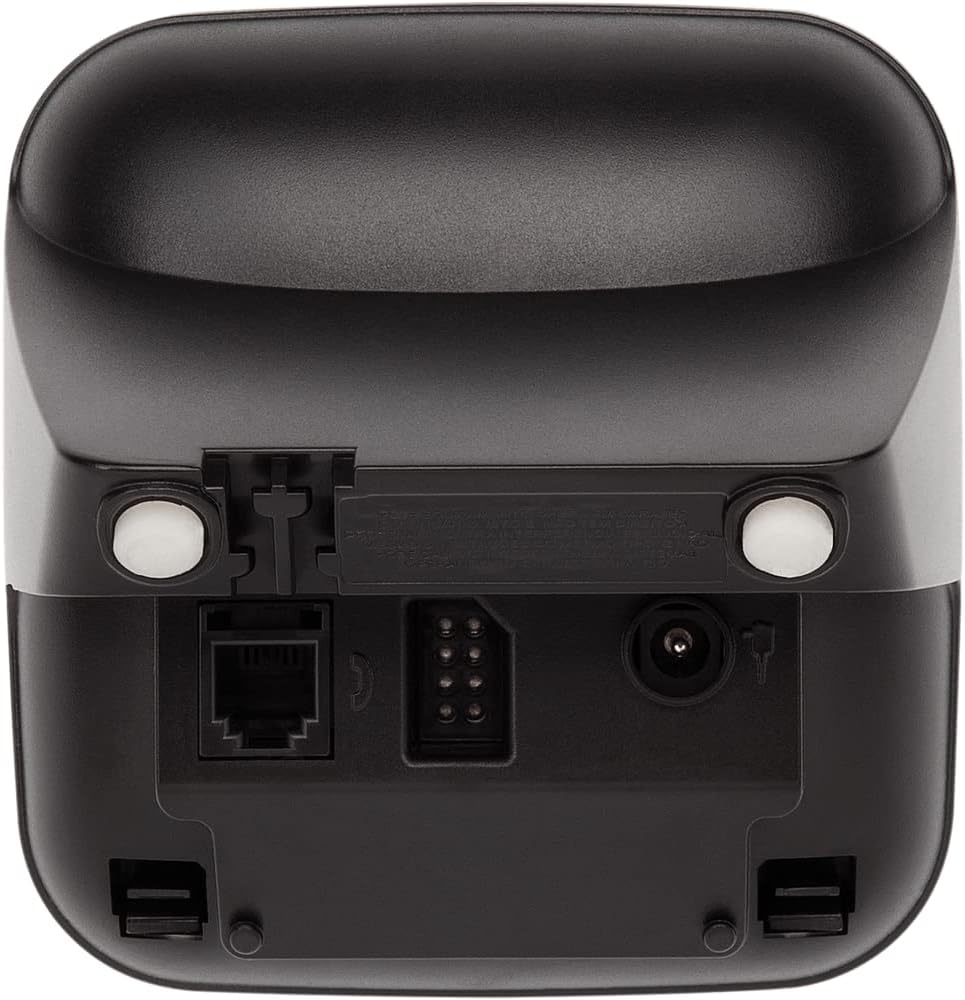
This image shows the back of the Intelbras TS 3112 base unit, highlighting the ports for the telephone line connection (RJ11) and the power adapter input. This illustrates where to connect the necessary cables for initial setup.
3.2. Installing and Charging Handset Batteries
- פתחו את מכסה תא הסוללות בגב כל אחד מהשליחים.
- הכניסו את הסוללות הנטענות, תוך הקפדה על הקוטביות הנכונה (+ ו-).
- סגור את מכסה תא הסוללות.
- Place each handset on its respective charging base. Ensure the "Charging" indicator (if available) illuminates.
- Allow the handsets to charge for at least 12-15 hours before initial use, even if the display indicates a full charge. This ensures optimal battery performance.
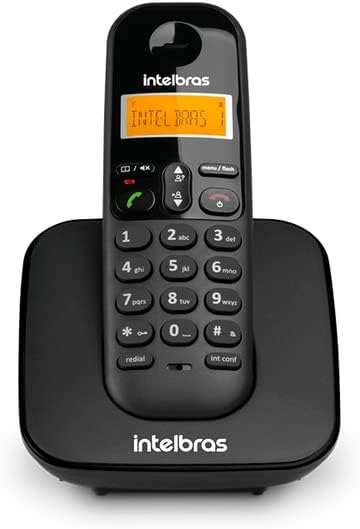
This image shows a single Intelbras TS 3112 cordless handset securely placed on its charging base. This is the correct position for charging the handset's batteries.
3.3. Registering Additional Handsets (if not pre-registered)
Your additional handset may already be registered to the main base. If not, or if you purchase additional handsets (up to 6 total), follow these steps:
- On the main base unit, press and hold the עַמוּד button (or similar registration button) for approximately 5 seconds until the base enters registration mode.
- On the handset you wish to register, access the menu and navigate to the "Register Handset" or "Registration" option.
- Enter the PIN code (default is usually 0000 or 1234, refer to the handset display for prompts).
- The handset display will confirm successful registration.

This diagram visually represents the Intelbras TS 3112's capability to support multiple handsets connected to a single base unit, allowing for convenient communication throughout a home or office environment.
4. הוראות הפעלה
4.1. ביצוע וקבלת שיחות
- להתקשר: הרם את השפופרת, לחץ על Talk/Green button, and dial the number. Alternatively, dial the number first and then press the Talk/Green לַחְצָן.
- קבלת שיחה: כאשר הטלפון מצלצל, לחצו על Talk/Green כפתור כדי לענות.
- סיום שיחה: הקש על End/Red לחצו על הכפתור או הניחו את השפופרת בחזרה על בסיס הטעינה.

תמונה זו מספקת תמונה מפורטת view of the Intelbras TS 3112 handset, highlighting its backlit display for clear visibility and the well-arranged numeric keypad with function buttons for easy operation.
4.2. Caller ID and Call History
The handset display will show the caller's number (if available and subscribed to Caller ID service) for incoming calls. You can access a list of recent calls (answered or missed) through the handset menu. Navigate using the arrow keys and press Menu/Flash כדי לבחור אפשרויות.
4.3. Intercom and Three-Way Conferencing
- Intercom (Handset to Handset): הקש על INT CONF button (or similar) on one handset and select the desired internal handset to call.
- Three-Way Conferencing: While on an external call, you can initiate an intercom call to another internal handset. Once the second handset answers, press the INT CONF button again (or follow on-screen prompts) to join all three parties into a conference call.

This image illustrates the DECT 6.0 digital technology used in the Intelbras TS 3112, ensuring clear and secure wireless communication.
5. תחזוקה
- ניקוי: נגבו את הטלפון ואת יחידות הבסיס בעזרת מטלית רכהamp בַּד. אין להשתמש בחומרי ניקוי שוחקים או ממסים.
- טיפול בסוללה: For optimal battery life, avoid over-discharging the batteries completely. If the phone will not be used for an extended period, remove the batteries.
- מיקום: Place the base unit in a central location, away from large metal objects, other electronic devices, and heat sources to ensure optimal range and call quality.
6. פתרון תקלות
| בְּעָיָה | סיבה אפשרית | פִּתָרוֹן |
|---|---|---|
| אין צליל חיוג | כבל קו הטלפון מנותק או פגום. | Check all cable connections. Ensure the telephone line cord is securely plugged into the base unit and the wall jack. Test with another phone if possible. |
| המכשיר לא נטען | Handset not properly seated on the base; dirty charging contacts; faulty batteries. | Ensure the handset is correctly placed on the charging base. Clean the charging contacts on both the handset and base with a dry cloth. Replace batteries if old or damaged. |
| איכות צליל ירודה / סטטי | Handset out of range; interference from other electronic devices. | Move closer to the main base unit. Relocate the base unit away from other electronic devices (Wi-Fi routers, microwaves, computers). |
| לא ניתן לבצע או לקבל שיחות | No power to the base unit; handset not registered; telephone line issue. | Verify the base unit is powered on. Ensure the handset is registered to the base (see Section 3.3). Check the telephone line connection. |
7. מפרטים
- מותג: Intelbras
- דֶגֶם: TS 3112
- צֶבַע: שָׁחוֹר
- חוֹמֶר: פּלָסטִי
- מספר מכשירי טלפון: 2 (ניתן להרחבה עד 7)
- Product Dimensions (Base + Handset): 10 על 10.5 על 16 ס"מ בערך
- Weight (Base + Handset): בערך 610 גרם
- סוג טלפון: אלחוטי (DECT)
- מקור כוח: AC Power Adapter (for base unit), Rechargeable Batteries (for handsets)
8. אחריות ותמיכה
For warranty information, please refer to the documentation included with your purchase or visit the official Intelbras webאתר. שמור את הוכחת הרכישה שלך לצורך תביעות אחריות.
For technical support, product registration, or to find service centers, please visit the official Intelbras support page or contact their customer service directly. Contact details are typically available on the manufacturer's webאֲתַר.
You can visit the Intelbras store on Amazon for more products and information: Intelbras Store


