1. הקדמה
This manual provides comprehensive instructions for the safe and effective use of the PCE Instruments PCE-170 A Light Meter. This device is designed for measuring illuminance (lux or foot-candles) in various environments, such as offices, factories, and outdoor settings. It features a wide measurement range, fast response time, and a compact design for ease of use.
אנא קרא מדריך זה בעיון לפני הפעלת המכשיר ושמור אותו לעיון עתידי.
2. מידע בטיחות
Observe the following safety precautions to prevent injury and avoid damage to the device:
- אין לחשוף את המכשיר לטמפרטורות קיצוניות, ללחות או לאור שמש ישיר.
- הימנעו מרעידות או פגיעות חזקות.
- אל תנסה לפתוח או לשנות את המכשיר. יש לפנות לכל טיפול וטיפול באנשי מקצוע מוסמכים.
- Keep the light sensor clean and free from obstructions to ensure accurate readings.
- הסר את הסוללה אם המכשיר לא ישמש למשך תקופה ממושכת כדי למנוע דליפה.
- יש להשליך את הסוללות והמכשיר בהתאם לתקנות המקומיות.
3. המוצר נגמרview
The PCE-170 A Light Meter consists of a main unit with a display and control buttons, and an integrated light sensor.

איור 1: חֲזִית view of the PCE-170 A Light Meter, showing the display, control buttons, and light sensor at the top.
3.1 רכיבים
- חיישן אור: Located at the top of the device, protected by a white dome. This silicon photodiode measures incident light.
- תצוגת LCD: A 5-digit display showing measurement values, units (lux/fc), and function indicators (e.g., AUTO RANGE, HOLD, MIN, MAX).
- כפתור הפעלה (הפעלה/כיבוי): מפעיל או מכבה את המכשיר.
- כפתור CAL: Used for zero adjustment.
- החזק לחצן: מקפיא את הקריאה הנוכחית על הצג.
- fc/lx Button: Toggles between foot-candle (fc) and lux (lx) measurement units.
- לחצן RANGE: Manually selects measurement ranges or activates auto-ranging.
- תא סוללות: Located at the rear, houses the 9V battery.

איור 2: תקריב view of the LCD display, showing a reading of "534 lx" and "AUTO RANGE 4 000".
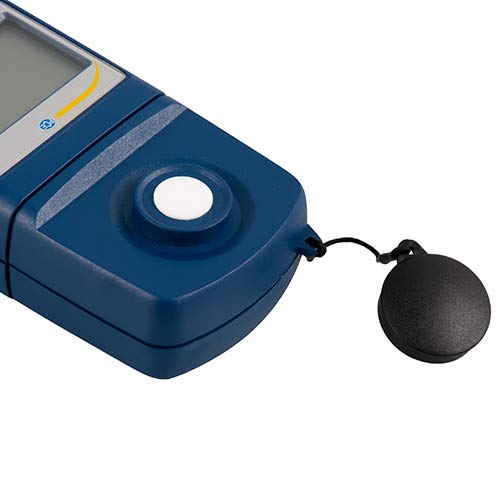
איור 3: מְפוֹרָט view of the light sensor at the top of the device, with its protective cap removed.
4. התקנה
4.1 התקנת סוללה
- אתר את מכסה תא הסוללה בגב המכשיר.
- Slide the cover open or unscrew it, depending on the model.
- Insert one 9V battery, observing the correct polarity (+/-).
- החזר היטב את מכסה תא הסוללות.
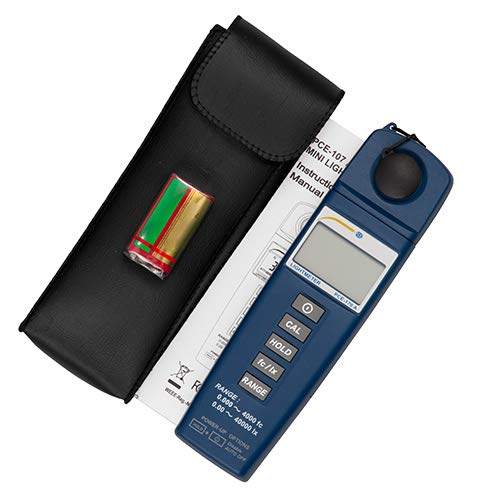
איור 4: The PCE-170 A Light Meter shown with its carrying case and the included 9V battery, ready for installation.
4.2 הפעלה ראשונית
הקש על כּוֹחַ button to turn on the device. The display will illuminate and show a reading. If the battery symbol appears, replace the battery.
5. הוראות הפעלה
5.1 ביצוע מדידה
- Turn on the device using the כּוֹחַ לַחְצָן.
- ודא שחיישן האור נקי וללא חסימה.
- Position the light sensor at the location where illuminance is to be measured. Ensure the sensor is facing the light source directly for accurate readings.
- The current illuminance value will be displayed on the LCD.

איור 5: A user measuring light levels in an office environment with the PCE-170 A Light Meter.
5.2 Changing Measurement Units (fc/lx)
הקש על fc/lx button to toggle between foot-candles (fc) and lux (lx) units. The selected unit will be indicated on the display.
5.3 פונקציית HOLD
הקש על לְהַחזִיק כדי להקפיא את הקריאה הנוכחית בתצוגה. לחץ עליו שוב כדי לשחרר את הלחיצה ולחדש את המדידות בזמן אמת.
5.4 Zero Adjustment (CAL)
כדי לבצע כוונון אפס:
- Place the light sensor in a completely dark environment (e.g., cover it with the protective cap or place it in a dark box).
- הקש על CAL button. The display should show "0.00" or a value very close to zero.
- If the display does not show zero, repeat the process.
5.5 בחירת טווח
The device typically operates in auto-ranging mode. To manually select a range or cycle through available ranges, press the טווח button. The display will indicate the active range. Press and hold the טווח button to return to auto-ranging mode.
5.6 Min/Max Function (Power-Up Option)
The PCE-170 A supports Min/Max recording. To activate this feature, refer to the power-up options indicated on the device label (e.g., press and hold a specific button during power-on). This function records the minimum and maximum illuminance values detected during a measurement session.
6. תחזוקה
6.1 ניקוי
Wipe the device with a soft, dry cloth. Do not use abrasive cleaners or solvents. Keep the light sensor clean and free of dust or smudges, as this can affect measurement accuracy.
6.2 אחסון
When not in use, store the PCE-170 A Light Meter in its carrying case in a cool, dry place, away from direct sunlight and extreme temperatures. Remove the battery if storing for extended periods.
7. פתרון תקלות
| בְּעָיָה | סיבה אפשרית | פִּתָרוֹן |
|---|---|---|
| המכשיר לא מופעל. | סוללה מתה או מותקנת בצורה שגויה. | Check battery polarity or replace with a new 9V battery. |
| הצג מראה "OL" (עומס יתר). | Light intensity exceeds the current measurement range. | Switch to a higher measurement range using the טווח button, or move to a less intensely lit area. |
| קריאות לא מדויקות. | Dirty sensor, incorrect zero adjustment, or sensor not facing light source correctly. | Clean the sensor, perform zero adjustment in darkness, and ensure the sensor is properly oriented. |
| התצוגה ריקה או מהבהבת. | סוללה חלשה. | החלף את סוללת 9 וולט. |
8. מפרטים
| פָּרָמֶטֶר | עֵרֶך |
|---|---|
| טווחי מדידה | 0.00 ... 40,000 lux / 0.000 ... 4000 fc |
| הַחְלָטָה | 0.01 לוקס / 0.001 fc |
| דִיוּק | ±3% of measurement value + 5 digits |
| מחוון עומס יתר | "OL" |
| קצב מדידה | כל 2 שניות |
| טמפרטורת הפעלה | 0 ... 40°C / 32 ... 104°F |
| חיישן אור | Silicon photodiode, corrected cosine angle |
| לְהַצִיג | LCD בן 5 ספרות |
| מקור כוח | סוללת 9V (כלול) |
| מידות | 33 x 54 x 196 מ"מ / 1.3 x 2.1 x 7.7 אינץ' |
| מִשׁקָל | 180 g / <1 lb (approx. 9.17 ounces) |
8.1 היקף אספקה
The standard delivery package includes:
- 1 x PCE-170 A Lux Meter
- סוללה 1 x 9V
- 1 x תיק נשיאה
- 1 x מדריך למשתמש (מסמך זה)
9. אחריות ותמיכה
PCE Instruments provides a warranty for this product against defects in materials and workmanship. For specific warranty terms and conditions, please refer to the warranty card included with your purchase or visit the official PCE Instruments website. For technical support, service, or calibration inquiries, please contact PCE Instruments customer service.
PCE Instruments ארה"ב: בקר בחנות


