מָבוֹא
תודה על הרכישהasing the Trevi RR 501 BT Portable Bluetooth, USB, SD, MP3 Stereo Boombox. This manual provides essential information for the safe and efficient use of your new device. Please read these instructions carefully before operating the unit and retain them for future reference.
מידע בטיחות
- אין לחשוף מכשיר זה לגשם או לחות.
- אין לחסום פתחי אוורור.
- ודא שכבל החשמל אינו צבט או נדחף עליו.
- השתמש רק בתוספות/אביזרים שצוינו על ידי היצרן.
- נתקו את המכשיר מהחשמל במהלך סופות ברקים או כאשר אינו בשימוש למשך תקופות ארוכות.
- הפנה כל טיפול לצוות שירות מוסמך.
- אין לפתוח את היחידה גasinז; אין בפנים חלקים הניתנים לתחזוקה על ידי המשתמש.
תוכן החבילה
אנא ודאו שהפריטים הבאים כלולים בחבילה שלכם:
- Trevi RR 501 BT Boombox Unit
- כבל חשמל
- מדריך למשתמש (מסמך זה)
המוצר נגמרview
Familiarize yourself with the main components of your Trevi RR 501 BT Boombox.
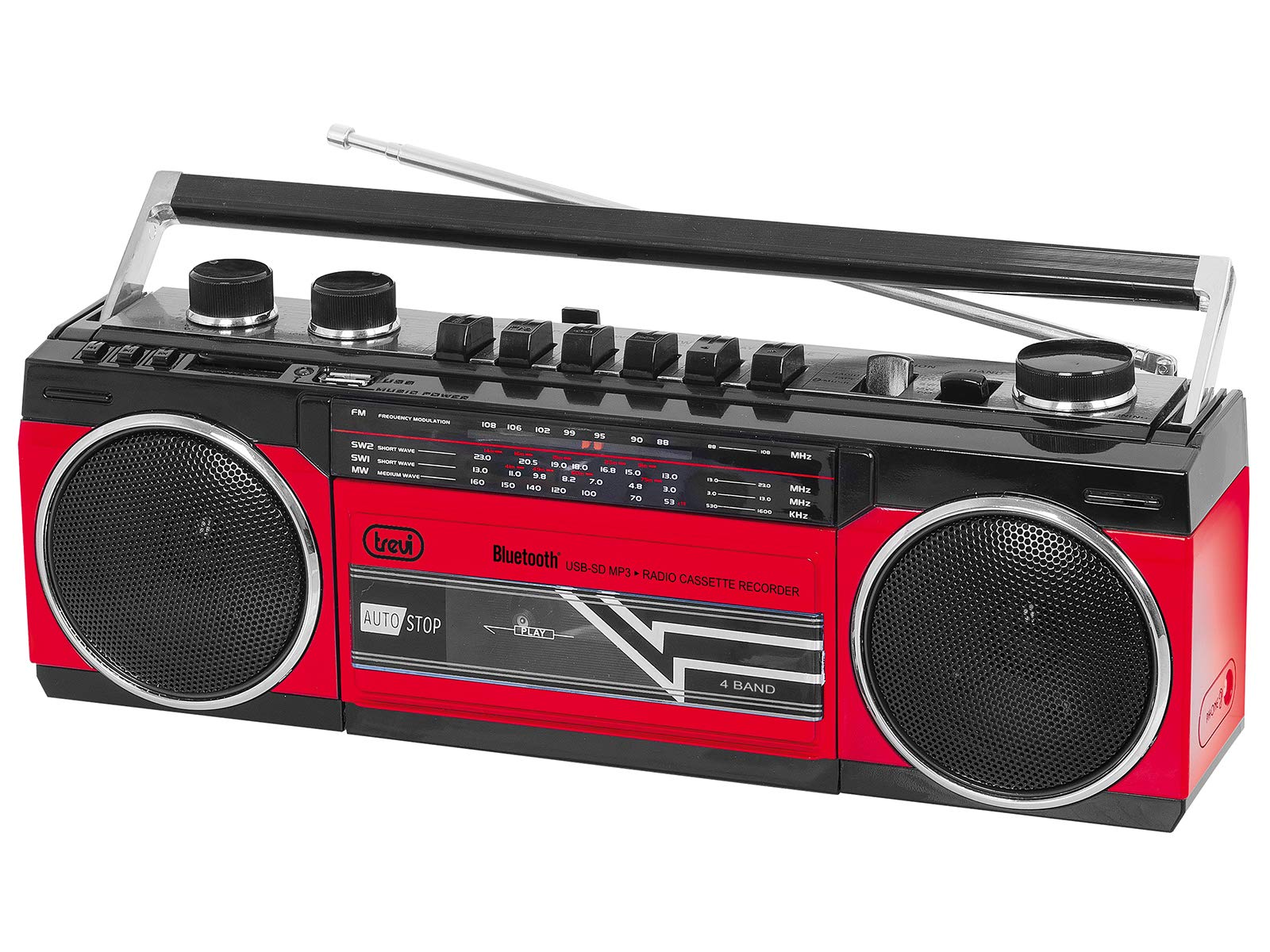
איור 1: חֲזִית view of the Trevi RR 501 BT Boombox, showing the dual speakers, control panel, and cassette deck.

איור 2: בזווית view of the Trevi RR 501 BT Boombox, highlighting the side profile ולטפל.
מרכיבי מפתח:
- רמקולים: Two integrated stereo speakers.
- לוּחַ בַּקָרָה: Buttons for playback, mode selection, and tuning.
- ידית עוצמת הקול: מכוונן את רמת פלט השמע.
- כפתור כוונון: For radio frequency selection.
- בורר מצבים: Switches between Radio, Bluetooth, USB, SD, and Cassette modes.
- סיפון קלטות: For playing and recording audio cassettes.
- יציאת USB: להשמעת כונן הבזק מסוג USB.
- חריץ לכרטיס SD: להשמעת כרטיס SD.
- אַנטֶנָה: אנטנה טלסקופית לקליטת רדיו FM.
- קלט כוח: לחיבור כבל חשמל AC.
- תא סוללות: (Located on the bottom/rear) For optional battery operation.
הגדרה
חיבור חשמל:
- מתח AC: Insert the AC power cable into the AC input jack on the back of the unit, then plug the other end into a standard wall outlet.
- סוללה (אופציונלי): Open the battery compartment cover (usually on the bottom or rear). Insert the required number of D-size batteries (not included), ensuring correct polarity (+/-). Close the compartment cover securely.
Note: When using AC power, batteries are automatically disconnected. Remove batteries if the unit will not be used for an extended period.
הוראות הפעלה
הפעלה/כיבוי:
To turn the unit on, rotate the כפתור עוצמת הקול clockwise until you hear a click. To turn off, rotate the כפתור עוצמת הקול counter-clockwise until it clicks off.
Radio Operation (FM):
- הפעל את היחידה.
- הגדר את בורר מצבים to "RADIO".
- הרחב את האנטנה הטלסקופית לקבלת קליטה אופטימלית.
- סובב את ה כוונון כפתור to select your desired FM station.
- התאם את כפתור עוצמת הקול לרמת ההאזנה המועדפת עליך.
חיבור Bluetooth:
- הפעל את היחידה.
- הגדר את בורר מצבים to "BT" (Bluetooth). The unit will enter pairing mode, indicated by a flashing LED.
- במכשיר התומך ב-Bluetooth שלך (למשל, סמארטפון, טאבלט), הפעל את Bluetooth וחפש מכשירים זמינים.
- Select "Trevi RR 501 BT" from the list of devices.
- Once paired, the LED indicator will stop flashing and remain solid. You can now play audio from your device through the boombox.
הפעלת USB/SD:
- הפעל את היחידה.
- הכנס כונן הבזק מסוג USB לתוך יציאת USB או כרטיס SD לתוך חריץ לכרטיס SDודא שהמדיה מכילה אודיו בפורמט MP3. files.
- הגדר את בורר מצבים to "USB/SD". The unit will automatically begin playing the first compatible audio file.
- Use the playback control buttons (e.g., Play/Pause, Next, Previous) on the unit to manage your audio.
השמעת קלטות:
- הפעל את היחידה.
- הקש על עצור/הוצאה לחץ על הכפתור שעל גבי מחסנית הקלטות כדי לפתוח את תא הקלטות.
- Insert an audio cassette with the open edge facing upwards and the tape side facing you. Close the compartment door.
- הגדר את בורר מצבים to "TAPE".
- הקש על לְשַׂחֵק כפתור להפעלת השמעה.
- השתמש ב- גלגל אחורה ו FAST FORWARD כפתורים לניווט בקלטת.
- לִלְחוֹץ עצור/הוצאה כדי לעצור את הנגינה ולפתוח את התא.
הקלטת קלטת:
- Insert a blank cassette into the cassette deck.
- Select the desired audio source (Radio, Bluetooth, USB, SD) using the בורר מצבים.
- Start playback of the source audio.
- הקש על רְשׁוּמָה button (usually red) on the cassette deck. The לְשַׂחֵק הכפתור ייכנס גם הוא. ההקלטה תתחיל.
- להפסקת ההקלטה, לחץ על עצור/הוצאה לַחְצָן.
תַחזוּקָה
- ניקוי: השתמשו במטלית רכה ויבשה לניקוי החלק החיצוני של היחידה. אין להשתמש בחומרי ניקוי שוחקים או ממסים.
- טיפול בסיפון קסטות: נקו מעת לעת את ראשי הסרט וגלילי הלחיצה בעזרת מקלון צמר גפן קלות.ampהסתיים עם איזופרופיל אלכוהול.
- אִחסוּן: When not in use for extended periods, store the unit in a cool, dry place, away from direct sunlight and extreme temperatures. Remove batteries if applicable.
פתרון בעיות
| בְּעָיָה | סיבה אפשרית | פִּתָרוֹן |
|---|---|---|
| אין כוח | כבל החשמל אינו מחובר; הסוללות התרוקנו או הוכנסו בצורה שגויה. | Check AC power connection; Replace batteries or ensure correct polarity. |
| קליטת רדיו גרועה | אנטנה לא מורחבת; אות חלש. | Fully extend the telescopic antenna; Reposition the unit for better signal. |
| בלוטות' לא מתאמת | היחידה אינה במצב BT; המכשיר רחוק מדי; כבר משויך למכשיר אחר. | Ensure mode is set to BT; Move device closer; Disconnect from other devices. |
| USB/SD לא מתנגן | מצב שגוי; לא תואם file format; Corrupted media. | Set mode to USB/SD; Ensure files are MP3; Try different USB/SD media. |
| בעיות בהשמעת קלטת | Cassette inserted incorrectly; Tape heads dirty. | Re-insert cassette correctly; Clean tape heads and pinch rollers. |
מפרטים
| מותג | טרווי |
| מספר דגם | 0RR50102 |
| טכנולוגיית קישוריות | בלוטות', USB |
| סוג רמקול | סטריאו |
| מידות (L x W x H) | 50 x 50 x 28 סנטימטרים |
| מקור כוח | AC |
| משקל פריט | 1.25 קילוגרם |
| כוח פלט | 6 וואט |
| צֶבַע | אָדוֹם |
| סִגְנוֹן | רטרו |
אחריות ותמיכה
For warranty information and technical support, please refer to the warranty card included with your product or visit the official Trevi website. Information regarding spare parts availability and software updates is not provided in the product specifications.
אנא שמור את הוכחת הרכישה שלך לכל תביעת אחריות.


